
Static vs Dynamic Routing: Complete Guide with OSPF & BGP
Static vs dynamic routing comes down to who builds the routes. With static routing, you type every route by hand. With dynamic routing, routers share information and build routes on their own using protocols like OSPF and BGP. Static suits small, stable networks, while dynamic suits large or changing ones.
Before You Start
Table of Contents
Static vs Dynamic Routing: Key Differences at a Glance
Picture a delivery driver with a paper map printed last year. That’s static routing. Now picture the same driver with a GPS app that reroutes around a closed road. That’s dynamic routing. Both get packages delivered, but they behave very differently when something changes.
| Feature | Static routing | Dynamic routing |
|---|---|---|
| Setup | You enter each route manually | You configure a protocol once, routers learn the rest |
| Flexibility | Fixed until you edit it | Adjusts to changes automatically |
| Failover | None, unless you add a backup route | Automatic, usually in seconds |
| Scalability | Gets painful past a few dozen routes | Built for hundreds or thousands of routes |
| CPU and bandwidth | Almost none | Moderate, because routers exchange updates |
| Performance | Fast and predictable | Can pick better paths based on metrics |
| Security | Nothing advertised, so less exposure | Needs authentication and route filtering |
| Best for | Small offices, stub networks, single links | Growing, redundant, multi-site networks |
How Routing Works
A router’s job is simple: look at where a packet wants to go, then send it one step closer. It doesn’t know the whole journey. It only knows the next stop.
Routing Table and Next Hop
Every router keeps a routing table. Think of it like a post office sorting list. Each line tells the router:
- Destination network: where the traffic is headed
- Next hop or exit interface: where to send it next
- Source: how the route was learned (static, OSPF, BGP and so on)
- Metric: a score used to compare routes to the same place
The next hop is just the neighbouring router that will pass the packet along.
Longest Prefix Match
What if more than one route matches? The router picks the most specific one. Say a packet is going to 192.168.1.25 and the table looks like this:
| Prefix | Next hop |
|---|---|
| 192.168.0.0/16 | 10.0.2.1 |
| 192.168.1.0/24 | 10.0.0.1 |
| 0.0.0.0/0 | 10.0.3.1 |
- The router reads the destination address, 192.168.1.25.
- All three routes match it.
- It picks /24 because it has the longest prefix, so the packet goes to 10.0.0.1.
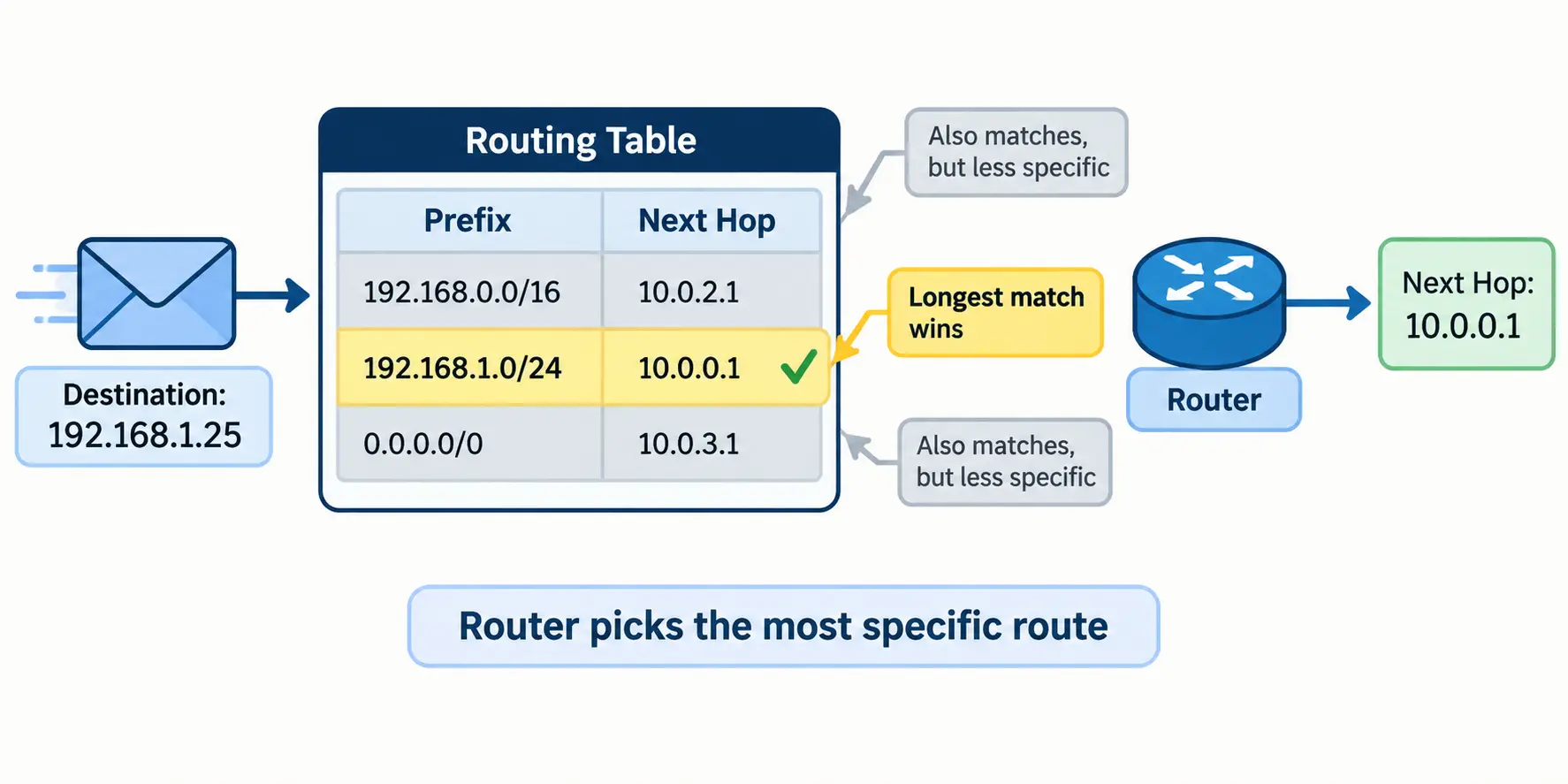
It works like mailing a letter. A full street address beats just a city name.
What Is Static Routing?
With static routing, a network admin types in the path to every destination by hand, and the router follows those instructions exactly as written. The route stays the same until someone changes it.
How Static Routing Works
You enter a destination network and either a next-hop IP or an exit interface. Once saved, the route sits in the routing table and the router follows it for every matching packet. Nothing is exchanged with other routers, so there’s no extra traffic on the wire.
A real example: a small shop with one internet connection. The router needs just two things, a route to the shop’s own LANs and one default route that sends everything else to the ISP.
Static Route Configuration (Cisco)
On Cisco routers, the command is ip route followed by the destination network, the subnet mask and the next hop. In our lab, R1 reaches the 192.168.1.0/24 LAN behind R2 through 10.0.0.1:
R1# configure terminal
R1(config)# ip route 192.168.1.0 255.255.255.0 10.0.0.1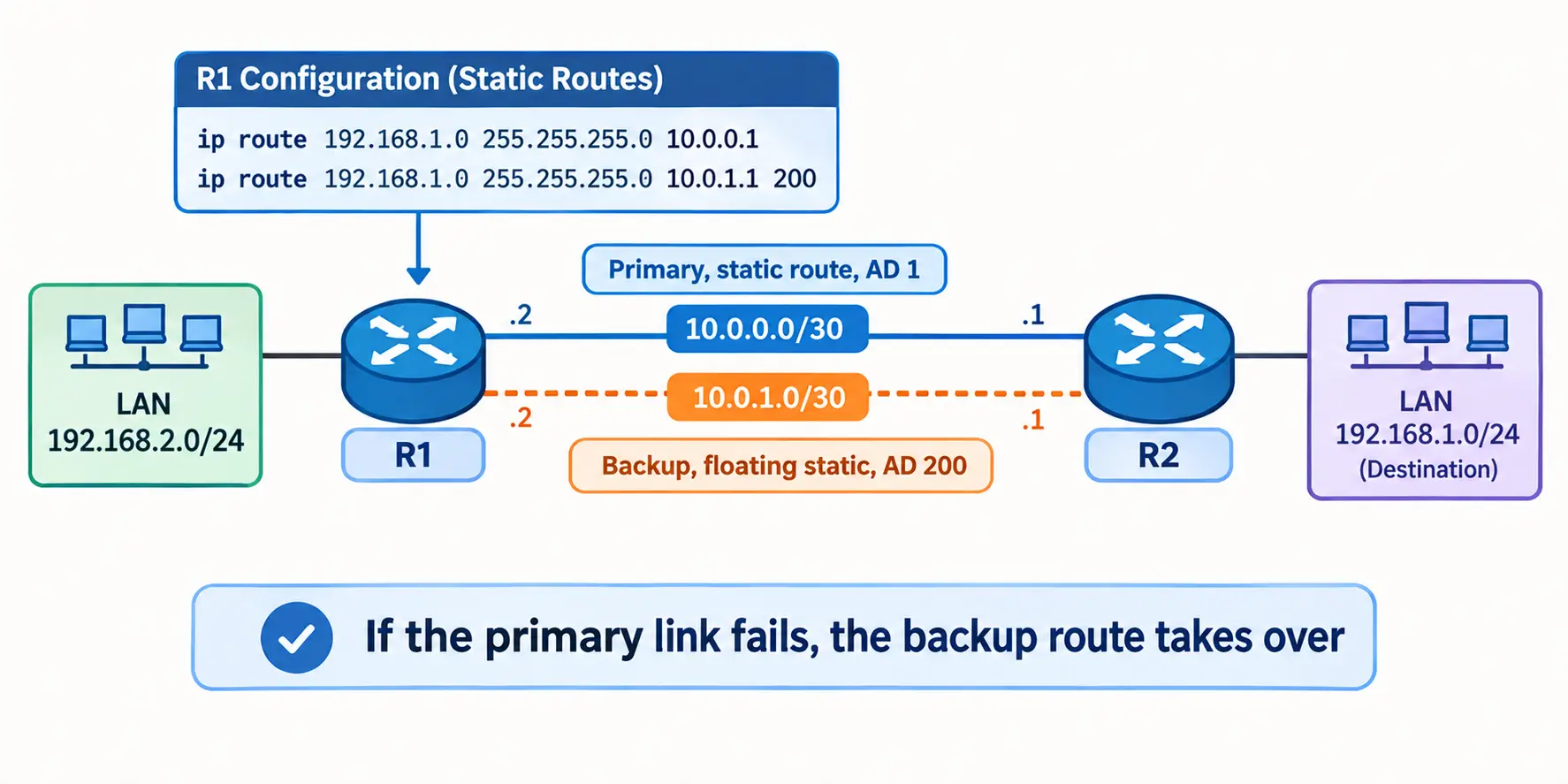
You can also use an exit interface, such as ip route 192.168.1.0 255.255.255.0 GigabitEthernet0/0. The next-hop version is usually safer on Ethernet links.
Default Route and Floating Static Route
A default route is a catch-all. It sends any traffic with no better match to one upstream device, usually your ISP:
R1(config)# ip route 0.0.0.0 0.0.0.0 203.0.113.1A floating static route is a backup. You give it a higher administrative distance (AD), so the router ignores it until the main route disappears:
R1(config)# ip route 192.168.1.0 255.255.255.0 10.0.0.1
R1(config)# ip route 192.168.1.0 255.255.255.0 10.0.1.1 200
If the primary link fails, the backup link at 10.0.1.1 takes over. It’s a cheap way to get basic failover without running a protocol.
Advantages and Disadvantages
Advantages
- Uses almost no CPU, memory or bandwidth
- Predictable: you always know the path traffic takes
- Nothing is advertised, so less topology exposure
- Quick to configure when you only have a handful of networks
Disadvantages
- Every change needs a manual edit, and typos can create black holes
- If a link goes down, traffic stays stuck until you fix the route yourself
- Hard to manage once the network grows
What Is Dynamic Routing?
Dynamic routing lets routers learn routes automatically by talking to each other through routing protocols. When a link fails or a new network appears, the routers notice and update their tables without anyone logging in.
Types of Routing Protocols
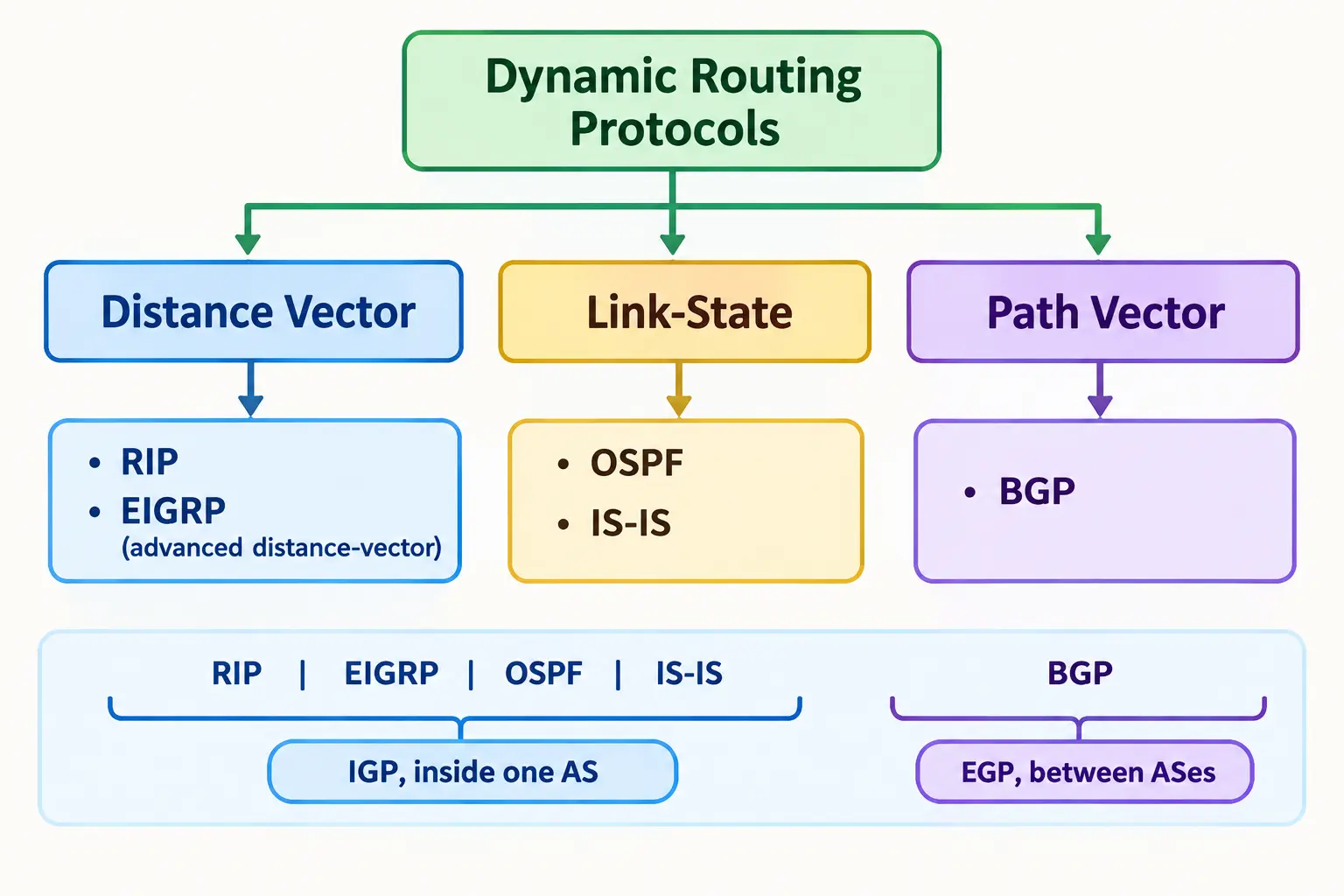
Routing protocols are grouped by how they learn routes:
- Distance vector (RIP, EIGRP): Routers share what they know with neighbours. RIP counts hops and sends its full table periodically. EIGRP, developed by Cisco, is an advanced distance-vector protocol and is much more efficient.
- Link-state (OSPF, IS-IS): Every router builds a map of the whole network, then calculates the shortest path. Only changes are flooded after the first exchange.
- Path vector (BGP): Routers share the list of networks (autonomous systems) a route passes through. It is the glue that links the thousands of separate networks that make up the internet.
IGP vs EGP
- IGP (Interior Gateway Protocol): runs inside one organisation’s network. Examples: OSPF, EIGRP, IS-IS, RIP.
- EGP (Exterior Gateway Protocol): handles routing between separate networks owned by different companies or ISPs. BGP is the one used today.
So a company might run OSPF inside its offices and BGP to talk to its ISPs.
Benefits of Dynamic Routing Protocols
- Automatic failover: traffic moves to another path when a link dies
- Easy growth: add a new site or subnet without editing every router
- Better path choices: metrics like cost or bandwidth guide the decision
- Load sharing: many protocols can use several equal paths at once
The trade-off is more CPU, memory and bandwidth use, plus more skill needed to configure and secure it.
Administrative Distance (AD) Explained
When a router learns the same network from different sources, it needs a way to decide whom to trust. That trust score is the administrative distance. Lower is better.
| Route source | Default AD |
|---|---|
| Connected interface | 0 |
| Static route | 1 |
| eBGP | 20 |
| EIGRP (internal) | 90 |
| OSPF | 110 |
| IS-IS | 115 |
| RIP | 120 |
| iBGP | 200 |
That’s why a floating static route uses an AD like 200. It sits below OSPF (110) in trust, so it only wins if OSPF’s route vanishes.
Same AD Scenario
People often ask what happens when a static and a dynamic route have the same AD. First, remember the order of checks:
- Longest prefix match comes first. A /24 route beats a /16 route, whatever the AD.
- AD is compared only when the prefixes are identical and the routes come from different sources.
- Metric breaks ties between routes from the same protocol.
If prefix and AD are both identical across sources, the result can depend on the vendor and software version. Don’t rely on it. Set the AD yourself so the winner is clear.
What Is OSPF?
Open Shortest Path First (OSPF) is a link-state routing protocol used inside organisations. It’s one of the most common choices for campus and enterprise networks.
Here’s how it works in plain steps:
- Routers find their neighbours using hello packets.
- Each router shares information about its links in messages called LSAs.
- Every router builds the same map of the network, called the link-state database.
- Each router runs the SPF (Dijkstra) algorithm on that map to find the best path.
Neighbours move through states such as Init, 2-Way and Full. Seeing Full means the two routers have synced their databases.
Areas, DR/BDR and Cost
- Areas: OSPF splits big networks into areas to keep tables small. Area 0 is the backbone, and every other area connects to it.
- DR and BDR: On shared networks like Ethernet switches, routers elect a Designated Router and a Backup so they don’t all swap updates with each other.
- Cost: OSPF’s metric. It’s based on interface bandwidth, so faster links get a lower cost and are preferred.
OSPF Configuration Example
Here are three routers in a triangle, all in Area 0:
- R1–R2: 10.0.12.0/30 (R1 .1, R2 .2)
- R2–R3: 10.0.23.0/30 (R2 .1, R3 .2)
- R1–R3: 10.0.13.0/30 (R1 .1, R3 .2)
R1(config)# router ospf 1
R1(config-router)# router-id 1.1.1.1
R1(config-router)# network 10.0.12.0 0.0.0.3 area 0
R1(config-router)# network 10.0.13.0 0.0.0.3 area 0

R2(config)# router ospf 1
R2(config-router)# router-id 2.2.2.2
R2(config-router)# network 10.0.12.0 0.0.0.3 area 0
R2(config-router)# network 10.0.23.0 0.0.0.3 area 0

R3(config)# router ospf 1
R3(config-router)# router-id 3.3.3.3
R3(config-router)# network 10.0.23.0 0.0.0.3 area 0
R3(config-router)# network 10.0.13.0 0.0.0.3 area 0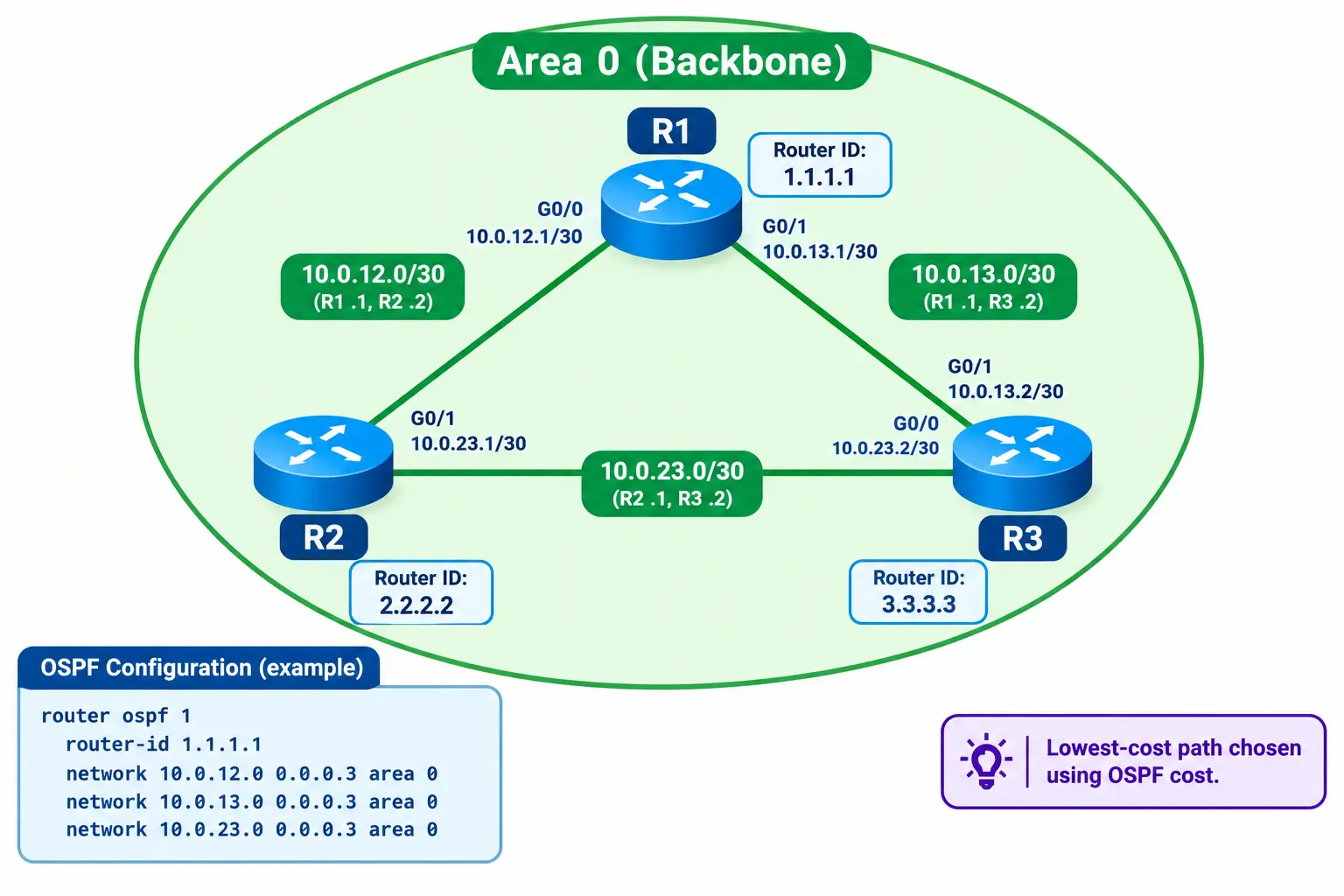
The 0.0.0.3 is a wildcard mask. It matches a /30 subnet. After a minute, run show ip ospf neighbor and you should see each neighbour in the Full state.
What Is BGP?
Border Gateway Protocol (BGP) is the routing protocol of the internet. It exchanges routes between autonomous systems (AS), which are networks run by one organisation, such as an ISP, a cloud provider or a large company. BGP runs over TCP port 179 and cares less about speed and more about policy and control.
eBGP vs iBGP, AS Numbers
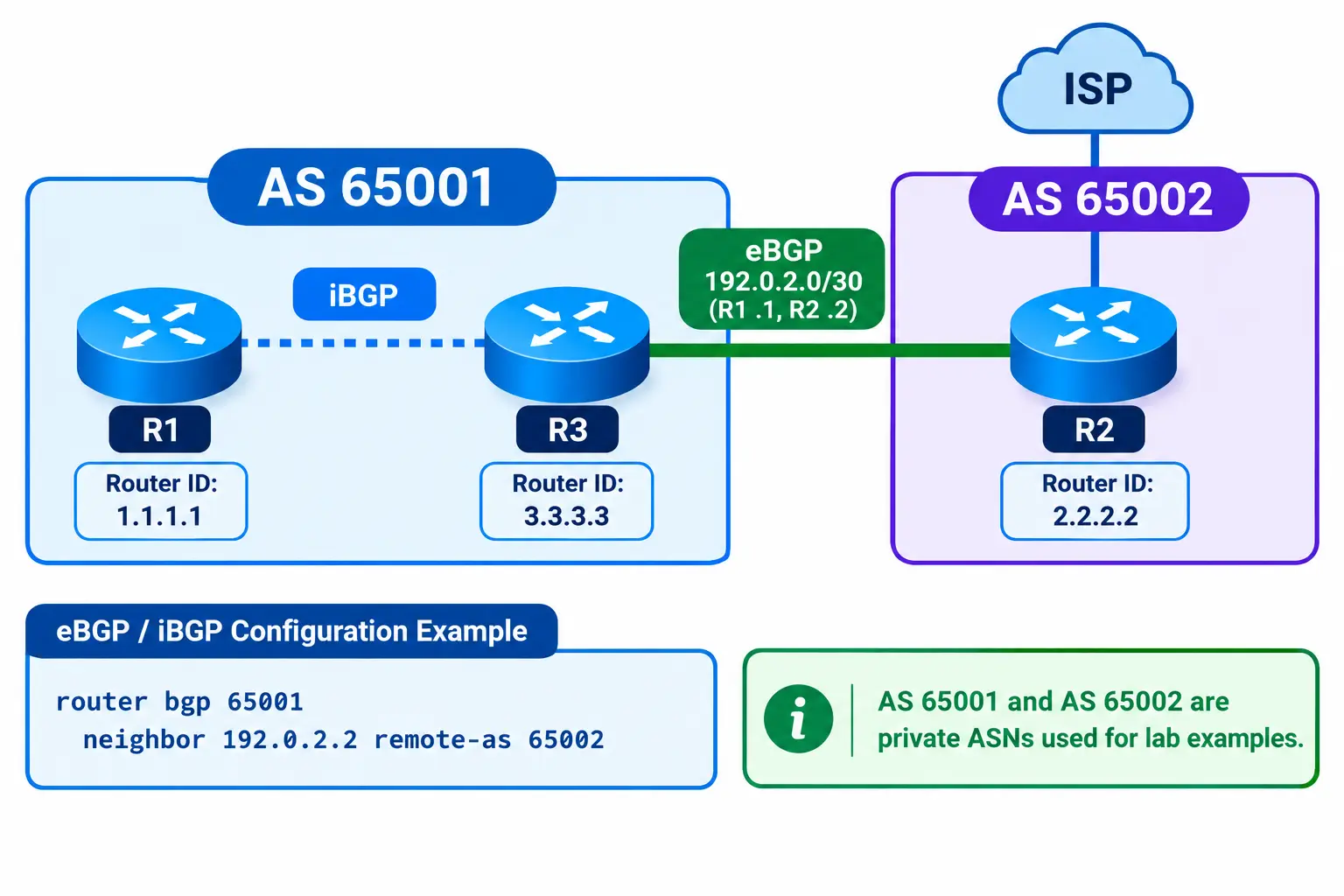
- AS number (ASN): a unique ID for each autonomous system. Numbers 64512 to 65534 are private and fine for labs.
- eBGP: a session between routers in different ASes, such as your company and your ISP.
- iBGP: a session between routers in the same AS, used to spread the learned routes inside.
BGP Path Attributes
BGP picks a best path using attributes attached to each route. Three you’ll see often:
- AS-path: the list of ASes the route passed through. Shorter is preferred.
- Local preference: set inside your AS. Higher wins. It’s the usual way to choose which ISP to use for outbound traffic.
- MED: a hint sent to a neighbour AS about which of your links to use for incoming traffic. Lower is preferred.
There are more steps in the full selection process, but these three cover most beginner needs.
BGP Configuration Example
R1 (AS 65001) peers with R2 (AS 65002) over 192.0.2.0/30, with R1 at .1 and R2 at .2:
R1(config)# router bgp 65001
R1(config-router)# neighbor 192.0.2.2 remote-as 65002
R1(config-router)# network 198.51.100.0 mask 255.255.255.0

R2(config)# router bgp 65002
R2(config-router)# neighbor 192.0.2.1 remote-as 65001
The network command only advertises a prefix that already exists in R1’s routing table, so make sure 198.51.100.0/24 is there first. Check the session with show ip bgp summary.
Why BGP Converges Slower Than OSPF
BGP isn’t broken, it’s just built differently:
- It prioritises stability over speed. Internet-wide route flapping would be a disaster.
- It uses timers. Cisco’s default hold time is 180 seconds, so a silent neighbour isn’t declared dead right away.
- It carries a huge table, around a million routes on the public internet, and every change is processed against policy.
You can speed it up with tools like BFD, which detects link failure in under a second.
BGP Security Basics
BGP was designed when the internet was small and trusting, so it needs extra protection:
- Prefix filters: accept only the routes you expect from each neighbour
- RPKI: checks that an AS is allowed to announce a prefix
- Max-prefix limits: shut a session down if a neighbour sends far too many routes
- Session protection: use authentication and TTL security on peers
The MANRS project publishes good guidance on this.
OSPF vs BGP: Which Is Better?
Neither is better. They solve different problems.
| Feature | OSPF | BGP |
|---|---|---|
| Scope | Inside one AS (IGP) | Between ASes (EGP) |
| Type | Link-state | Path vector |
| Metric | Cost (bandwidth based) | Attributes and policy |
| Convergence | Fast, seconds | Slower, by design |
| Scale | Thousands of routes in a company | Whole internet |
| Control | Limited policy | Very detailed policy |
| Typical use | Campus, branch, data centre | ISPs, internet edge, multi-ISP setups |
Can OSPF and BGP Run Together
Yes, and many networks do. A common setup is OSPF inside the company and BGP at the internet edge. To share routes between them you use redistribution. Be careful here. Poorly planned redistribution can create routing loops. Use route tags and prefix filters, and never redistribute the full internet table into OSPF.
Static vs Dynamic Routing: Which Should You Use?
Quick Decision Checklist
- Small, stable network with only a few routes? Use static routing.
- Need basic backup without a protocol? Use static routes with a floating backup.
- Need automatic failover or expect growth? Use OSPF (or another IGP).
- Connecting to the internet or multiple ISPs? Use BGP, with OSPF inside.
- A mix of needs? Use a hybrid design.

Hybrid Design
Most real networks use both. A typical branch office has a static default route to its ISP, while the head office runs OSPF between sites. Another common pattern is a dynamic protocol as the main path, with a floating static route as the safety net. Document every static route and test failover before you rely on it.
Migrating from Static to Dynamic Routing
- Plan and document. List every static route, its next hop and why it exists.
- Enable the protocol alongside. Turn on OSPF and confirm neighbours reach Full.
- Test with AD. Raise the static routes’ AD (for example, to 250) so OSPF routes win while the statics stay as a backup. Check with
show ip route. - Remove the statics. Delete them one at a time during a maintenance window and keep your config backup handy.
Static vs Dynamic Routing in Modern Networks
The basics haven’t changed, but how they’re used has:
- Data centres often run eBGP between switches, with ECMP to share load across many equal paths.
- Cloud networking uses BGP for links like AWS Direct Connect and Azure ExpressRoute, while static routes are common in virtual network route tables.
- SD-WAN automates path choice across links, but it still relies on routing underneath.
- BFD is widely used with OSPF and BGP for fast failure detection.
Routing Verification and Troubleshooting Commands
Start with what the router believes. If the route is wrong, the problem is in the routing, not the app.
| Command | What it tells you |
|---|---|
show ip route | Routes in the table and how each was learned |
show ip ospf neighbor | OSPF neighbours and their state (look for Full) |
show ip bgp summary | BGP sessions and prefixes received |
ping | Basic reachability |
traceroute | The hop-by-hop path packets take |
Frequently Asked Questions
What is the main difference between static and dynamic routing?
Static routes are entered manually and stay fixed until you change them. Dynamic routes are learned automatically through protocols like OSPF and BGP, and they update when the network changes.
What are two advantages of static routing over dynamic routing?
Static routing uses almost no CPU, memory or bandwidth, and it gives you a fully predictable path. It also advertises nothing, so there’s less exposure than with a routing protocol.
When should I switch from static to dynamic routing?
Switch when you have many routes, multiple sites, redundant links, or a topology that keeps changing. If every change means editing several routers by hand, it’s time.
What happens if static and dynamic routes have the same administrative distance?
The router checks the longest prefix match first. If prefix and AD still match, the outcome can vary by vendor, so set the AD manually to avoid surprises.
Can OSPF and BGP run together in the same network?
Yes. Many networks use OSPF internally and BGP at the internet edge. Share routes between them with redistribution, and use filters and route tags to avoid loops.
Why is BGP slower than OSPF?
BGP favours stability and policy over speed. It uses longer timers, handles a very large table, and processes routing policy. Features like BFD can make it react much faster.
When would you use BGP instead of OSPF?
Use BGP when connecting to an ISP, using multiple ISPs, or linking separate autonomous systems. Use OSPF for routing inside a single organisation.
What is the best routing protocol for a home or small network?
Usually none. A home router uses a default route to the ISP. If a small business has several routers, OSPF is a solid choice.
Conclusion
Static vs dynamic routing comes down to one question: how often does your network change? Static is simple, cheap and predictable. Dynamic adapts and scales. OSPF handles routing inside your network, and BGP handles routing between networks. Most real designs mix them, so pick the simplest setup that still gives you the failover and growth you need.