
IP Addressing and Subnetting: IPv4 & IPv6 Made Easy
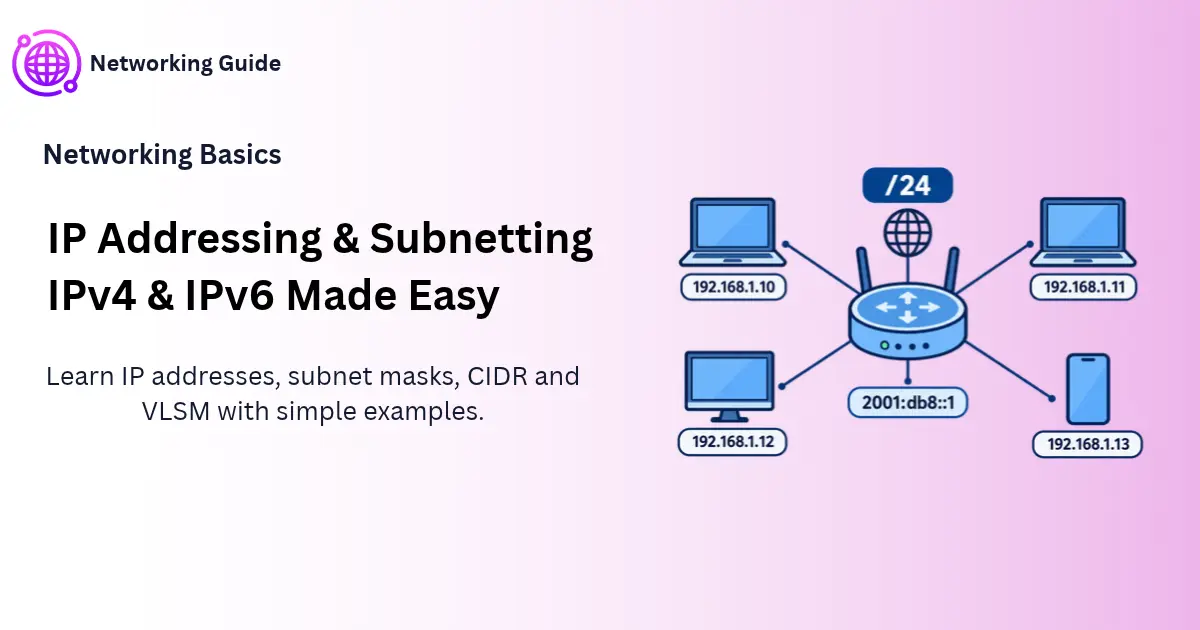
IP addressing and subnetting decide how devices find each other on a network. This guide explains IPv4, IPv6, subnet masks, CIDR and VLSM in plain English, with worked examples and practice questions.
Before You Start
Table of Contents
What Is IP Addressing and Subnetting?
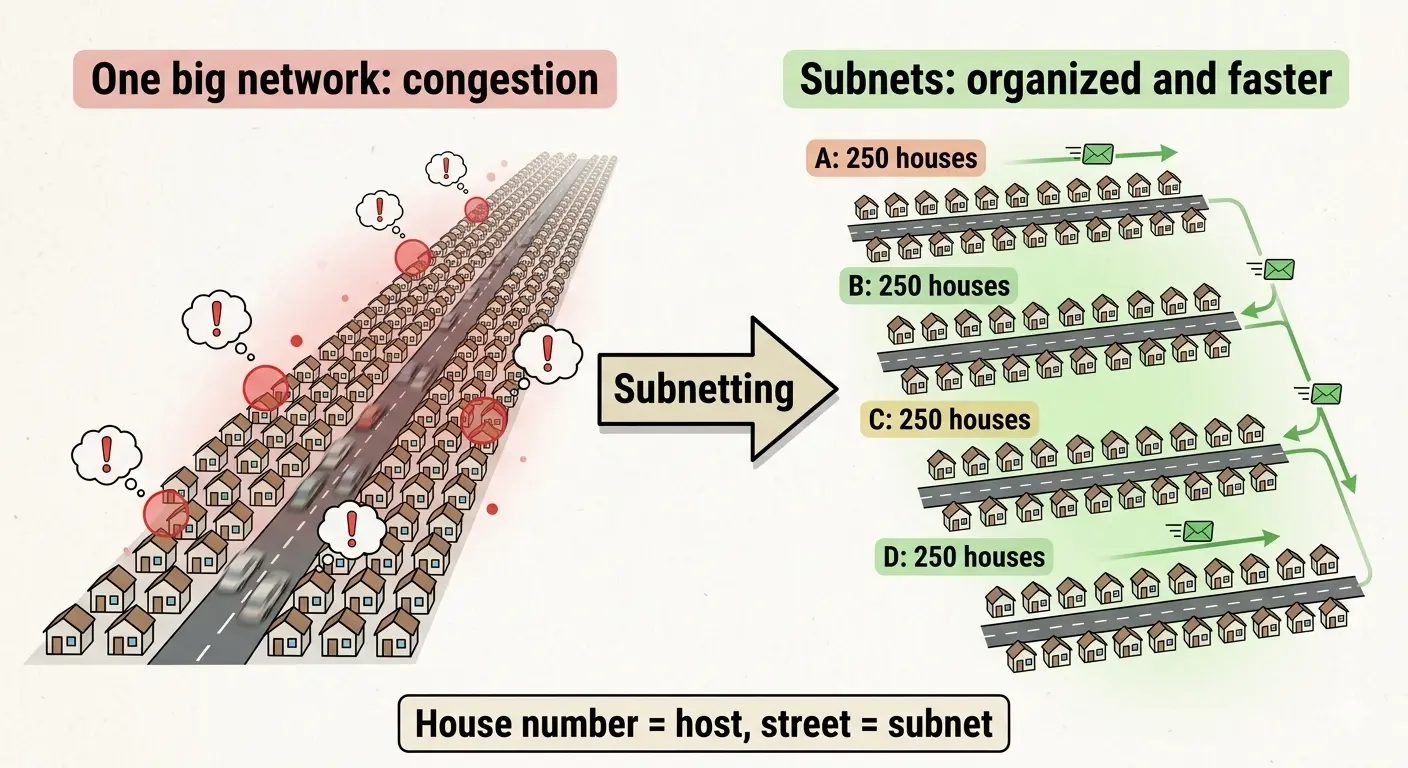
IP addressing gives every device on a network its own unique number, so data knows where to go. Subnetting cuts a big network into smaller ones, called subnets. In short, addressing tells you who a device is, and subnetting tells you which group it sits in. Together, IP addressing and subnetting work like a house number and a street name.
Picture a city. Each house has a number, and houses are grouped into streets. The house number is the IP address. The street is the subnet.
What Is IP Addressing?
An IP address is a number that identifies a device on a network. Your phone has one. So does your laptop, your printer and that smart TV you barely use. Without an address, data has nowhere to land.
Every IP address has two parts:
- Network ID: which network the device belongs to.
- Host ID: which device it is inside that network.
Phone numbers work the same way. The area code points to a region, and the remaining digits point to one phone in it.
When you open a website, your data doesn’t travel in one piece. It’s chopped into small packets, and each packet carries a source IP and a destination IP. Think of a letter with a sender and a receiver written on the envelope.
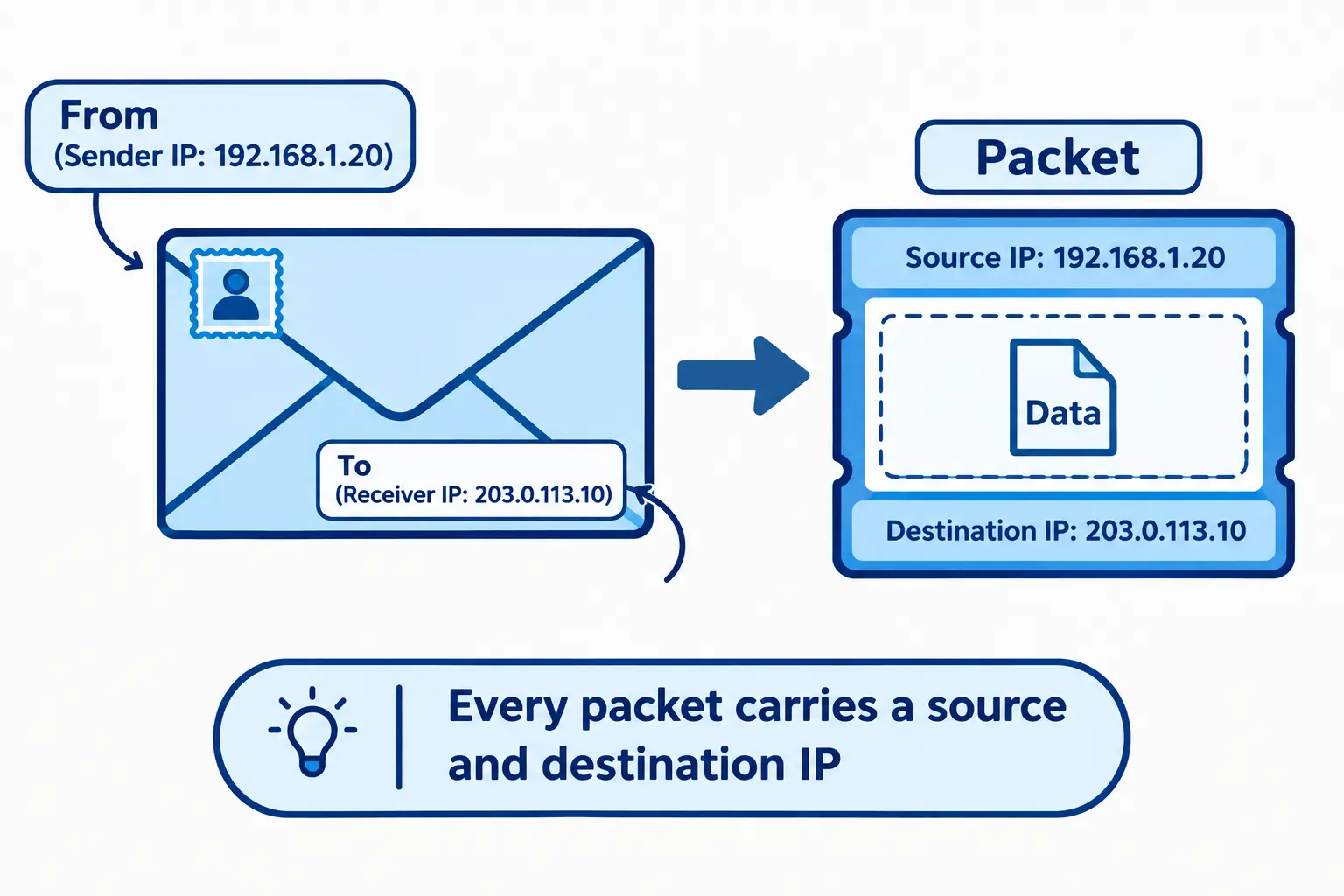
Most devices carry three identities:
- MAC address: a physical address fixed in the network card.
- IP address: a logical address that changes when you change networks.
- Hostname: a friendly name, like “Ali-Laptop”.
Real example: Join your home Wi-Fi and your router might hand your phone 192.168.1.15. Walk into a café, connect there, and you’ll get something completely different. The MAC address stays the same through all of it.
IPv4 Addressing: Structure, Classes and Special Addresses
IPv4 Structure
IPv4 is still the version you’ll meet most often in IP addressing and subnetting. An address is 32 bits long, split into four groups of 8 bits called octets. Each octet is written as a number from 0 to 255, with dots in between.
Here’s 192.168.1.20 in decimal and binary:
| Octet | 1 | 2 | 3 | 4 |
|---|---|---|---|---|
| Decimal | 192 | 168 | 1 | 20 |
| Binary | 11000000 | 10101000 | 00000001 | 00010100 |
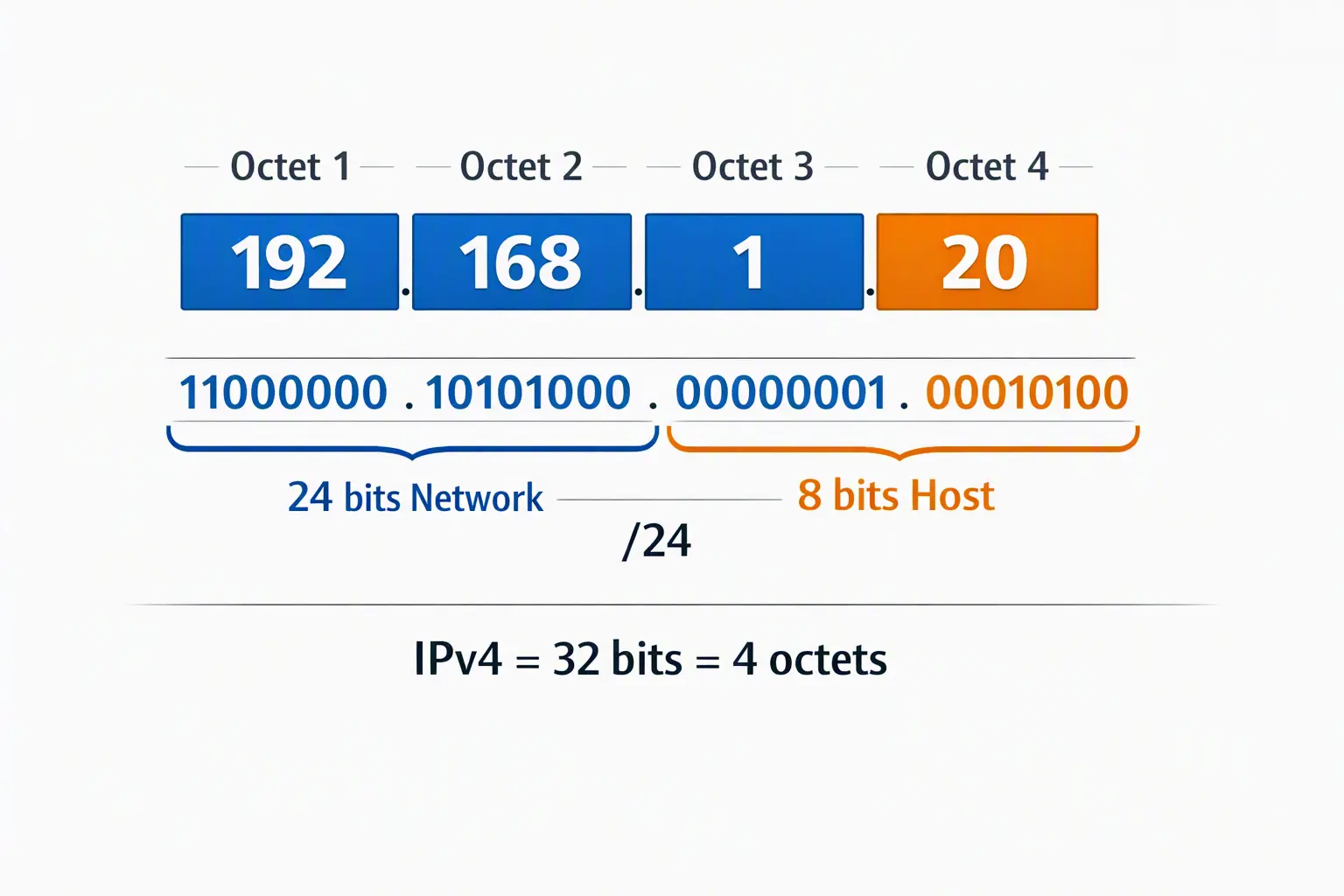
Thirty-two bits give 2³², roughly 4.3 billion addresses. That felt endless in the 1980s. It doesn’t now, when a single person may own a phone, a laptop, a watch and a few smart bulbs.
A quick binary trick: each bit position has a value: 128, 64, 32, 16, 8, 4, 2, 1. To convert 20, pick the values that add up to 20. That’s 16 + 4, so the binary is 00010100.
IPv4 Classes (A to E)
Early IPv4 sorted addresses into fixed classes using the first octet:
| Class | First octet | Default mask | Usable hosts | Used for |
|---|---|---|---|---|
| A | 1–126 | 255.0.0.0 (/8) | 16,777,214 | Very large networks |
| B | 128–191 | 255.255.0.0 (/16) | 65,534 | Medium networks |
| C | 192–223 | 255.255.255.0 (/24) | 254 | Small networks |
| D | 224–239 | n/a | n/a | Multicast |
| E | 240–255 | n/a | n/a | Experimental |
Notice 127 is missing from Class A. It’s reserved for loopback.
Honestly, classes are mostly history. Real networks use CIDR now. But CCNA and Network+ still test them, so learn them once and move on.
Special IPv4 Addresses
- 127.0.0.1 (loopback): your own machine. Run
ping 127.0.0.1to check that your network software works. - 169.254.x.x (APIPA): a self-assigned address when no DHCP server responds. If you see it, something is broken.
- 0.0.0.0: “unknown” or “any address”, depending on where it’s used.
- 255.255.255.255: a broadcast to every device on the local network.
- 100.64.0.0/10: shared space that ISPs use for carrier-grade NAT (CGNAT).
Public IP vs Private IP and NAT
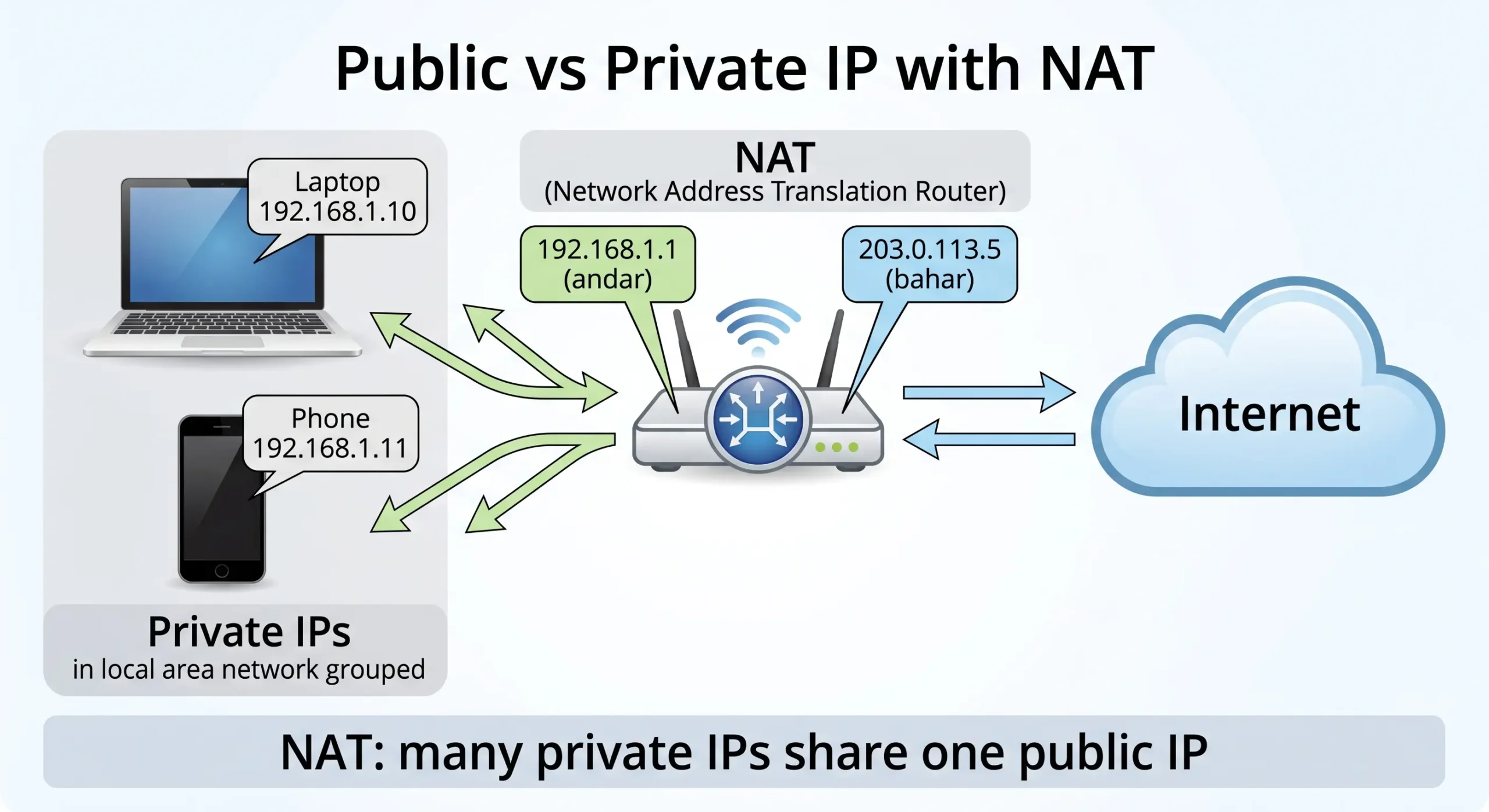
A public IP is unique across the whole internet. Your ISP gives it to you, and websites see it. A private IP only works inside your local network. Millions of homes use 192.168.1.x at the same time, and nothing clashes, because those addresses never leave the house.
RFC 1918 reserves three private ranges:
| Range | CIDR | Typical use |
|---|---|---|
| 10.0.0.0 – 10.255.255.255 | 10.0.0.0/8 | Large companies |
| 172.16.0.0 – 172.31.255.255 | 172.16.0.0/12 | Medium networks |
| 192.168.0.0 – 192.168.255.255 | 192.168.0.0/16 | Homes and small offices |
How NAT Works
Private addresses can’t travel on the internet, so your router uses Network Address Translation (NAT). When data leaves, the router swaps your private address for its public one. When the reply comes back, it swaps it again and passes the data to the right device.
Real example: Five devices in your home share one public IP. A website sees only that single address. Your router keeps a small table so it remembers which device asked for what.
What if a private IP matches a public IP? Your device would assume the address is local and search for it inside your own network. You’d never reach the real public server. That’s exactly why private ranges are kept off the public internet.
IPv6 Address Structure and Types
IPv6 is the newer half of IP addressing and subnetting, and it exists because IPv4 ran short. It uses 128 bits, which gives about 340 undecillion addresses (3.4 × 10³⁸). That’s more than enough for every device on Earth, and then some.
An IPv6 address has eight groups of four hex digits, separated by colons:
2001:0db8:85a3:0000:0000:8a2e:0370:7334
Hex simply means digits 0–9 plus letters a–f.
IPv6 Shorthand Rules
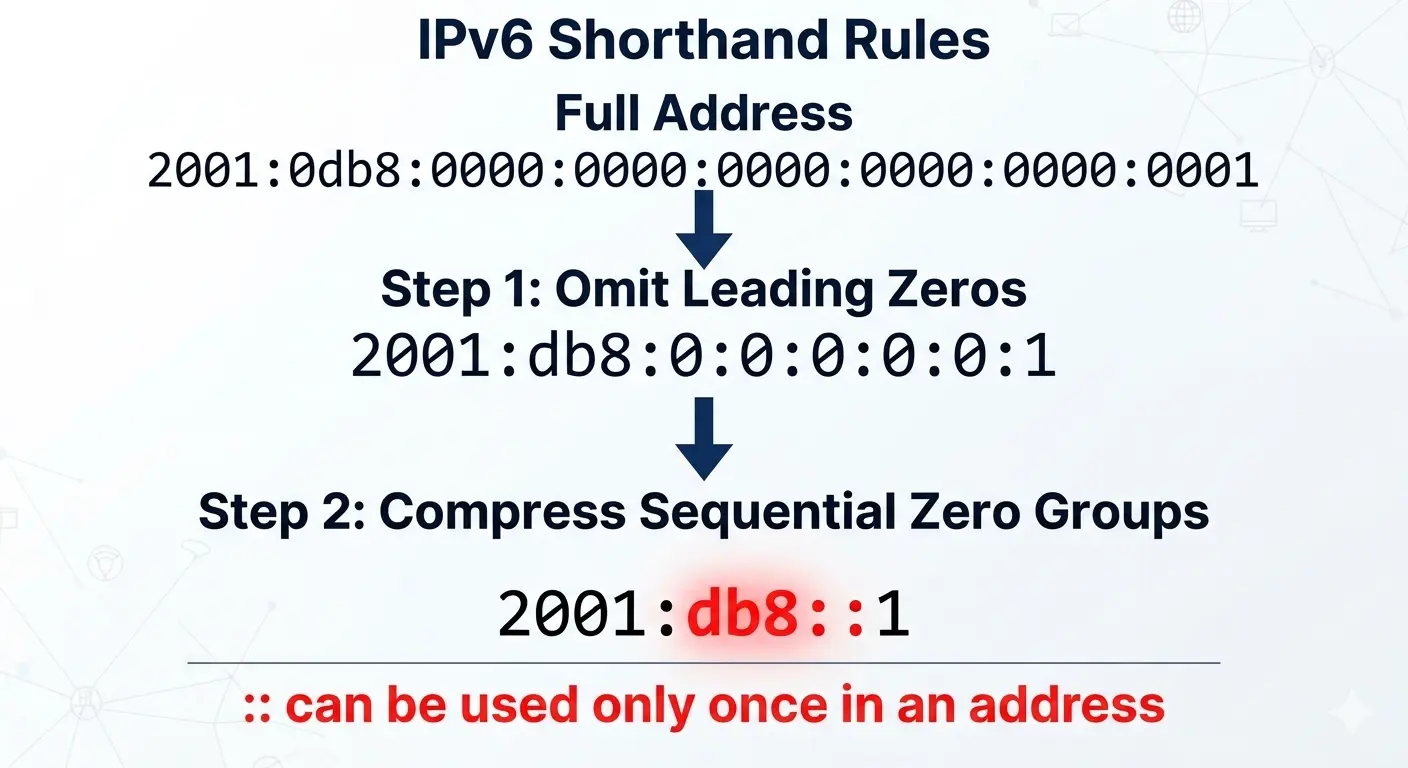
Nobody wants to type that every time, so two rules shorten it:
- Drop leading zeros in each group.
0db8becomesdb8. - Replace one run of all-zero groups with
::. Only once per address. Use it twice and nobody can tell how many zeros each one hides.
Example 1:
- Full:
2001:0db8:0000:0000:0000:0000:0000:0001 - Step 1:
2001:db8:0:0:0:0:0:1 - Step 2:
2001:db8::1
Example 2: fe80:0000:0000:0000:0202:b3ff:fe1e:8329 becomes fe80::202:b3ff:fe1e:8329.
IPv6 Address Types
| Type | Prefix | What it does |
|---|---|---|
| Global unicast | 2000::/3 | Public, routable on the internet |
| Link-local | fe80::/10 | Works on the local link only; every IPv6 device has one |
| Unique local | fc00::/7 | Private-style addresses inside an organization |
| Multicast | ff00::/8 | One sender, many chosen receivers |
| Anycast | Shared unicast | Same address on several servers; the nearest one answers |
| Loopback | ::1 | Your own device |
IPv6 has no broadcast. It uses multicast, which wastes less traffic. Also, 2001:db8::/32 is set aside for documentation, which is why you’ll see it in examples like these.
IPv4 vs IPv6
| Feature | IPv4 | IPv6 |
|---|---|---|
| Size | 32 bits | 128 bits |
| Format | Decimal, dots | Hex, colons |
| Total addresses | ~4.3 billion | ~340 undecillion |
| Broadcast | Yes | No |
| NAT | Widely needed | Not needed to fix address shortage |
| Auto-configuration | DHCP | SLAAC or DHCPv6 |
If IPv4 Ran Out, Why Is It Still Used?
Because a few clever fixes bought it decades:
- NAT lets many devices share one public address.
- CIDR stopped the waste caused by fixed classes.
- DHCP leases addresses temporarily, so they get reused.
- Dual-stack runs IPv4 and IPv6 side by side.
And upgrading old equipment costs money. Plenty of organizations simply keep what works.
Purpose of Subnetting: Why We Use It
In IP addressing and subnetting, the subnetting part splits one big network into smaller, separate ones. It’s useful for four reasons:
- Less waste: each group gets only the addresses it needs.
- Better speed: broadcast traffic stays inside its own subnet.
- Better security: finance servers can sit away from guest devices.
- Easier fixes: when networks are small, problems are easier to find.
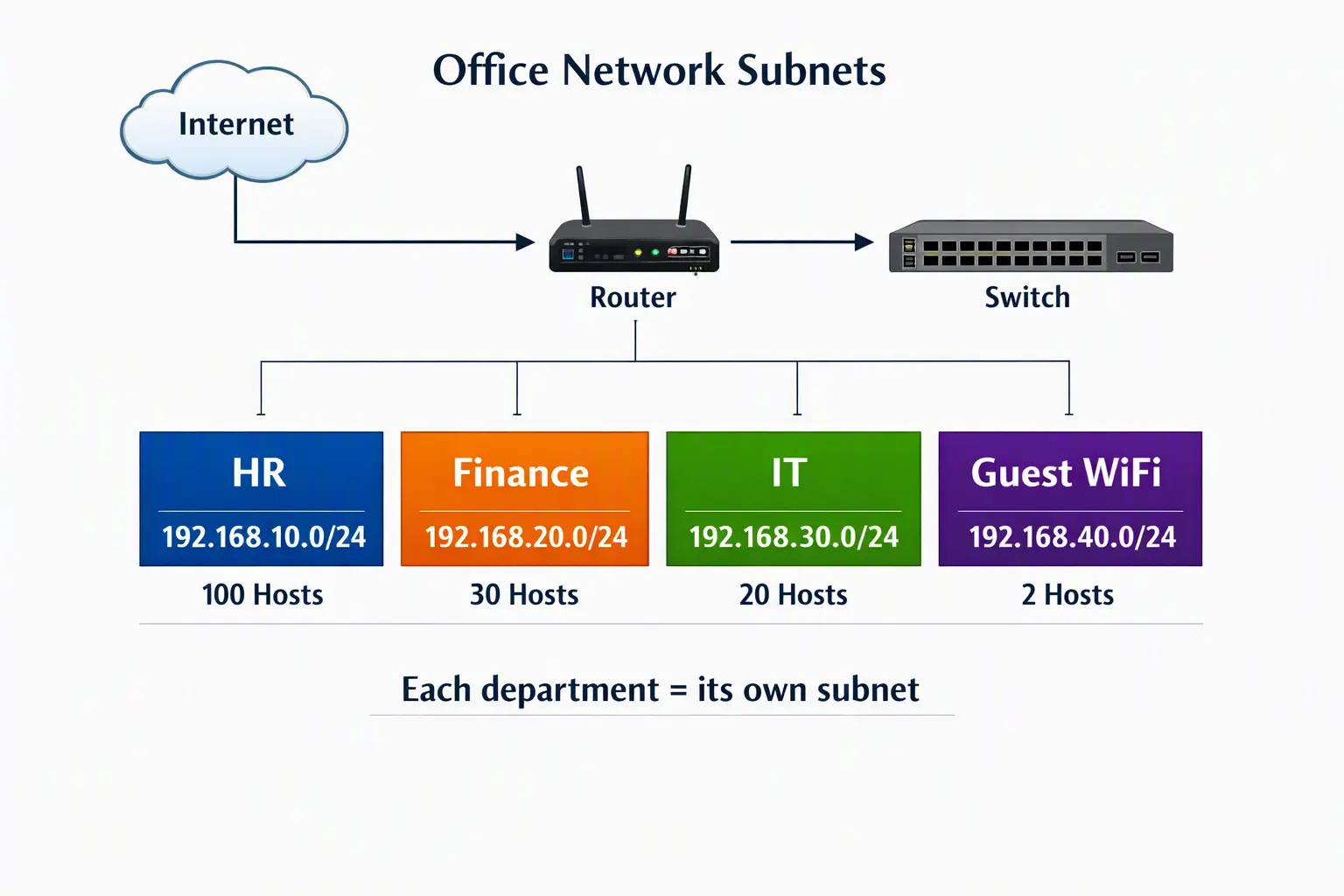
Real example: Imagine 200 devices on one flat network. One faulty laptop starts flooding traffic, and the whole office slows down. If HR, Finance, IT and Guest Wi-Fi each had their own subnet, only one department would notice. Guests also couldn’t browse internal files.
Subnet Mask and CIDR Notation
Most beginners get stuck on the mask, so let’s clear it up before any IP addressing and subnetting math.
Subnet vs Subnet Mask
These two get mixed up all the time:
- A subnet is a smaller network segment.
- A subnet mask is a number that tells a device which part of an IP is the network and which part is the host.
In a mask, 1s mark network bits and 0s mark host bits. So 255.255.255.0 is 24 ones followed by 8 zeros.
CIDR Notation
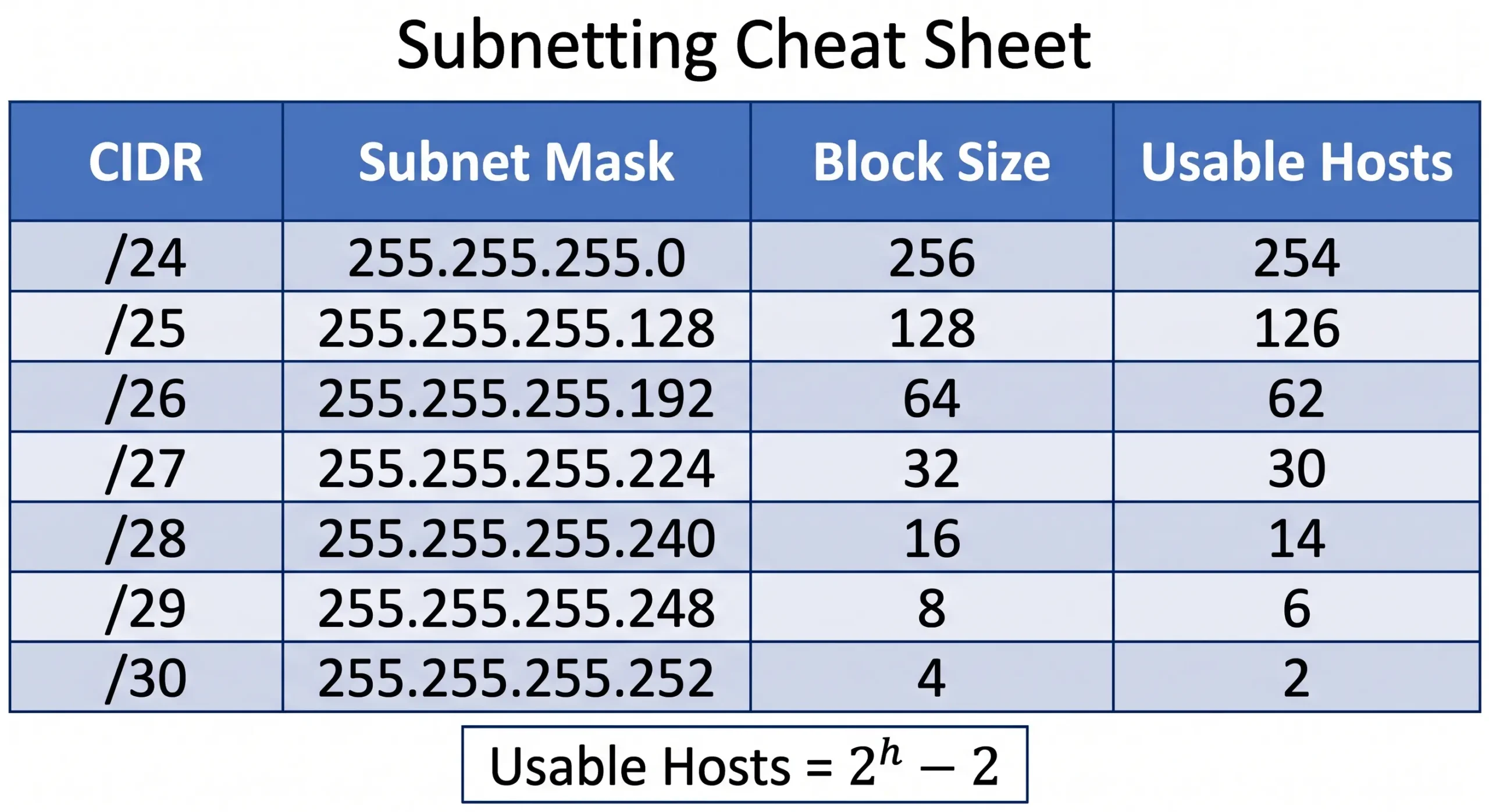
CIDR (Classless Inter-Domain Routing) writes the mask as a slash and a number. The number is how many bits belong to the network. So 255.255.255.0 becomes /24.
| CIDR | Subnet mask | Total addresses | Usable hosts |
|---|---|---|---|
| /24 | 255.255.255.0 | 256 | 254 |
| /25 | 255.255.255.128 | 128 | 126 |
| /26 | 255.255.255.192 | 64 | 62 |
| /27 | 255.255.255.224 | 32 | 30 |
| /28 | 255.255.255.240 | 16 | 14 |
| /29 | 255.255.255.248 | 8 | 6 |
| /30 | 255.255.255.252 | 4 | 2 |
Each subnet loses two addresses: the network address (first) and the broadcast address (last). That’s why usable hosts are always the total minus 2. A /31 is a special case, allowed on point-to-point links under RFC 3021.
Classful vs Classless
Classful addressing forces the split at /8, /16 or /24. Need 2,000 addresses? A Class B gives you 65,534 and wastes about 63,000.
Classless addressing lets you pick any prefix. A /21 gives 2,048 addresses (2,046 usable), which is almost a perfect fit.
Subnetting Calculation: Step-by-Step with Examples
Subnetting calculation looks scary at first, but every IP addressing and subnetting problem needs only three formulas.
The Formulas
- Number of subnets = 2ⁿ, where n is the number of borrowed bits.
- Usable hosts per subnet = 2ʰ − 2, where h is the number of host bits.
- Block size (the “magic number”) = 256 minus the mask value in the interesting octet.
For /26 the mask is 255.255.255.192, so block size = 256 − 192 = 64. Subnets start at 0, 64, 128 and 192.
How to Find the Network Address
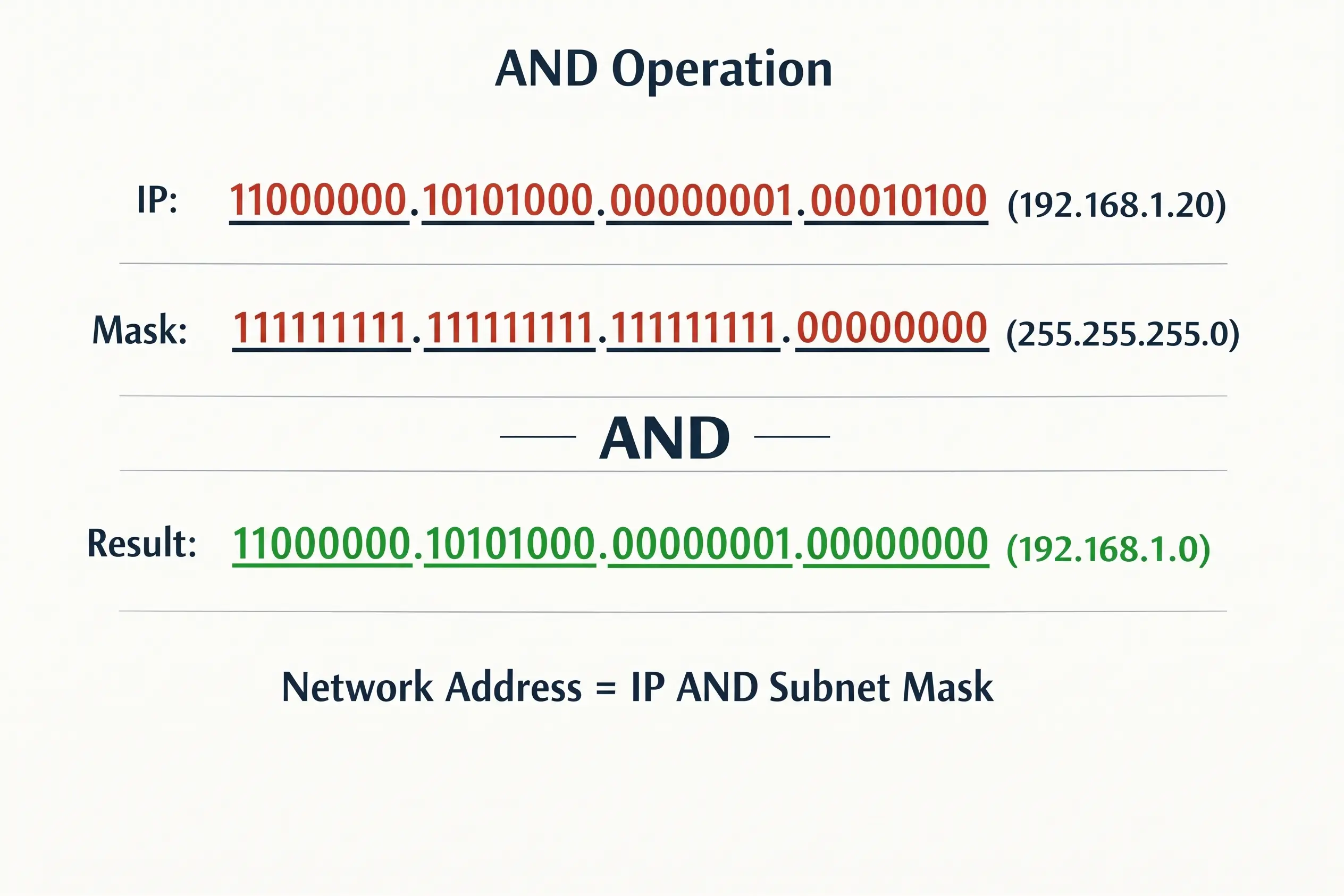
Method 1: The AND method. Write the IP and the mask in binary. Where both bits are 1, the result is 1. Anywhere else, it’s 0.
- IP:
11000000.10101000.00000001.00010100(192.168.1.20) - Mask:
11111111.11111111.11111111.00000000(255.255.255.0) - Result:
11000000.10101000.00000001.00000000(192.168.1.0)
Method 2: The block size shortcut. Let’s find the network of 192.168.1.130/26.
- Block size is 64.
- Subnet starts are 0, 64, 128, 192.
- 130 sits between 128 and 191, so the network address is 192.168.1.128.
- The broadcast is the next start minus 1: 192.168.1.191.
- The usable range is .129 to .190.
I’d use Method 2 for exams. It’s faster, and you can do it in your head.
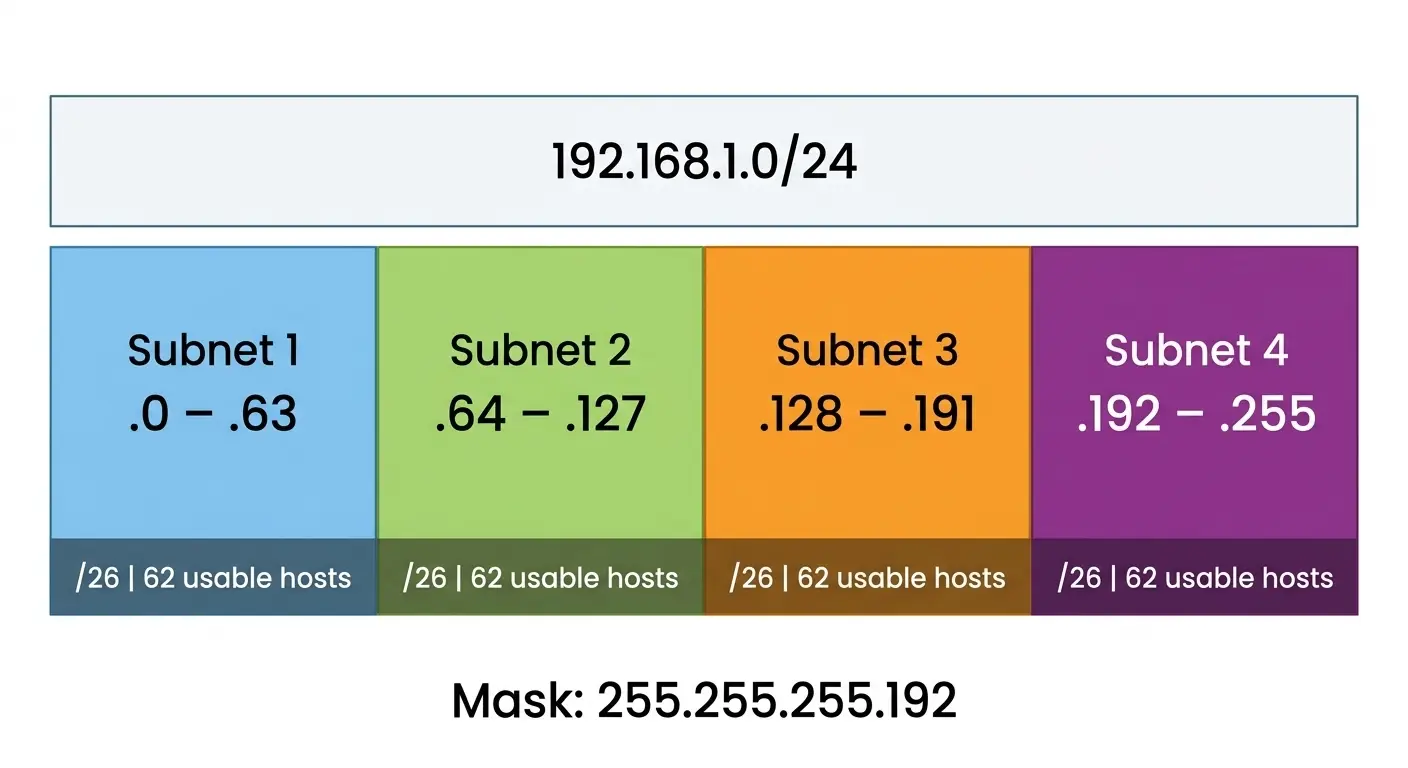
Worked Example: Split 192.168.1.0/24 Into 4 Subnets
Step 1: You need 4 subnets. 2² = 4, so borrow 2 bits.
Step 2: New prefix = 24 + 2 = /26.
Step 3: Mask = 255.255.255.192. Block size = 64.
Step 4: Hosts per subnet = 2⁶ − 2 = 62.
| Subnet | Network | Usable range | Broadcast |
|---|---|---|---|
| 1 | 192.168.1.0 | .1 – .62 | 192.168.1.63 |
| 2 | 192.168.1.64 | .65 – .126 | 192.168.1.127 |
| 3 | 192.168.1.128 | .129 – .190 | 192.168.1.191 |
| 4 | 192.168.1.192 | .193 – .254 | 192.168.1.255 |
How Many Host Bits Do You Need?
Say a department has 50 devices. Find the smallest power of 2 that covers 50 plus the two reserved addresses. 2⁶ = 64, and 64 − 2 = 62, which is enough. So you need 6 host bits, which means a /26 (32 − 6 = 26).
VLSM Subnetting (Variable Length Subnet Mask) Explained
VLSM is the advanced side of IP addressing and subnetting. It means using different masks inside the same network, so every subnet fits its job. The older approach, fixed-length subnetting (FLSM), gives every subnet the same size. That wastes a lot of addresses.
CIDR vs VLSM: CIDR is the classless system with slash notation, used for addressing and for summarizing routes across the internet. VLSM is the practice of using different prefix lengths inside one network. They work together, not against each other.
The Golden Rule
Allocate the largest subnet first. It keeps your blocks aligned and stops them from overlapping.
VLSM Worked Example
You have 192.168.1.0/24 and four needs:
| Department | Hosts needed | Block size | Prefix | Network | Usable range |
|---|---|---|---|---|---|
| Sales | 100 | 128 | /25 | 192.168.1.0 | .1 – .126 |
| HR | 50 | 64 | /26 | 192.168.1.128 | .129 – .190 |
| IT | 20 | 32 | /27 | 192.168.1.192 | .193 – .222 |
| WAN link | 2 | 4 | /30 | 192.168.1.224 | .225 – .226 |
Addresses .228 to .255 stay free for later.
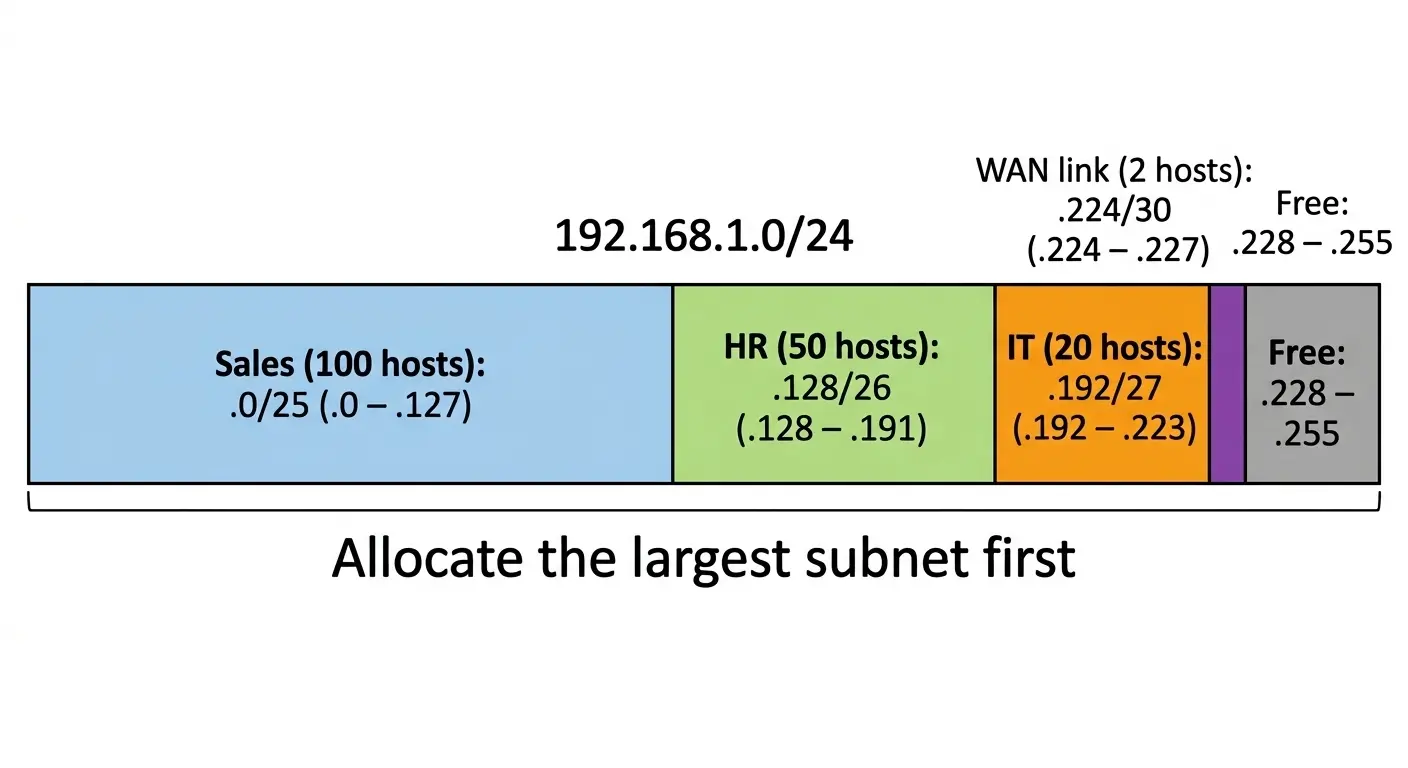
Why not use equal subnets? Because Sales needs a /25, and four /25 subnets need 512 addresses. A /24 has only 256. VLSM fits everything and still leaves room.
IPv6 Subnetting
IPv6 subnetting is easier, because you stop counting hosts. You just pick a subnet ID.
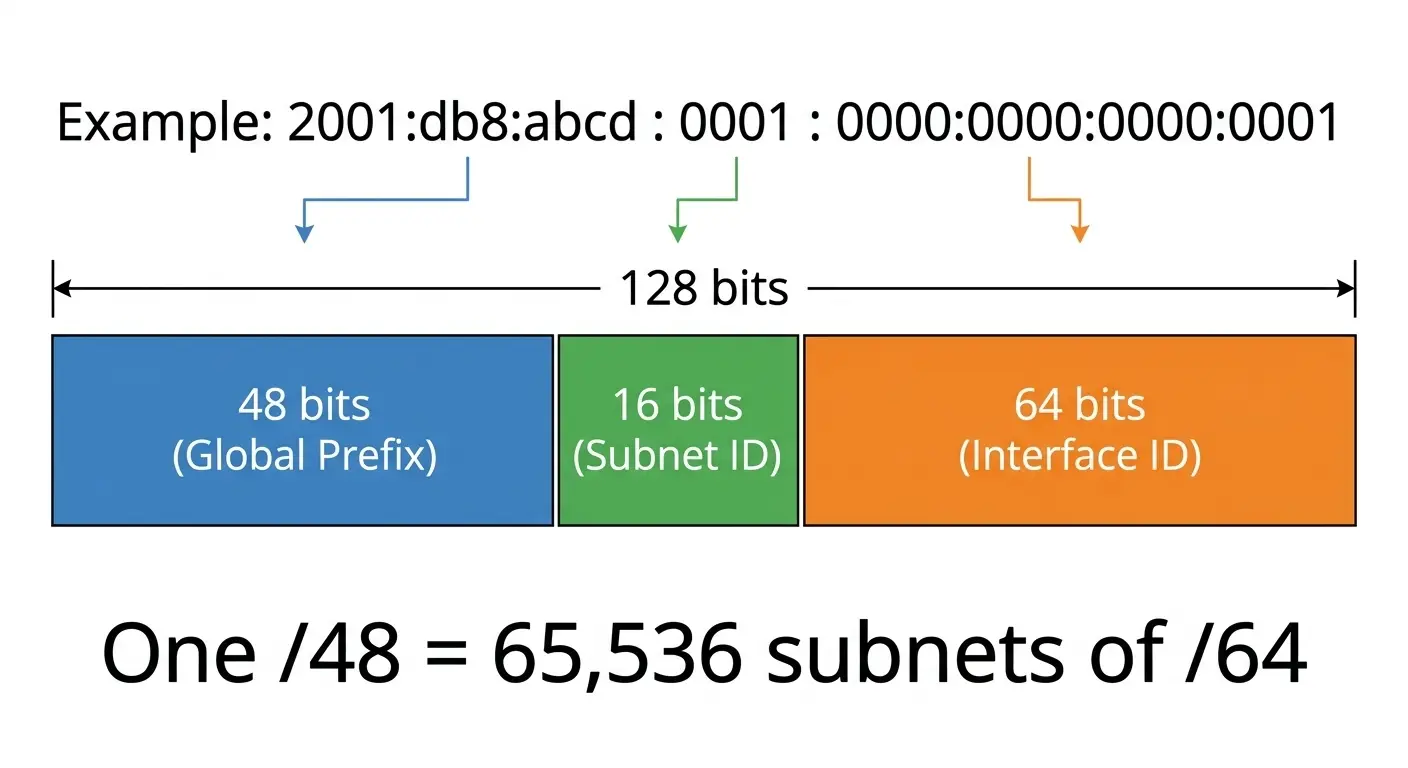
- ISPs usually give a /48 (businesses) or a /56 (many homes).
- The standard subnet size is /64. Features like SLAAC need a 64-bit interface ID.
- A typical address splits into 48 bits of global prefix, 16 bits of subnet ID and 64 bits of interface ID.
A /48 gives 2¹⁶ = 65,536 subnets, and each /64 holds 2⁶⁴ addresses. A /56 gives 256 subnets.
Example: From 2001:db8:abcd::/48, you could create 2001:db8:abcd:1::/64 for Sales, 2001:db8:abcd:2::/64 for HR, and so on.
Try to split on 4-bit boundaries, since each hex digit is 4 bits. Addresses stay much easier to read.
Real-World Examples and Troubleshooting
Here’s where IP addressing and subnetting shows up in everyday networks.
Where Subnets Are Used
- Offices: HR
192.168.10.0/24, Finance192.168.20.0/24, IT192.168.30.0/24, Guest Wi-Fi192.168.40.0/24. - Campuses: students, staff and guests sit on separate subnets.
- Homes: your router creates one small subnet, usually 192.168.1.0/24.
- ISPs: they divide large blocks into smaller ones for customers.
Check Your IP Settings
| System | Command |
|---|---|
| Windows | ipconfig |
| Linux | ip addr |
| macOS | ifconfig |
Then use ping to test whether another device answers.
Common Problems
- IP starts with 169.254: the device couldn’t reach a DHCP server. Check the cable, the Wi-Fi or the server.
- Wrong subnet mask: the device reaches some machines but not others.
- Duplicate IP: two devices share one address, causing random disconnects.
- Wrong default gateway: local access works, internet doesn’t.
Common Mistakes and Tips to Learn Subnetting
Most errors in IP addressing and subnetting come from a few repeated slips.
Mistakes to avoid:
- Forgetting the network and broadcast addresses when counting hosts.
- Creating overlapping subnets.
- Mixing up /28 and /30.
- Giving a subnet too many or too few addresses.
- Allocating small VLSM blocks before large ones.
Tips that help:
- Memorize the powers of 2 up to 256.
- Learn the block size trick before binary.
- Do a few problems daily rather than a pile once a week.
- Sketch the address range on paper.
- Use a subnet calculator to check your answers, not to replace practice.
Practice Questions
Test your IP addressing and subnetting skills with these five questions.
- What is the network address of 192.168.5.77/24?
- How many usable hosts are in a /27?
- You split 10.0.0.0/24 into 8 equal subnets. What is the new mask?
- Which subnet contains 172.16.10.200/26?
- Shorten
2001:0db8:0000:0000:0000:ff00:0042:8329.
Answers:
- 192.168.5.0. The first three octets stay, and the host part becomes 0.
- 2⁵ − 2 = 30.
- 8 subnets need 3 bits, so the prefix is /27 and the mask is 255.255.255.224.
- Block size is 64. 200 falls in the 192 block, so the network is 172.16.10.192 and the broadcast is 172.16.10.255.
- 2001:db8::ff00:42:8329.
Frequently Asked Questions
What is the use of subnetting in a computer network?
Subnetting splits a large network into smaller ones. It saves IP addresses, cuts traffic, improves security by isolating groups, and makes faults easier to find. A company can keep Finance, HR and guests on separate subnets.
How do you calculate the number of subnets and hosts?
Subnets = 2ⁿ, where n is the number of borrowed bits. Usable hosts = 2ʰ − 2, where h is the remaining host bits. Borrowing 2 bits from a /24, for instance, gives 4 subnets with 62 hosts each.
What is the difference between CIDR and VLSM?
CIDR is the classless system that uses slash notation like /24 and allows route summarization. VLSM means using different prefix lengths inside one network. CIDR is the system, and VLSM is one way of using it.
What is the difference between a subnet and a subnet mask?
A subnet is a smaller network segment. A subnet mask is the number that tells a device which part of an IP address is the network and which part is the host. The mask sets the subnet’s boundaries.
What does an IPv6 address look like?
It has eight groups of four hex digits separated by colons, like 2001:0db8:85a3:0000:0000:8a2e:0370:7334. You can shorten it by dropping leading zeros and replacing one run of zero groups with ::.
If IPv4 addresses ran out, why are they still in use?
NAT, CIDR and DHCP stretched the limited supply. Many networks also run dual-stack, using IPv4 and IPv6 together. Replacing older systems takes time and money, so the move to IPv6 is gradual.
What happens if a private IP is the same as a public IP?
Your device treats the address as local and looks for it inside your own network. You couldn’t reach the public server with that address. That’s why private ranges are reserved and never used on the internet.
How do IP addressing and subnetting work together?
IP addressing gives each device a unique address. Subnetting then groups those addresses into smaller networks using a subnet mask. IP addressing and subnetting together decide where a packet goes and which network it stays in.
Conclusion
IP addressing and subnetting come down to two ideas. Every device needs a unique address, and big networks behave better when they’re split up. Once binary, masks and block sizes click, the calculations turn routine.
Start with the /26 example, then try VLSM, then move to IPv6. A few questions a day will make you faster than you expect. Bookmark this guide and use the cheat sheet whenever you need a quick check.