
ZTA Cybersecurity: Zero Trust Architecture
Beyond the Perimeter Model
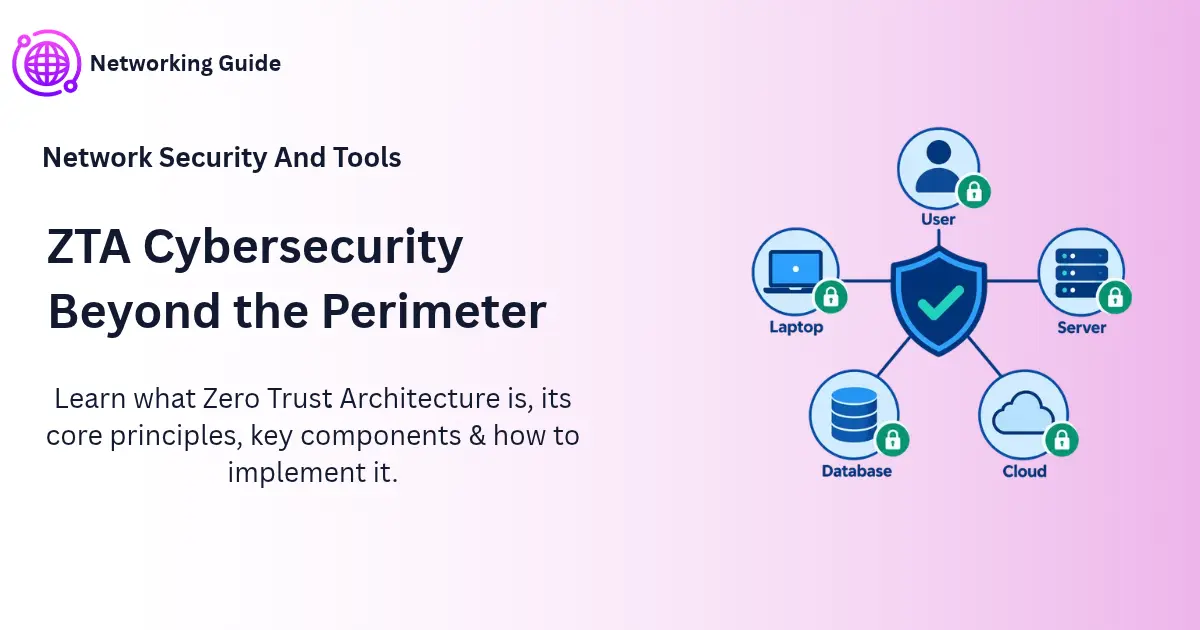
ZTA cybersecurity is built on one simple rule: never trust anyone or anything automatically, and check every request every time. This guide explains how Zero Trust Architecture works, why the old castle-and-moat model is not enough, and how to start.
Before You Start
Table of Contents
What Is Zero Trust Network Architecture? ZTA Cybersecurity Explained
Zero Trust Architecture (ZTA) is a security approach where no user, device or app is trusted by default, even inside the company network. Before anyone gets in, the system looks at who they are, how healthy their device is and what they are trying to do. ZTA is an overall plan, not something you can buy in a box.
The US National Institute of Standards and Technology (NIST) explains the idea behind ZTA cybersecurity in its publication SP 800-207, finalized in 2020. In simple words, zero trust is a set of ideas for making safe access decisions when you assume the network may already be compromised.
A real-life example: Think of a hotel. Being inside the hotel does not mean every room is open to you. Your key card opens only your room, and only during your stay. Zero Trust protects company data with that same logic.
Why is it trending? Three things changed how we work:
- Apps and data moved to the cloud, outside the office.
- Employees log in from home, coffee shops and airport lounges.
- Attackers now steal passwords instead of breaking through firewalls.
The idea behind ZTA cybersecurity is not new. A security expert named Stephen Marsh used the term “zero trust” in a 1994 thesis, and analyst John Kindervag of Forrester made it popular in 2010.
The Perimeter Security Model: Castle and Moat Explained
For many years, companies protected their networks like a medieval castle. They built strong walls and a moat around the outside, and anyone inside was treated as a friend. This is called the perimeter security model, or the castle-and-moat model.
How the Perimeter Model Works
Here the aim is to defend the outer boundary of the network. The usual tools are:
- Firewalls: inspect data entering or leaving and block what looks unsafe.
- VPNs: give remote workers an encrypted tunnel into the office network.
- DMZ: a buffer zone for public-facing servers, such as a website.
- IDS/IPS: systems that detect and block suspicious traffic.
Example: An office building has one guard at the front door. Once you show your badge, you can walk to any floor, any room, any desk. That works only if the guard is never fooled.
Why It Fails Today
- Cloud apps: company data now lives on servers the firewall does not control.
- Personal devices (BYOD): phones and laptops connect from many places.
- Stolen credentials: a valid password looks like a trusted user.
- Lateral movement: once inside, an attacker can move from one system to another.
Example: An employee clicks a phishing link and enters their password on a fake page. The attacker logs in like a normal employee, then quietly explores file servers. The firewall sees nothing wrong, because the login looks real.
Network Security vs Perimeter Security
People often mix these two up, but they are not the same.
- Network security covers every method used to keep a network, and the data on it, safe. It includes access control, monitoring, encryption and more.
- Perimeter security is a smaller piece of that picture. It only protects the outer boundary.

Think of home security. Locking the front door is perimeter security. Locks, cameras, an alarm and a safe together are network security.
Is Perimeter Security Obsolete?
No. Firewalls still block a large amount of unwanted traffic, and you should keep them. The risk comes when they are your only defense. Zero Trust adds more layers inside the walls, so one mistake does not give an attacker everything.
Zero Trust vs Traditional Security
In ZTA cybersecurity, the biggest difference from older models is where trust comes from. Traditional security trusts location. Zero Trust trusts only what it has checked.
| Area | Traditional (perimeter) | Zero Trust |
|---|---|---|
| Trust | Given to anyone inside the network | Never given automatically |
| Access | Broad after login | Limited to what is needed |
| Login checks | Once, at the start | Repeated and based on context |
| Visibility | Focus on the edge | Focus on every user, device and app |
| Attacker movement | Easy once inside | Blocked by small network segments |
ZTA vs ZTNA vs VPN vs SASE
These terms are often confused. Here is the simple difference:
| Term | What it is | How it relates to ZTA |
|---|---|---|
| ZTA | The overall security strategy and design | The big picture |
| ZTNA | A technology that gives access to specific apps based on identity | One piece of ZTA |
| VPN | A secure connection that links a remote user to a private network, usually with broad reach | Can be replaced or reduced by ZTNA |
| SASE | A cloud-delivered package that combines network and security functions in one service | A way to deliver parts of ZTA |
In short, ZTNA is a tool. ZTA is the plan that uses the tool.
Zero Trust Least Privilege and Other Core Principles
Most ZTA cybersecurity guidance comes down to three ideas.
Verify Explicitly
Always check the available facts before saying yes. This includes who the user is, what device they use, where they are and how sensitive the data is.
Least Privilege (JIT and JEA)
Let each person have just the permissions their role requires, and only for as long as they need it.
- Just-in-Time (JIT): access is given for a short time, then removed.
- Just-Enough-Access (JEA): access covers only the exact task.
Example: A contractor needs to update one database. Instead of a permanent admin account, they get access to that one database for two hours.
Assume Breach
Plan as if an attacker is already inside. This means splitting the network into small zones, encrypting data and watching for strange behavior, so damage stays small.
Zero Trust vs Least Privilege
These two are related but not identical.
- Least privilege is one rule: give the minimum access.
- Zero Trust is the full approach: least privilege plus identity checks, device checks, network segmentation and constant monitoring.
So least privilege is a key part of Zero Trust, but doing only least privilege does not make you Zero Trust.
Continuous Authentication in Zero Trust: What It Looks Like in Practice
Continuous authentication does not mean typing your password every minute. In ZTA cybersecurity, it means the system keeps checking in the background and changes its decision if something looks wrong.
A simple scenario: Sara works in finance. She opens the payroll system from a cafe, using her personal laptop.
- Request: Sara asks to open payroll data.
- Signals checked: The system looks at her identity, device health, location, usual behavior and how sensitive the data is.
- Decision: Her password is correct, but the device is unmanaged and the Wi-Fi is public. The system asks for an extra MFA check, or allows read-only access.
- During the session: If her laptop suddenly shows a malware alert, the system ends the session right away.
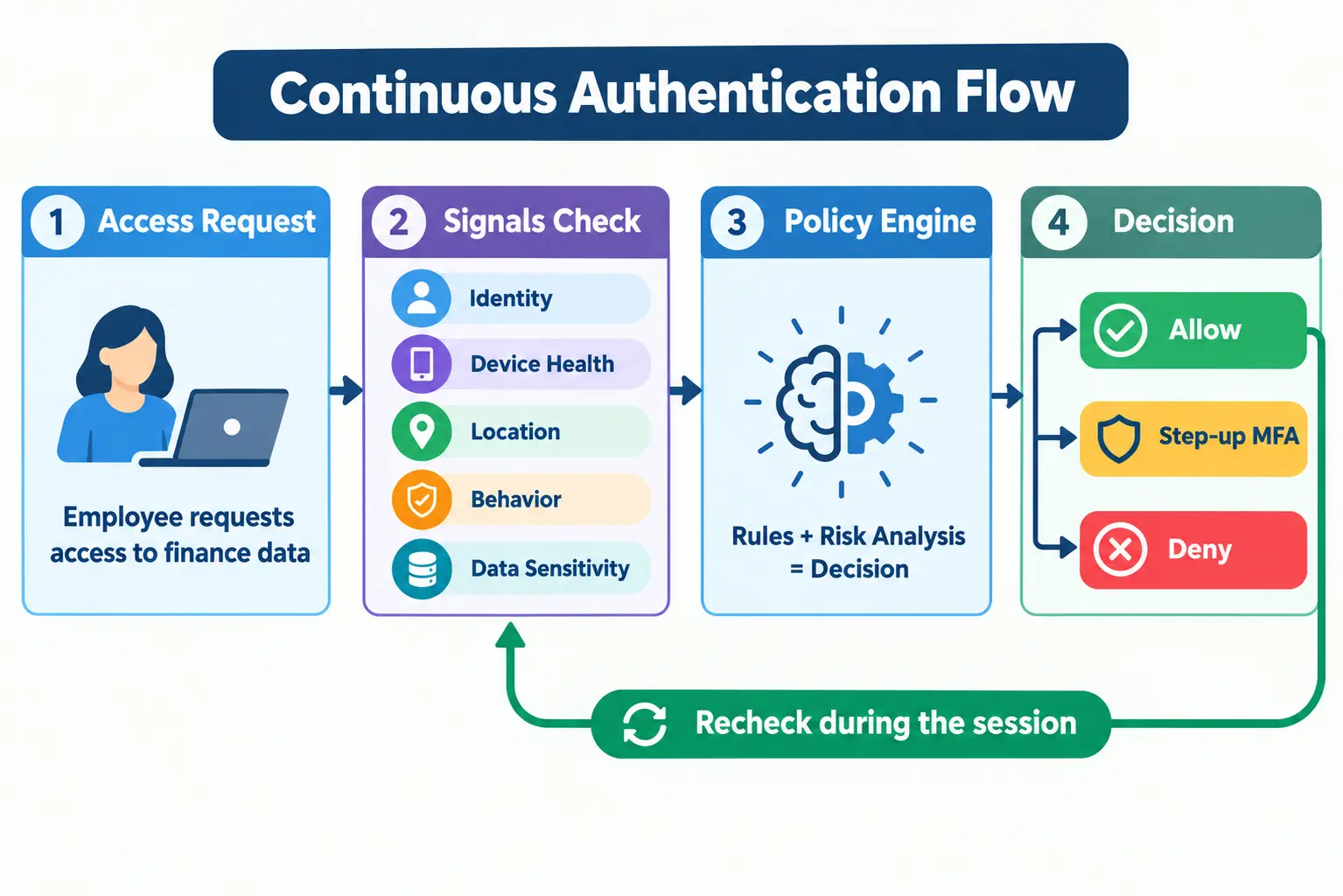
The common signals are:
- Who the user is (identity and MFA)
- Device health (updates, antivirus, encryption)
- Location and network
- Behavior (unusual time, unusual downloads)
- Data sensitivity
How ZTA Works: NIST Components and the 5 Pillars
NIST describes ZTA using a few core parts that work together to decide who gets in.
- Policy Engine (PE): the decision maker. It says allow or deny.
- Policy Administrator (PA): carries out the decision by setting up or closing the connection.
- Policy Enforcement Point (PEP): the gate that sits in front of the resource and opens or closes.
- Data sources: tools like device monitoring, threat intelligence and the identity system feed the Policy Engine.
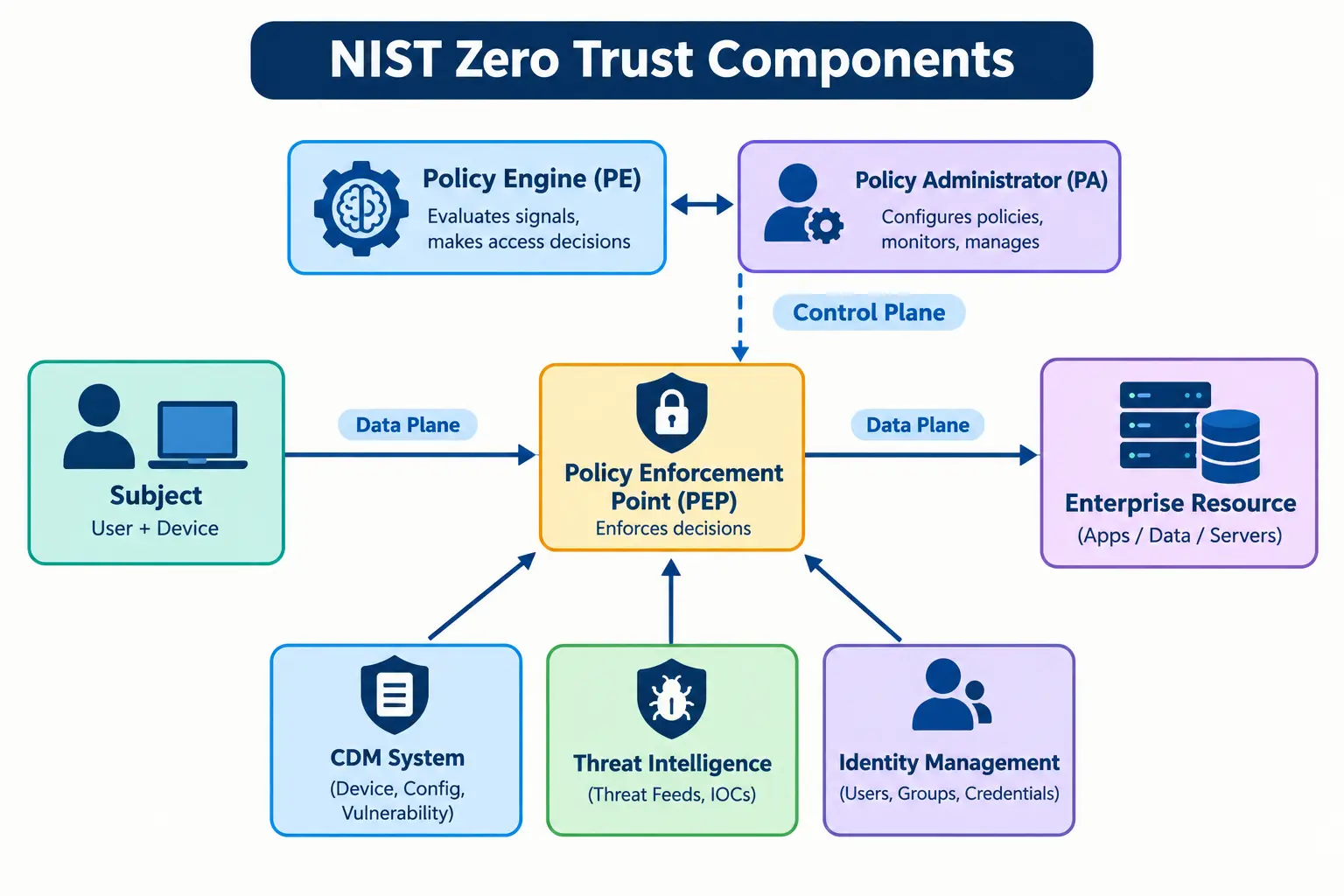
The Policy Engine uses a trust algorithm. It is simply the logic that weighs all the signals, such as user, device, request and known threats, and gives a result.
Example: Think of airport security. The officer (PE) decides, the system (PA) updates your boarding status, and the gate (PEP) lets you through or stops you.
The Five Pillars
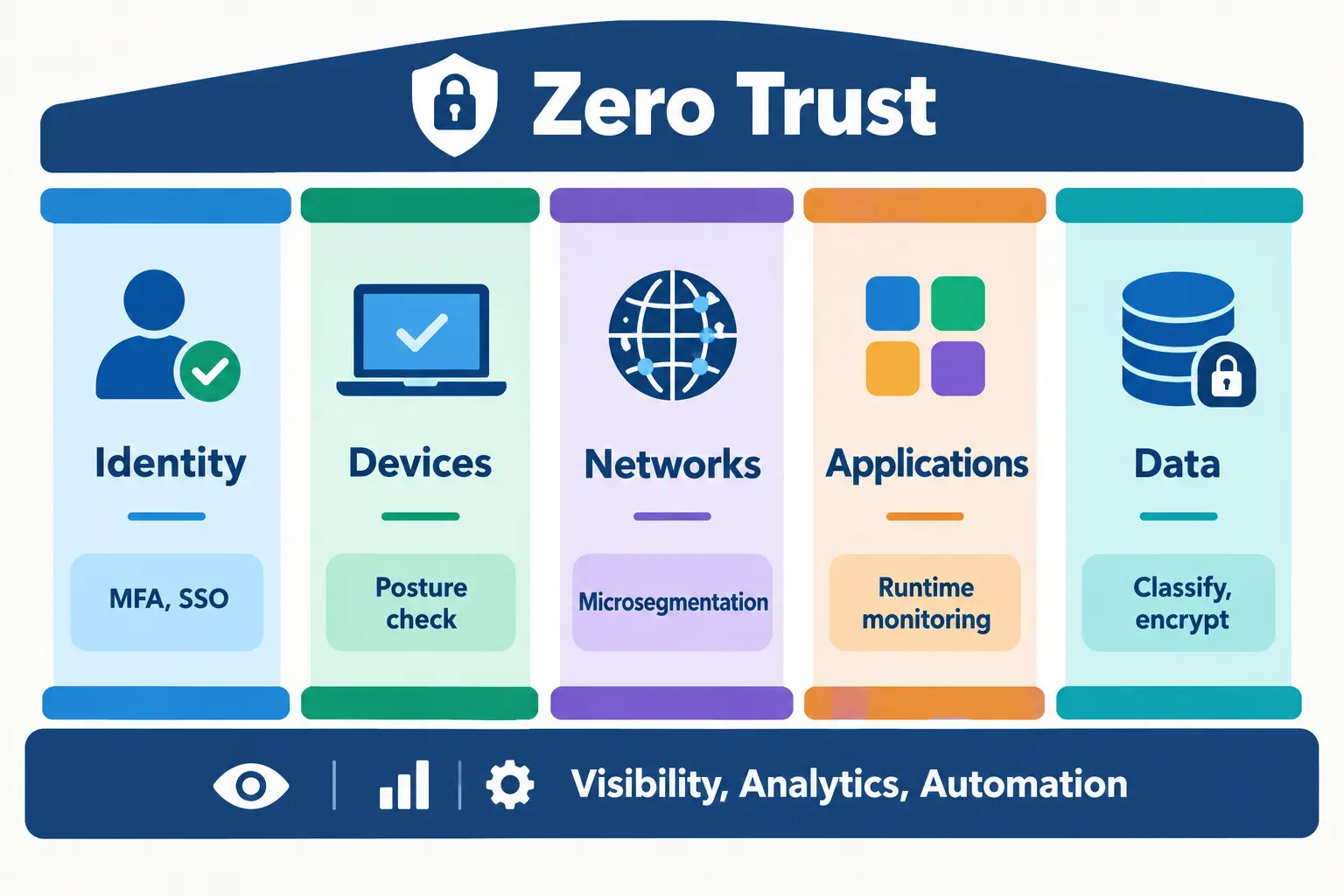
The US CISA model groups Zero Trust into five areas:
| Pillar | What it protects | Simple example |
|---|---|---|
| Identity | Users and machine accounts | MFA and single sign-on |
| Devices | Laptops, phones, servers, IoT | Check that updates and antivirus are on |
| Networks | Traffic between systems | Split into small segments |
| Applications | Software and workloads | Check access at the app level |
| Data | Files and records | Classify and encrypt sensitive data |
Benefits of Zero Trust Architecture
The main benefits of ZTA cybersecurity are:
- Smaller breach damage: if one account is stolen, the attacker cannot reach everything.
- Better visibility: you see who accessed what, from where and when.
- Safer remote work: employees can work from anywhere with the same checks.
- Easier compliance: access logs and controls help with rules such as GDPR, HIPAA and PCI DSS.
- Less insider risk: people can only reach what their role needs.
- Faster response: you can isolate one compromised account or device without shutting everything down.
Example: A stolen sales account can open the CRM, but it cannot reach payroll or source code. The damage stays small.
One honest note: these benefits depend on how well Zero Trust is put in place. Buying a tool alone will not deliver them.
How to Implement ZTA: Roadmap and Maturity Model
You do not need to change everything at once to adopt ZTA cybersecurity. A practical path looks like this:
- Define what to protect: list your most important data, apps and systems first.
- Map how they are used: see who accesses what and how.
- Build the architecture: add identity checks, device checks and segmentation around those assets.
- Create policies: write clear rules, such as “finance data needs MFA and a managed device.”
- Monitor and improve: review logs, fix gaps and repeat.
Maturity Stages
CISA’s Zero Trust Maturity Model describes four stages, so you can see where you stand:
| Stage | What it looks like |
|---|---|
| Traditional | Perimeter-based, mostly manual and static |
| Initial | Some automation, MFA and basic segmentation |
| Advanced | More automated policies and device checks |
| Optimal | Continuous, dynamic and highly automated |

A Real-World Example: Google BeyondCorp
After a major attack on Google known as Operation Aurora in 2009, Google began building BeyondCorp. The idea was to stop trusting the internal network. Employees get access based on who they are and the health of their device, not on whether they are in the office or on a VPN.
Where Small Businesses Can Start
- Turn on MFA for all accounts, especially email and admin accounts.
- Require updated, encrypted devices.
- Remove old accounts and extra admin rights.
- Use separate accounts for admin work.
Challenges, Myths and IoT Security in Zero Trust
Common Challenges
- Old systems: legacy apps may not support modern login checks.
- Cost and time: it is a gradual project, not a one-time purchase.
- User pushback: extra checks can annoy people if done badly.
- Central identity risk: if your identity provider fails or is hacked, many systems are affected. Use strong protection and a backup plan for it.
Three Myths
- “Zero Trust is a product.” It is a strategy that uses many tools.
- “It replaces firewalls.” It works together with them.
- “It is only a VPN replacement.” VPN is just one small part of the picture.
What About IoT Devices?
Cameras, printers and sensors often cannot run security software. For these, put them in their own network segment, allow only the connections they need, and watch for unusual behavior.
Is It Just Marketing Hype?
The word “zero trust” is certainly overused by vendors. But the core idea behind ZTA cybersecurity is practical and widely recommended by bodies such as NIST and CISA. Judge a product by how it supports the principles above, not by the label.
Zero Trust AI Security Framework for Enterprises in 2026
In 2026, many companies use AI assistants and automated agents that read files, call tools and take actions. These are non-human identities, and they need Zero Trust rules too.
- Give every agent its own identity. Do not let agents share one powerful account.
- Apply least privilege. An agent that summarizes emails should not be able to delete files.
- Use short-lived access. Temporary credentials reduce the damage if they leak.
- Control delegation. When one agent hands a task to another, the second agent should get only the permissions needed for that task.
- Log everything. Record what each agent accessed and did.
Example: An AI assistant helps with expense reports. It can read receipts and write to the expense system, but it cannot see HR files or send money.
AI also helps attackers. It makes phishing messages and fake voices more convincing. On the defense side, AI can spot unusual behavior faster.
Zero Trust is not enough on its own. It works best together with patching, backups, staff training and a tested incident response plan. This layered approach is called defense in depth.
Frequently Asked Questions
Is ZTA a product or a strategy?
ZTA cybersecurity is a strategy. It combines policies, identity checks, device checks and monitoring. Vendors sell tools that support it, but no single product delivers Zero Trust.
How does ZTA differ from a VPN?
A VPN usually gives wide access to a network once you connect. ZTA gives access to specific resources after checking identity, device and context, and keeps checking.
Can a small business implement Zero Trust?
Yes. Start with MFA, updated devices, removal of unused accounts and limited admin rights. These low-cost steps follow Zero Trust principles.
What is the NIST definition of ZTA?
NIST SP 800-207 describes zero trust as ideas that reduce uncertainty in access decisions, assuming the network is already compromised. Every request is checked, and access is limited.
Is Zero Trust more secure than traditional models, or just marketing?
It is not magic, but its principles are sound. By limiting access and checking continuously, it reduces how far an attacker can go after a breach.
What are the biggest challenges in implementing Zero Trust?
The most common ones are legacy systems, limited time and budget, user resistance and unclear asset inventories. A phased plan makes them easier to manage.
Is Zero Trust enough against AI-driven attacks?
No. It reduces damage, but you also need patching, backups, training and monitoring. Give AI agents their own limited identities as well.
Conclusion
Zero Trust is not a product you buy. It is a way of thinking: check every request, give minimum access, and plan for the day something goes wrong. Start with your most important data, add MFA and device checks, and improve step by step. Review your current setup against the CISA maturity stages to see your next move.