
How VLAN Works: VLANs and Trunking Explained for Local Networks
A VLAN splits one physical network into several separate logical networks, so devices only talk to the devices they should. This guide explains how VLAN networking works, from tagging and trunk ports to native VLANs and routing, using simple examples.
Before You Start
Table of Contents
What Is a VLAN? (VLAN Networking Basics)
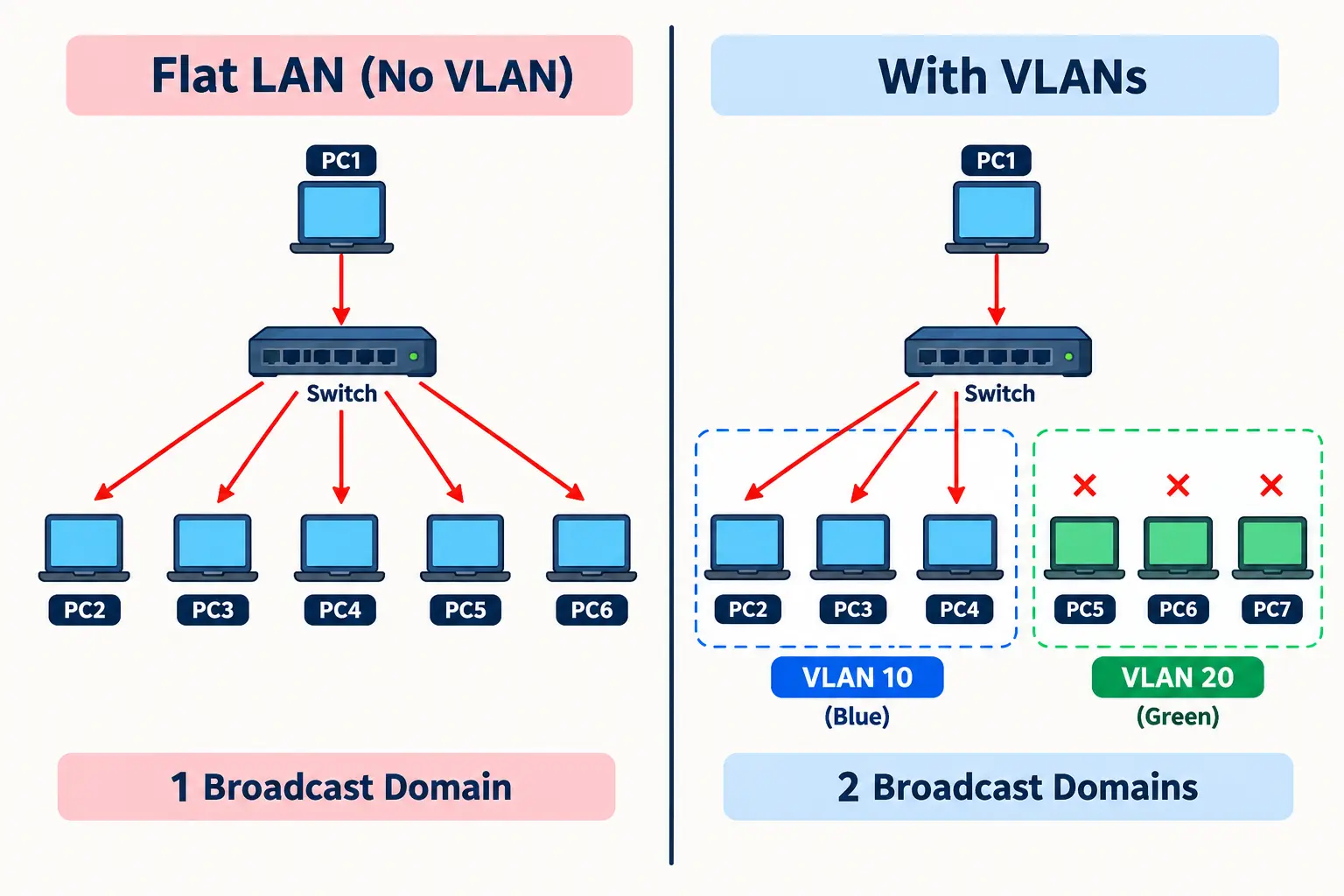
Quick answer: A VLAN (Virtual Local Area Network) is a way to divide one physical network into multiple logical networks. Each VLAN is its own broadcast domain.
Think of an office building with one set of cables and switches. Without VLANs, every computer, printer and phone sits on the same network. A broadcast message from one device reaches all of them.
With VLANs, you group devices by role instead of location. Accounting, Sales and Guests each get their own network, even if they all plug into the same switch.
Here is the key idea: a regular switch treats all ports as one network. A VLAN-capable switch lets you say “ports 1 to 10 are Staff, ports 11 to 20 are Guests.”
VLAN vs LAN
| Feature | LAN | VLAN |
|---|---|---|
| Defined by | Physical cables and switches | Switch configuration |
| Broadcast domain | One for everyone | One per VLAN |
| Changing groups | Often needs rewiring | Change a port setting |
| Isolation | None by default | Separate by default |
VLAN vs Subnet
A VLAN works at Layer 2 (data link). A subnet works at Layer 3 (IP addressing). They are different things, but in most networks each VLAN gets its own subnet. For example, VLAN 10 uses 10.1.10.0/24 and VLAN 20 uses 10.1.20.0/24.
VLAN vs VPN
A VLAN separates traffic inside your local network. A VPN creates an encrypted tunnel across an outside network like the internet. They solve different problems and are often used together.
How VLAN Works Step by Step
Quick answer: Here is how VLAN works: a switch labels each frame with a VLAN ID and only delivers it to ports in the same VLAN.
Devices on a network send broadcasts to find each other, for example to ask “who has this IP address?” On a small network that is fine. On a network with hundreds of devices, broadcasts add up and waste bandwidth, like too many cars on one road.
VLANs shrink the road. Each VLAN is a smaller broadcast domain, so a broadcast only reaches devices in that VLAN.
The Journey of One Frame
Imagine two switches in a school. PC-A and PC-B are both in VLAN 10 (Staff), but they sit on different floors.
- PC-A sends a normal, untagged Ethernet frame.
- Switch 1 receives it on an access port set to VLAN 10.
- Switch 1 sends it over the trunk link to Switch 2 and adds a tag saying “VLAN 10.”
- Switch 2 reads the tag and knows the frame belongs to VLAN 10.
- Switch 2 removes the tag and delivers the frame to PC-B only. A student PC in VLAN 20 never sees it.
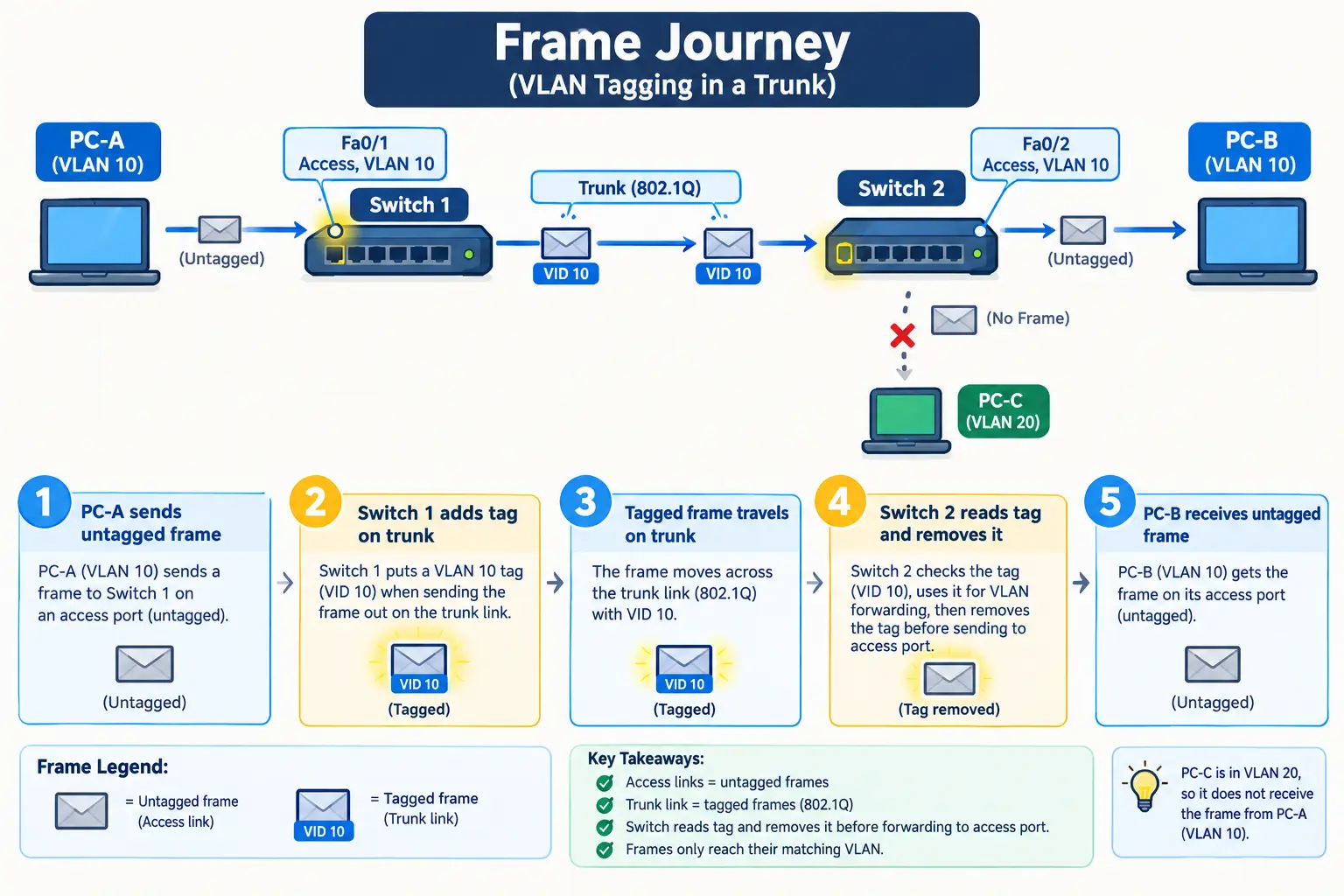
This is how VLAN works in practice: the PCs never know VLANs exist. The switches do all the work.
VLAN ID and IEEE 802.1Q Tagging
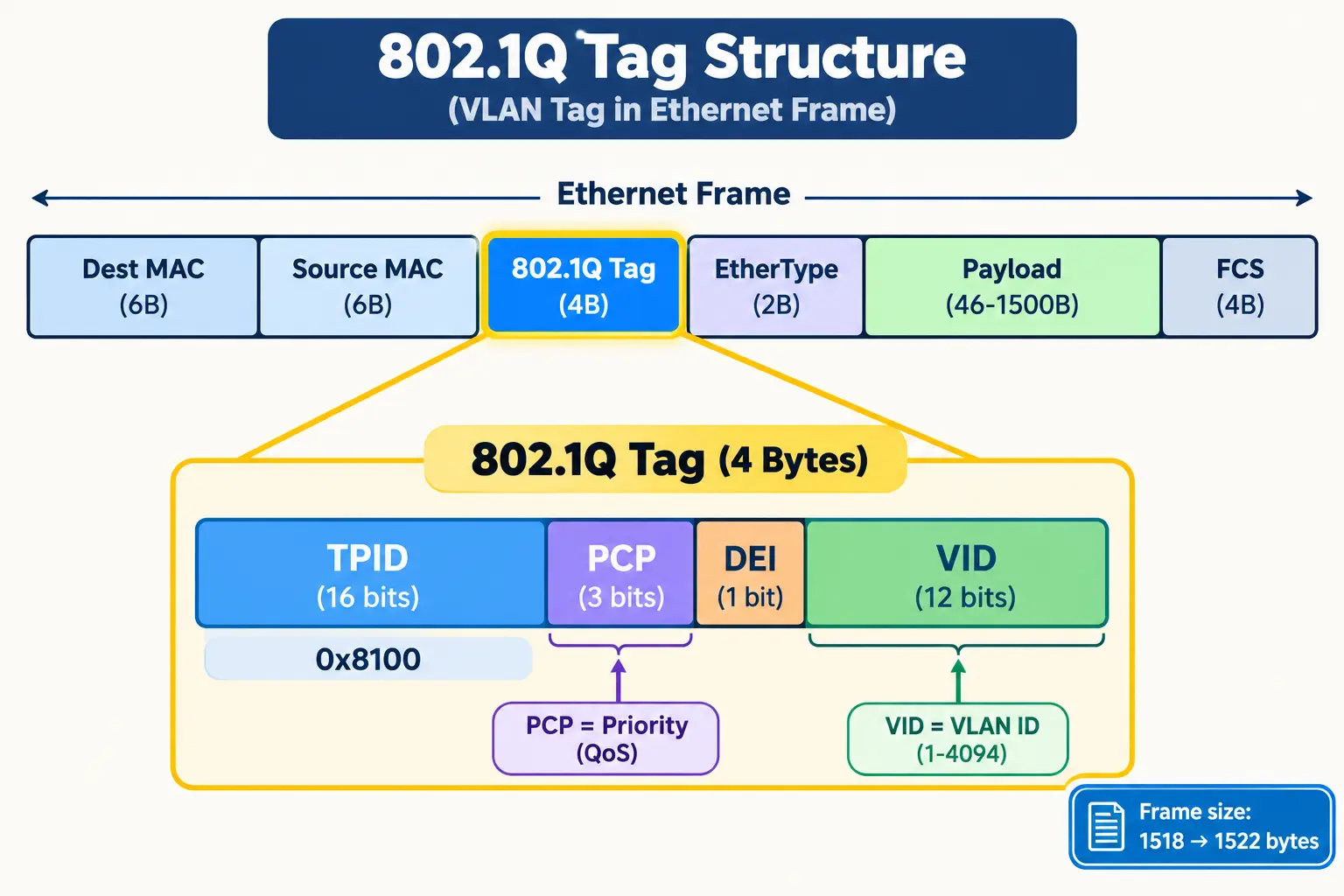
Quick answer: IEEE 802.1Q is the standard that adds a 4-byte tag to an Ethernet frame. The tag carries the VLAN ID.
What Is Inside the 802.1Q Tag
The tag sits inside the frame, right after the source MAC address. It has four fields:
- TPID (16 bits): Always
0x8100. It tells the switch “a VLAN tag follows.” - PCP (3 bits): Priority for QoS, useful for voice traffic.
- DEI (1 bit): Marks frames that can be dropped first during congestion.
- VID (12 bits): The VLAN ID itself.
Adding the tag grows the maximum Ethernet frame from 1518 to 1522 bytes.
Why Only 4,094 VLANs?
The VID has 12 bits, which gives 2¹² = 4,096 values. IDs 0 and 4095 are reserved, so you get 4,094 usable VLANs (1 to 4094).
VLAN ID Ranges (Cisco)
- 1: Default VLAN. Every port starts here.
- 2 to 1001: Normal range.
- 1002 to 1005: Reserved for old technologies like FDDI and Token Ring.
- 1006 to 4094: Extended range.
What Is a PVID?
The Port VLAN ID (PVID) is the VLAN assigned to untagged frames that enter a port. On an access port, it is the access VLAN. On a trunk port, it is the native VLAN.
Smart VLAN ID Planning
Pick a pattern and stick to it:
- 10: Staff
- 20: Voice
- 30: Guest
- 99: Management
Changing a VLAN ID later is possible but risky. You must update every port, trunk list, router interface and firewall rule that uses it. Plan carefully at the start.
Types of VLANs
Types are based on purpose, not on a strict standard.
- Default VLAN: VLAN 1 on most switches. Avoid using it for real traffic.
- Data VLAN: Carries normal user traffic like laptops and desktops.
- Voice VLAN: Carries IP phone traffic with priority so calls stay clear.
- Management VLAN: Used to log in to switches and access points.
- Native VLAN: Carries untagged traffic on a trunk (explained below).
How devices join a VLAN: The most common way is by port (static). Some networks use MAC address or protocol, and modern networks often use dynamic assignment based on login.
Access Port vs Trunk Port
Quick answer: An access port carries one VLAN without tags. A trunk port carries many VLANs with tags.
What Is an Access Port?
An access port connects an end device like a PC, printer or IP camera. It belongs to one VLAN. The device sends normal frames, and the switch handles the VLAN part.
What Is a Trunk Port?
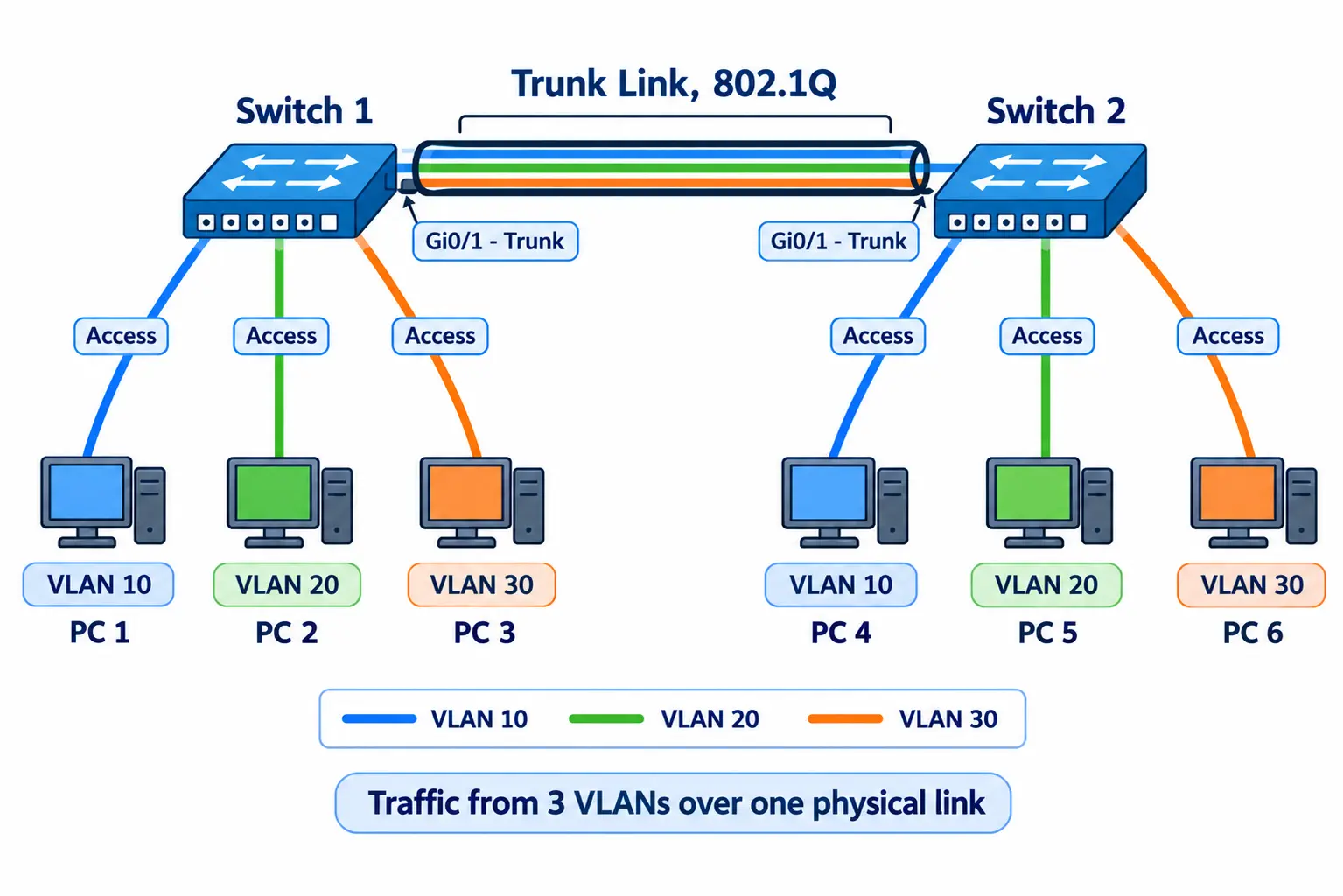
A trunk port connects switches to other switches, routers or access points. It carries traffic for many VLANs over one cable, and it uses 802.1Q tags so the other side knows which VLAN each frame belongs to.
Real example: a Wi-Fi access point broadcasts “Staff” and “Guest” networks. One cable from the switch to the AP is a trunk carrying both VLANs.
Access Port vs Trunk Port Comparison
| Access Port | Trunk Port | |
|---|---|---|
| VLANs carried | One | Many |
| Tagging | Untagged | Tagged (except native VLAN) |
| Connects to | PCs, printers, phones | Switches, routers, APs, servers |
| Cisco command | switchport mode access | switchport mode trunk |
Hybrid Ports
Some vendors offer a hybrid port that carries untagged and tagged VLANs together. It is vendor-specific and not part of the 802.1Q standard.
Can a PC or Server Receive Tags?
A normal PC does not use tags, so it belongs on an access port. Servers running virtual machines (hypervisors) often use trunk ports because different VMs may sit in different VLANs.
VLAN Trunking
Quick answer: VLAN trunking lets many VLANs share one physical link between devices.
Without trunking, you would need one cable per VLAN between every pair of switches. With five VLANs, that is five cables. A trunk does it with one. Trunking is a big part of how VLAN works across more than one switch.
Allowed VLAN List and Pruning
A trunk does not have to carry everything. You can choose which VLANs are allowed. This is called the allowed VLAN list.
- Fewer VLANs on a trunk means less unnecessary traffic.
- It also reduces risk, because unused VLANs cannot cross the link.
VLAN pruning does a similar job. It stops broadcasts for a VLAN from going to switches that have no ports in that VLAN.
DTP and VTP
- DTP (Dynamic Trunking Protocol): A Cisco protocol that lets ports negotiate trunking automatically. It can be abused, so turn it off with
switchport nonegotiateon trunks. - VTP (VLAN Trunking Protocol): A Cisco protocol that shares the VLAN database between switches. Each update carries a revision number. If you plug in a switch with a higher revision number, it can overwrite the VLAN database on every other switch. Many engineers use VTP transparent mode or turn it off for this reason.
Native VLAN Explained
Quick answer: The native VLAN is the VLAN whose traffic crosses a trunk without a tag.
To understand how VLAN works on a trunk link, you also need to know about the native VLAN.
On a trunk, most frames carry a tag. Frames with no tag are placed into the native VLAN. By default, that is VLAN 1.
Native VLAN vs VLAN 1
VLAN 1 is the default VLAN every port starts in. The native VLAN is a trunk setting. They are the same by default, but you can change the native VLAN to any other number.
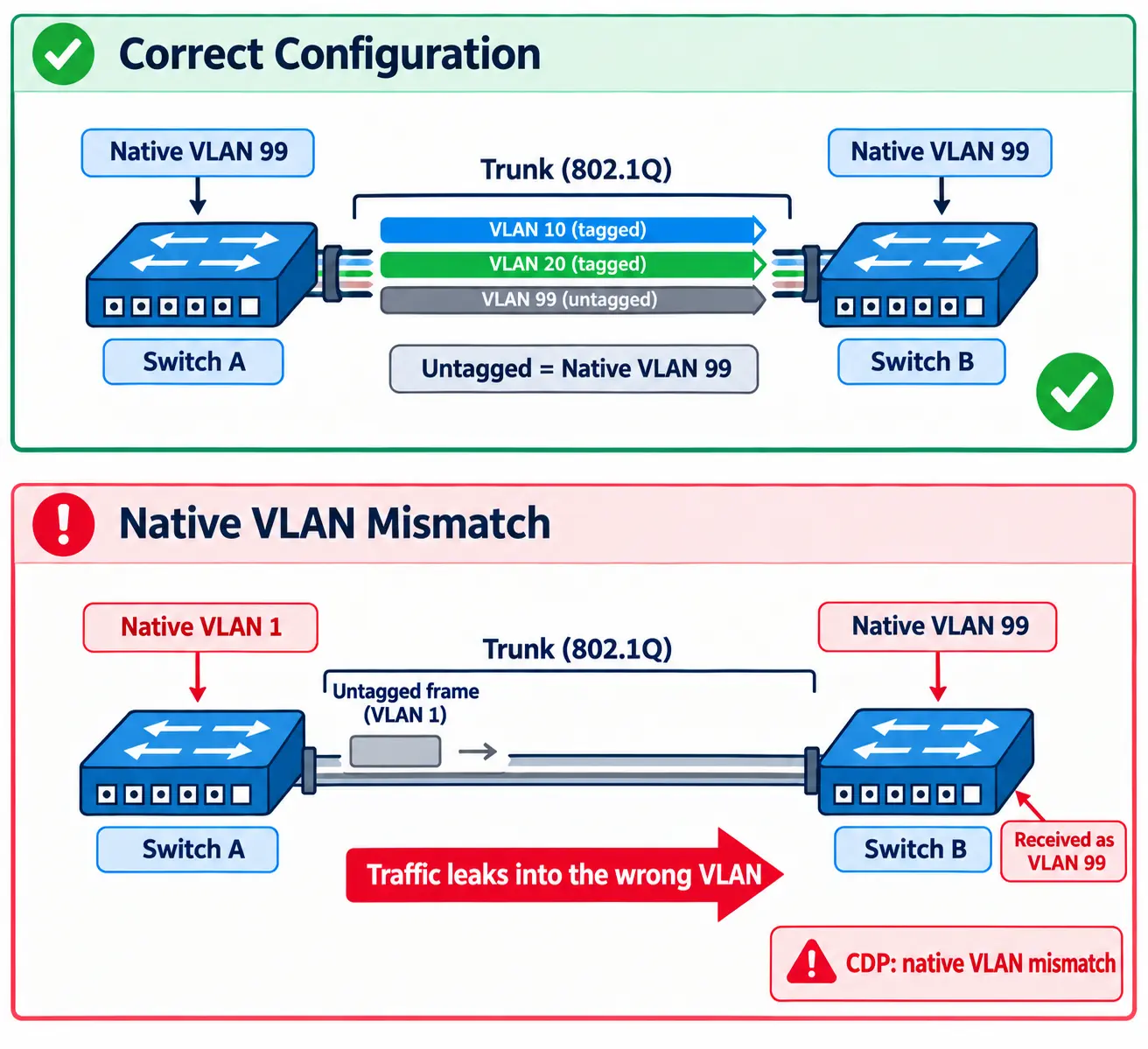
Native VLAN Mismatch
Both ends of a trunk must use the same native VLAN. If Switch A uses VLAN 1 and Switch B uses VLAN 99:
- Untagged frames end up in the wrong VLAN.
- Traffic can leak between VLANs.
- Cisco switches often show a CDP “native VLAN mismatch” warning.
Is the Native VLAN Dangerous?
It can be if misconfigured. In a double-tagging attack, an attacker on an access port in the native VLAN adds two tags to a frame. The first switch removes the outer tag, and the second switch reads the inner tag and delivers the frame into another VLAN.
Native VLAN vs Voice VLAN
An IP phone usually sends voice traffic in a tagged voice VLAN, while a PC plugged into the phone sends untagged data traffic. The voice VLAN is tagged. The native VLAN is not.
The fix: Set the native VLAN to an unused VLAN (like 999) and never put user devices in it.
Inter-VLAN Routing
Quick answer: Devices in different VLANs need a Layer 3 device, like a router or Layer 3 switch, to communicate.
VLANs are separate networks. Staff in VLAN 10 cannot reach a printer in VLAN 20 unless something routes between them. Each VLAN needs a default gateway, and the router or Layer 3 switch provides it.
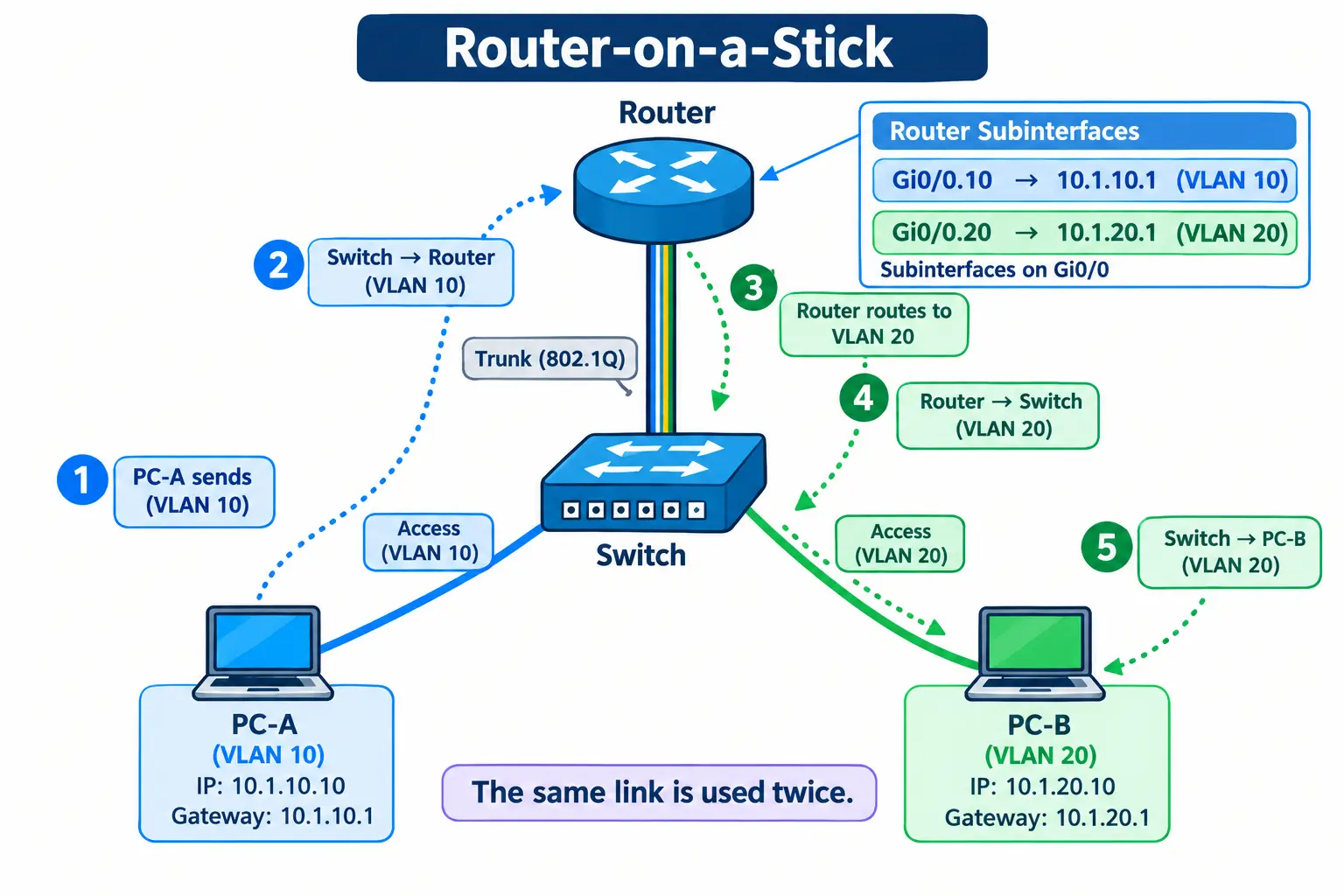
Option 1: Router-on-a-Stick
One router interface connects to the switch through a trunk. The router splits it into subinterfaces, one per VLAN.
interface g0/0
 no shutdown
interface g0/0.10
 encapsulation dot1Q 10
 ip address 10.1.10.1 255.255.255.0
interface g0/0.20
 encapsulation dot1Q 20
 ip address 10.1.20.1 255.255.255.0
It is cheap and simple, good for small offices. The downside is that all inter-VLAN traffic shares one link, which can become a bottleneck.
Option 2: Layer 3 Switch (SVI)
A Layer 3 switch routes between VLANs internally using Switch Virtual Interfaces (SVIs). It is faster and is the usual choice for mid-size and large networks.
ip routing
interface vlan 10
 ip address 10.1.10.1 255.255.255.0
interface vlan 20
 ip address 10.1.20.1 255.255.255.0
Option 3: Firewall Routing
You can send inter-VLAN traffic through a firewall. This gives the most control, because you can set detailed rules, such as “Guests can reach the internet but nothing internal.” It is common where security matters most, though it can be slower and costlier.
Rule of thumb: Layer 3 switch for speed, firewall for control, router-on-a-stick for small and simple setups.
VLAN Benefits and Disadvantages
Benefits of VLANs
- Better security: Guest Wi-Fi stays away from payment systems or staff files.
- Less broadcast traffic: Smaller broadcast domains mean a faster network.
- Flexibility: Move a user to another group by changing a port setting, not cables.
- Lower cost: One switch can serve several networks.
- Easier management: Apply policies per group, such as priority for voice.
Disadvantages of VLANs
- More complex setup: Needs planning and documentation.
- Misconfiguration risk: One wrong trunk setting can break connectivity.
- Harder troubleshooting: Traffic flows are split, so finding faults takes more steps.
- Compatibility issues: Some older or non-standard devices handle VLANs poorly.
VLAN Security and Best Practices
VLANs help security, but they are not a complete defense.
Common VLAN Attacks
- Double tagging: Explained above. Avoid by never using the native VLAN for user ports.
- Switch spoofing: An attacker pretends to be a switch and negotiates a trunk through DTP. Avoid by setting access ports to
switchport mode accessand disabling DTP.
Best Practices
- Shut down unused ports and move them to an unused VLAN.
- Do not use VLAN 1 for user or management traffic.
- Use an unused native VLAN on trunks.
- Allow only needed VLANs on each trunk.
- Control traffic between VLANs with ACLs or a firewall.
Private VLANs
A private VLAN splits a VLAN further. Devices in isolated ports cannot talk to each other, only to the gateway. Devices in community ports can talk within their group. Hosting providers and hotels use this so one customer or guest cannot reach another.
A Common Myth: “VLANs Are a Firewall”
They are not. A VLAN separates networks, but without ACLs or a firewall between them, the separation is only as strong as your routing rules.
Basic VLAN Configuration
Here is a simple Cisco example. Commands may vary slightly by model.
! Create VLANs
vlan 10
 name Staff
vlan 20
 name Guest
vlan 999
 name Native-Unused

! Access port for a PC
interface fa0/1
 switchport mode access
 switchport access vlan 10

! Trunk port to another switch
interface gi0/1
 switchport mode trunk
 switchport trunk native vlan 999
 switchport trunk allowed vlan 10,20
 switchport nonegotiate
Some older Cisco switches need switchport trunk encapsulation dot1q before setting trunk mode.
Check Your Work
show vlan brieflists VLANs and their ports.show interfaces trunkshows trunk ports, allowed VLANs and the native VLAN.
Common Mistakes
- VLAN not in the trunk’s allowed list.
- Native VLAN mismatch between the two ends.
- Port left in the wrong VLAN.
- VLAN created on one switch but missing on the other.
Frequently Asked Questions
What is a VLAN and how does it work?
A VLAN is a logical network created inside a physical one. Switches use VLAN IDs, carried in 802.1Q tags on trunk links, to keep each VLAN’s traffic separate.
What is the difference between an access port and a trunk port?
An access port carries one VLAN untagged and connects end devices. A trunk port carries many VLANs tagged and connects switches, routers or access points.
Can an access port have multiple VLANs?
No, a standard access port belongs to one data VLAN. The exception is a voice VLAN alongside a data VLAN on a phone port.
What is a native VLAN, and is it dangerous?
It is the VLAN used for untagged traffic on a trunk. It becomes risky if left as VLAN 1 or mismatched, so use an unused VLAN.
How many VLANs can a switch have?
The standard allows 4,094 VLAN IDs. The real limit depends on the switch model, and many support fewer.
What is the difference between a VLAN and a subnet?
A VLAN is a Layer 2 separation. A subnet is a Layer 3 IP range. Usually, one VLAN maps to one subnet.
How do VLANs communicate with each other?
Through inter-VLAN routing using a router, a Layer 3 switch or a firewall.
Is it safe to change a VLAN ID later?
It can be done, but you must update all ports, trunks, gateways and rules that use it. Do it during a planned maintenance window.
Do VLANs give real security?
They give separation, which helps. For real protection, combine them with ACLs, a firewall and good port settings.
Conclusion
VLANs turn one physical network into several logical ones, which improves security and performance without new cabling. Remember the basics: access ports for devices, trunks for links between devices, matching native VLANs, and a Layer 3 device to route between VLANs. Next, try the config above in Cisco Packet Tracer, or read our guide on subnetting to see how VLANs and IP ranges fit together.