
VPNs & Encryption: The Complete Guide to Remote Access Security
Working from home used to be the exception — now it’s just work, and every login from a café or airport counts as remote access, which also makes it a possible way in for someone who shouldn’t be there. This is where remote access security comes in, and this guide breaks down how VPNs and encryption actually work, which protocol fits which situation, and where most people go wrong.
Before You Start
Table of Contents
What Is Remote Access Security?
At its core, remote access security is just the collection of rules and tools that make sure only the right people can get into a company’s network or data when they’re not physically in the office.
A decent way to picture it: think of a bouncer standing outside a club. He checks your ID first (that’s authentication), decides which rooms you’re actually allowed into (access control), and keeps an eye out for anyone trying to sneak past (that’s where encryption and monitoring come in).
Why does any of this matter so much right now? A few reasons:
- Remote employees log in from home routers, airport Wi-Fi, and café hotspots — none of which your IT team controls.
- One weak password, one unprotected connection, and suddenly a company’s entire database is exposed.
- Rules like HIPAA and GDPR aren’t optional either — businesses are legally required to protect this kind of access.
How Does a VPN Work? (Step-by-Step Explanation)
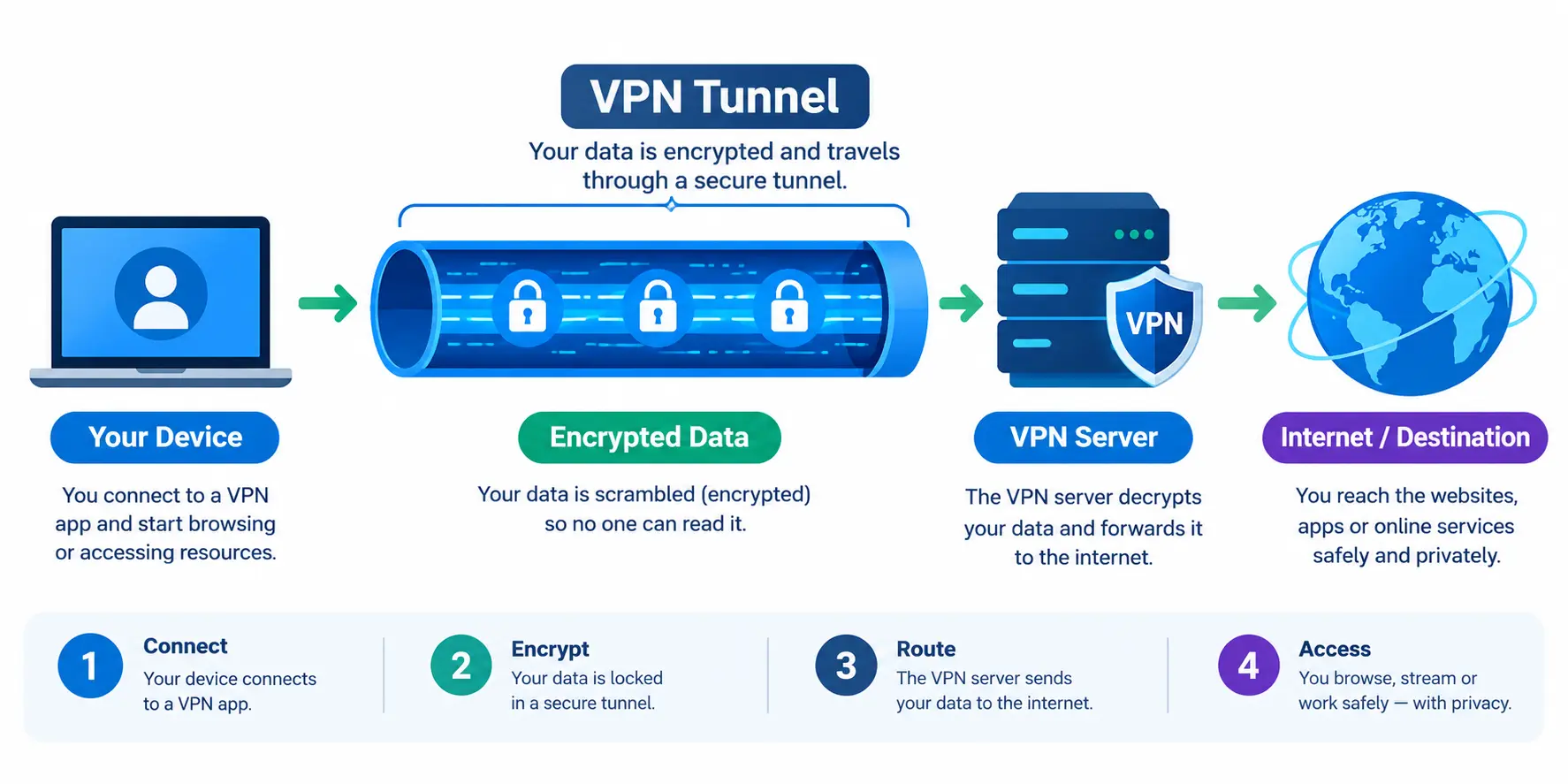
A VPN, or Virtual Private Network, builds a private, encrypted “tunnel” between your device and the internet. Nobody sitting in between — not your ISP, not a stranger on the same Wi-Fi — can actually see what’s inside.
The Tunnel Analogy — Why It’s Called “Tunneling”
Here’s a simple way to think about it. Sending data without a VPN is a bit like mailing a postcard — anyone who handles it along the way can read what’s written. Sending data through a VPN is more like sealing that same message inside a locked tunnel that only opens at two points: your device and the destination. That’s the whole idea behind the term “tunneling.”
Step-by-Step: What Happens When You Connect to a VPN
- You open your VPN app and tap “connect.”
- Your device and the VPN server quietly swap digital keys to set up a secure link.
- Everything you send gets encrypted right there on your device, before it even leaves.
- The VPN server unlocks it and passes it along to whatever website or company server you were trying to reach.
- The response comes back the exact same encrypted way.
A real example: say you’re checking your work inbox at a café. Without a VPN, someone using basic tools on that same public network could potentially catch your login details. Turn the VPN on, though, and all they’d see is meaningless scrambled data.
How Network Encryption Actually Works
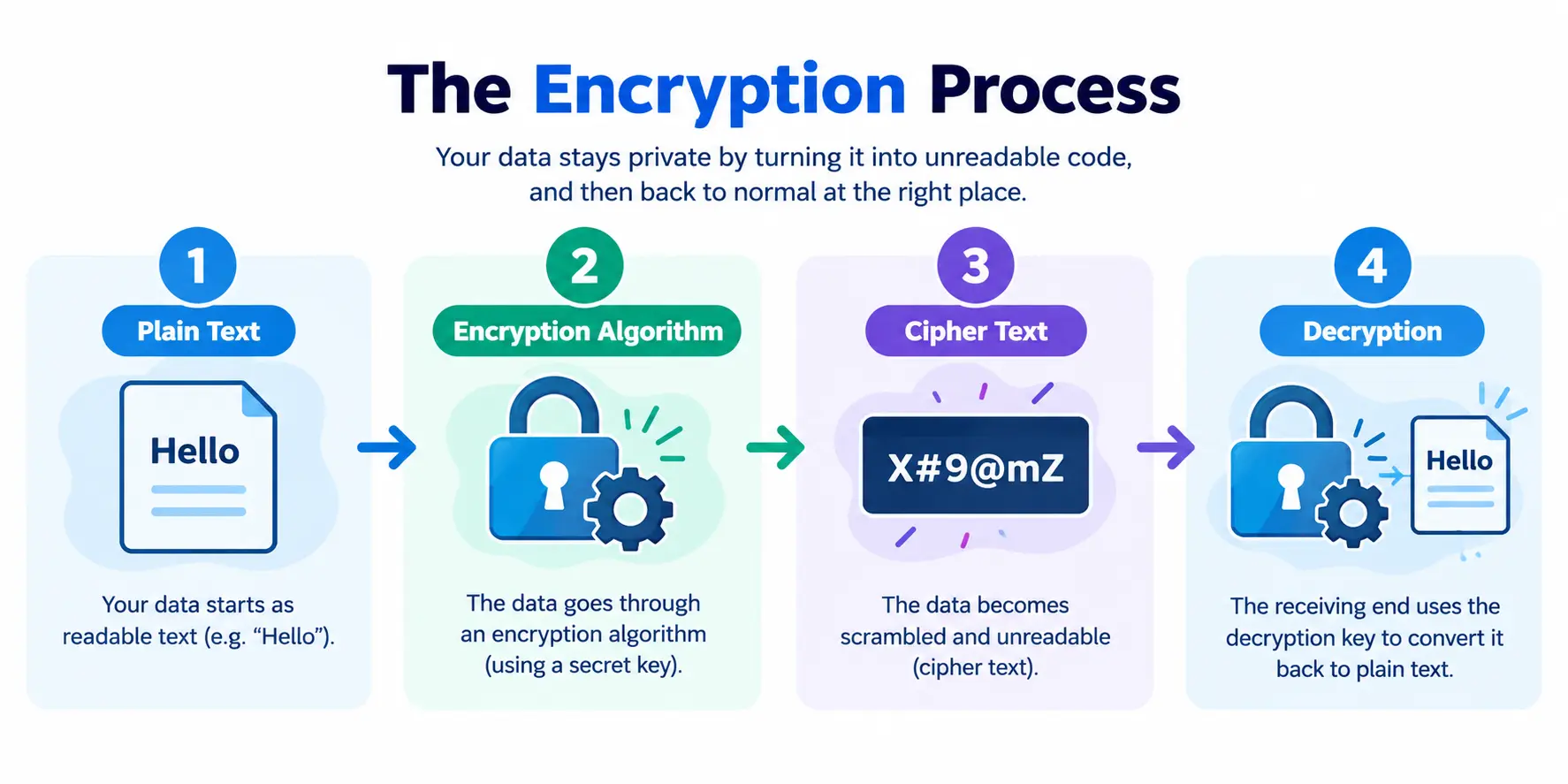
Encryption, in plain terms, scrambles your data into something unreadable. Only someone holding the right “key” can turn that gibberish back into actual information.
Symmetric vs Asymmetric Encryption
- Symmetric encryption uses one key to lock and unlock the data. It’s fast, which is exactly why it’s used for large amounts of information — AES-256 is a good example.
- Asymmetric encryption works with two keys instead — a public one to lock, a private one to unlock. It’s slower, so it’s mostly reserved for verifying identity, like that little padlock icon you see in your browser.
AES-256 and TLS — The Standards Behind Secure Connections
AES-256 is often compared to a bank vault with a 256-digit combination lock — technically crackable, practically impossible in any reasonable amount of time. TLS (Transport Layer Security) is what’s actually behind that padlock icon in your browser, quietly protecting the connection between your browser and, say, your bank’s website.
Example worth remembering: when you type your card number into an online store, TLS scrambles it before it ever leaves your browser. Anyone watching the network traffic sees nothing but noise.
VPN Tunneling Protocols Explained
A tunneling protocol is basically the rulebook — it decides how your data gets packaged and encrypted once it enters the VPN tunnel.
| Protocol | Security | Speed | Best For |
| PPTP | Weak (outdated) | Fast | Avoid — legacy systems only |
| L2TP/IPsec | Strong | Medium | General business use |
| IKEv2 | Strong | Fast | Mobile users who switch networks often |
| OpenVPN | Strong | Medium-fast | Versatile, open-source, widely trusted |
| WireGuard | Strong | Very fast | The modern default for most setups |
Which Protocol Should You Use?
Honestly, for most businesses today, WireGuard or OpenVPN are the safe bets. If your team is constantly bouncing between Wi-Fi and mobile data, IKEv2 handles that switch smoothly without dropping the connection. And PPTP? Just skip it — it’s old, and it’s not hard to break into anymore.
IPsec VPN vs SSL VPN: Which One Should You Use?
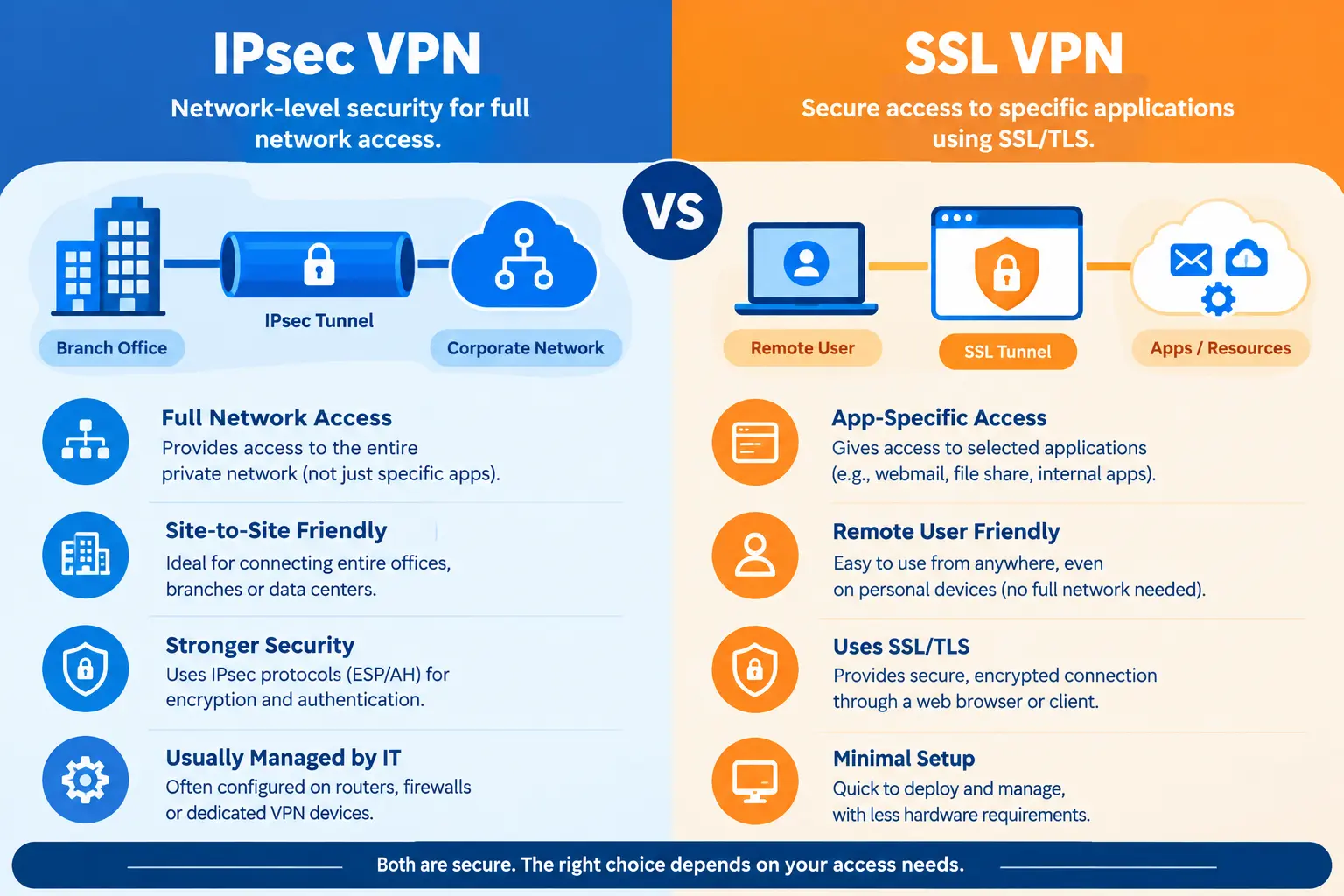
Here’s a quick way to remember the difference: IPsec VPN hands someone the keys to the whole office. SSL VPN hands them a badge that only opens one door.
| Feature | IPsec VPN | SSL VPN |
| Access Level | Entire network | Specific apps or resources |
| Setup | Needs client software | Works right through a browser |
| Best For | Site-to-site, full access | Remote workers, limited access |
| Security Layer | Network layer | Application layer |
When to Choose IPsec
Go with IPsec when remote staff genuinely need office-level access — connecting two branch offices together is a classic example.
When to Choose SSL VPN
SSL VPN makes more sense when you want a contractor to reach one internal tool, without handing them the keys to everything else.
Split Tunneling vs Full Tunneling: Which Is Right for You?
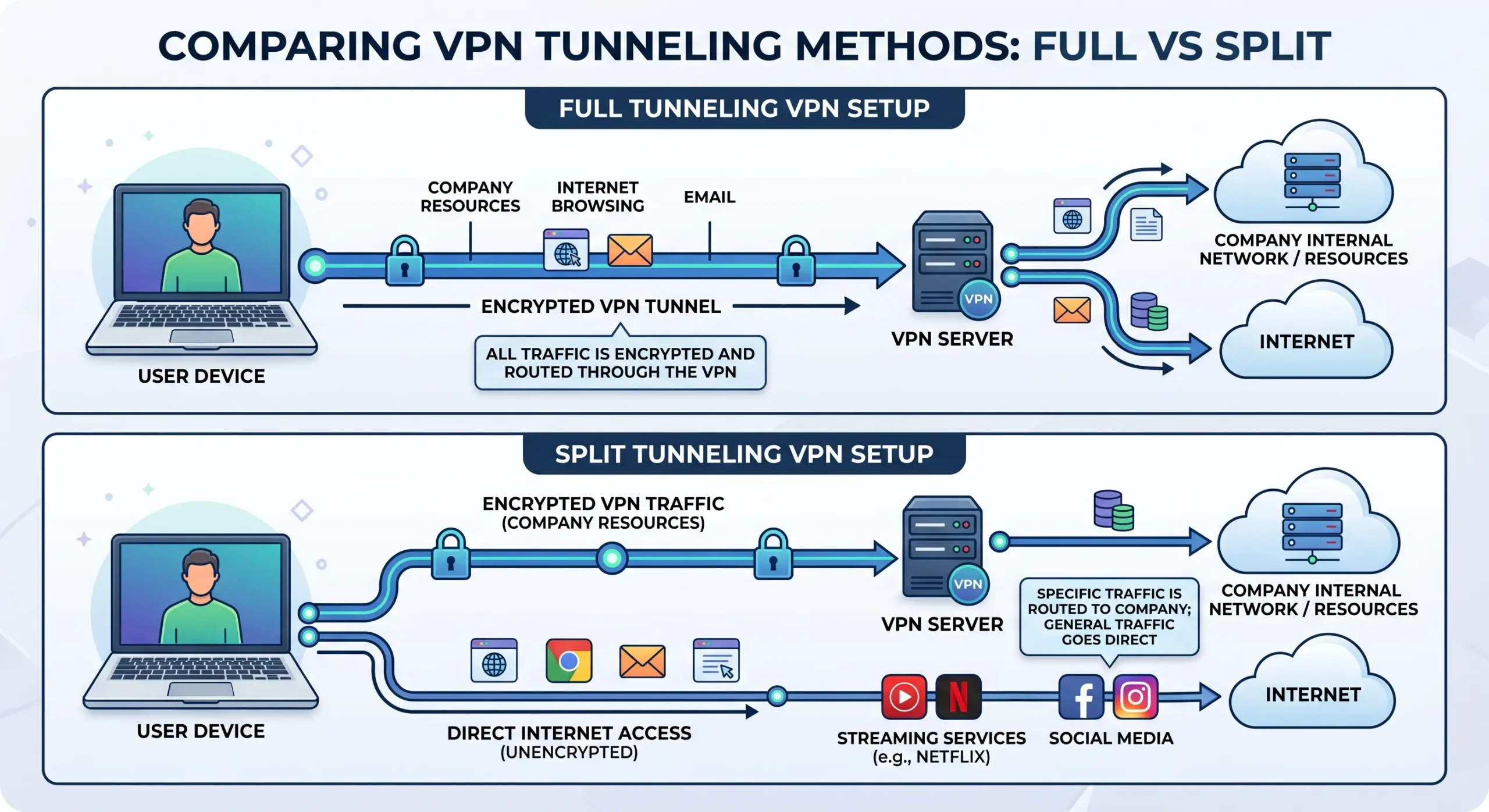
Full tunneling routes every bit of your internet traffic through the VPN. Split tunneling is more selective — only your work traffic goes through the VPN, while everything else, Netflix included, just goes straight to the internet.
| Type | Traffic Through VPN | Speed | Security |
| Full Tunnel | Everything | Slower | Higher |
| Split Tunnel | Only selected traffic | Faster | Slightly lower |
Pros and Cons of Each
Full Tunnel:
- Nothing slips past the VPN — maximum protection
- Can noticeably slow down browsing or streaming
Split Tunnel:
- Faster, and it’s easier on your bandwidth
- Whatever’s outside the VPN isn’t protected
A quick example: an employee on split tunneling can pull up the company’s internal system through the VPN while still streaming music in the background, without either one dragging the other down.
Client-to-Site VPN vs Site-to-Site VPN
Client-to-site VPN connects one remote person to the company network. Site-to-site VPN connects two whole office networks — say, headquarters and a branch office — to each other.
- Client-to-site works well for individual employees logging in from home.
- Site-to-site fits companies with multiple offices that need to share resources permanently.
VPN vs Zero Trust Network Access (ZTNA)
A traditional VPN behaves a bit like an old castle with a single drawbridge — once you’re across it, you can wander wherever you like. Zero Trust flips that around: it checks your identity at every single door, every time, no exceptions.
- VPN (castle-and-moat model): log in once, roam freely.
- ZTNA (zero trust model): every request gets verified, wherever you happen to be.
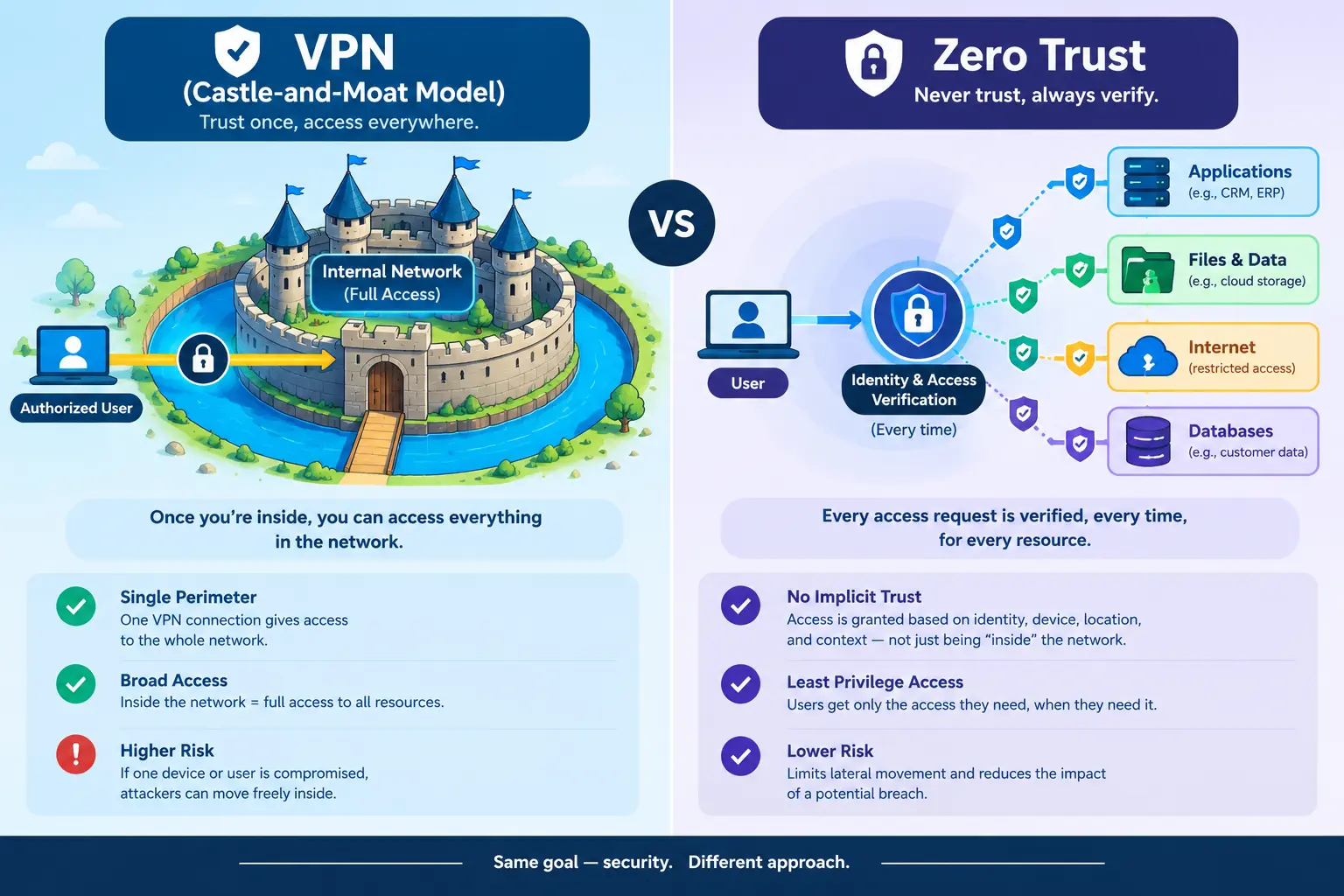
More companies are moving toward ZTNA for a simple reason — a stolen VPN password used to mean an attacker got the run of the entire network. With ZTNA, they only get whatever that one account was allowed to touch, and nothing beyond that.
Top Remote Access Security Risks (With Real Examples)
- Weak passwords — still one of the easiest doors to walk through, honestly.
- No MFA — one stolen password is all it takes. The 2021 Colonial Pipeline attack happened partly because a VPN account had no multi-factor authentication in place, and it ended up causing fuel shortages across parts of the US.
- Outdated software — unpatched VPN products have been used to break into government and healthcare networks more than once.
- Unencrypted data — sending information without encryption is a lot like mailing a postcard instead of sealing it in an envelope.
- Poor permission management — when everyone has access to everything, a single hacked account can expose the whole system.
Remote Access Security Best Practices Checklist
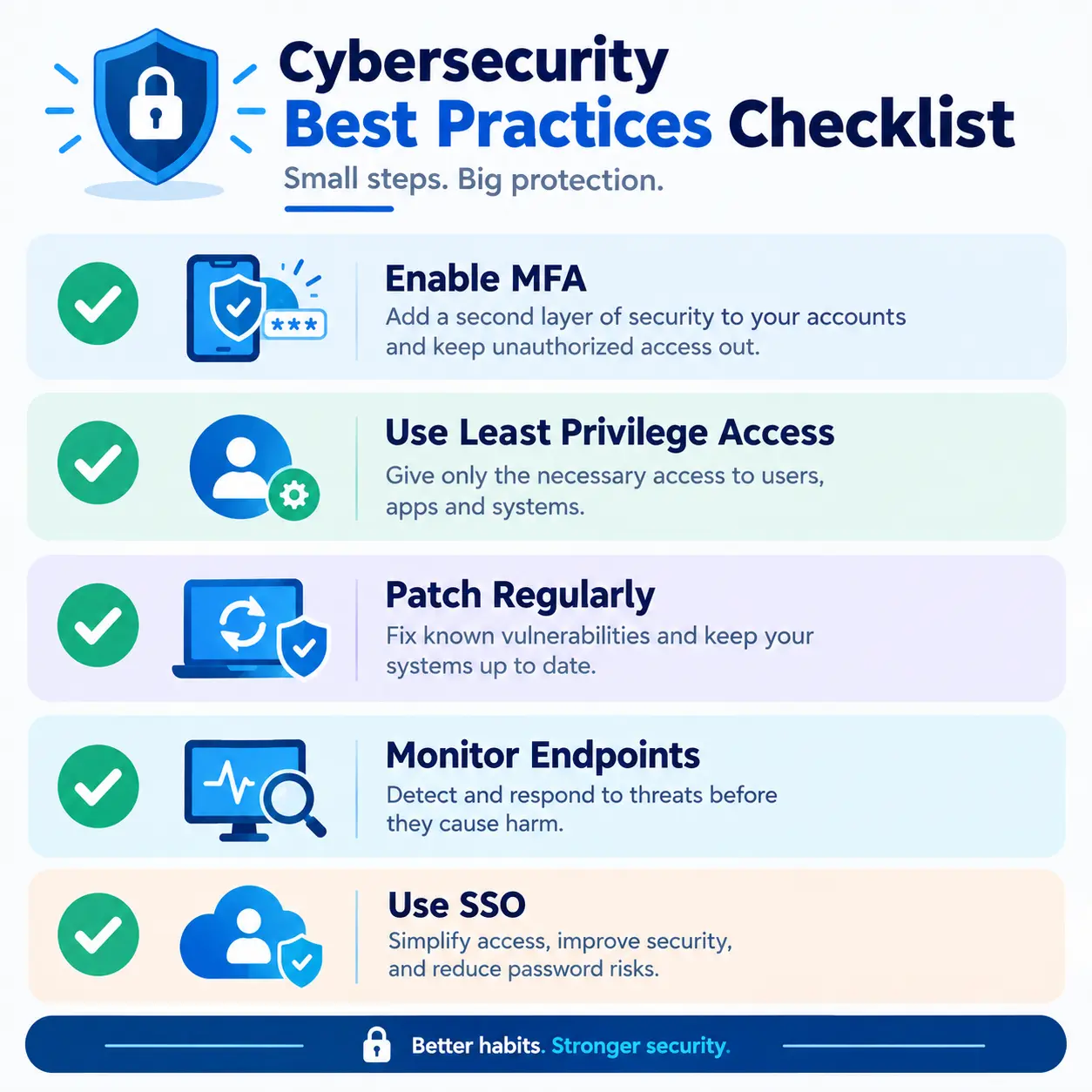
- Turn on multi-factor authentication for every remote login, no exceptions.
- Stick to least privilege access — give people only what they actually need.
- Keep software and VPN apps updated (yes, even when it’s inconvenient).
- Run endpoint protection — antivirus, firewalls — on every device that connects.
- Keep an eye on login activity for anything from an odd location or odd hour.
- Use single sign-on to cut down on password fatigue across the team.
Frequently Asked Questions
Is remote access software safe to use without third-party tools?
Built-in options, like your operating system’s own VPN client, can actually be safer than random third-party apps — as long as they’re set up properly with encryption and MFA turned on.
IPsec VPN or SSL VPN — which is better?
Neither wins outright. IPsec makes more sense for full network access; SSL VPN is the better fit when you only need limited, app-specific access.
What’s the difference between split tunneling and full tunneling?
Full tunneling sends all your traffic through the VPN. Split tunneling only sends selected traffic through it, letting the rest go straight to the internet.
Can a network be encrypted without a VPN?
Yes. TLS and HTTPS, for instance, encrypt specific connections — like browsing a website — without needing a full VPN running in the background.
Is end-to-end encryption really private?
When it’s implemented correctly, yes. Only the sender and receiver can actually read the message — not even the service provider in the middle gets to see it.
Why is a VPN called a “tunnel”?
Because it creates a private, protected path for your data — much like a real tunnel shields a road from whatever’s happening above it.
Conclusion
At the end of the day, remote access security isn’t really about owning a VPN. It’s about pairing the right protocol with strong encryption and a few sensible habits — MFA, least privilege, and so on. Whether you land on IPsec or SSL VPN, full tunneling or split, the goal never really changes: keep the connection private, keep the data safe, no matter where the work is happening from.