
Wireless Security: WPA2 vs WPA3 Explained (Which One Should You Use?)
WPA2 vs WPA3 comes down to one thing: how well your Wi-Fi password is protected. WPA3 is safer, but WPA2 is still fine when you use a strong password and keep your router updated. This guide explains both in plain English.
Before You Start
Table of Contents
Quick Answer
In the WPA2 vs WPA3 choice, go with WPA3 if your router and every device on the network can use it. If a few old gadgets can’t, mixed mode works as a stopgap. Stay on WPA2 only when you have to, and then let a long password do the heavy lifting.
| Your situation | What to pick |
|---|---|
| Home, everything fairly new | WPA3-Personal |
| Home, old and new devices together | WPA2/WPA3 mixed mode, long password |
| Old router, no WPA3 option | WPA2 with AES, strong password |
| Office or business | WPA3-Enterprise or WPA2-Enterprise |
What Is WPA?
WPA stands for Wi-Fi Protected Access. It’s the lock on your Wi-Fi. Without one, anybody standing outside your gate could read what you send and receive.
It does two jobs:
- It decides who gets in. No password, no entry.
- It scrambles your data. Someone can catch your signal and still see only gibberish.
You’ve probably seen the no-lock version at an airport. Open Wi-Fi, no password, and a vague feeling that you shouldn’t check your bank balance.
WEP, WPA, WPA2 and WPA3
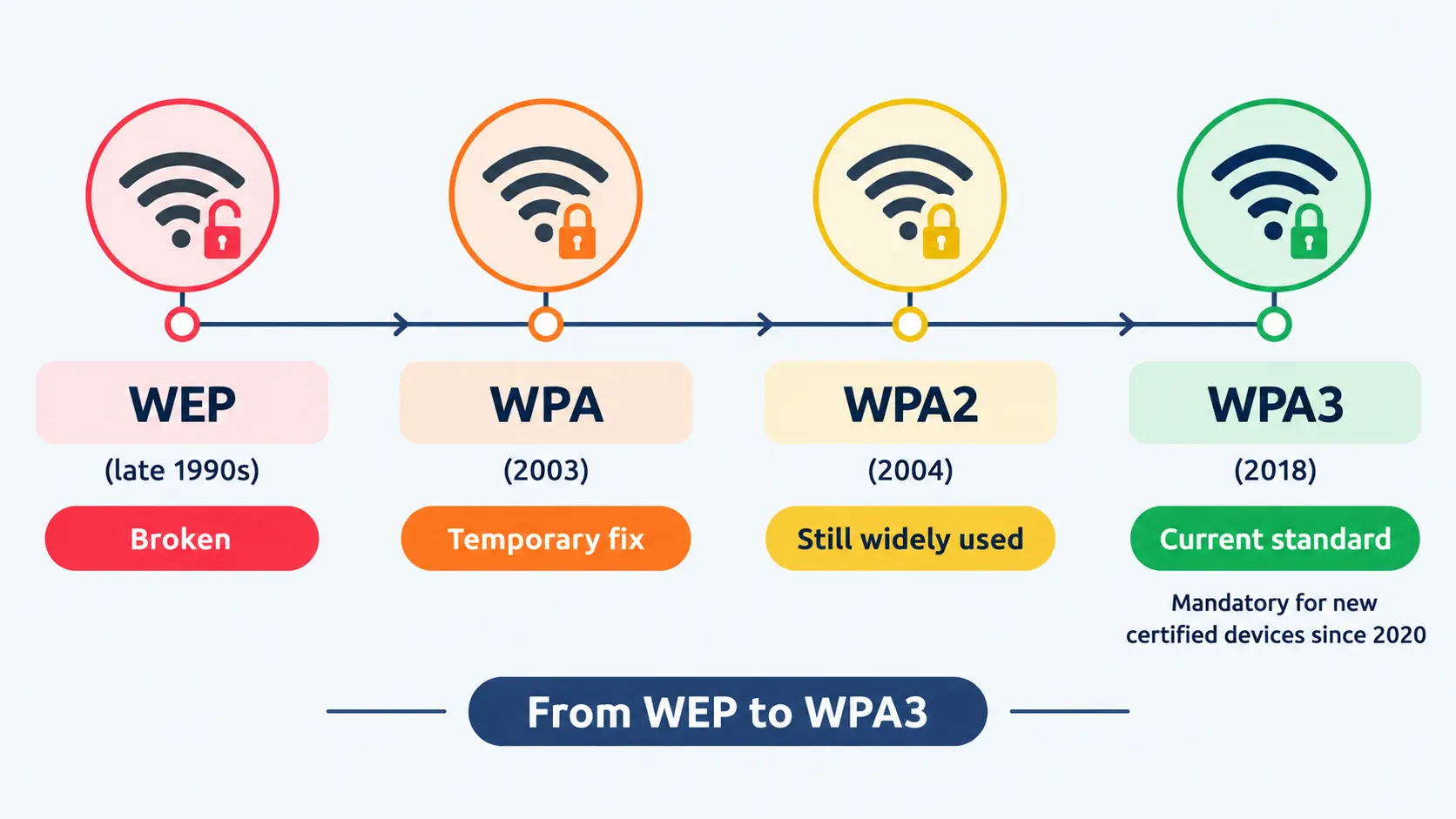
Here’s how the locks have changed, and where WPA2 vs WPA3 fits in:
| Protocol | Year | Where it stands |
|---|---|---|
| WEP | Late 1990s | Broken. Don’t use it. |
| WPA | 2003 | Outdated. Skip it. |
| WPA2 | 2004 | Still everywhere. Fine when set up well. |
| WPA3 | 2018 | The newest. Required on new certified devices since 2020. |
WPA vs WPS
These two get confused a lot. WPA is the lock. WPS is a shortcut, a button or an 8-digit PIN that lets a device join without typing the password. That PIN can be guessed, so WPS is a bit like hiding a spare key under the doormat. Turn it off in your router if you can.
What Is WPA2?
WPA2 showed up in 2004 and quietly became the default on nearly every router. It comes in two flavours. Personal uses one shared password, which is what most homes run. Enterprise gives each person their own login, which is what offices run.
WPA2 AES Encryption
AES is the method WPA2 uses to scramble your data. Banks and governments rely on the same family of encryption, so no, it isn’t the weak link. The older method, TKIP, is the weak one.
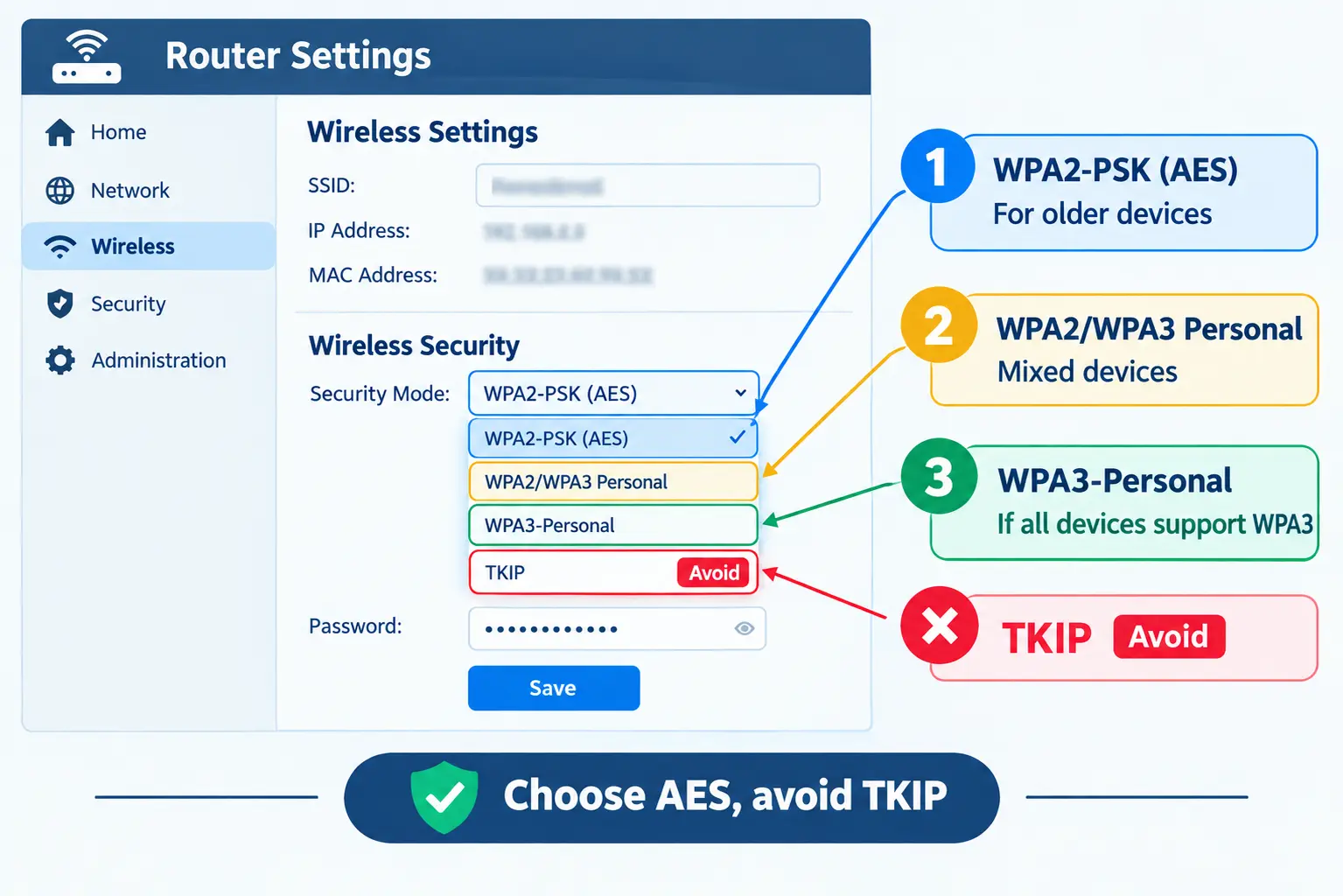
Router menus make this confusing, so here’s a quick decoder:
- WPA2-PSK (AES), sometimes written WPA2PSK-AES: the best WPA2 setting. Pick this.
- WPA/WPA2 with TKIP+AES: lets very old devices in, but the TKIP part drags your protection down.
- WPA2-PSK (TKIP): avoid.
So, TKIP+AES or AES only? AES only. If a device refuses to connect after that, it’s probably too old to trust on your network anyway. TKIP can also cap your speeds on some routers.
WPA2 Vulnerabilities
WPA2 isn’t broken. It does have a few soft spots, though.
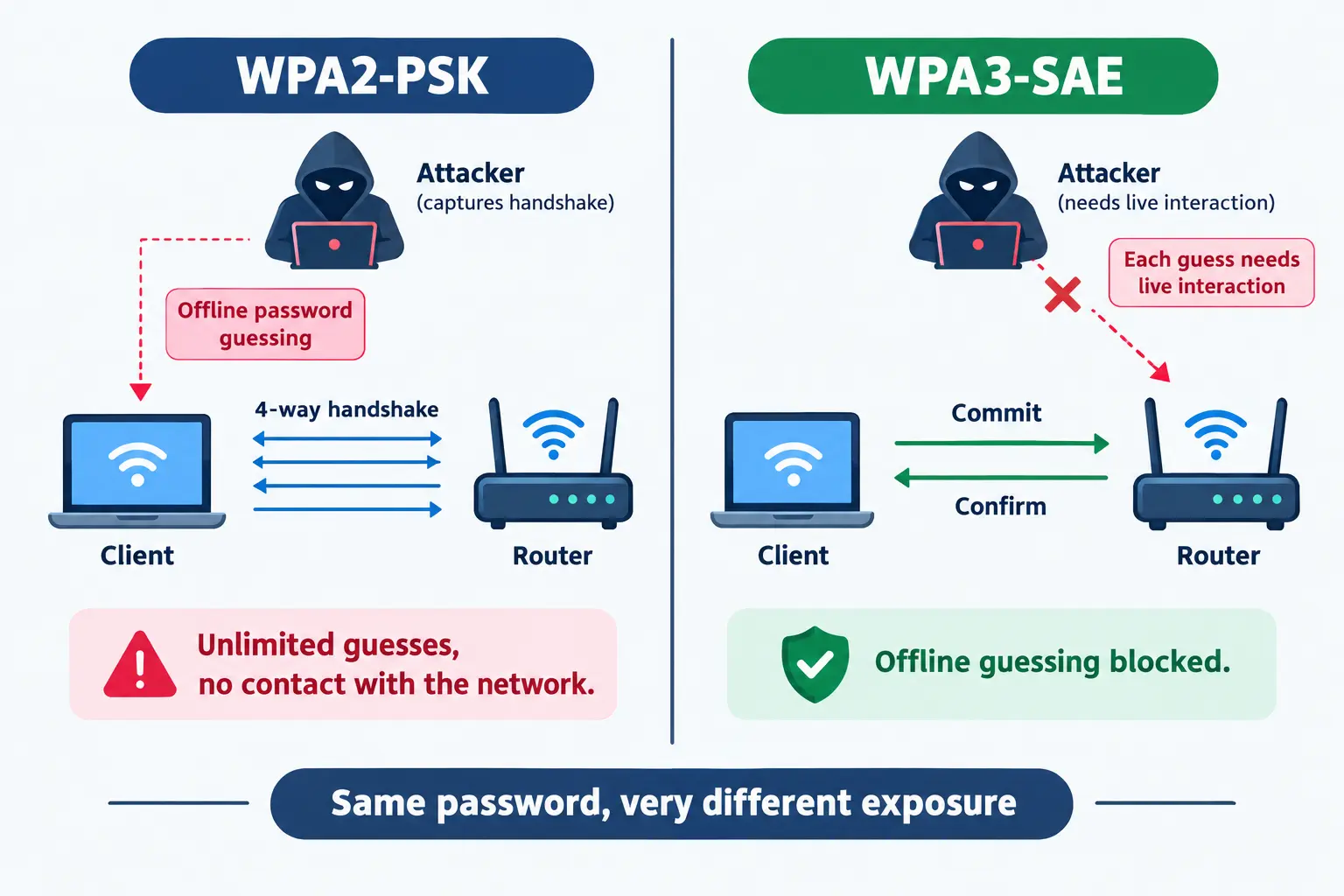
- Offline password guessing. This is the big one. When your phone joins the Wi-Fi, it swaps a short message with the router. Someone parked nearby can record that exchange, take it home, and let their computer try millions of passwords. You’d never know, because they’re no longer talking to your router. A password like “Lahore2024” falls in minutes. Four random words strung together won’t.
- KRACK (2017). A flaw in how devices connected. Software updates fixed it, so it only bites if you never update your router or devices.
- Unprotected control messages. An attacker can send fake “disconnect” commands and knock your device off the network.
- WPS. Covered above. Switch it off.
The takeaway is simple. WPA2 is as strong as your password. Make it long and random, around 14 to 16 characters, and keep the router firmware up to date.
What Is WPA3?
The Wi-Fi Alliance released WPA3 in 2018 to patch WPA2’s design problems. Since 2020, every new device that gets Wi-Fi certification has to support it. Like WPA2, it has a Personal and an Enterprise version.
Simultaneous Authentication of Equals (SAE)
SAE is the biggest difference in WPA2 vs WPA3 for home networks. It’s the new way WPA3-Personal checks your password.
Picture a thief who wants into your house. Under WPA2, he copies your lock and practises on it at home for as long as he likes. Under WPA3, he has to stand at your front door and try every attempt in person. That’s slow, noisy, and not worth his time.
- WPA2: record once, guess forever.
- WPA3: every guess needs a live exchange with your router.
SAE also makes a mediocre password less risky. Less risky isn’t safe, though, so don’t get lazy.
Forward Secrecy
Suppose someone records your encrypted traffic today and stores it. With WPA2, if they learn your password next year, they may be able to open those old recordings. WPA3 creates fresh keys for every session, so the old recordings stay locked even if the password leaks later.
Enhanced Open for Public Wi-Fi
Enhanced Open encrypts your connection on networks with no password, like hotels and airports. Other guests on the same Wi-Fi can’t easily read your traffic anymore.
It has one limit. It doesn’t prove the network is genuine, so a fake hotspot with the same name can still fool you. It keeps your conversation private but doesn’t vouch for who’s listening on the other end.
Protected Management Frames and Easy Connect
- Protected Management Frames (PMF): required in WPA3. They stop fake “disconnect” commands.
- Wi-Fi Easy Connect: lets you add a smart bulb or camera by scanning a QR code instead of typing a password.
In short, WPA3 fixes the password-guessing problem and protects your past traffic. You don’t have to do anything extra to get that.
WPA2 vs WPA3 Side by Side
| Feature | WPA2 | WPA3 |
|---|---|---|
| Released | 2004 | 2018 |
| Password check | Pre-shared key (PSK) | SAE |
| Offline password guessing | Possible | Blocked |
| Forward secrecy | No | Yes |
| Protected management frames | Optional | Required |
| Open network protection | None | Enhanced Open |
| Personal mode encryption | 128-bit AES | 128-bit AES (same) |
| Top Enterprise level | 128-bit | Optional 192-bit mode |
| Device support | Almost everything | Newer devices |
| Required on new certified devices | No | Yes, since 2020 |
Notice what’s missing from this WPA2 vs WPA3 table: a stronger cipher at home. The real difference is how the password is handled and what happens if it gets exposed.
Common WPA3 Myths
“WPA3 uses much stronger encryption.” Not at home. Both use 128-bit AES. The 192-bit option exists only in WPA3-Enterprise, built for governments and banks. WPA3 wins on the password check.
“WPA3 makes my Wi-Fi faster.” No. It’s about safety, not speed. Speed comes from your router, your Wi-Fi generation, your distance from the router and your internet plan.
“WPA2 is unsafe now.” Not with a strong password, AES only and updated firmware. It’s less protected than WPA3, but it isn’t useless.
Which Mode Should You Pick?
Personal Modes
- WPA2-Personal: works with almost everything. Use AES and a long password.
- WPA3-Personal: the best home choice when all your devices support it.
- WPA2/WPA3 mixed mode: new devices use WPA3, old ones use WPA2, all on the same network name. Handy while you replace old gear.
WPA2-Enterprise vs WPA3-Enterprise
Both give every person a personal login handled by a central server, so there’s no shared password to leak when someone quits. WPA3-Enterprise makes PMF mandatory and adds that optional 192-bit mode for sensitive work. One more thing: a captive portal, the login page you meet in hotels, only asks you to sign in. It doesn’t encrypt anything by itself.
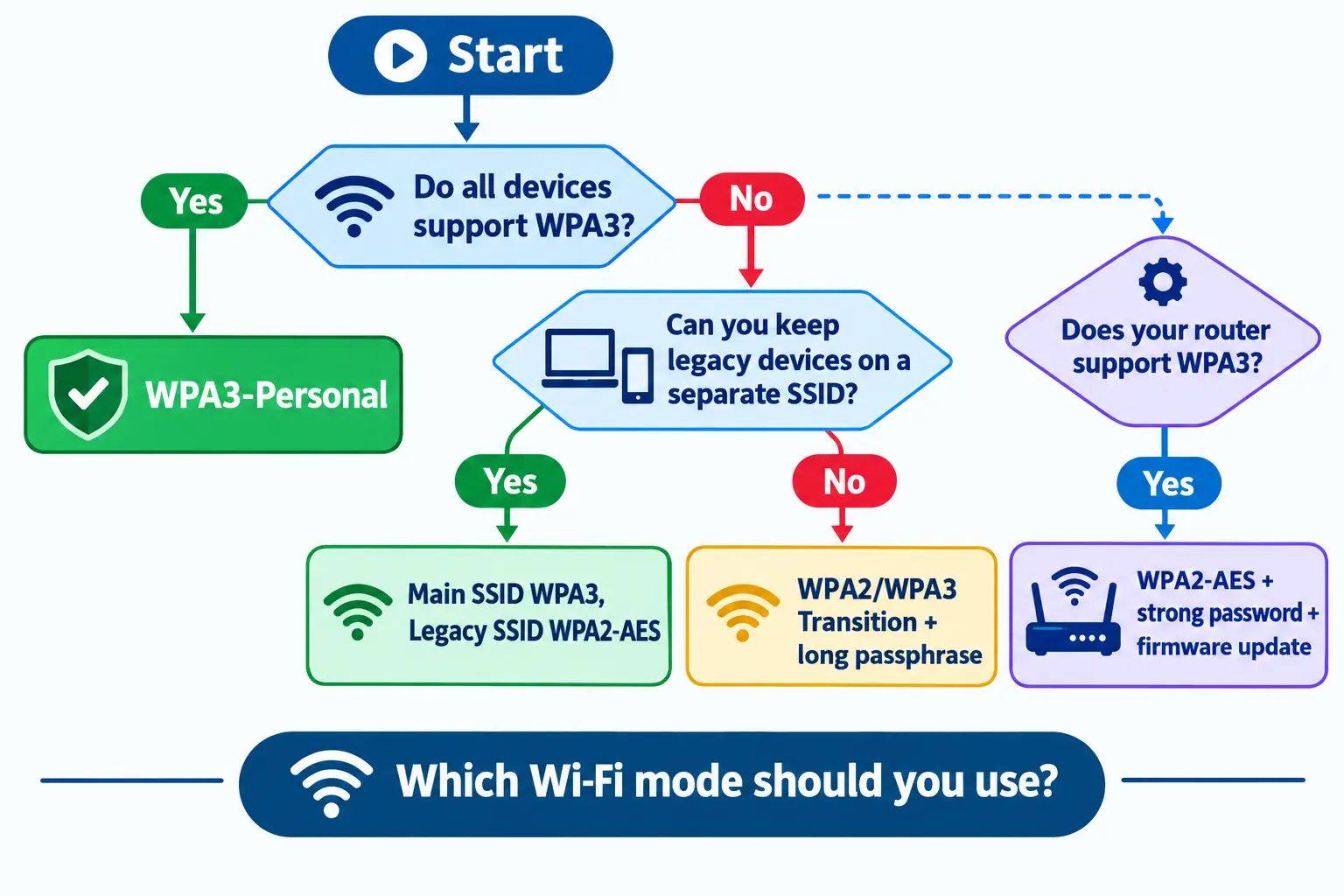
Decision Table
| Scenario | Go with |
|---|---|
| Every device supports WPA3 | WPA3-Personal |
| Just a few old devices | Main network on WPA3, old devices on a separate WPA2 network |
| Lots of old devices | Mixed mode with a long password |
| Router has no WPA3 | WPA2 (AES), strong password, firmware update |
| Public guest Wi-Fi | Enhanced Open, if supported |
| Company network | An Enterprise mode |
Compatible Devices and Mixed Mode
Is WPA3 Backwards Compatible with WPA2?
Not by itself. A WPA3-only network turns away devices that only speak WPA2. That’s why most routers offer mixed mode, which runs both side by side.
Is Mixed Mode Safe?
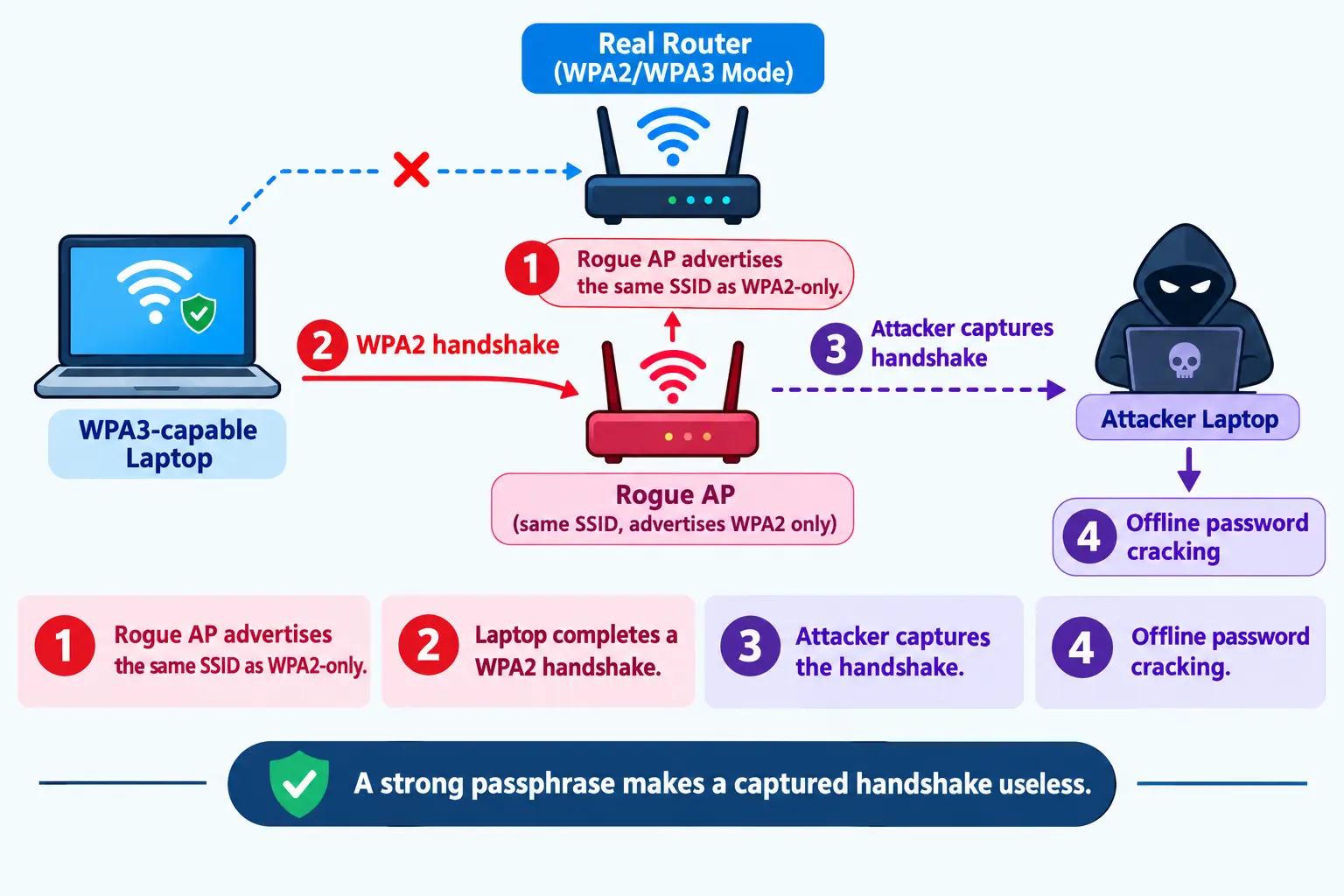
It’s better than plain WPA2 for your newer devices, but it has a known weakness. In 2019, researchers behind the Dragonblood study showed that an attacker can set up a fake network using your Wi-Fi name and claim it only supports WPA2. A device may join it, and the attacker records a WPA2 handshake to crack offline.
So treat mixed mode as a bridge, not a place to live. To make it safer:
- Use a long, random password so a captured handshake is worthless.
- Move old devices, like a smart plug or printer, to their own network. Then the main one can go WPA3-only.
- Update your router. Other early WPA3 flaws from that same research were patched.
Which Devices Support WPA3?
As a rough guide:
- Phones: Android 10 and newer, iOS 13 and newer.
- Computers: Windows 11, recent Windows 10 builds, and recent macOS versions.
- Routers and mesh systems: most models from around 2019 to 2020 onward, but always check the specs.
- Wi-Fi 6 isn’t a requirement. Wi-Fi 6 devices must support WPA3, but older Wi-Fi types can too.
The most reliable check is the Wi-Fi Alliance certified products database. Search your router or mesh model there rather than trusting a list that may be out of date.
Old Devices Can’t See Your WPA3 Network?
Try these in order:
- Update the device’s system software and Wi-Fi driver.
- Switch your router to mixed mode.
- Still no luck? Put the device on a separate WPA2 network.
- For an old smart gadget, see if the maker has a firmware update. If not, keep it isolated.
Don’t buy new gadgets just for WPA3. Check support first, then decide between mixed mode and a separate network.
Should You Switch?
| Where | Advice |
|---|---|
| Home Wi-Fi | Yes, if all devices support it. Otherwise mixed mode. |
| Phone hotspot | WPA3 if your phone offers it and your devices connect. Otherwise WPA2 with a strong password. |
| Guest Wi-Fi | Use a separate guest network, with Enhanced Open if available. |
| Smart home | Many only support WPA2. Keep them on their own network. |
| Office | An Enterprise mode with individual logins. |
How to Check Your Wi-Fi Security Type
On Your Router
- Open a browser and type in your router’s address (often printed on the router itself).
- Log in with the admin account.
- Head to the Wireless or Wi-Fi settings.
- Find Security Mode or Authentication.
- Choose WPA3-Personal, WPA2/WPA3, or WPA2-PSK (AES).
- Save, then reconnect your devices.
On Windows, Android and iPhone
- Windows: Settings, Network and internet, Wi-Fi, then your network’s properties. Look for Security type.
- Android: Settings, Wi-Fi, tap the gear beside your network. Menus vary by brand.
- iPhone: Settings, Wi-Fi, tap the info icon beside your network. It warns you if the security is weak.
Frequently Asked Questions
Is WPA3 better than WPA2?
Yes. In the WPA2 vs WPA3 comparison, WPA3 blocks offline password guessing and protects old traffic, which WPA2 can’t do. At home both use the same 128-bit AES, so the gain comes from how the password is handled.
Is WPA3 faster than WPA2?
No. It’s built for security, not speed. What you actually get depends on your router, Wi-Fi generation, distance and internet plan.
Is there any point in using WPA2/WPA3 mixed mode?
Yes, for a while. New devices get WPA3 and old ones still connect. It carries a downgrade risk, so pair it with a long password and plan to move old devices off the main network.
Does WPA3 require new hardware?
Sometimes. Many routers and phones get it through updates, but older ones may not. Look up your model in the Wi-Fi Alliance database before spending money.
Why can’t my older devices see my WPA3 network?
They most likely only understand WPA2. Update the device, switch the router to mixed mode, or give it a separate WPA2 network.
What’s the difference between WPA2-AES and TKIP+AES?
WPA2-AES uses only the strong AES scrambling. TKIP+AES also allows the older, weaker TKIP for ancient devices. Pick AES only unless something truly can’t connect.
Is WPA3 necessary for a home network?
Not strictly. A strong password and an updated router make WPA2 reasonable. Still, if your devices support WPA3, it’s a free upgrade with real benefits.
Conclusion
In the WPA2 vs WPA3 debate, WPA3 wins on password protection, so it’s the one to choose when your devices allow it. If they don’t, WPA2 with AES, a long password and updated firmware is still a reasonable setup. Use mixed mode as a short bridge, and take five minutes today to check what your router is actually running.