
IDS and IPS Explained: Intrusion Detection & Prevention Systems, Types, Differences & Deployment Guide
IDS and IPS are network security tools that spot cyberattacks. An IDS (intrusion detection system) watches traffic and raises an alert, like a burglar alarm. An IPS (intrusion prevention system) also detects the attack but blocks it automatically, like a guard at the door. Most organizations use both together.
Before You Start
Table of Contents
What Are IDS and IPS?
Every network gets tested all day long. Bots scan for open ports, attackers guess passwords, and infected files try to spread. IDS and IPS tools exist to notice this activity and help you respond. They do not replace a firewall. They add another layer of protection behind it.
What Is an IDS?
An intrusion detection system (IDS) is a security tool that keeps an eye on your network or devices and raises a flag when it sees activity that does not look right. It does not stop the traffic. A person or another tool must decide what to do next.
In practice, an IDS helps a network in three ways:
- It shows you what is really happening on the network.
- It helps you catch attacks early.
- It keeps logs that you can use for investigations and audits.
Real-world example: A company’s IDS notices that a file server is sending large amounts of data to an unknown address at 3 AM. The tool raises an alarm, and the security team looks into it when the morning shift starts.
What Is an IPS (Intrusion Prevention System)?
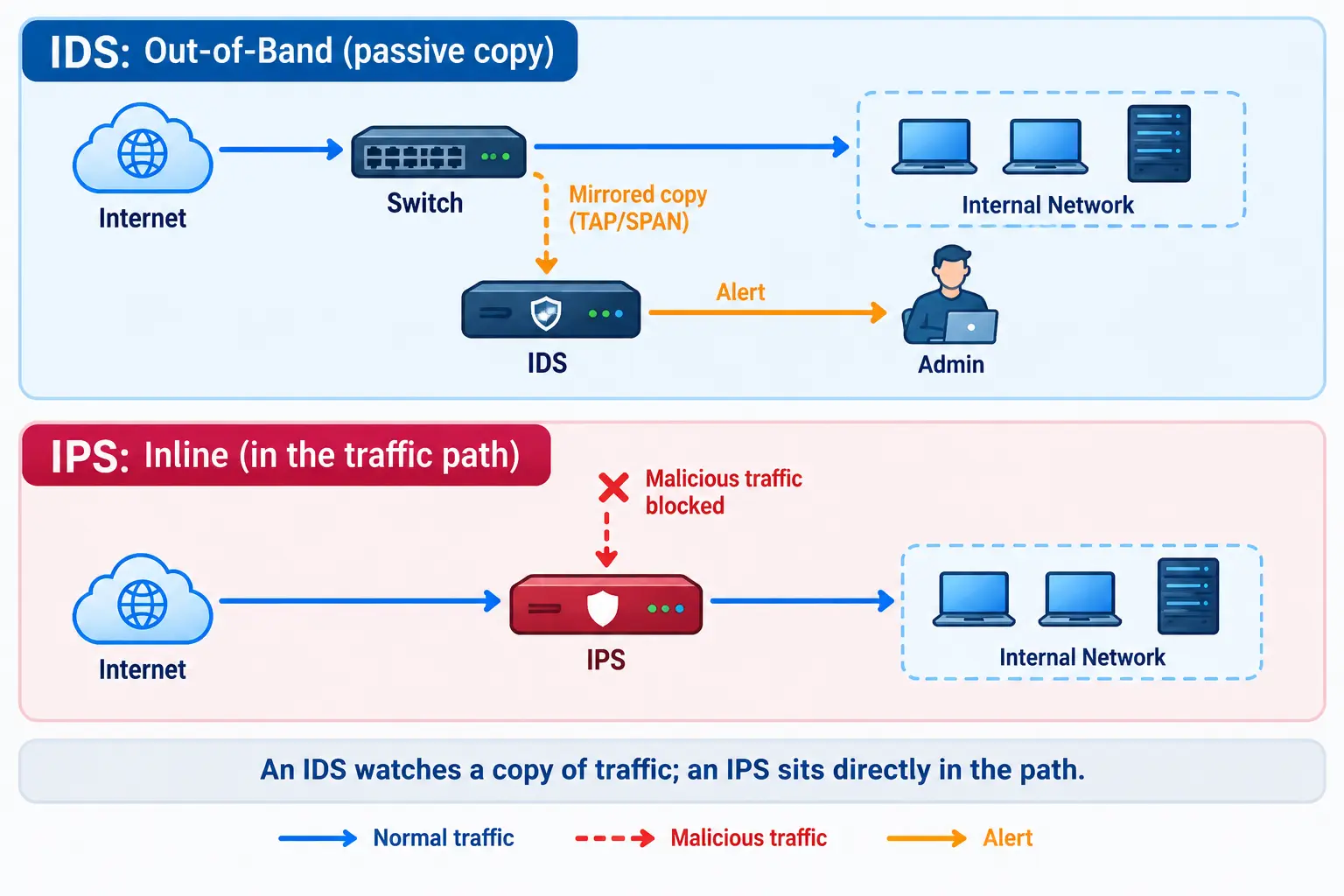
An intrusion prevention system (IPS) does everything an IDS does, but it also acts. It sits directly in the path of traffic and can drop bad packets, block an IP address or end a connection without waiting for a human.
Note: in networking, IPS means intrusion prevention system. It has nothing to do with “IPS” computer screens (in-plane switching) or IP addresses.
Real-world example: An attacker tries a known exploit against your web server. The IPS recognizes the pattern and drops the packets before they reach the server.
You may also see the term IDPS (intrusion detection and prevention system). It simply means a product that offers both functions.
Difference Between IDS and IPS
Short answer: An IDS only warns you about a threat, while an IPS steps in and stops it on its own. An IDS watches a copy of traffic from the side. An IPS sits in the middle of the traffic path.
| Feature | IDS | IPS |
|---|---|---|
| Main job | Detect and alert | Detect and block |
| Placement | Out-of-band (watches a copy) | Inline (in the traffic path) |
| Response | Manual, done by people | Automatic, based on rules |
| Speed impact | Very little | Can add small delay |
| If it makes a mistake | One wrong alert | Real users may get blocked |
| If the device fails | Network keeps working | Depends on fail-open or fail-closed setting |
Passive IPS vs IDS
Many IPS products can run in a detect-only (passive) mode. In this mode they only log and alert, so they behave like an IDS. This is a safe way to test a new IPS before you let it block anything.
Fail-Open vs Fail-Closed
Because an IPS sits inline, its failure matters.
- Fail-open: If the device crashes, traffic keeps flowing. The network stays up, but it is unprotected for a while.
- Fail-closed: If the device crashes, traffic stops. The network is safe, but users lose access.
A hospital may prefer fail-open so critical systems stay online. A payment system may prefer fail-closed. Choose based on what hurts more: downtime or risk.
IDS Detection Methods: How IDS and IPS Detect Attacks
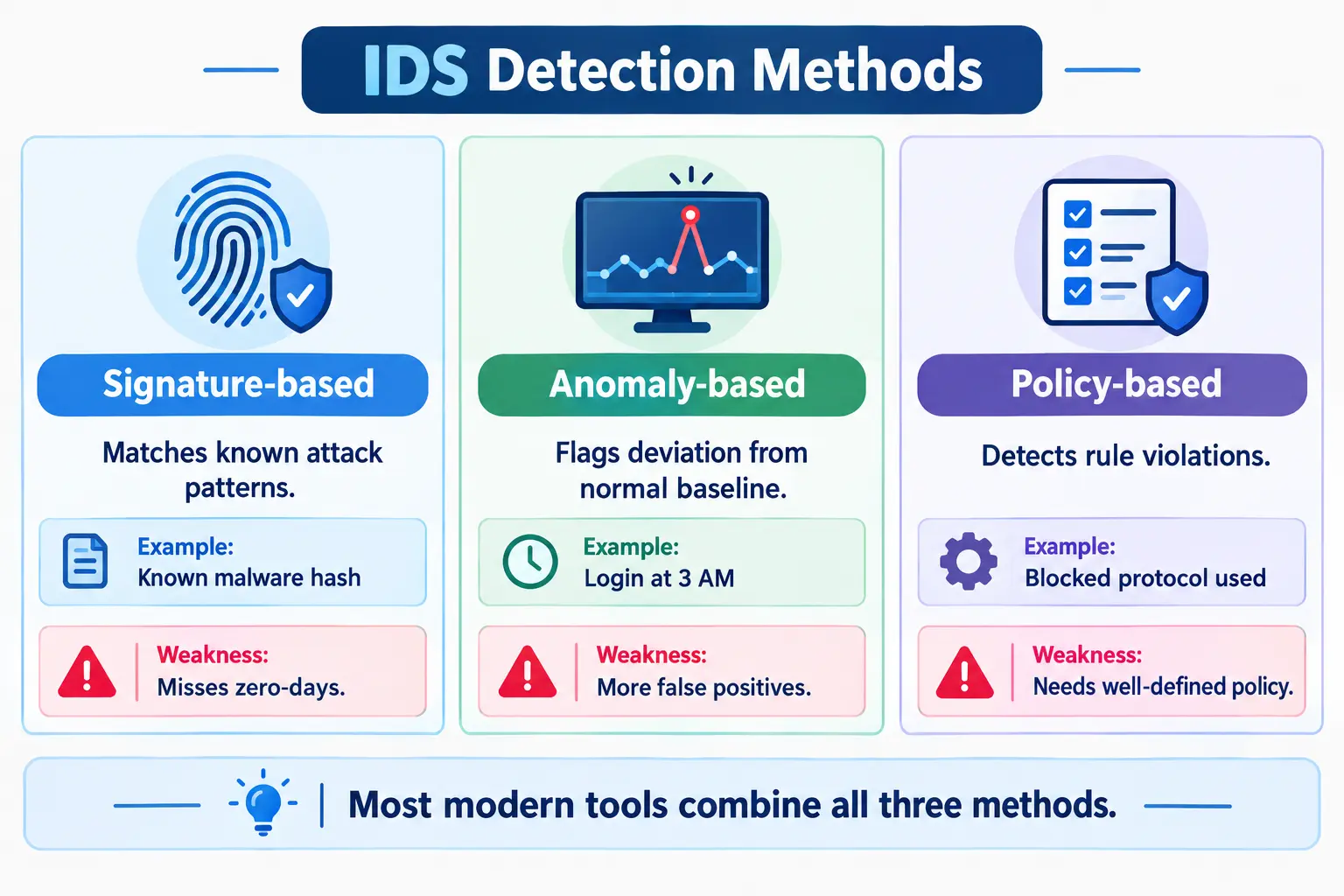
Both tools use the same basic detection methods:
- Signature-based: Compares traffic to a database of known attack patterns. Think of it as a fingerprint match.
- Anomaly-based: Learns what normal looks like, then flags anything unusual. Example: an employee account logging in from two countries within an hour.
- Policy-based: Flags activity that breaks your own rules. Example: someone using a file-sharing protocol that your company bans.
- Stateful protocol analysis: Checks if a protocol is behaving the way it should. Example: a browser request with a broken or oddly built HTTP header that no normal browser would send.
Many modern tools also use machine learning to improve anomaly detection and reduce false alarms.
| Method | Strength | Weakness |
|---|---|---|
| Signature | Accurate for known attacks | Misses brand-new attacks |
| Anomaly | Can catch unknown threats | More false positives |
| Policy | Enforces your own rules | Needs clear, updated policies |
| Stateful protocol | Catches protocol abuse | Needs more processing power |
What These Tools Actually Catch
- Port scans: An attacker checks which doors (ports) are open on your servers.
- Brute-force attacks: Hundreds of failed logins in a short time.
- Command-and-control (C2) beaconing: An infected computer “phones home” to an attacker’s server at regular intervals.
A Simple Rule Example
Here is a simplified Snort-style rule that alerts when one source makes many SSH connection attempts in a minute:
alert tcp any any -> $HOME_NET 22 (msg:"Possible SSH brute force"; flags:S; threshold:type threshold, track by_src, count 5, seconds 60; sid:1000001; rev:1;)In plain words: if the same address starts 5 SSH connections within 60 seconds, raise an alert. This is for learning only. Test rules in a lab first.
Types of Intrusion Detection Systems (NIDS, HIDS & More)
IDS types differ by where they watch. The two main ones are network-based and host-based.
Network-Based Intrusion Detection System (NIDS)
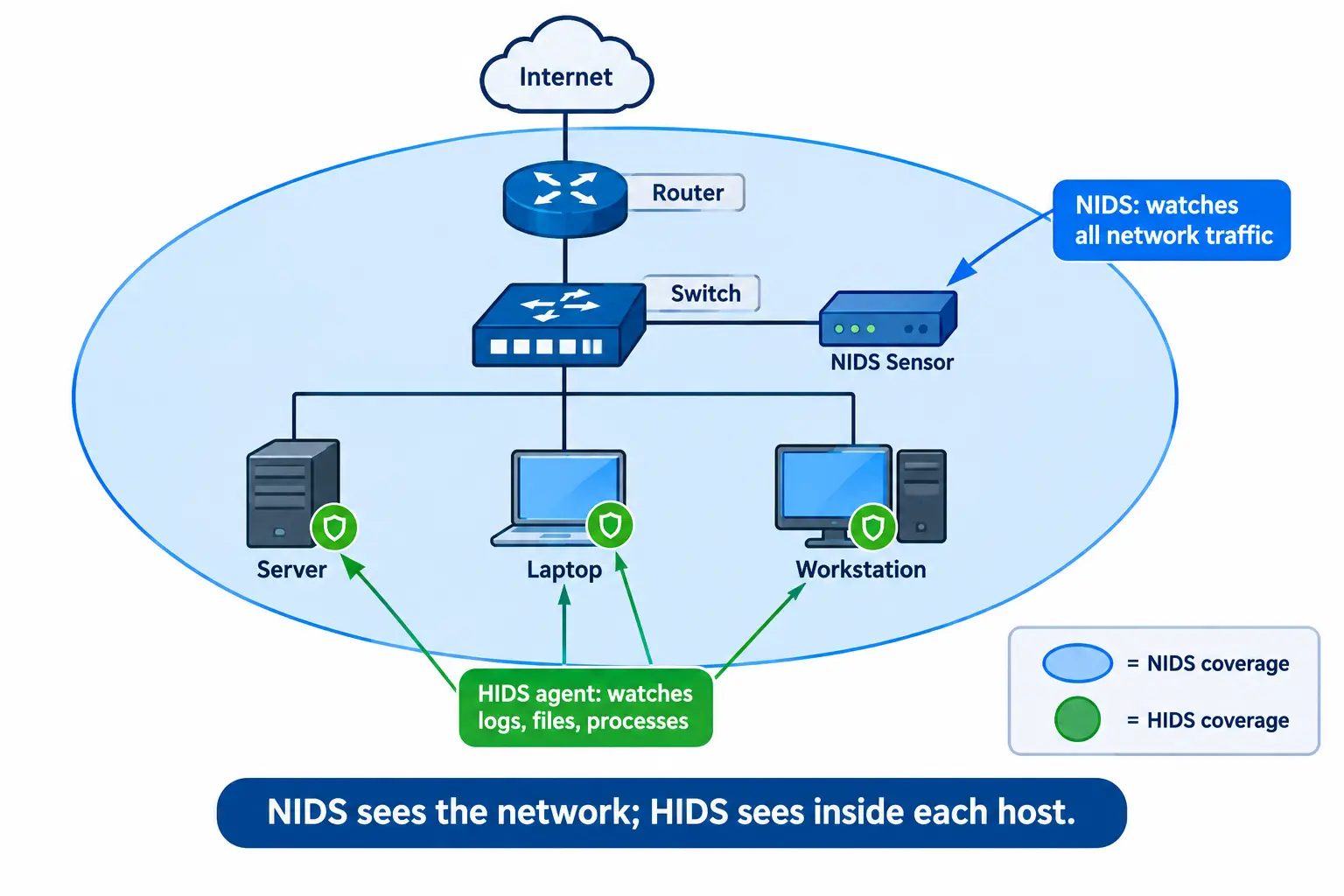
A network-based intrusion detection system (NIDS) listens to the data flowing through one part of your network and checks it for signs of attack. One sensor can see many devices at once, like a security camera in a hallway.
Key technologies behind a NIDS:
- Sensors: Hardware or software placed at key points in the network.
- TAP or SPAN port: Sends a copy of traffic to the sensor so the real traffic is not disturbed.
- Packet capture: Records the traffic for analysis.
- Deep packet inspection (DPI): Looks inside packets, not just at their headers.
- Protocol analysis: Checks if traffic follows the rules of its protocol.
Host-Based Intrusion Detection System (HIDS)
A host-based IDS (HIDS) is installed on a single computer or server. It watches what happens inside that device:
- System and application logs
- Changes to important files (file integrity monitoring)
- Running processes and user logins
Think of it as a camera inside one room instead of in the hallway.
HIDS vs NIDS
| Feature | NIDS | HIDS |
|---|---|---|
| Where it runs | On the network | On each device |
| What it sees | Traffic between devices | Files, logs, processes |
| Best for | Wide visibility | Deep detail on one host |
| Blind spot | Cannot see inside encrypted traffic or inside the device | Cannot see traffic to other devices |
| Setup effort | Fewer sensors | An agent on every device |
Neither is better on its own. NIDS gives the big picture, while HIDS shows what happened on the machine. Most teams use both.
Protocol-Based, Application-Protocol-Based and Hybrid IDS
- Protocol-based (PIDS): Watches the traffic between a user and a server, often for web protocols.
- Application-protocol-based (APIDS): Watches how servers talk to each other using specific application protocols.
- Hybrid IDS: Combines two or more of the above in one system.
Types of IPS, Including Wireless IDS/IPS
| Type | What it protects | Example use |
|---|---|---|
| Network-based (NIPS) | Whole network, usually at the gateway | Blocking exploit traffic at the office entrance |
| Host-based (HIPS) | One computer or server | Stopping a suspicious program from changing system files |
| Wireless (WIPS) | Wi-Fi networks | Detecting and blocking fake access points |
| Network behavior analysis (NBA) | Traffic patterns across the network | Spotting a DDoS attack |
Wireless Intrusion Detection System (WIDS vs WIPS)
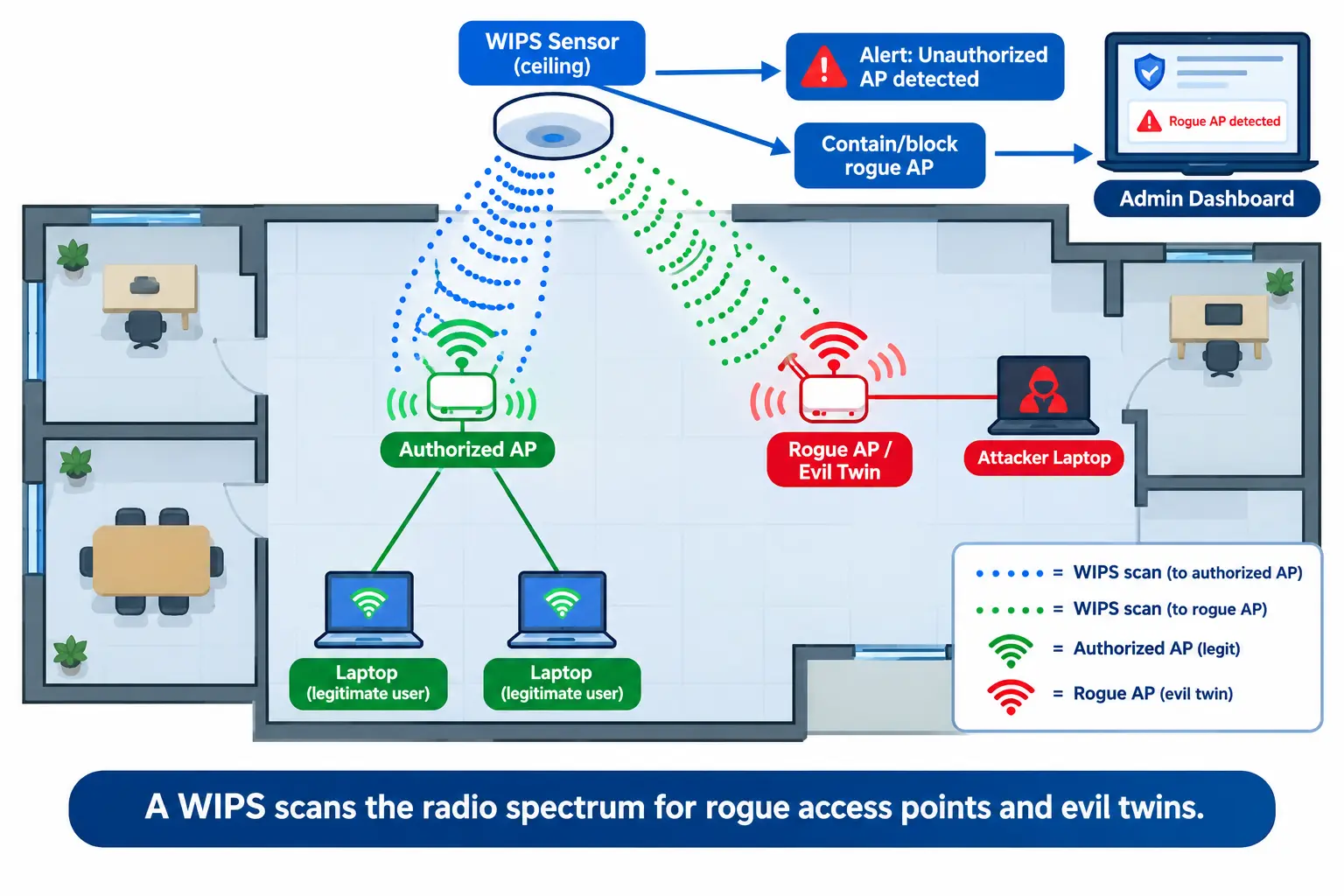
Wi-Fi can be attacked without anyone touching your cables. A wireless intrusion detection system (WIDS) scans the radio waves and alerts you. A wireless intrusion prevention system (WIPS) goes further and can block the threat.
Common wireless threats:
- Rogue access point: An unauthorized Wi-Fi device plugged into your network.
- Evil twin: A fake Wi-Fi network with the same name as yours, built to steal logins.
- Deauthentication attack: Attackers kick users off Wi-Fi to force them onto a fake network.
Real-world example: A visitor at a coffee shop sees two networks named “CafeWiFi.” One is fake. A WIPS in a business setting would spot such a copy and alert the admin.
IDS/IPS vs Firewall: What Is the Difference?
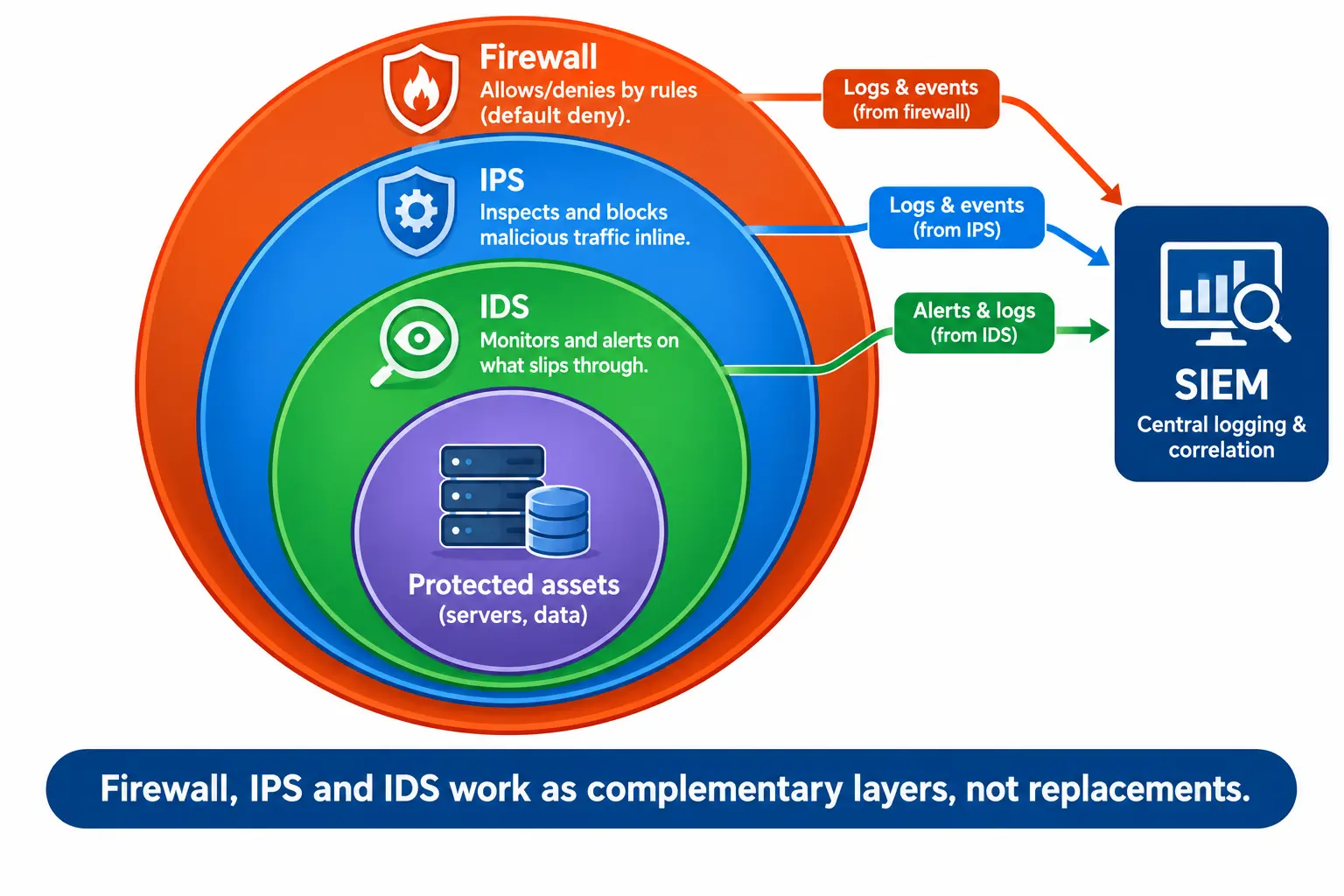
Short answer: A firewall decides who can enter based on rules, such as allowed ports and addresses. IDS and IPS look at what is inside the allowed traffic and check if it is harmful.
A firewall with a “default deny” rule blocks everything unless you allow it. That is strong, but attackers can still hide inside traffic you allowed, like web traffic on port 443. IDS and IPS help catch that.
| Tool | Main question it answers | Action |
|---|---|---|
| Firewall | Is this traffic allowed? | Allow or block |
| IDS | Is this traffic suspicious? | Alert |
| IPS | Is this traffic malicious? | Block |
| SIEM | What do all these logs mean together? | Collect and correlate |
| EDR / NDR | What is happening on devices (EDR) or across the network (NDR)? | Detect and respond |
Today, many next-generation firewalls (NGFWs) include IPS features in one box. So you may already own one without knowing it.
Where to Place IDS/IPS in Your Network
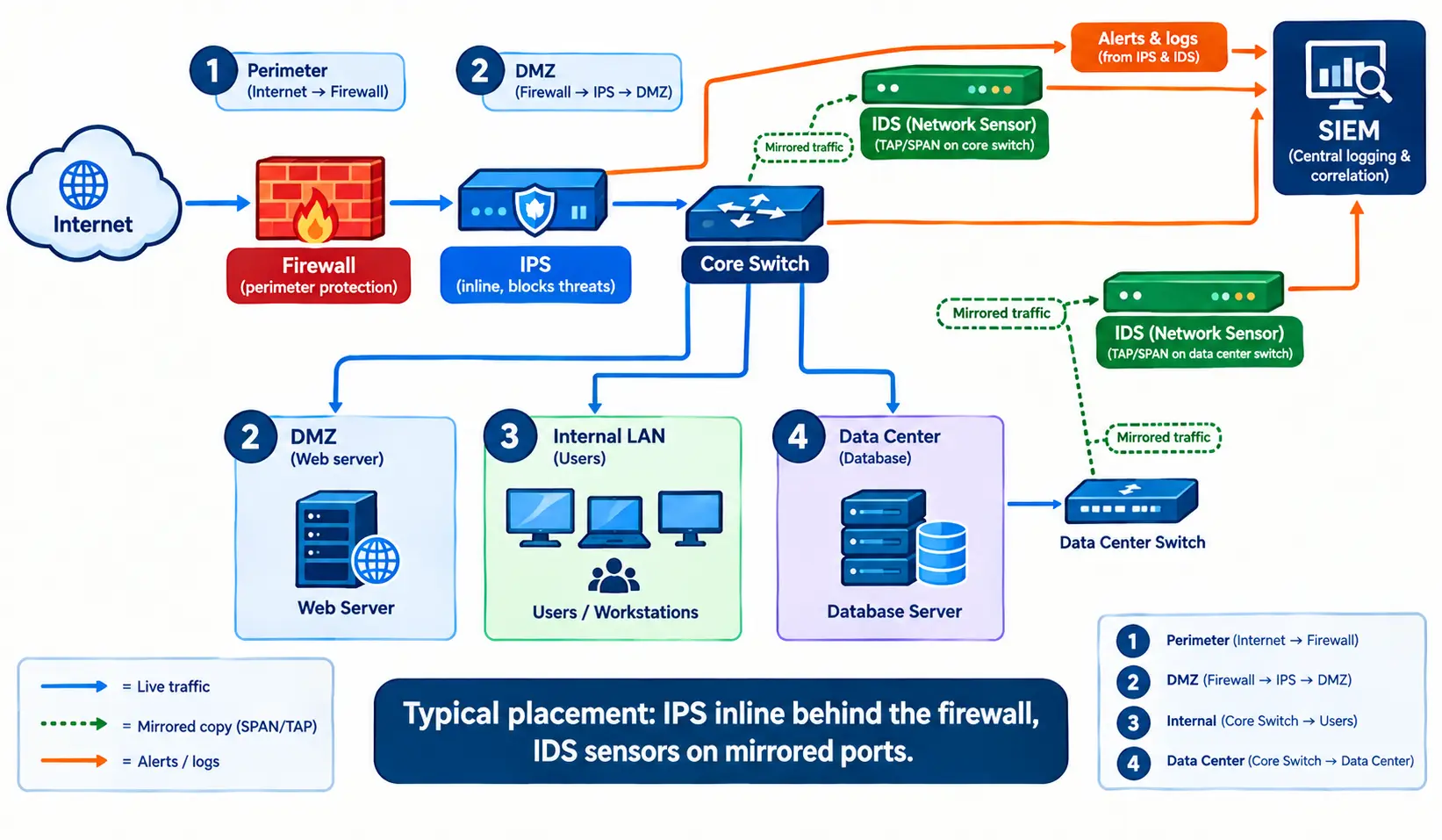
Where you put the tool decides what it can see.
- Perimeter: Place an IPS inline just behind the firewall to block common attacks from the internet.
- DMZ: Watch servers that face the public, such as web and email servers. They are attacked most often.
- Internal network: Place an IDS on mirrored ports to catch threats that already got in, such as an infected laptop.
- Data center: Protect your most valuable systems, such as databases.
- Cloud: Use traffic mirroring or cloud-native tools, because you cannot plug a physical sensor into a cloud network.
Every IDS Deployment Should Include
Use this checklist:
- Sensors placed where important traffic passes
- A baseline of what normal traffic looks like
- Regular signature and rule updates
- Connection to a SIEM or central log system
- A clear process for who reviews alerts, and how fast
- A scheduled time to tune rules and remove noisy alerts
A tool with no one reading its alerts gives a false sense of safety.
Best IDS/IPS Tools: Open-Source vs Commercial
| Tool | Type | Best for |
|---|---|---|
| Snort | Open-source NIDS/NIPS | Learning and rule-based detection |
| Suricata | Open-source NIDS/NIPS | Multi-threaded, high-speed monitoring |
| Zeek | Open-source network monitor | Deep network logs and investigations |
| Wazuh / OSSEC | Open-source HIDS | Endpoint and log monitoring |
| Security Onion | Open-source platform | Ready-made monitoring lab or SOC |
| NGFW vendors (Cisco, Palo Alto, Fortinet) | Commercial | All-in-one firewall with IPS |
| Trellix and other NDR tools | Commercial | Large enterprises needing support |
Open-source is a good choice when:
- Your budget is small.
- You have staff who are comfortable with Linux and rule writing.
- You want full control and customization.
Commercial is a good choice when:
- You need vendor support and service guarantees.
- You face strict compliance audits.
- You need very high throughput with less manual work.
How to Choose and Implement IDS/IPS
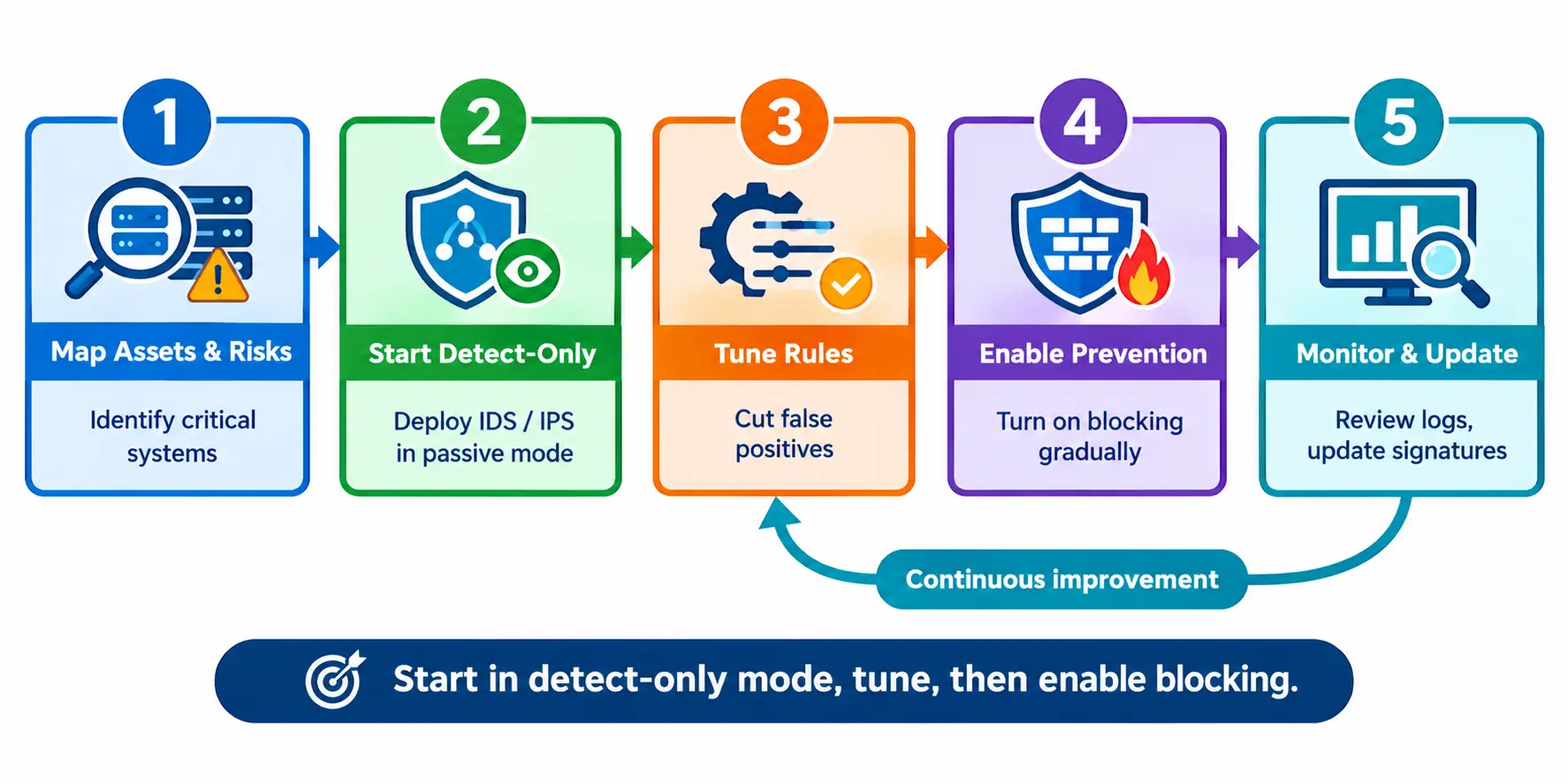
Follow these five steps:
- Map your assets and risks. List the systems that matter most, such as customer data and payment servers.
- Start in detect-only mode. Run the tool as an IDS first and watch what it flags.
- Tune the rules. Remove noisy alerts and add rules for your own environment.
- Turn on prevention slowly. Enable blocking for high-confidence rules first.
- Monitor and update. Review logs, update signatures and repeat the tuning.
When choosing a product, check:
- Throughput: Can it handle your real traffic without slowing it down?
- Encrypted traffic: Can it inspect TLS, or does it need another tool for that?
- Team skills: Do you have people who can manage it?
- Budget: Include staff time, not only license cost.
Limitations and Common Misconceptions
Limitations
- Encrypted traffic: Most web traffic is encrypted, so tools may not see inside it without extra decryption.
- Evasion: Skilled attackers can split or disguise traffic to avoid detection.
- Alert fatigue: Too many false alerts and people start ignoring them.
- Zero-day attacks: Signature-based detection cannot match an attack it has never seen.
Common myths
- “An IPS stops every attack.” No tool offers 100% protection.
- “Only big companies need this.” Small businesses are attacked too, and many tools are free or built into firewalls.
- “Once installed, it runs itself.” It needs updates and regular tuning.
Compliance and Future Trends
Compliance: Several standards expect intrusion monitoring.
- PCI DSS asks organizations that handle card data to use intrusion detection or prevention techniques. Check the requirement number for your version (it is 11.5.1 in v4.0).
- NIST SP 800-94 is a widely used guide to intrusion detection and prevention systems.
- GDPR Article 32 requires appropriate technical measures to protect personal data. An IDS/IPS can be one of them.
Trends to watch:
- AI and machine learning for better anomaly detection
- Cloud and container-based monitoring
- Network detection and response (NDR) and XDR platforms that combine many data sources
IDS and IPS FAQ
What is the main difference between IDS and IPS?
An IDS detects suspicious activity and sends an alert. An IPS detects it and blocks it automatically. The IDS watches a copy of traffic, while the IPS sits directly in the traffic path.
Can IDS and IPS be used together?
Yes. Many organizations use an IPS to block known threats in real time and an IDS to get deeper visibility. Next-generation firewalls often include both features.
Can IDS/IPS replace a firewall?
No. A firewall controls which traffic is allowed in or out. IDS and IPS inspect allowed traffic for threats. They work best as layers, not replacements.
Which is better, HIDS or NIDS?
Neither is better in every case. NIDS sees traffic across the network, while HIDS sees activity inside a device. Using both gives the most complete coverage.
Where should an IPS be installed?
Usually inline, just behind the firewall at the network edge. You can also place it in front of sensitive segments, such as a data center or DMZ.
Is open-source IDS good enough for production?
Yes, if you have the skills to manage it. Snort, Suricata and Wazuh are widely used. You get less vendor support, so plan for staff time.
Can an IPS block legitimate traffic?
Yes. This is called a false positive. Start in detect-only mode, tune the rules and enable blocking gradually to reduce the risk.
Conclusion
IDS and IPS solve different parts of the same problem. An IDS tells you something is wrong, and an IPS stops it. Start with an IDS or detect-only mode, tune it, then add prevention where you are confident. Pair both with a firewall and someone who reads the alerts.