
Network Access Control (NAC): Who Gets on Your Network
Every laptop, phone, and camera on your network is quietly asking to be let in. Network access control is what decides the answer. In this guide, I’ll explain what network access control is, how it works, and how to start without breaking anything.
Before You Start
Table of Contents
What Is Network Access Control? (NAC Explained)
What is network access control? It is a security method that decides which users and devices can connect to a network, and what they can reach once connected. It checks who you are and whether your device is safe, then allows, limits, or blocks access based on company rules.
Network access control (NAC) is a security method that decides which users and devices can connect to a network, and what they can reach once connected. It checks who you are and whether your device is safe, then allows, limits, or blocks access based on company rules.
Think about a company front desk. The guard looks at your badge. A visitor gets a pass for one floor. A person with no badge waits in the lobby. NAC does that job for your network. You’ll also see it called network admission control. Same thing, different label.
What Is the Main Purpose of NAC?
Keep unknown or unsafe devices out. Give everyone else only what they need. A marketing intern doesn’t need the payroll server, so NAC makes sure they can’t open it.
How Access Control Works in Modern Security Systems
Most modern access systems come down to three questions:
- Who are you? You prove it with a password, a certificate, or MFA.
- Is your device safe? Updates, antivirus, signs of infection.
- What can you do here? Your role and location set the rules.
Say a nurse signs in on a hospital tablet. NAC confirms her identity, sees the tablet is current, and opens patient records. If the tablet were missing a security update, she’d be sent to a limited area until it’s fixed.
Why Organizations Need Network Access Control
Now that you know what is network access control, here is why it matters so much today.
Twenty years ago, a company network mostly held office desktops. Now it carries personal phones, printers, smart TVs, cameras, and guests’ laptops. Every one of them is a possible way in.
- An employee’s own phone might be months behind on updates.
- A smart camera running its factory password is an easy target.
- A contractor needs internet access, not your finance files.
- One infected laptop can spread ransomware across a flat network in minutes. NAC can cut that laptop off.
- HIPAA, PCI DSS, and GDPR all expect you to control who reaches sensitive data. NAC’s rules and logs support that, but it won’t make you compliant by itself.
Here’s a small example. Someone at a shop plugs a cheap Wi-Fi router into a spare wall port. Suddenly it sits on the same network as the card payment system. With NAC, that router is unknown, so it gets blocked.
How Does NAC Work?
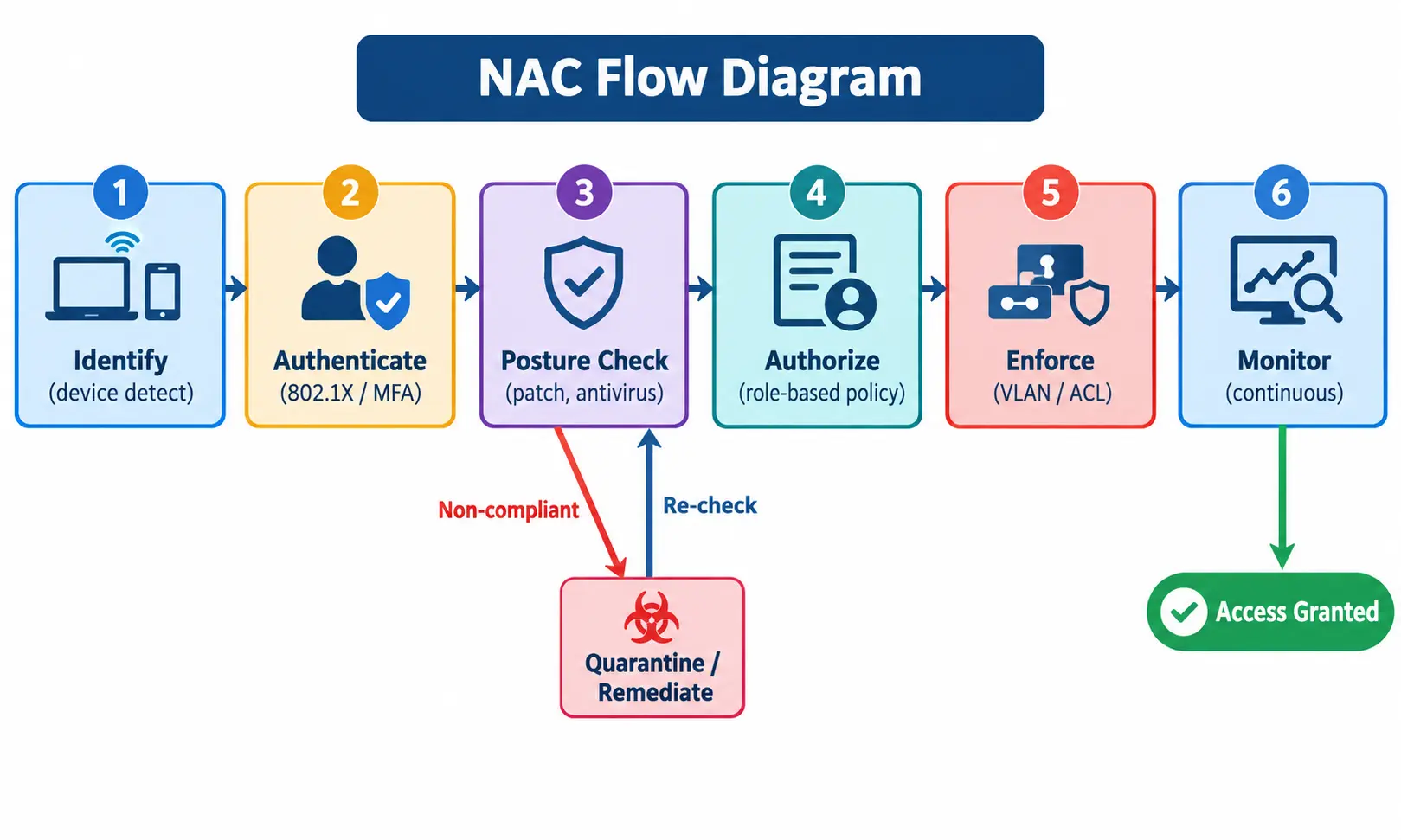
Once you know what is network access control, the next question is how it works. Products differ, but the flow usually goes like this:
- Identify. The network notices a new device trying to connect.
- Authenticate. The user or device proves who it is.
- Check posture. NAC looks at health: updates, antivirus, encryption.
- Authorize. Role plus health result decides the access level.
- Enforce. A switch or Wi-Fi controller applies the decision, often by placing the device in a VLAN, which is a separate virtual segment of the network.
- Monitor. NAC keeps watching. If the device starts behaving oddly, access can change.
The Protocols Behind It
Three names show up everywhere:
- 802.1X makes a device prove itself before a port or Wi-Fi connection opens.
- RADIUS is the server that checks the login and answers yes or no.
- EAP carries the login details across the network safely.
A simple way to remember: 802.1X is the locked door, RADIUS is the guard holding the guest list, and EAP is you handing over your ID.
Core NAC Capabilities
- Writing and updating access policies as the business changes
- Profiling devices so you know what’s on the network
- Self-service Wi-Fi sign-up for guests
- Posture checks against your security standards
- Automatic isolation of risky devices
- API links to SIEM, EDR, and firewalls
Remediation, Quarantine, and Captive Portals
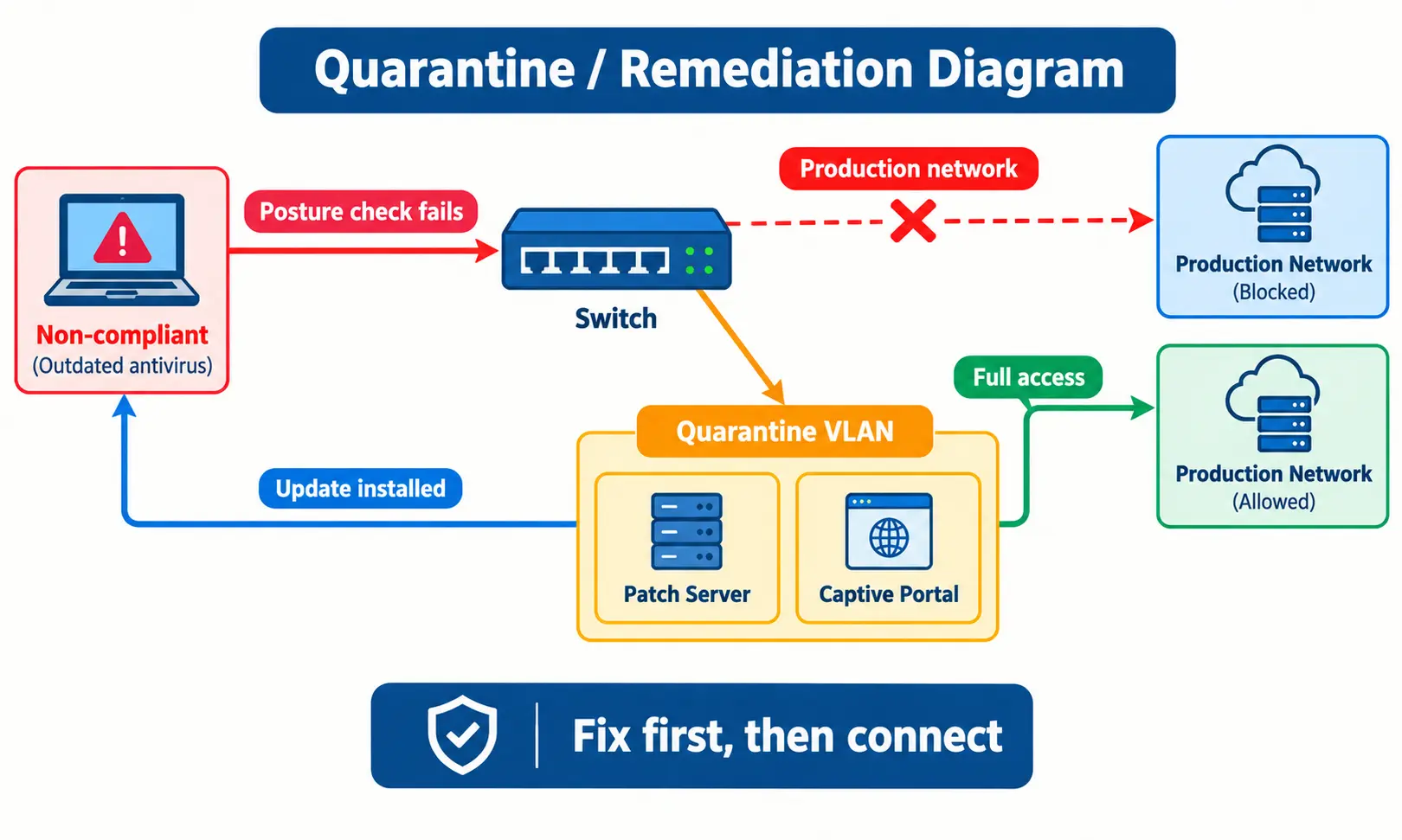
What if a device fails the check? Usually it isn’t thrown out. It’s moved to a quarantine network, a restricted area that can only reach update servers. Many systems also show a captive portal, a web page like a hotel Wi-Fi login, that explains the problem and the fix. After the update, the device is checked again and let in.
Key Components of a NAC System
| Component | Role | Example |
|---|---|---|
| Access requestor | Asks to connect | Laptop, phone, camera |
| Network access server | Enforces the decision | Switch, Wi-Fi controller, VPN gateway |
| Policy server | Makes the decision | RADIUS-based NAC server |
If you’re still asking what is network access control made of, these three parts are the answer.
The policy server rarely works alone. Before it decides, it usually checks your user directory, such as Active Directory, and your endpoint security tools.

Types of Network Access Control
What is network access control in practice? It comes in a few types, depending on when and how devices are checked.
Pre-Admission vs Post-Admission
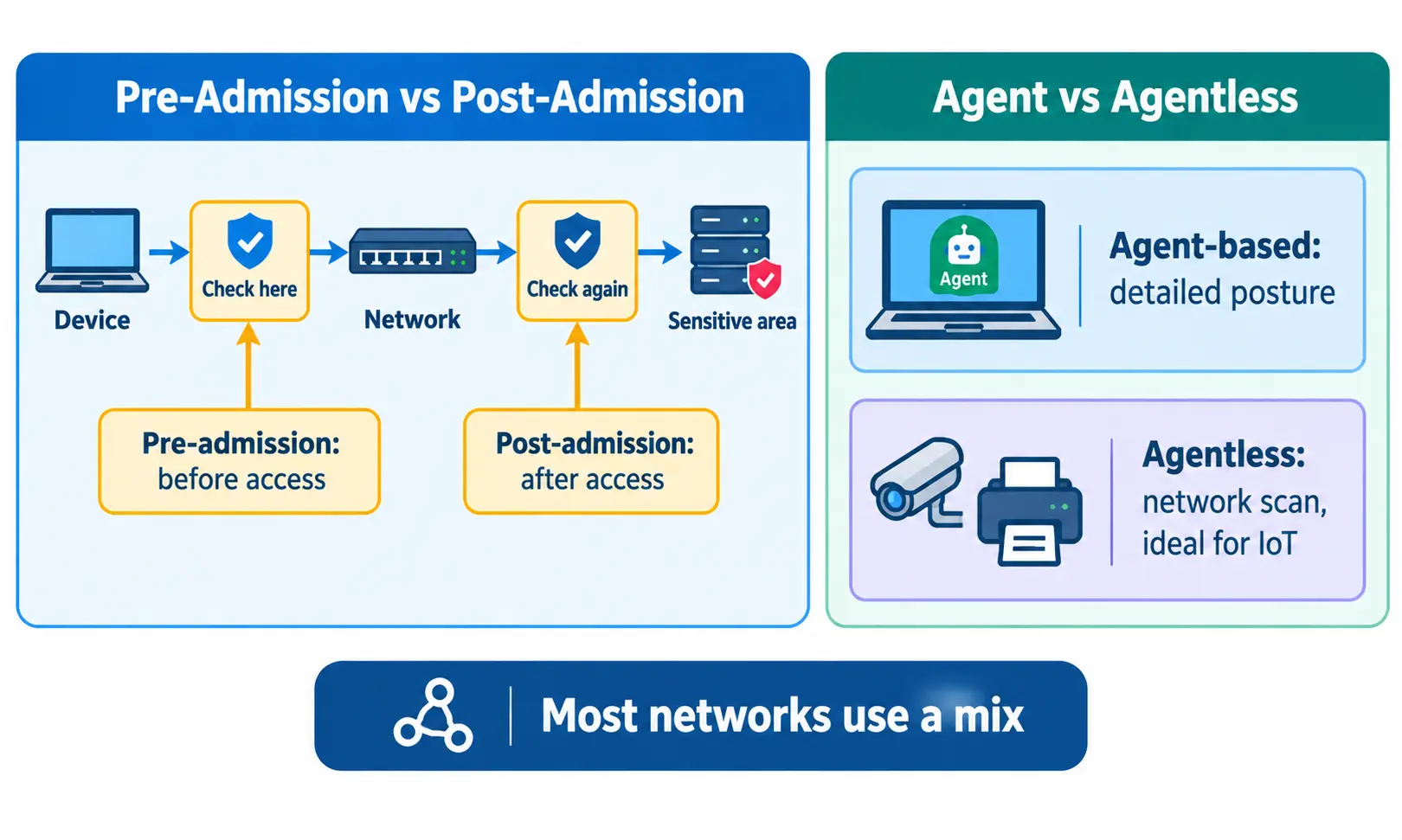
Pre-admission NAC checks a device before it gets any access. A laptop with expired antivirus never gets past the door. Post-admission NAC keeps checking after someone is inside, mostly when they move toward something sensitive. An employee already on Wi-Fi might have to verify again before opening the finance system.
Agent-Based vs Agentless NAC
Agent-based NAC (people often search this as “NAC agent”) puts a small program on the device. It reports patch level, antivirus status, and more. The checks go deeper, but someone has to install and maintain that agent.
Agentless NAC installs nothing. The network scans or watches traffic to work out what the device is. That’s the only realistic choice for printers and cameras, since they can’t run extra software. Most real networks end up using both.
Out-of-Band vs Inline NAC
Out-of-band means the NAC server sits off to the side and tells your switches what to do. You reuse the gear you already own. Inline means the NAC device sits right in the traffic path, like a checkpoint on a road. Control is tighter, but an undersized box can slow everyone down.
Cloud-Native NAC
This is NAC delivered as a service. There’s no hardware to rack or cable, which suits remote and hybrid teams and usually means less upkeep.
| Type | Best for | Watch out for |
|---|---|---|
| Pre-admission | Stopping risky devices early | Needs well-written policies |
| Post-admission | Limiting movement inside | More re-checks for users |
| Agent-based | Company-managed laptops | Install and upkeep |
| Agentless | IoT, printers, guests | Less detail on device health |
| Cloud-native | Spread-out teams | Relies on internet and vendor |
Network Access Control Benefits
So what is network access control actually good for? Here are the main benefits:
- Stronger security. Risky devices are stopped before they do damage.
- Real visibility. You see everything connected, including devices nobody told you about.
- Role-based access. People get what their job needs and nothing extra.
- Less manual work. Devices are checked and sorted automatically.
- Faster response. An infected device can be isolated in seconds.
- Audit help. Logs show who connected, when, and to what.
- Fewer user headaches. Trusted people connect without extra steps.
NAC Use Cases
So, what is network access control used for in real life? Here are the most common cases:
- BYOD: an employee’s phone gets email only after it meets your rules.
- IoT and medical devices: a hospital keeps infusion pumps in their own protected segment.
- Guests and contractors: a visiting consultant gets internet but can’t see the file server.
- Remote access: VPN users are checked before they enter.
- Schools: students, teachers, and visitors each get different access.
- Retail: payment terminals stay apart from customer Wi-Fi.
NAC vs ZTNA vs Firewall
Still unsure what is network access control and how it differs from ZTNA or a firewall? Here’s the short version.
Zero Trust Network Access (ZTNA) follows “never trust, always verify.” Rather than opening the whole network, it gives a user access to specific applications. It fits remote workers and cloud apps well.
| NAC | ZTNA | Firewall | |
|---|---|---|---|
| Main job | Controls who connects to the network | Controls who reaches which app | Filters traffic by rules |
| Works at | LAN, Wi-Fi, and remote edge | Application level | Network boundary or between zones |
| Best for | Offices, campuses, IoT | Remote and cloud access | Blocking unwanted traffic |
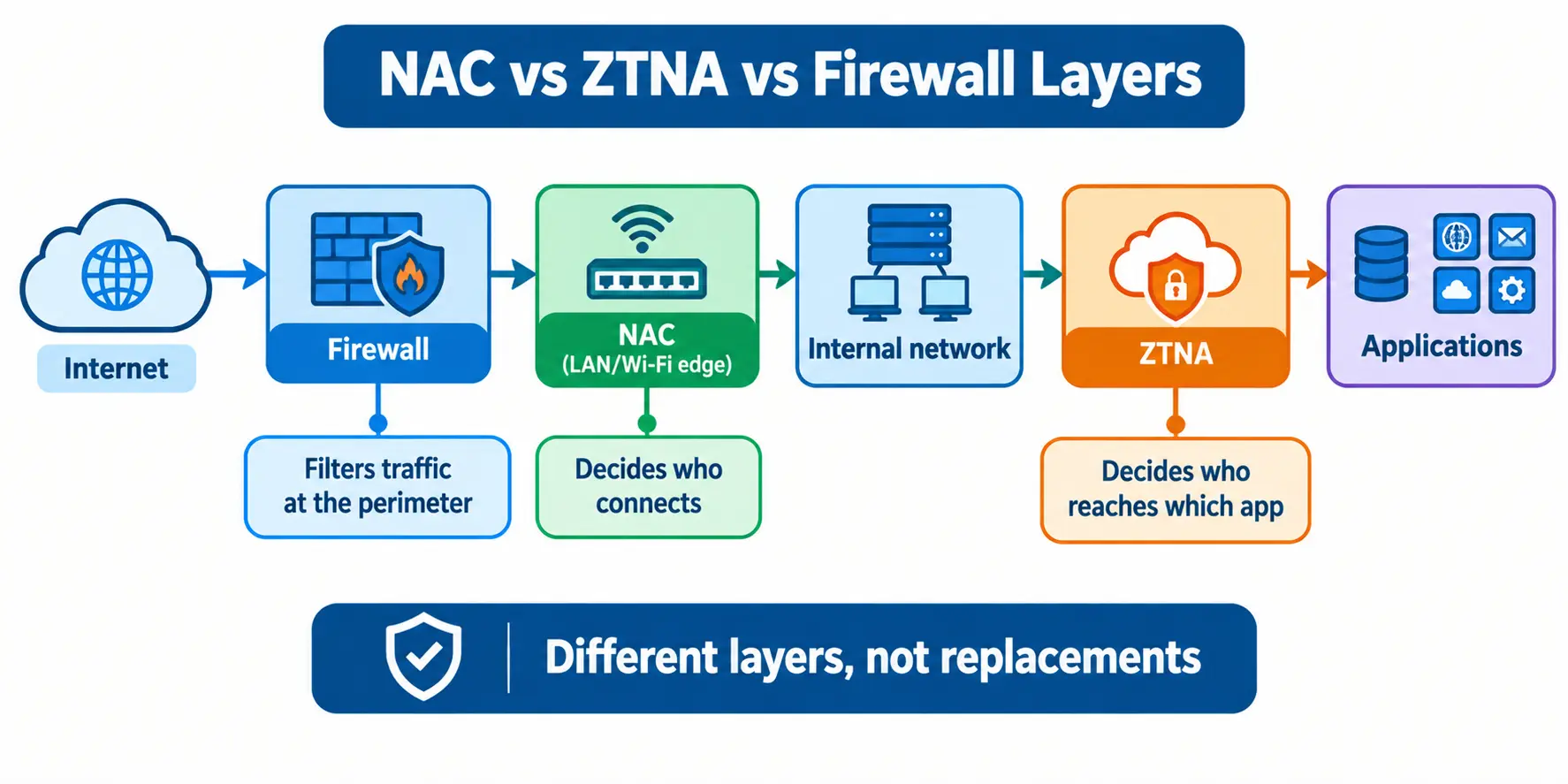
Can ZTNA replace NAC? Mostly no. A security camera can’t log into a ZTNA portal, but NAC can still identify it and limit where it goes. A fully cloud-based company with no office network may need very little NAC. Everyone else is better off with both.
You’ll also hear about posture checks in tools like Cisco ISE. That’s NAC checking device health at the network edge. ZTNA runs a similar check, just for app access.
Don’t Mix These Up: NAC vs NACL vs NLP
- NACL is a network access control list, a set of traffic rules on a subnet in cloud platforms like AWS. Not the same as NAC.
- NLP is natural language processing, a field of AI. Nothing to do with NAC.
How to Implement NAC
NAC implementation goes much better in small steps.
- Take inventory. List devices, users, and where they connect.
- Define policies. Start simple: employee, guest, IoT.
- Connect identity. Link Active Directory or LDAP and turn on MFA.
- Pilot in monitor mode. Log what NAC would do, but block nothing.
- Enforce in phases. Begin with guests and one department.
- Monitor and audit. Review logs and update rules on a schedule.
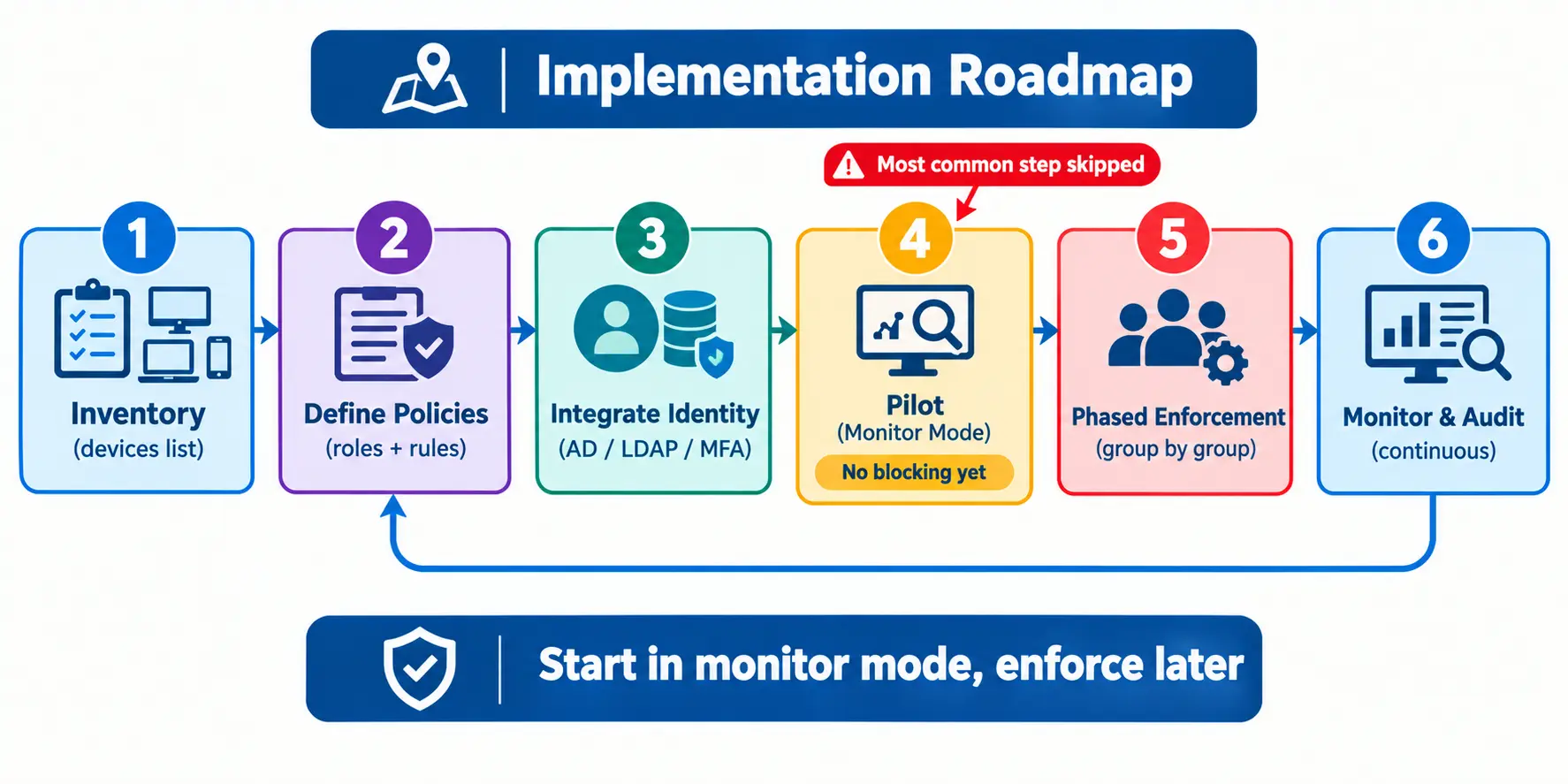
My honest opinion: step 4 is the one people skip, and it’s the one that saves you. A few habits also help. Give the least access needed, write rules for roles instead of individuals, and keep sensitive systems in their own segments.
Common Implementation Mistakes
- Skipping monitor mode. You lock out real people and flood the help desk.
- Forgetting special devices. Printers and VoIP phones often can’t use 802.1X, so plan exceptions.
- Writing complicated rules. The more complex the policy, the harder it is to debug.
- No help-desk plan. Staff should know what to do the first time they’re blocked.
NAC for Small Businesses
What is network access control for a small team? It doesn’t need an enterprise setup. A lighter version works fine:
- Pick cloud-based, agentless NAC, so there’s no hardware to buy.
- Use certificates instead of passwords where you can.
- Start with guest Wi-Fi separation and a separate IoT network.
- Add employee device checks later.
A 30-person office, for example, can move guests and smart devices onto their own networks first. That one step removes a surprising amount of risk.
Open-Source NAC Options
Yes, they exist.
- PacketFence is a well-known open-source NAC with guest access, device registration, and quarantine.
- FreeRADIUS is a popular RADIUS server. It handles authentication, but it isn’t a full NAC alone.
The software is free. The setup and upkeep aren’t, because they take real skill and time. If you’re starting from zero networking knowledge, building NAC from scratch isn’t realistic. Learn the basics and practice in a lab first.
How to Choose a NAC Solution
Once you understand what is network access control, choosing a tool gets easier. When comparing any network access control NAC solution, ask these questions:
- Does it work with switches and Wi-Fi from different vendors?
- Is there an agentless option for IoT?
- Can it scale to your device count?
- Does it connect to your SIEM, EDR, and identity tools?
- Does it support cloud and hybrid setups?
- How hard is deployment and daily management?
- Can it produce compliance reports?
- What’s the total cost, including licenses and support?
Before you commit, trial it with real devices from your own network. Demos always look clean.
NAC Limitations and Bypass Risks
So what is network access control not good at? It’s strong, but it has gaps.
- IoT blind spots. Some devices can’t be fully identified.
- Devices without 802.1X. Printers and phones may fall back on weaker checks like a MAC address.
- MAC spoofing. An attacker can copy a trusted device’s address, so trusting MAC addresses alone is risky.
- Misconfiguration. One wrong rule can leave a hole.
- Insider misuse. NAC won’t stop a trusted user abusing their access.
To reduce these risks, use certificates instead of MAC-only trust, watch device behavior for anything unusual, segment the network so one breach stays small, and review policies and exceptions regularly.
Frequently Asked Questions
What is the main purpose of NAC?
NAC keeps unauthorized and unsafe devices off your network and limits each user to the access they need. It checks identity and device health first.
Is NAC the same as a firewall?
No. A firewall filters traffic between networks. NAC decides which users and devices can join in the first place. Most organizations use both.
Can ZTNA replace NAC?
Usually not. ZTNA controls access to applications, while NAC controls devices on the local network, including IoT devices that can’t use ZTNA.
What is the difference between agent-based and agentless NAC?
Agent-based NAC installs software on the device for detailed health checks. Agentless NAC uses network methods instead, which suits printers, cameras, and unmanaged devices.
Is there an open-source NAC?
Yes. PacketFence is a known open-source NAC, and FreeRADIUS is often used for authentication. Both need technical skill to run.
Can NAC be bypassed?
Yes, if it’s poorly set up, for example through MAC spoofing or weak exceptions. Certificates, segmentation, and behavior monitoring make it much harder.
Can small businesses use NAC?
Yes. Cloud-based, agentless options are simpler and need no extra hardware. A good first step is separating guest and IoT traffic.
Conclusion
So, what is network access control in short? It answers one question: who should be on your network, and what should they reach? List your devices, run a pilot in monitor mode, and add rules a little at a time. Pair it with a firewall and a ZTNA tool for stronger protection. Even one small step, like moving guest Wi-Fi off your main network, makes a real difference.