
Network Attack: Common Types & Proven Mitigation (2026)
A network attack is any attempt to break into a network, steal what’s on it, or knock it offline. It doesn’t matter if you run a home Wi-Fi or a company with 500 laptops. This guide covers the common types in plain English, how to spot them, and what actually stops them.
Before You Start
Table of Contents
What Is a Network Attack?
A network attack is a deliberate move to get into a network without permission, disrupt it, or steal the data travelling through it. Security people judge the damage using the CIA triad. Sounds fancy, but it’s just three questions:
- Confidentiality: can someone else read your data? A stranger grabbing your login on public Wi-Fi is a confidentiality problem.
- Integrity: can someone change it? Imagine an attacker swapping the bank account number on an invoice.
- Availability: can people still use your service? A shop’s website crashing on sale day is an availability problem.
Network Attack vs Threat vs Vulnerability
These three words get mixed up constantly. Here’s the quick difference.
| Term | Meaning | Example |
|---|---|---|
| Threat | Anything that could cause harm | A hacker group going after small businesses |
| Vulnerability | A weak spot | A router that never got its update |
| Attack | The actual attempt | The hacker logs in to that router and watches traffic |
Possible Results of a Network Attack
The damage is rarely just technical.
- Data loss or theft: customer records, passwords, business files.
- Downtime: staff can’t work, customers can’t buy.
- Money: ransom, clean-up costs, lost sales.
- Trust and legal trouble: leaked personal data can mean fines and customers who walk away.
Active vs Passive Network Attacks
Every network attack falls into one of two groups.
| Passive attack | Active attack | |
|---|---|---|
| What the attacker does | Watches and collects | Changes, blocks, or injects |
| Does data change? | No | Yes |
| Easy to notice? | Hard | Usually easier |
| Examples | Packet sniffing, eavesdropping | MITM, spoofing, DoS |
Think of a passive attack as someone listening outside your door. An active attack is someone walking in and moving your furniture around.
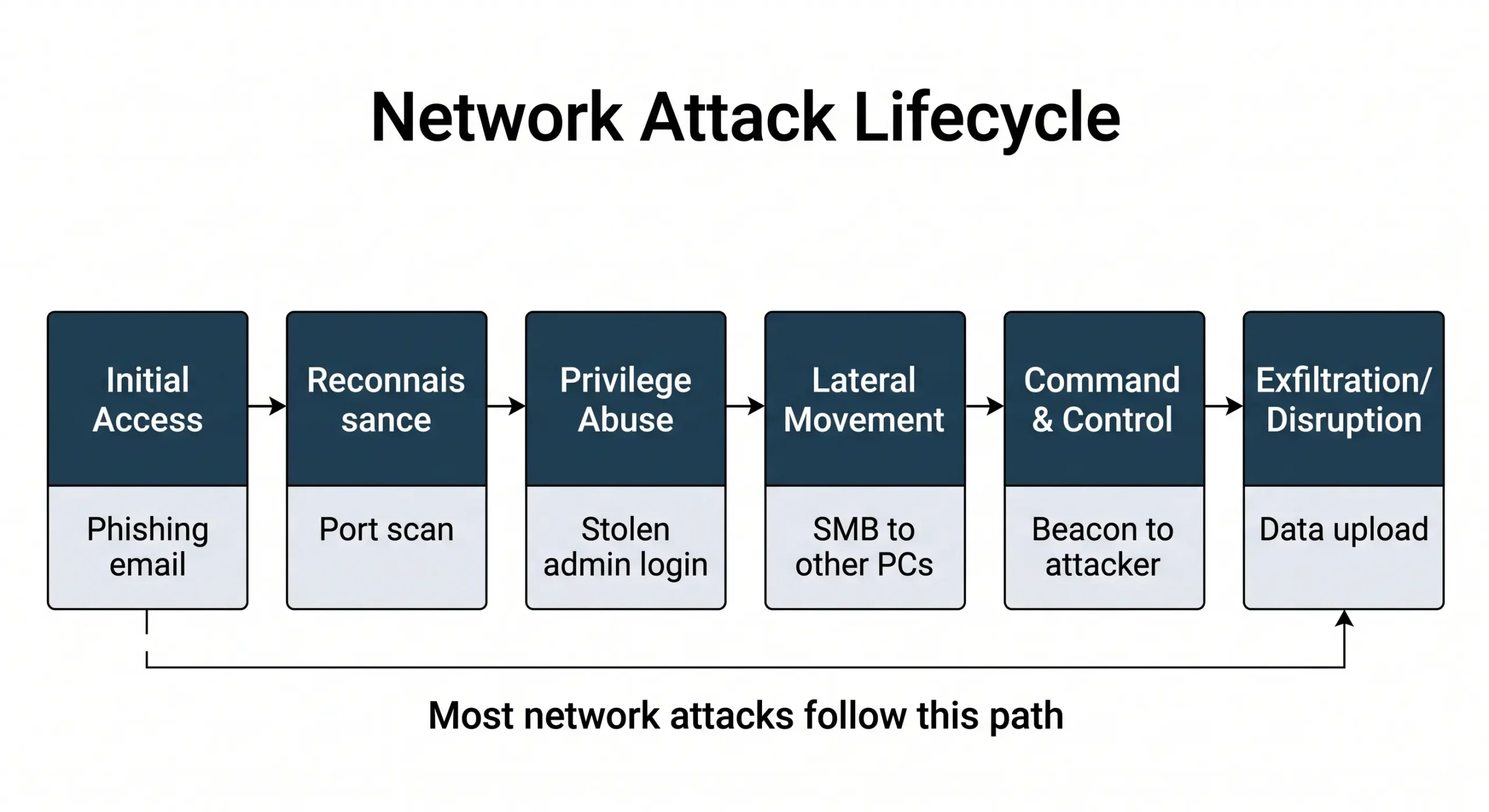
Real attacks also rarely end in one step. They tend to follow a path:
- Initial access: a phishing email steals a password.
- Reconnaissance: the attacker scans the network to see what’s there.
- Privilege abuse: a stolen admin login gives them more power.
- Lateral movement: they hop from one computer to the next.
- Command and control (C2): infected machines “call home” for orders.
- Exfiltration or disruption: data gets stolen, or systems get locked.
Types of Network Attacks at a Glance
Here’s the short version. Details follow below.
| Attack | What it does | Risk |
|---|---|---|
| DoS/DDoS | Overloads a service | High |
| MITM | Secretly reads or changes traffic | High |
| DNS attacks | Sends users to fake sites | High |
| Phishing | Tricks people into giving access | High |
| Ransomware | Locks files for money | Very high |
| Password attacks | Guess or reuse passwords | Medium to high |
| SQL injection/XSS | Abuse website inputs | High |
| Port scanning | Finds weak spots | Low, but a warning sign |
DoS vs DDoS Attacks
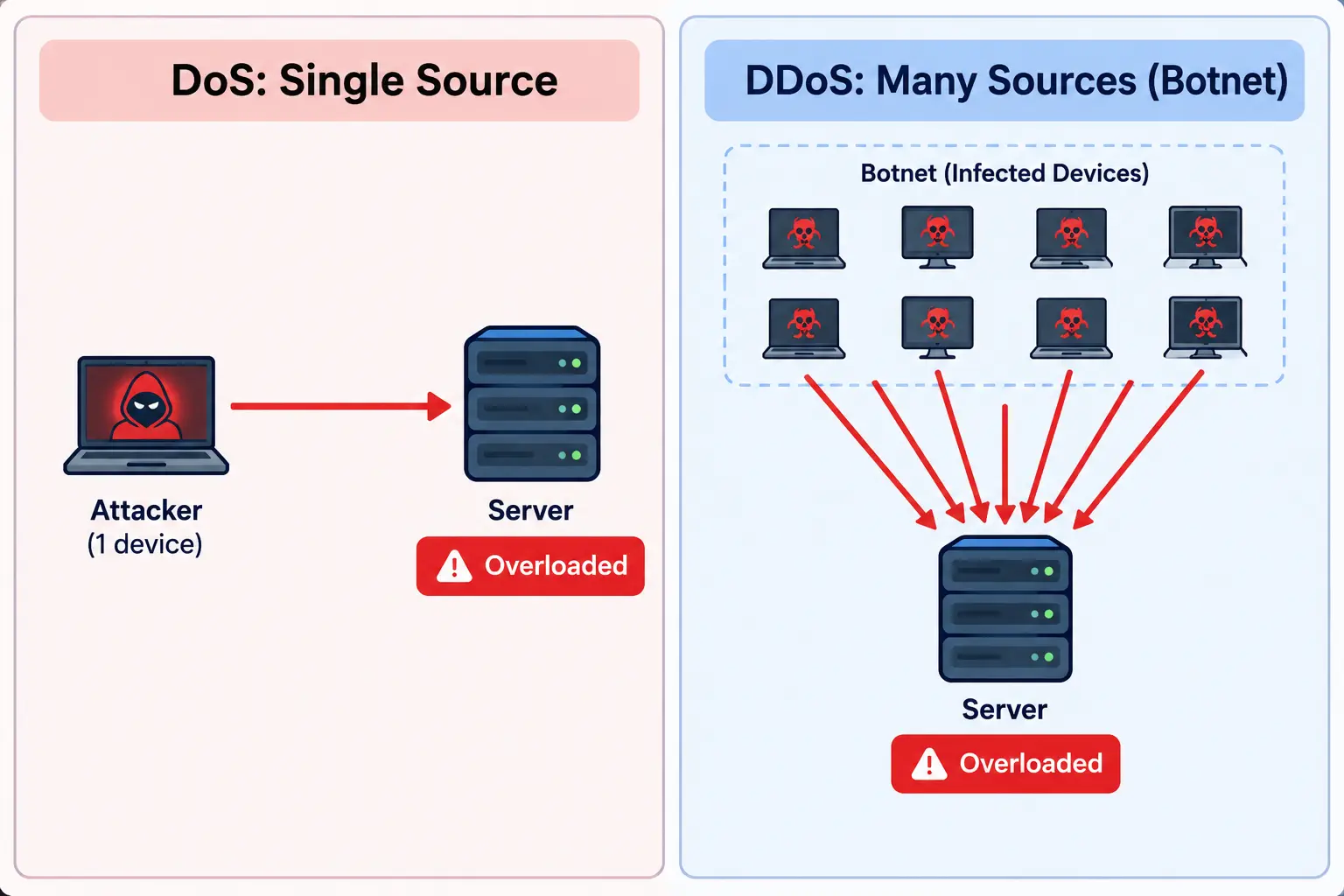
A denial-of-service (DoS) attack tries to take a website or service down by overloading it. A distributed denial-of-service (DDoS) attack does the same job, but from thousands of devices at once.
Difference Between DoS and DDoS
| DoS | DDoS | |
|---|---|---|
| Attack source | One device | Many devices (a botnet) |
| Power | Limited | Very high |
| Blocking it | Easy: block one IP | Hard: traffic comes from everywhere |
| Tracing the attacker | Easier | Much harder |
A botnet is a crowd of infected devices (cameras, routers, PCs) that an attacker controls remotely. Most owners have no clue their device is part of one.
Here’s an everyday way to see it. One person calls a pizza shop 500 times so nobody else can order. That’s DoS, and the shop just blocks the number. Now 10,000 people call at the same moment. That’s DDoS, and there’s no single number to block.
Types of DoS/DDoS Attacks
- Volumetric attacks flood your connection with so much data that real users can’t squeeze through.
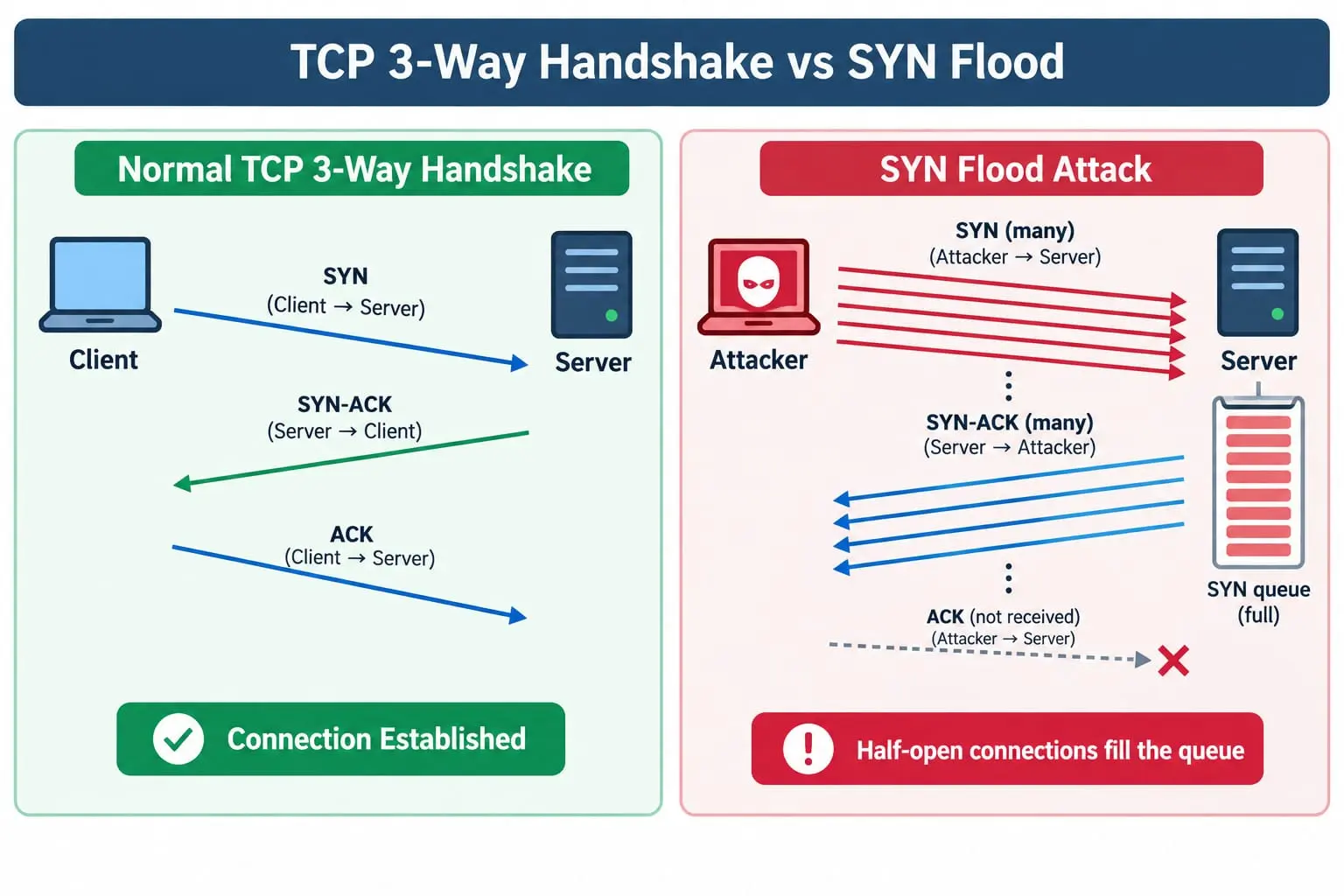
- Protocol attacks abuse how network protocols work. The classic one is the SYN flood: the attacker starts loads of connections and never finishes them, so the server’s waiting list fills up. Ping of Death and Smurf are older tricks. Modern systems are mostly patched against them, though they still show up in exams.
- Application-layer attacks send requests that look real, like thousands of searches or logins, until the website runs out of resources.
To get a SYN flood, first see a normal connection. The client sends SYN, the server replies SYN-ACK, and the client confirms with ACK. In a SYN flood, that last step never arrives.
How to Stop a DDoS Attack
Before it happens:
- Put your site behind a CDN (content delivery network) so traffic gets spread out.
- Set rate limits so one source can’t send unlimited requests.
- Add a web application firewall (WAF) to filter junk requests.
- Keep spare bandwidth and a written response plan.
While it’s happening:
- Call your hosting provider or ISP first. They can filter traffic before it reaches you.
- Switch on “under attack” mode if your CDN offers one.
- Use a traffic scrubbing service, which cleans bad traffic and passes the good.
- Treat blackhole routing as a last resort, because it drops real visitors too.
Can you stop it for free? Partly. Some CDN providers have free plans with basic DDoS protection, and rate limiting costs nothing on most servers. A big attack usually needs paid help. If the attacker demands money to stop, don’t pay. There’s no guarantee they will.
Man-in-the-Middle (MITM) and Spoofing Attacks
How MITM Attacks Work
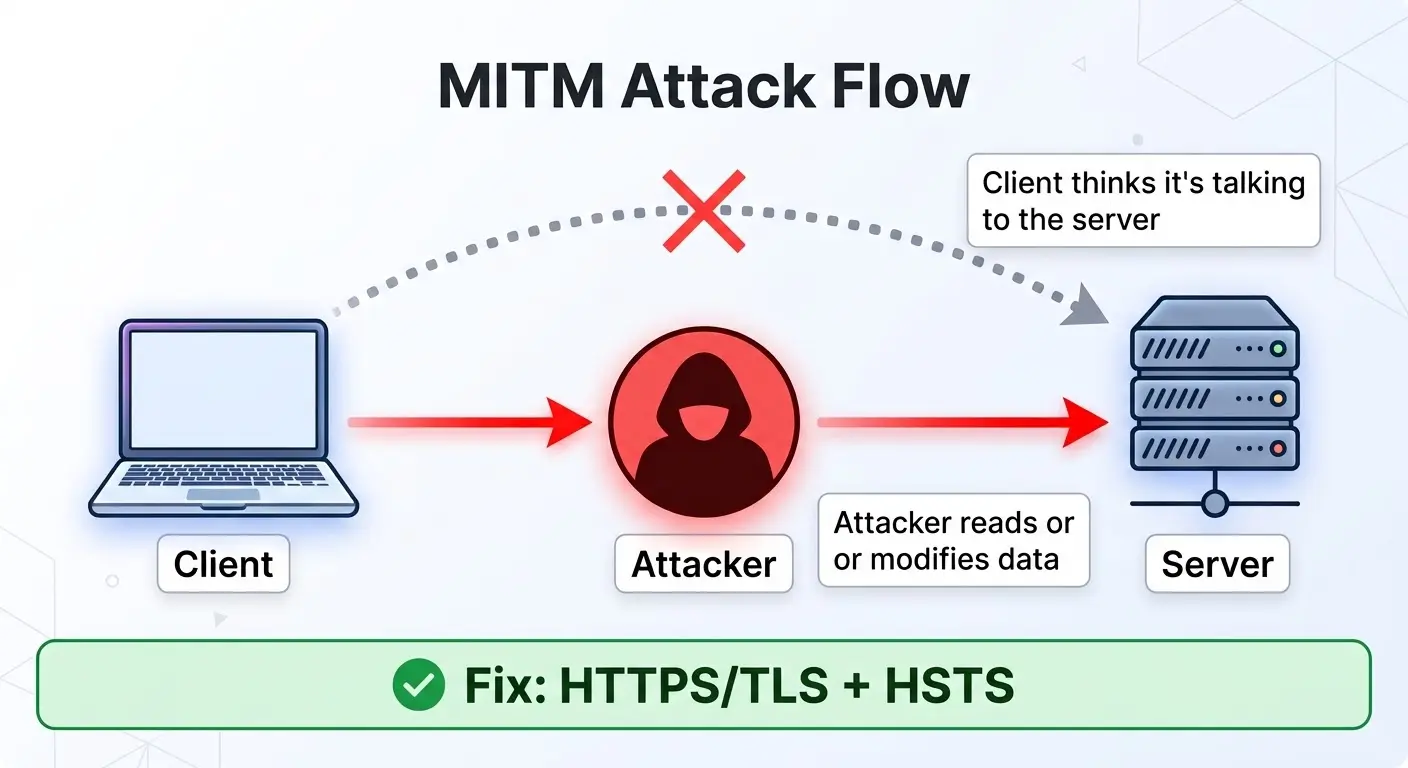
In a man-in-the-middle attack, someone quietly sits between you and the service you’re using. You think you’re connected directly. You’re not.
- Passive MITM: they only read your data.
- Active MITM: they change it, like altering a payment detail.
A common setup: you join a café Wi-Fi called “CafeFree.” An attacker has created a fake hotspot with the same name. You connect, and anything unprotected passes through their laptop.
Session Hijacking, Replay, IP/ARP Spoofing and Evil Twin Wi-Fi
MITM comes in a few flavors:
- Session hijacking: the attacker steals your logged-in session, so they don’t even need your password.
- Replay attack: they capture a valid request, like a payment, and send it again.
- IP spoofing: packets carry a fake sender address so they look trusted.
- ARP spoofing: on a local network, the attacker ties their device to the router’s address, and traffic flows through them.
- Evil twin Wi-Fi: the fake hotspot from the café example.
How to Prevent Man-in-the-Middle Attacks
- Use HTTPS/TLS. It encrypts traffic between you and the site.
- Turn on HSTS on your website, which forces browsers to use HTTPS only.
- Trust certificates. A valid digital certificate proves a site is who it says it is. Attackers can’t easily get one for a domain they don’t own, so browsers show a warning instead.
- Use a VPN on public Wi-Fi. It wraps your traffic in an encrypted tunnel.
- Enable Dynamic ARP Inspection (DAI) on switches to block fake ARP messages.
- Use multi-factor authentication (MFA), so a stolen password isn’t enough on its own.
Will a VPN help if your device is already compromised? Not really. A VPN protects data while it travels. If malware is already on your device, it can read your data before the VPN encrypts it. Clean the device first, then change your passwords from a safe one.
How do you prevent MITM on email? Choose providers that enforce TLS, turn on MFA, and set up SPF, DKIM, and DMARC on your domain. And skip logging in to email on public Wi-Fi without a VPN.
DNS Attacks
DNS is the internet’s phone book. It turns a name like example.com into an IP address. Corrupt it, and people land in the wrong place without noticing.
- Cache poisoning: the attacker plants a fake answer in a DNS resolver’s memory. Everyone using that resolver gets sent to the fake site.
- DNS hijacking: the attacker changes DNS settings on a router, device, or domain account.
- DNS tunneling: data is hidden inside DNS queries, either to sneak it out or to control infected devices.
- DNS amplification: small queries with a spoofed address trigger huge replies aimed at the victim. It’s a type of DDoS.
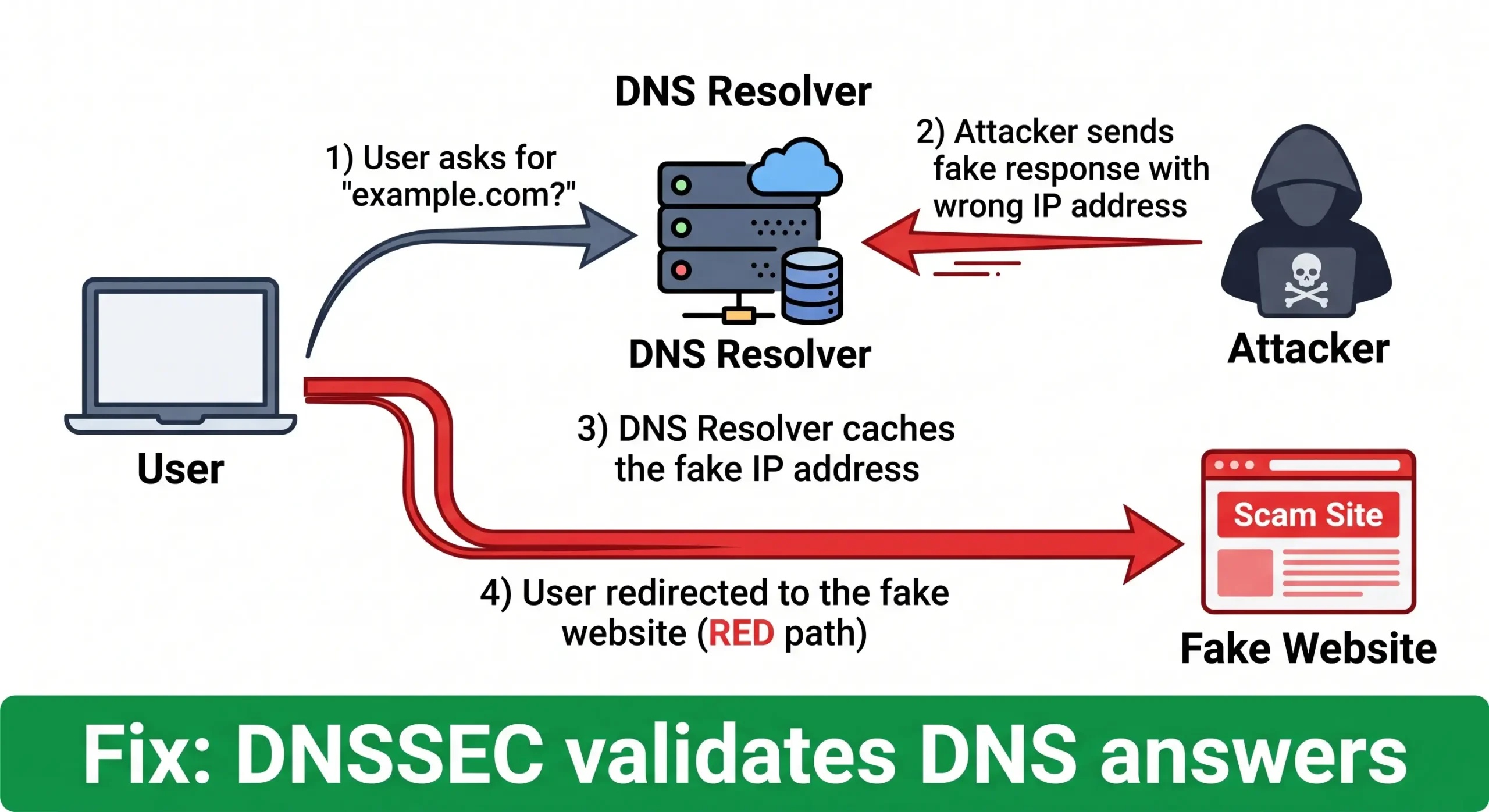
What happens if your DNS is attacked? Visitors may land on fake sites that steal logins. Your website or email can stop working. And stolen data can leave through hidden DNS traffic.
How to defend:
- Turn on DNSSEC, which lets resolvers verify answers are genuine.
- Use DNS over HTTPS (DoH) or DNS over TLS (DoT) to encrypt queries.
- Stick to trusted resolvers, and change default router passwords.
- Watch DNS logs for odd spikes, very long queries, or unknown domains.
- Protect your domain registrar account with MFA.
Phishing and Social Engineering
Phishing tricks people into handing over passwords, money, or access. Strictly speaking, it isn’t a network attack. It’s usually the door that lets one in.
Types of Phishing Attacks
- Email phishing: mass emails posing as a bank or service.
- Spear phishing: aimed at one person, using their name and job.
- Whaling: aimed at senior leaders like CEOs.
- Smishing: phishing by SMS.
- Vishing: phishing by phone call.
- Clone phishing: a real email gets copied and resent with a harmful link.
Phishing Email Examples
Example 1: “Account suspended.” “Dear Customer, your account will be suspended in 24 hours. Click here to verify.” It’s built to make you panic and click.
Example 2: “Invoice attached.” An unknown “supplier” sends a file named Invoice_8821. Open it, and malware can install.
Example 3: Delivery text. “Your parcel is on hold. Pay a small fee here.” The page then collects your card details.
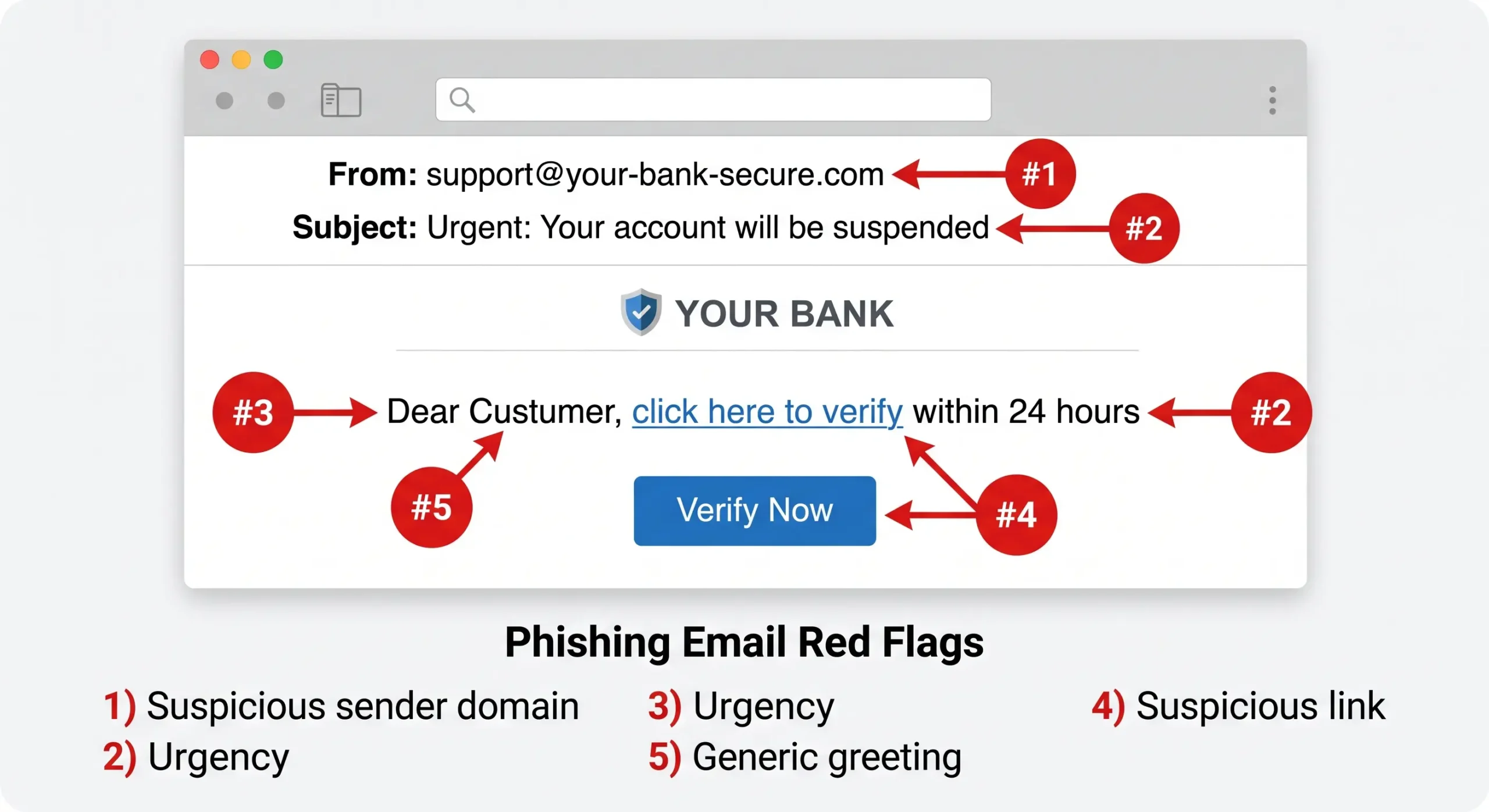
Red flags to look for:
- A sender address that’s nearly right but not quite, like your-bank-secure.com.
- Urgent or threatening wording.
- “Dear Customer” instead of your name.
- A link that doesn’t match the sender when you hover over it.
- Spelling mistakes and surprise attachments.
How to Prevent Phishing
- Turn on MFA on every account that offers it.
- Use email filtering to catch bad messages early.
- Don’t click links in urgent messages. Open the official site yourself.
- Run short, regular phishing tests for staff.
- Report suspicious emails instead of just deleting them.
Malware and Ransomware
Types of Malware
Malware is software made to harm, spy on, or take over a system.
- Virus: attaches to a file and needs a person to run it.
- Worm: spreads across networks by itself.
- Trojan: looks useful but hides harmful code, like a “free” game with a backdoor.
- Spyware: quietly records activity, such as keystrokes.
- Botnet malware: turns your device into a remote-controlled “zombie.”
- Ransomware: locks your files and demands payment.
How Does Malware Spread?
- Email attachments and links. Still the most common route.
- USB drives. A found or shared drive can carry malware.
- Drive-by downloads. Just visiting a hacked website can trigger a hidden download.
- Network shares (like SMB). Worms jump between computers through open shares.
- Fake or hacked software updates.
- Stolen passwords. No exploit needed. The malware just logs in.
Picture an employee who plugs in a USB drive found in the parking lot. It installs malware, which then looks around for other computers on the same office network.
How to Detect Ransomware
Early warning signs:
- Files suddenly renamed, or given strange extensions.
- Disk and CPU usage spike for no clear reason.
- Backups or shadow copies get deleted.
- Unknown processes start encrypting files.
- A ransom note appears in folders.
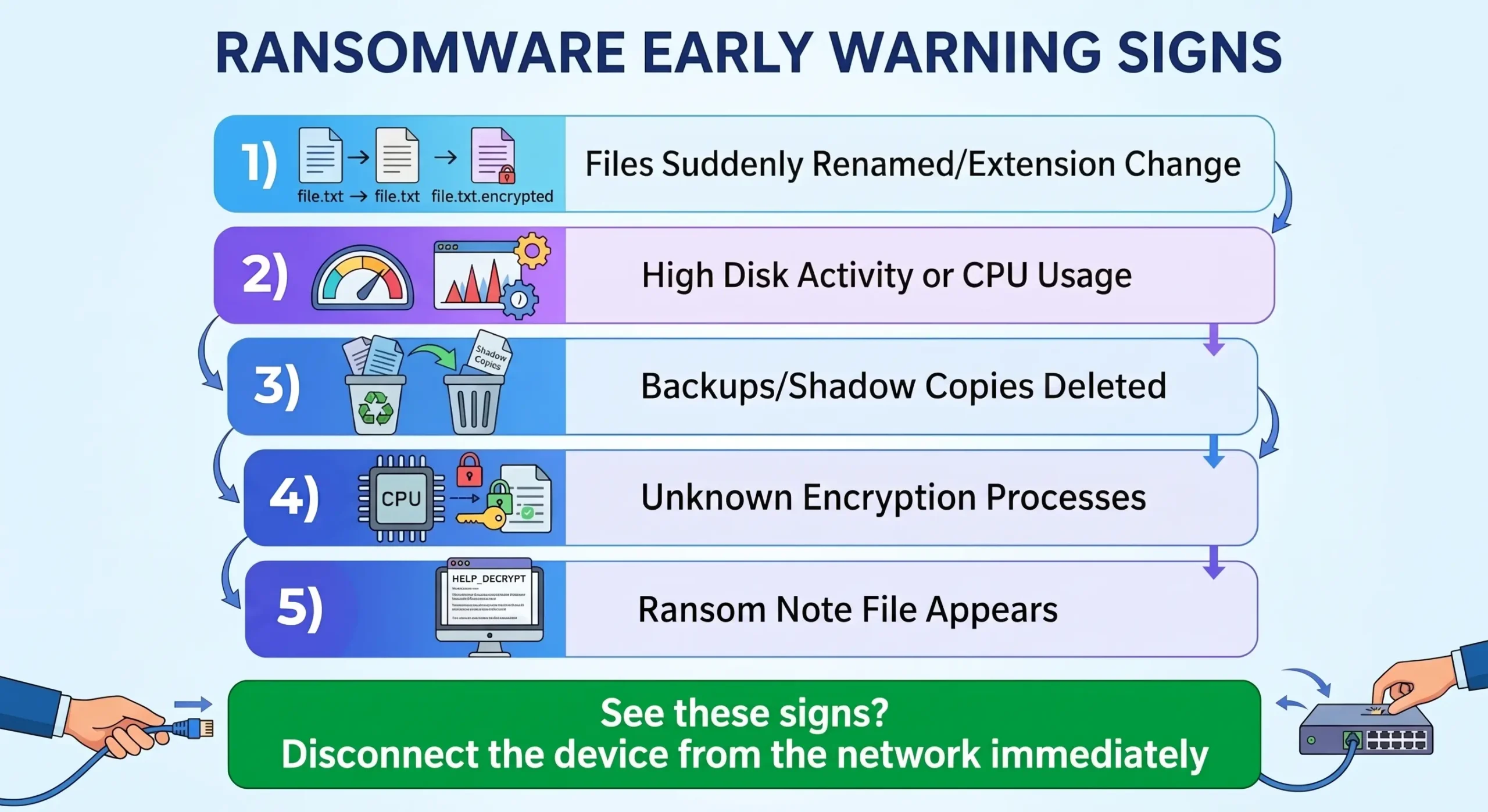
See these? Disconnect the device from the network immediately, then tell your IT team.
Helpful tools and methods:
- EDR (endpoint detection and response) watches behavior, like one program changing thousands of files in minutes.
- Honeypot files are decoys nobody should touch. If one changes, you get an alert.
- Antivirus catches many known ransomware families, but new variants can slip past. It’s one layer, not the whole defense.
Is ransomware a Trojan? Not exactly. Ransomware is its own type of malware. A Trojan is often just how it gets delivered.
Ransomware Prevention
- Patch operating systems and apps quickly.
- Follow the 3-2-1 backup rule: 3 copies, on 2 different media, 1 stored offline or off-site.
- Segment your network so ransomware can’t reach every computer.
- Limit admin rights, and block macros from unknown files.
Password and Web Application Attacks
Password attacks
- Brute force: software tries thousands of passwords until one works.
- Credential stuffing: passwords leaked from one site get tried on others.
- Defense: MFA, account lockouts, and a password manager with long, unique passwords.
Web application attacks
- SQL injection: an attacker types database commands into a form, like a login box, to read or delete data.
- Cross-site scripting (XSS): harmful scripts run in other users’ browsers and can steal sessions.
- Defense: parameterized queries, input validation, and a WAF.
Other Network Attacks You Should Know
- Port scanning (reconnaissance): checking which doors on a network are open. One computer scanning many others is a red flag.
- Privilege escalation: a basic account suddenly gets admin power.
- Insider threats: a current or former employee misuses access, on purpose or by mistake.
- Supply chain attacks: attackers compromise a trusted vendor or update to reach many victims at once.
- Zero-day attacks: the flaw is unknown to the vendor, so no patch exists yet.
- IoT botnets: cheap cameras and routers with default passwords get hijacked for DDoS.
How to Detect a Network Attack
Warning signs:
- One device trying to connect to lots of addresses or ports.
- Regular, repeating connections to an unknown outside server (called beaconing).
- Odd DNS activity, like long or random-looking domain names.
- Big outbound data transfers nobody expected, especially at night.
- SMB or RDP connections between computers that never talk to each other.
- Logins from new countries or at strange hours.
Tools:
- IDS/IPS spot (and block) suspicious traffic patterns.
- NDR (network detection and response) analyzes behavior inside the network.
- SIEM gathers logs from many systems and raises alerts.
- Wireshark is a free tool for inspecting packets during an investigation.
No single tool sees everything. Mixing network, endpoint, and login data gives the clearest picture.
Network Attack Mitigation Strategies
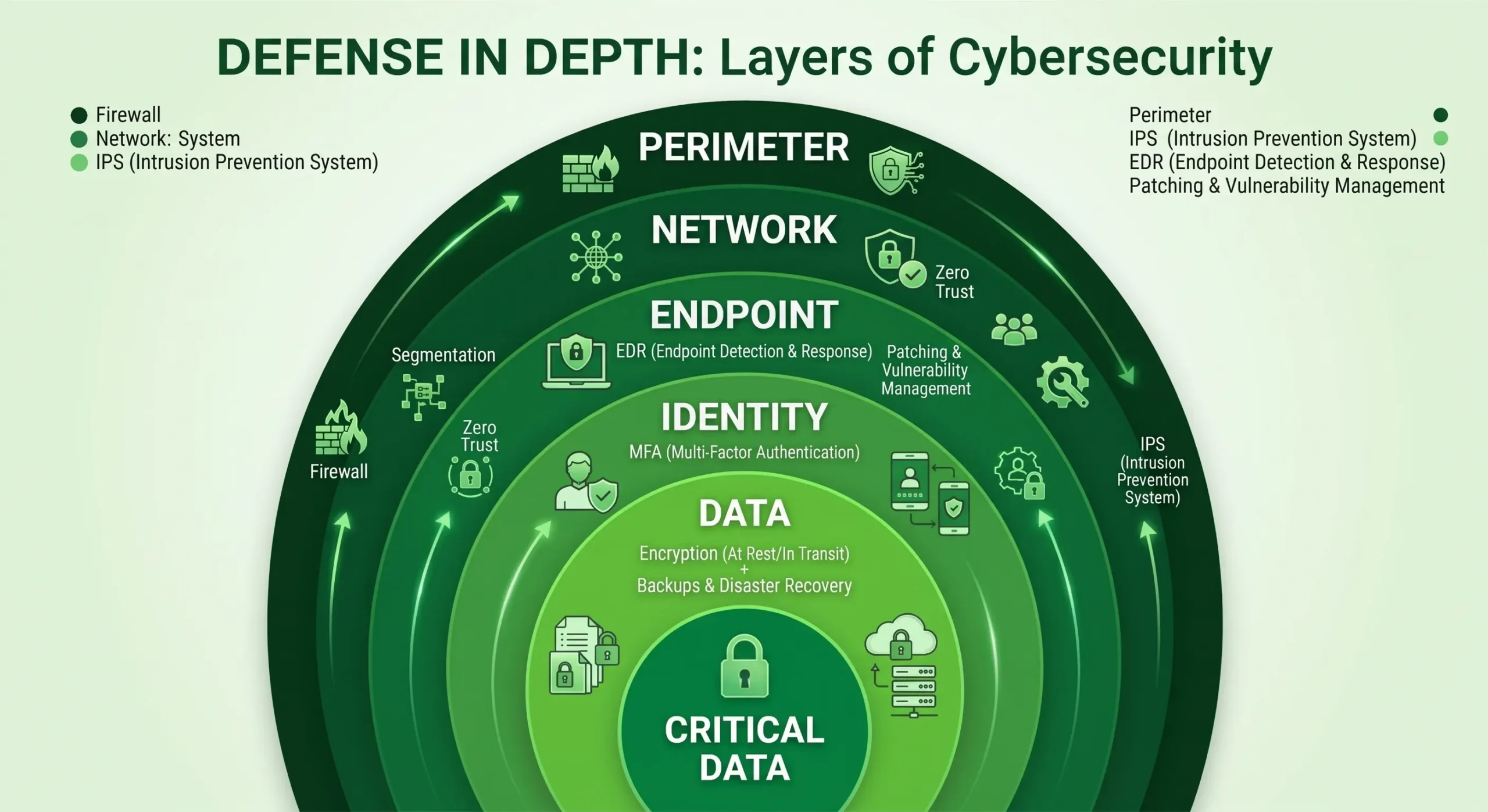
The best approach is defense in depth. Use several layers, so if one fails, another still holds.
- Firewalls: put them between network zones, not just at the edge.
- Network segmentation: split the network so one infected computer can’t reach everything.
- Zero Trust: don’t trust any user or device automatically. Verify every time.
- Patch management: close known weak spots fast.
- MFA: protect every important account.
- Encryption: HTTPS, VPNs, and WPA3 Wi-Fi.
- Monitoring and logging: you can’t stop what you can’t see.
- Backups and training: keep offline backups and teach people to spot scams.
Attack vs Best Mitigation
| Attack | Best mitigation |
|---|---|
| DDoS | CDN, rate limiting, DDoS protection service |
| MITM | HTTPS/TLS, HSTS, VPN, DAI |
| DNS attacks | DNSSEC, DoH/DoT, DNS monitoring |
| Phishing | MFA, email filtering, user training |
| Ransomware | Offline backups, EDR, patching, segmentation |
| Password attacks | MFA, lockouts, password manager |
| SQL injection/XSS | Parameterized queries, input validation, WAF |
| Insider threats | Least privilege, behavior monitoring |
| Supply chain | Vendor checks, isolate third-party access |
What to Do During a Network Attack
Keep it simple. Five steps:
- Identify: confirm what’s happening and which systems are hit.
- Contain: isolate affected devices by disconnecting them.
- Eradicate: remove the malware, close the entry point, reset stolen passwords.
- Recover: restore from clean backups and watch for repeat activity.
- Review: write down what happened, what worked, and what to fix.
Document each step as you go. You’ll need it for the review, and possibly for legal or insurance reasons.
Real-World Network Attack Examples
- Mirai botnet and Dyn (2016): Mirai infected insecure smart devices and used them to hit the DNS provider Dyn. Many popular websites became unreachable for hours.
- WannaCry (2017): this ransomware spread like a worm through unpatched Windows systems and hit organizations worldwide, including UK hospitals.
- SolarWinds (2020): attackers slipped malicious code into a trusted software update, which gave them a way into many organizations that installed it.
Frequently Asked Questions
What is the most common network attack?
Phishing is among the most common because it targets people, not technology. Malware, password attacks, and DDoS are also very common.
What is the difference between DoS and DDoS?
DoS comes from one source. DDoS comes from many devices at once, usually a botnet, so it’s harder to block.
Can antivirus detect ransomware?
Often, for known types. New variants can slip through, so pair antivirus with EDR, patching, and offline backups.
Does a VPN stop man-in-the-middle attacks?
It helps a lot on public Wi-Fi by encrypting your traffic. It won’t help if your device already has malware.
Can a DDoS attack be stopped for free?
Only partly. Rate limiting and basic CDN plans handle small attacks. Large ones usually need paid protection.
Is ransomware a Trojan?
No. Ransomware is its own malware type, though a Trojan can deliver it.
Conclusion
A network attack can arrive as a fake email, a weak password, an unpatched router, or a flood of traffic. Most of them lose to the basics: patch quickly, use MFA, segment your network, keep offline backups, and watch your traffic. Start there. Add more layers as you grow.