
Top Entry-Level Network Engineer Interview Questions & Answers (2026)
Got a network engineer interview coming up and not sure where to start? These network engineer interview questions cover what freshers really get asked, with short answers, everyday examples and a few follow-ups to be ready for.
Before You Start
Table of Contents
Network Engineer Interview Questions: What Interviewers Expect from Freshers
Nobody expects a fresher to know it all. Interviewers want clear basics and a calm head when something breaks. These network engineer interview questions start with what the role really involves.
L1 vs L2 vs L3 network engineer
- L1: the front line. Checking cables, restarting a stuck port, following the runbook. Most people start here.
- L2: configuring switches and routers, and fixing the faults L1 can’t.
- L3: designing networks and chasing the nastiest problems.
What interviewers actually test
They check your fundamentals, your troubleshooting order, and what you do when you don’t know something. Some will hand you a marker and ask you to sketch a network you’ve used, even your home Wi-Fi. Keep it neat and explain it out loud.
Networking Basics Interview Questions
Start here. Basic networking is where most network engineer interview questions begin.
Q1. What are LAN, MAN and WAN?
The difference is size.
- LAN: your home or office.
- MAN: a whole city, like a broadband provider’s backbone.
- WAN: countries and continents. The Internet is the biggest one.
Q2. What are the common network topologies?
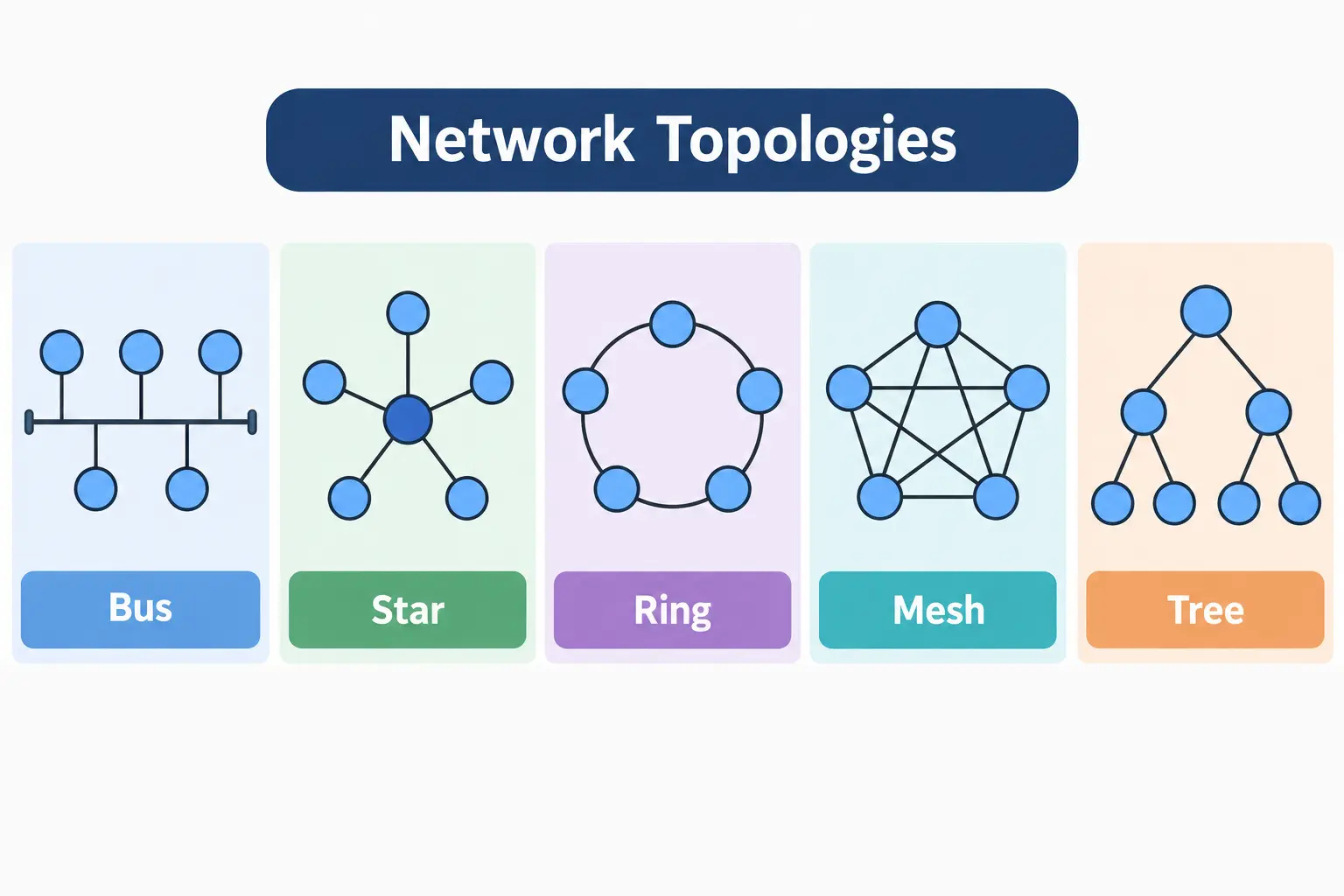
A topology is simply how devices are wired together. You’ll hear about bus (one shared cable), star (everything plugs into a central switch), ring, mesh (lots of cross-links) and tree (stars joined up). Offices mostly use star, so one failed cable drops only one PC.
Q3. What is the difference between a hub, switch and router?
- Hub (Layer 1): repeats everything to every port. Noisy.
- Switch (Layer 2): learns MAC addresses and sends data only where it needs to go.
- Router (Layer 3): joins different networks using IP addresses.
Q4. What is the difference between a MAC address and an IP address?
A MAC address is burned into the network card. An IP address is handed out and can change. Your MAC is like your ID number, and your IP is like your home address.
Q5. What are a collision domain and a broadcast domain?
A collision domain is where two devices can talk at once and clash. A broadcast domain is everyone who hears the same “shout to all.” Each switch port is its own collision domain, while routers and VLANs split broadcast domains. So a 24-port switch gives you 24 collision domains but just one broadcast domain.
OSI Model Interview Questions
Of all network engineer interview questions, the OSI model is the one almost everyone gets.
Q6. Explain the 7 layers of the OSI model
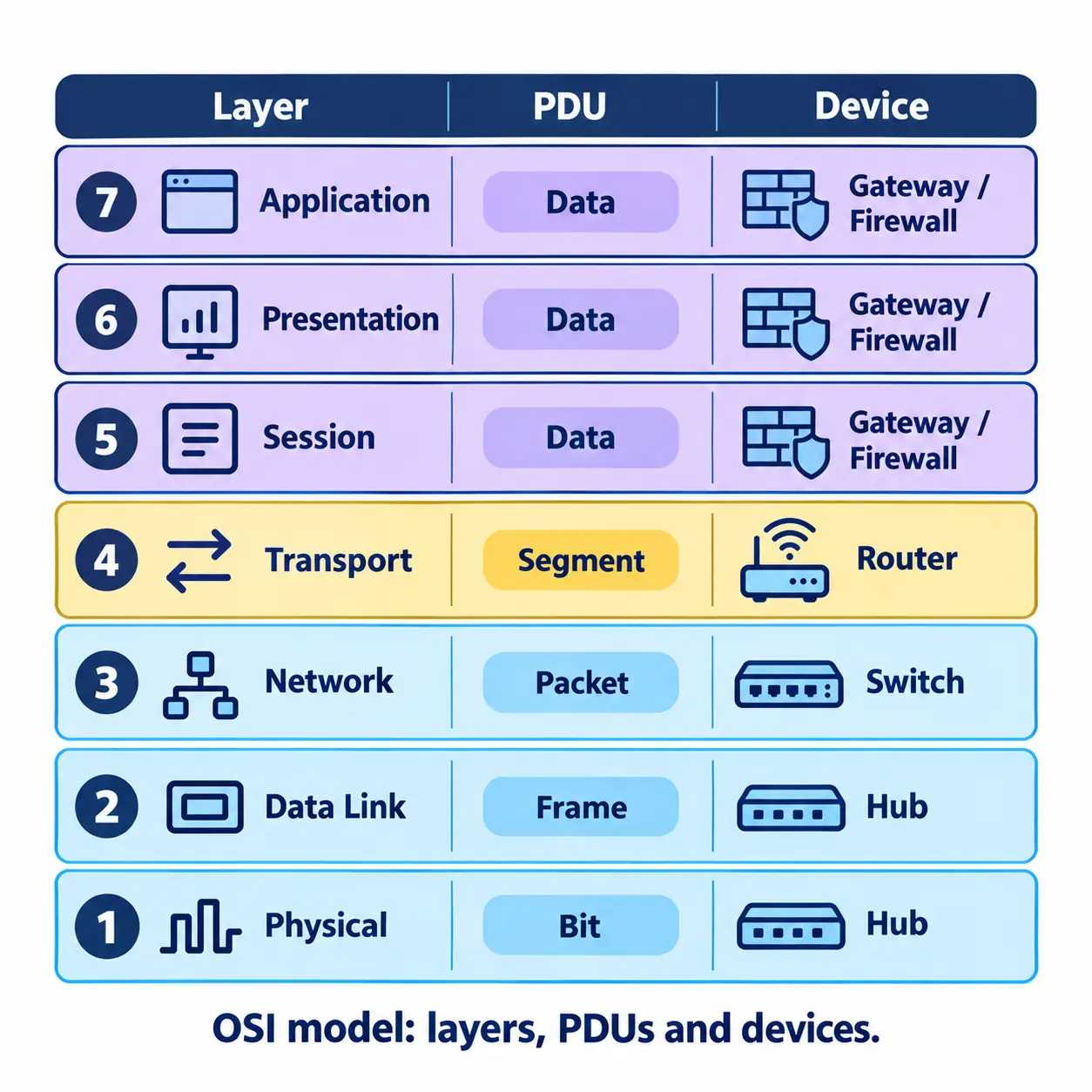
The OSI model splits network communication into seven layers, and each layer does one job.
| Layer | Name | Data unit | Example |
|---|---|---|---|
| 7 | Application | Data | HTTP, DNS |
| 6 | Presentation | Data | Encryption |
| 5 | Session | Data | Session control |
| 4 | Transport | Segment | TCP, UDP |
| 3 | Network | Packet | Router, IP |
| 2 | Data Link | Frame | Switch, MAC |
| 1 | Physical | Bits | Cable, hub |
Tip: Learn it bottom-up with one example per layer. “Please Do Not Throw Sausage Pizza Away” helps with the order.
Q7. What are encapsulation and decapsulation?
Each layer adds its own header on the way down (encapsulation). The receiver unpacks it in reverse (decapsulation).
Q8. Why do interviewers keep asking about the OSI model?
Because it gives engineers a shared way to say where a fault is. “Layer 1” usually means a bad cable or port. “Layer 2” points at a switch or VLAN. “Layer 3” means look at the IP or the route.
TCP/IP Interview Questions
Q9. What is the TCP/IP model, and how is it different from OSI?
TCP/IP has four layers (Application, Transport, Internet, Network Access) and it’s what the Internet really runs on. OSI has seven and is mostly a teaching tool. If a job ad says “understanding of TCP/IP,” expect questions on IP addressing, TCP vs UDP, ports, DNS, DHCP and HTTP.
Q10. What is the difference between TCP and UDP?
Among entry-level network engineer interview questions, TCP vs UDP comes up constantly. TCP makes sure your data arrives. UDP just sends it fast and moves on.
| Feature | TCP | UDP |
|---|---|---|
| Connection | Connection-oriented | Connectionless |
| Reliability | Resends lost data | No guarantee |
| Speed | Slower | Faster |
| Used for | Web, email, file transfer | Video calls, gaming, DNS |
Video calls prefer UDP because a tiny glitch beats a long pause.
Q11. Explain the TCP three-way handshake
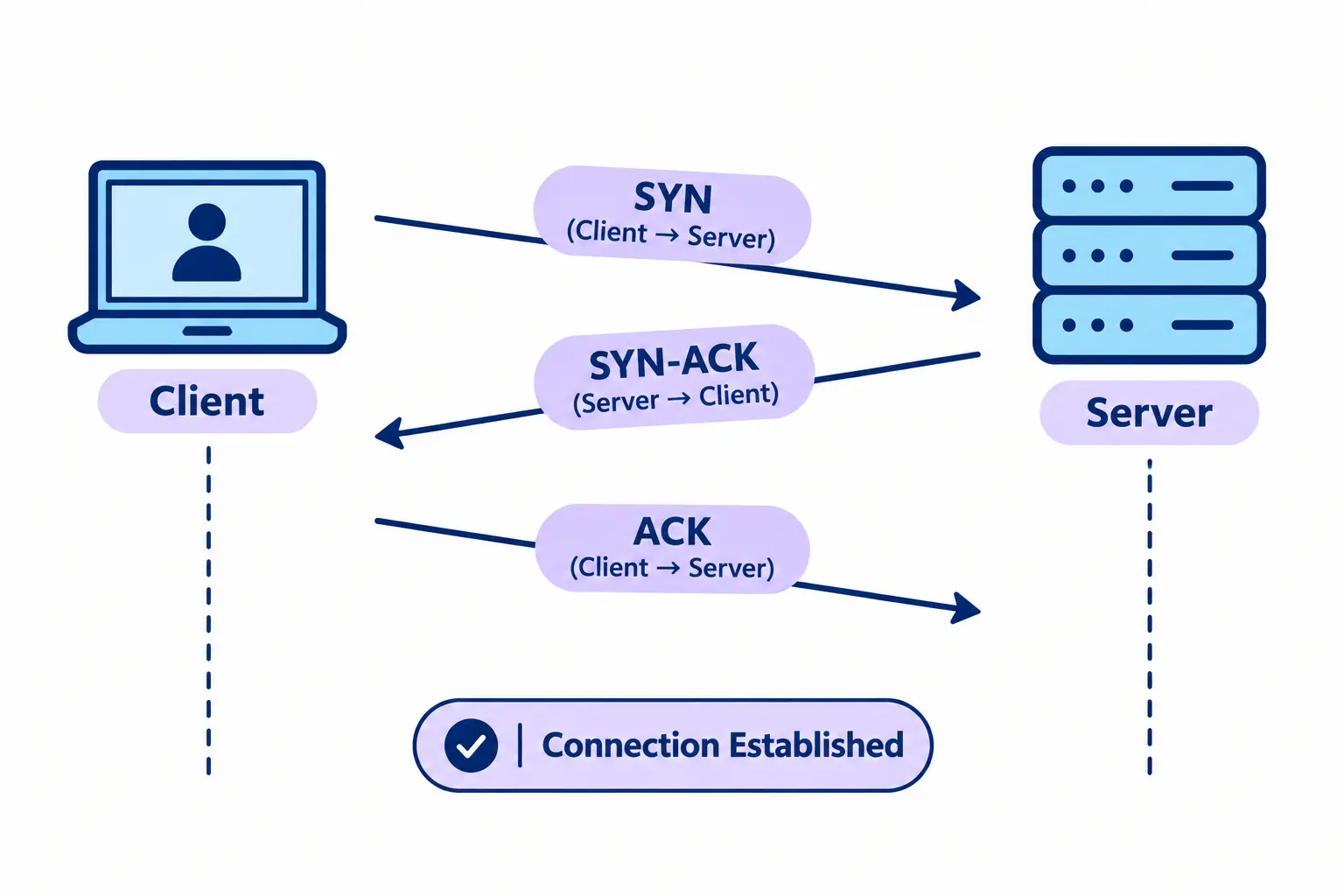
Before any data moves, TCP sets up a connection in three steps:
- SYN: the client says, “Can we talk?”
- SYN-ACK: the server says, “Yes, and I’m ready.”
- ACK: the client says, “Great, starting now.”
Follow-up to expect: “What if the SYN-ACK gets lost?” The client waits, then sends SYN again.
Q12. What are port numbers?
The IP address gets you to the right device. The port gets you to the right app on it. Learn these:
- 80: HTTP
- 443: HTTPS
- 22: SSH
- 53: DNS
- 25: SMTP (sending email)
- 67/68: DHCP
IP Addressing and Subnetting Interview Questions
Subnetting shows up in almost every set of network engineer interview questions.
Q13. What is the difference between IPv4 and IPv6?
IPv4 is 32 bits (about 4.3 billion addresses, like 192.168.1.1) and is nearly used up. IPv6 is 128 bits (like 2001:db8::1) and effectively endless. Many networks run both, called dual stack.
Q14. What are private IP addresses, NAT and PAT?
Private addresses work inside your own network and can’t be routed on the Internet:
- 10.0.0.0 to 10.255.255.255
- 172.16.0.0 to 172.31.255.255
- 192.168.0.0 to 192.168.255.255
NAT swaps a private address for a public one on the way out. PAT is the version where many devices share one public IP, kept apart by port numbers. That’s why your phone, laptop and TV can all use one home connection.
Q15. What are a subnet mask and CIDR?
A subnet mask tells you where the network part of an IP ends and the host part begins. CIDR is the short way to write it: /24 means 24 network bits.
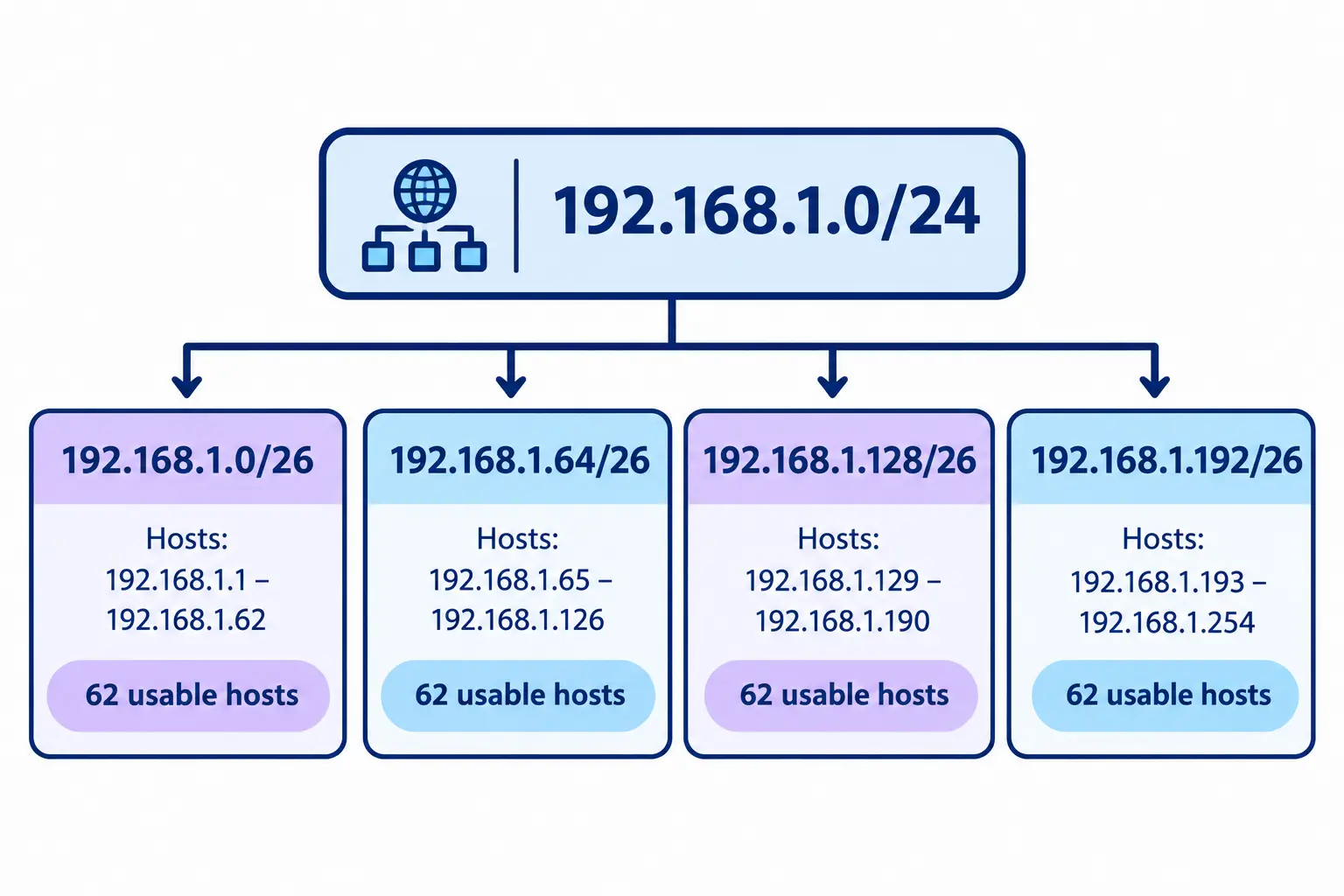
Worked example: split 192.168.1.0/24 into four equal subnets. A /24 has 254 usable hosts. Change it to /26 and you get four subnets of 64 addresses, each with 62 usable hosts.
| Subnet | Usable range |
|---|---|
| 192.168.1.0/26 | .1 to .62 |
| 192.168.1.64/26 | .65 to .126 |
| 192.168.1.128/26 | .129 to .190 |
| 192.168.1.192/26 | .193 to .254 |
Follow-up to expect: “How many usable hosts in a /27?” The answer is 30. The formula is 2^n − 2, where n is the number of host bits.
Q16. What is a default gateway?
It’s the exit door of your network. If your PC is 192.168.1.10 and the gateway is 192.168.1.1, website requests go to 192.168.1.1 first. Wrong gateway? Local devices work, but the Internet doesn’t.
DHCP Interview Questions
Q17. What is DHCP? Explain DORA
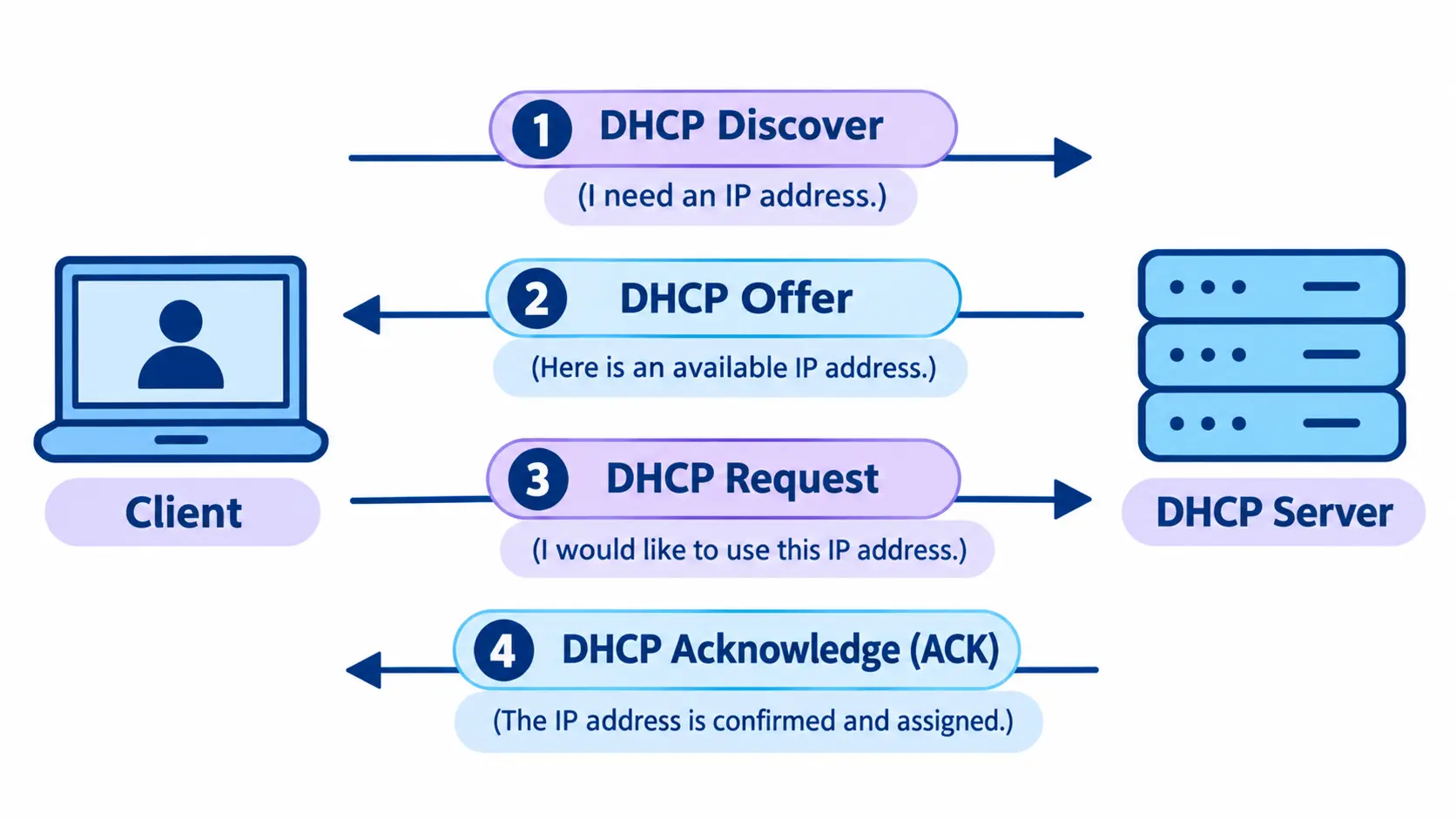
DHCP gives devices an IP address, subnet mask, gateway and DNS server automatically, so nobody types them in by hand. It happens in four steps, called DORA:
- Discover: the device shouts, “Any DHCP server here?”
- Offer: a server answers, “Use this address.”
- Request: the device says, “Okay, I’ll take it.”
- Acknowledge: the server confirms.
Tip: Mention lease time. It’s how long the device keeps the address before renewing.
Q18. What are the advantages of DHCP over static IP?
Less typing, fewer address clashes, one place to change settings. Servers, printers and routers still use static IPs.
Q19. What is APIPA?
If a device can’t find a DHCP server, it makes up a 169.254.x.x address for itself. See that in ipconfig? DHCP is probably your problem.
DNS Interview Questions
DNS is a favourite topic in network engineer interview questions because every fault seems to touch it.
Q20. How does DNS work?
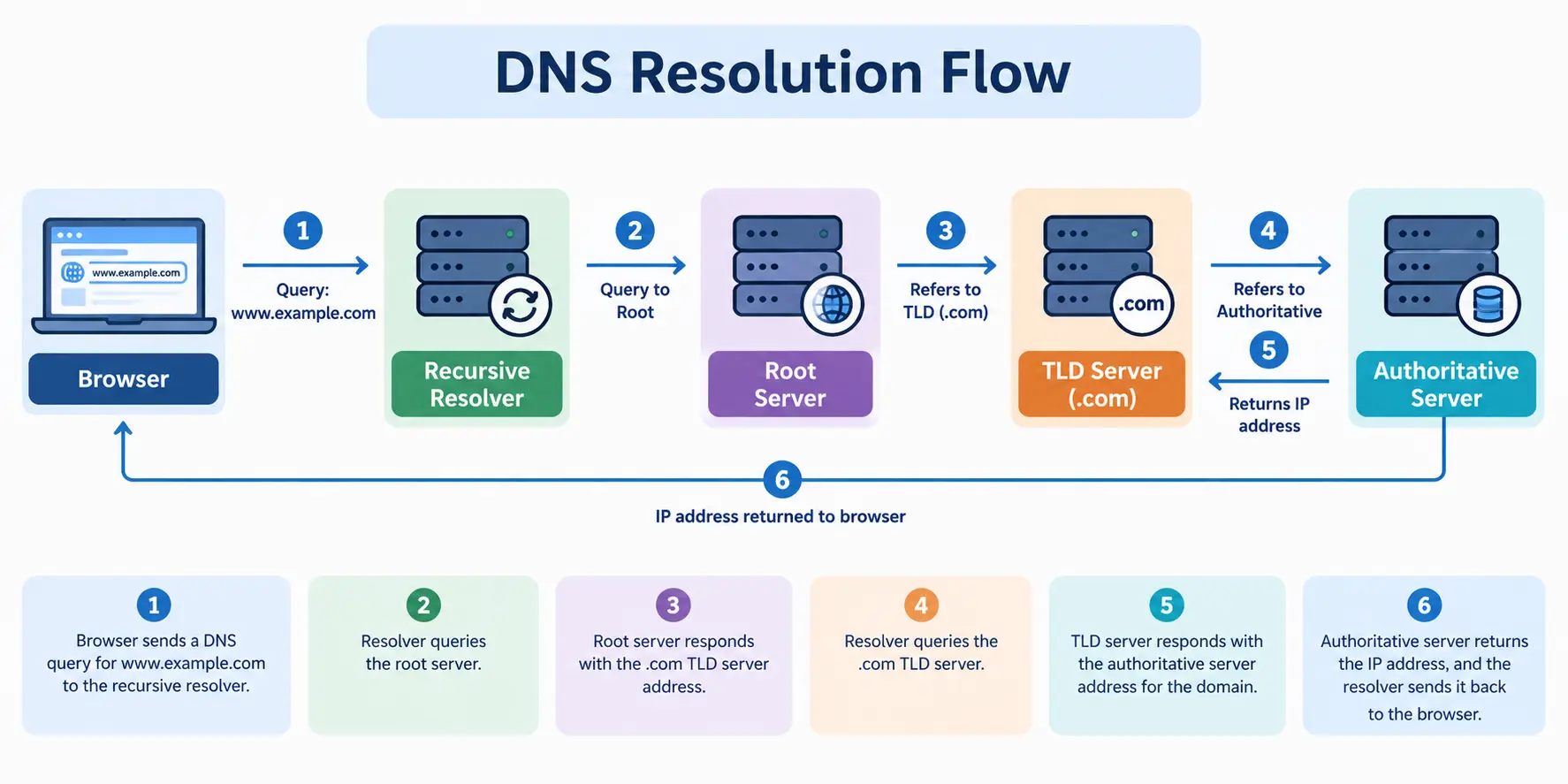
DNS turns a name like example.com into an IP address. It’s the Internet’s phone book.
- The browser checks its own cache first.
- If it finds nothing, it asks the resolver, usually your ISP’s.
- The resolver asks a root server, then a TLD server (.com), then the authoritative server.
- The answer comes back and the page loads.
Tip: If Active Directory logins feel slow, check whether the PC points to the domain controller for DNS. Using a public DNS like 8.8.8.8 is a classic cause.
Q21. What are the common DNS record types?
- A: name to IPv4 address
- AAAA: name to IPv6 address
- CNAME: an alias pointing to another name
- MX: mail servers
- PTR: IP back to name
- NS: servers for the domain
Test them with nslookup.
Switching Interview Questions: VLAN, Trunking and STP
Switching shows up often in network engineer interview questions, mostly VLANs and STP.
Q22. How does a switch learn MAC addresses?
It reads the source MAC on every frame it sees and saves it in a table with the port number. If it doesn’t know the destination yet, it floods the frame out of every other port.
Q23. What are a VLAN and trunking?
A VLAN splits one switch into separate virtual networks. Trunking carries several VLANs over one link using 802.1Q tags. Put HR and Finance in different VLANs and they can’t see each other’s traffic.
Q24. What is STP, and why is it important for a business?
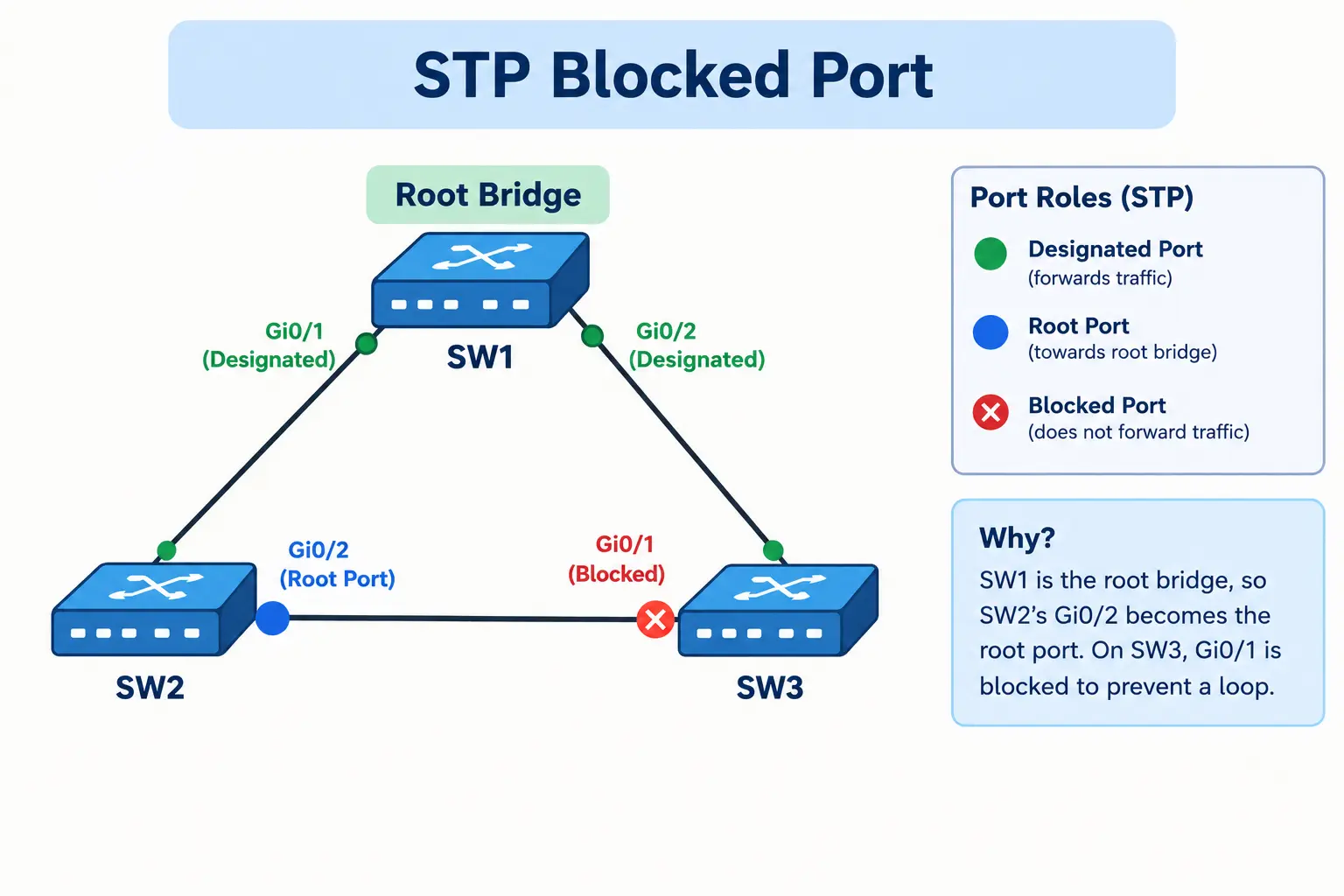
Spanning Tree Protocol stops switching loops. It picks a root bridge, blocks the extra links, and brings a blocked link back if an active one fails.
A business cares because a loop causes a broadcast storm that can freeze the office network. STP lets you keep backup cables safely.
Routing Interview Questions: Static, Dynamic and OSPF
Routing questions are simpler than they sound, and OSPF is the topic network engineer interview questions return to most.
Q25. What is the difference between static and dynamic routing?
Static routes are typed in by hand. They’re fine for small setups but won’t adapt if a link dies. Dynamic routing lets routers swap routes using OSPF or BGP and fix themselves.
Q26. What is the difference between distance vector and link-state?
Distance vector (RIP) works by word of mouth: a router only knows what its neighbors tell it. Link-state (OSPF) gives every router the full map, so it picks the best path itself and reacts faster.
Q27. What is OSPF?
OSPF (Open Shortest Path First) is a link-state protocol used inside one organization. It picks paths by cost, which comes from link bandwidth.
- Networks are split into areas. Area 0 is the backbone and every other area connects to it.
- Routers find neighbors with hello packets. On common Ethernet links that’s every 10 seconds, with a 40-second dead timer.
- On shared links, a DR and BDR are elected to cut router chatter.
Follow-up to expect: “Two routers won’t become neighbors. What do you check?” Look at hello and dead timers, area ID, subnet mask, authentication and basic connectivity.
Firewall Interview Questions
Q28. What is a firewall?
A firewall allows or blocks traffic using rules. It sits between a trusted network and an untrusted one, like the Internet. Think of a guard with a guest list.
Q29. What is the difference between a stateful and a stateless firewall?
A stateless firewall judges every packet on its own. A stateful one remembers connections, so replies to requests you sent are let back in automatically.
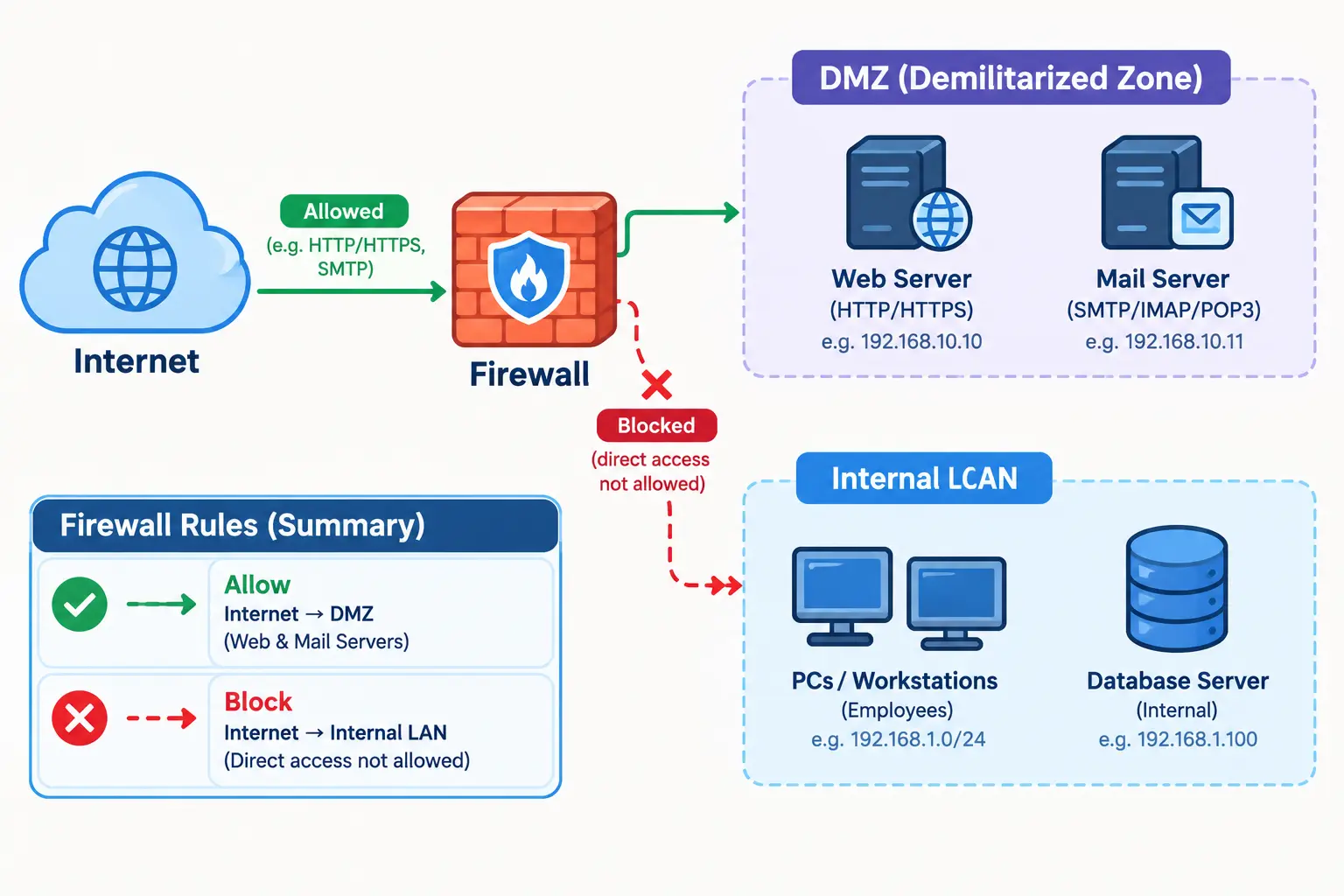
Q30. What are an ACL and a DMZ?
An ACL (Access Control List) is a list of permit and deny rules, read top to bottom. The first match wins, and anything with no match is denied. A DMZ is a separate zone for public-facing servers, like a web server, so a hacked server can’t easily reach your internal network.
VPN Interview Questions
Q31. What is a VPN?
A VPN (Virtual Private Network) wraps your traffic in an encrypted tunnel across the Internet. To explain it to a non-technical user: “It’s a private, locked tunnel between your laptop and the office.”
Q32. What is the difference between remote access and site-to-site VPN?
Remote access connects one person, like an employee working from home, to the company network. Site-to-site joins two whole networks, like head office and a branch, usually with IPsec.
Network Security Interview Questions
Security-related network engineer interview questions are usually basic at entry level.
Q33. What are common network threats?
- DDoS: a flood of traffic that knocks a server offline.
- Man-in-the-middle: someone quietly sitting between two devices and reading the traffic.
- Spoofing: pretending to be a trusted device.
- Phishing: fake emails or sites built to steal passwords.
Q34. How do you secure a network and Wi-Fi?
Split the network with VLANs, keep devices updated, use strong passwords plus multi-factor authentication, and give people only the access they need. For Wi-Fi, go with WPA3 (WPA2 at minimum) and put guests on their own network.
Network Troubleshooting Scenario Questions
Scenario-based network engineer interview questions test how you think, not what you memorized.
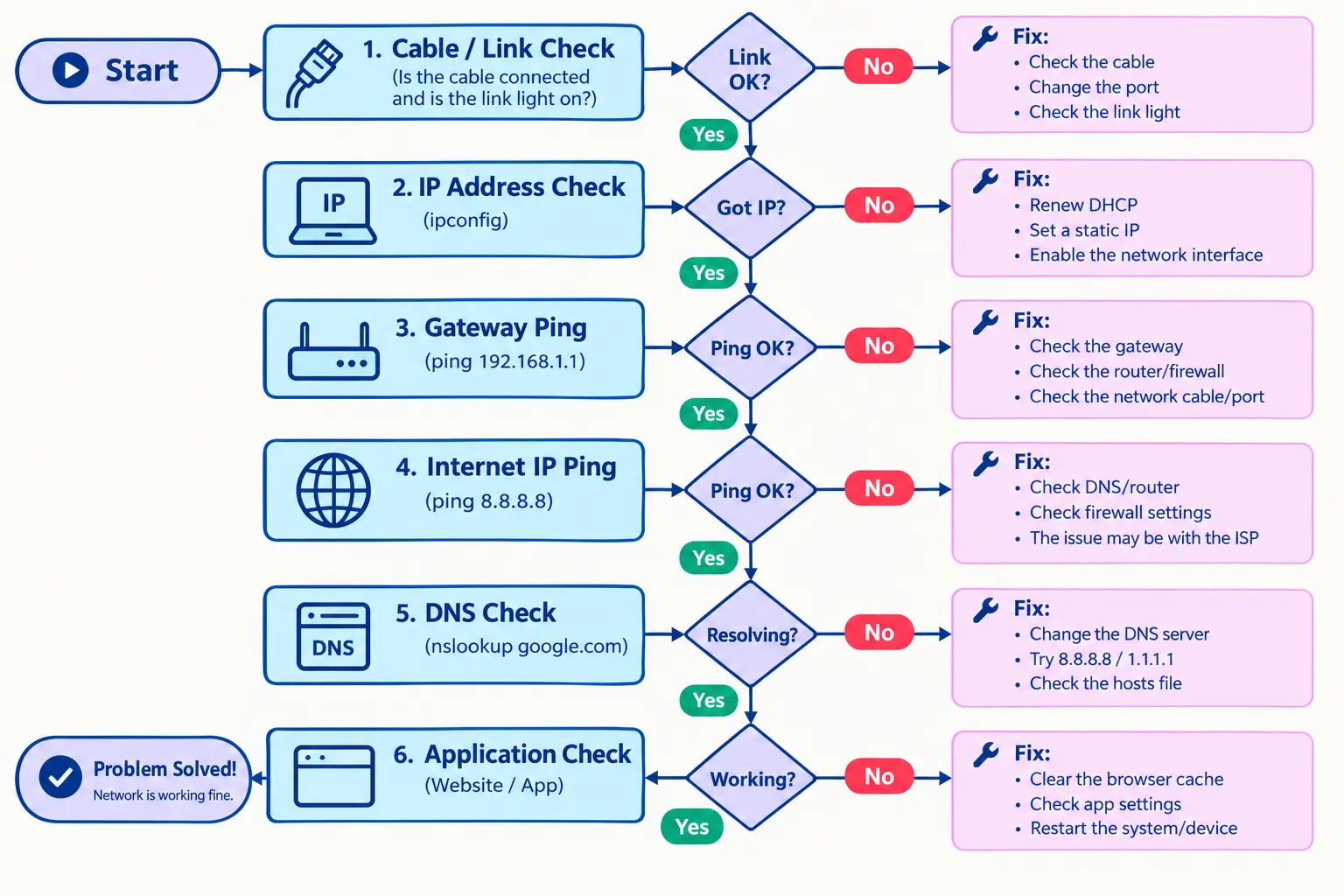
Q35. How do you troubleshoot a network issue step by step?
Start at the bottom and work up. Don’t guess.
- Understand the problem. Who’s affected? What changed?
- Check the physical link. Cable, port lights, Wi-Fi signal.
- Check IP settings. Run
ipconfigand watch for 169.254.x.x. - Ping the gateway to test the local network.
- Ping 8.8.8.8 to test the way out.
- Test DNS with
nslookup. - Check the app. Is the service running and the port open?
Follow-up to expect: “Ping to 8.8.8.8 works but websites won’t open. Why?” That’s most likely DNS.
Q36. Ping works but the website doesn’t load. What does that mean?
Basic connectivity is fine, so look higher up. DNS might be failing, a firewall might block port 80 or 443, or the web service itself might be down. You can test a port with telnet host 443.
Q37. What happens when you type a URL in the browser?
- The browser checks its cache, then asks DNS for the IP.
- It opens a TCP connection (the three-way handshake).
- For HTTPS, a TLS handshake sets up encryption.
- It sends an HTTP request.
- The server replies and the page appears.
Q38. You have only a laptop with a DHCP IP. How do you discover the network?
Only try this on a network you’re allowed to test.
- Run
ipconfig /allto see your IP, mask, gateway and DNS. - Check
arp -ato spot nearby devices. - Ping the gateway and scan your own subnet.
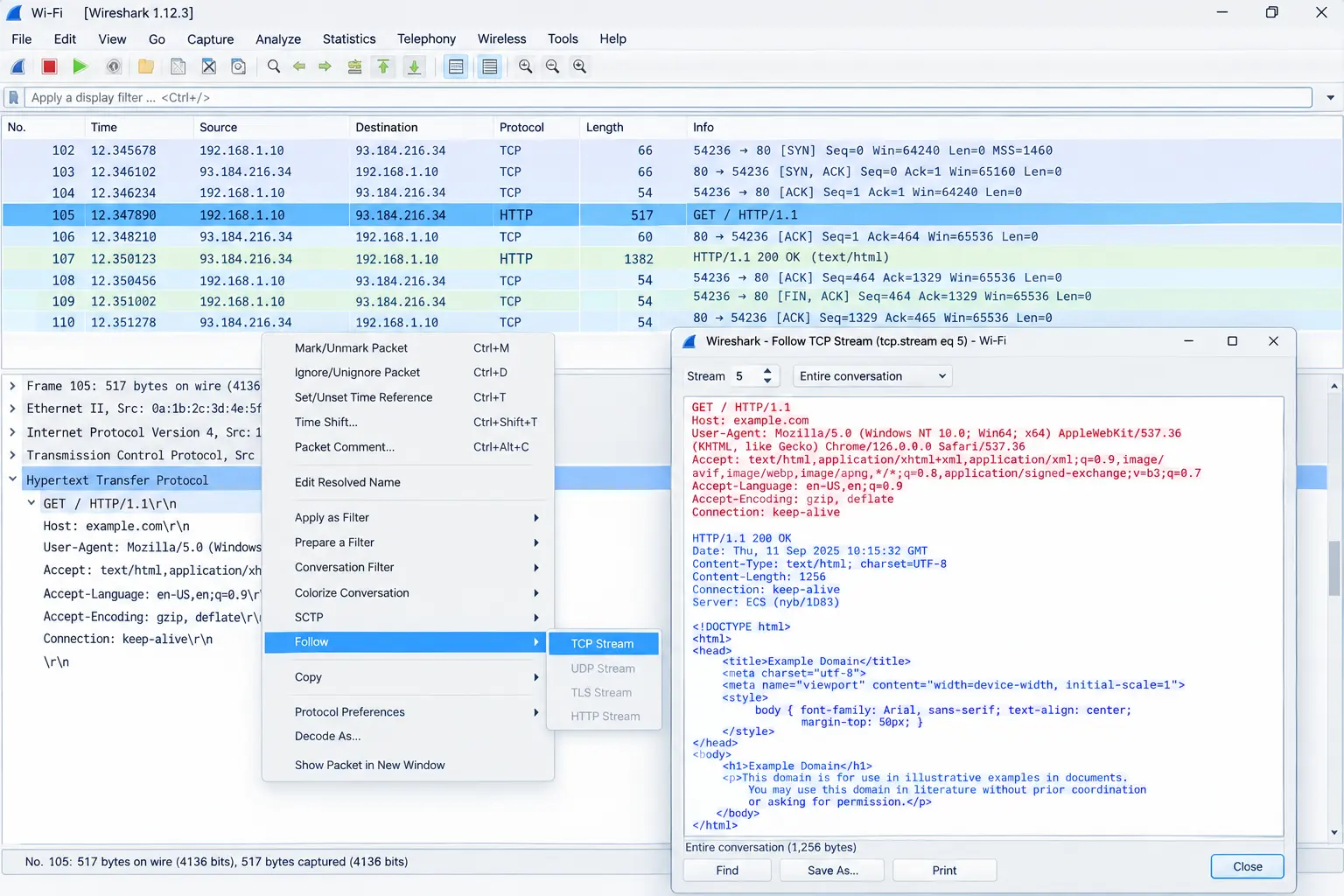
- Open Wireshark and watch the broadcast traffic to see which devices and protocols are active.
CLI cheat table
| Command | What it does |
|---|---|
ipconfig /all (Windows), ip a (Linux) | Shows IP, mask, gateway, DNS |
ping | Tests if a device is reachable |
tracert / traceroute | Shows the path to a destination |
nslookup | Tests DNS |
netstat -an | Shows open connections and ports |
show ip interface brief | Shows interface status (Cisco) |
show ip route | Shows the routing table |
show vlan brief | Shows VLANs on a switch |
Behavioral Interview Questions
Behavioral network engineer interview questions are easier than they look.
Q39. What do you do when you don’t know the answer?
Show that you try first, then ask smartly: “I check the documentation and test in my lab. If I’m still stuck, I ask a teammate and share what I tried.”
Q40. Tell me about the toughest technical problem you solved
Use the STAR method (Situation, Task, Action, Result). Swap this sample for your own story.
- Situation: new users in our college lab couldn’t connect to Wi-Fi.
- Action: I saw 169.254.x.x addresses, checked the DHCP server and found the address pool full of old leases.
- Result: I shortened the lease time and widened the pool. Everyone was online within the hour.
How to Prepare for a Network Engineer Interview
Certifications
CCNA and CompTIA Network+ prove you know the basics.
Home lab
Use Packet Tracer, GNS3 or EVE-NG. Build a small network, add VLANs, set up OSPF, then break it on purpose and fix it.
Resume
List only what you can explain.
Questions to ask the interviewer
What does a typical day look like? Which tools does the team use? How do new engineers learn?
Frequently Asked Questions
What is asked most in an entry-level network engineer interview?
Most network engineer interview questions at entry level cover OSI, TCP vs UDP, subnetting, DHCP, DNS, VLANs and basic troubleshooting.
Is CCNA required for an entry-level network engineer job?
No, but it helps. CCNA or CompTIA Network+ shows employers you know the basics. Lab practice and clear answers can also work.
How do I prepare for a network engineer interview?
Learn OSI, TCP/IP, subnetting, DHCP and DNS first. Then practice in Packet Tracer or GNS3 and prepare one real story.
What is the difference between L1, L2 and L3 network engineers?
L1 handles basic support, L2 handles configuration and harder faults, and L3 designs networks and solves complex problems.
Do network engineers need coding?
Not for most entry-level roles. Basic Python helps automate tasks, but networking basics matter more at the start.
What is the toughest network interview question?
Open scenarios like “What happens when you type a URL?” Answer step by step.
How do I crack a network engineer interview with no experience?
Build a home lab, earn CCNA or Network+, and practice explaining concepts simply. Count lab projects as experience.
Conclusion
You don’t need to know everything to pass an entry-level network interview. Learn the basics, practice in a lab, and explain your thinking in simple words. Work through these network engineer interview questions in order, then practice them out loud.