
OSI Reference Model in Computer Networks: All 7 Layers Simplified
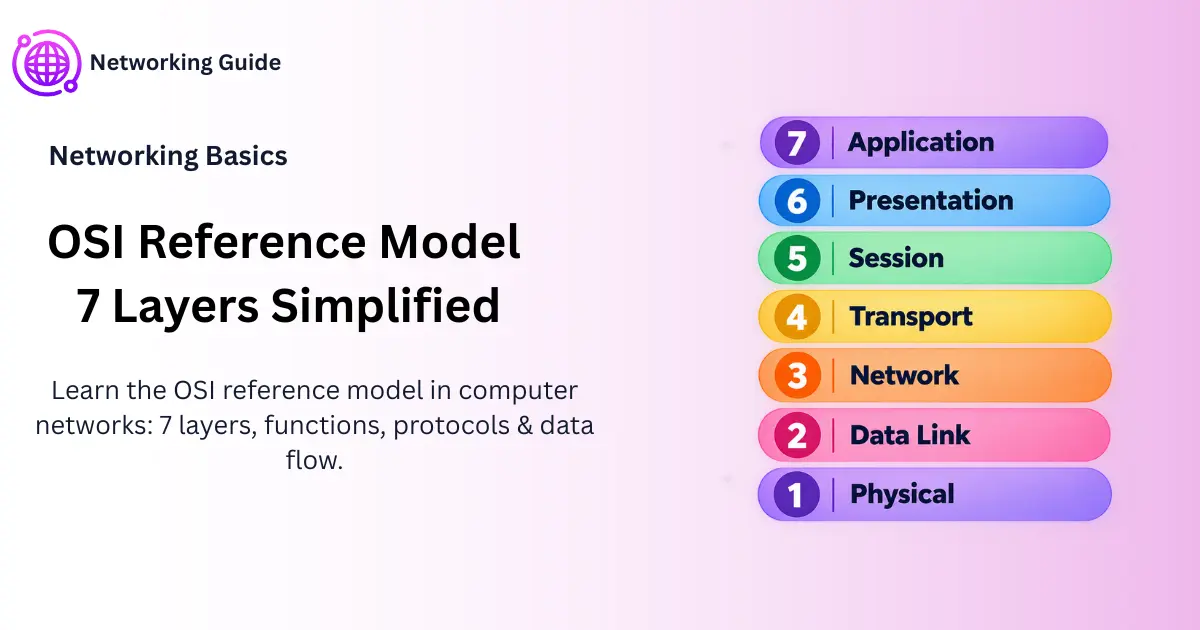
Ever wondered how an email actually gets from your laptop to someone’s inbox on the other side of the world? The OSI reference model in computer networks is the answer — a 7-layer system that breaks that whole journey into manageable steps. OSI stands for Open Systems Interconnection, and ISO built it in 1984 so that random pieces of hardware from different companies could actually understand each other.
Before You Start
Table of Contents
What Is the OSI Reference Model in Computer Networks?
Here’s an easy way to picture it. Say you’re mailing a package. You pack the item, wrap it, write an address on it, hand it to a courier, and a truck eventually drops it off at someone’s doorstep. You didn’t do all of that yourself — different people handled different parts. Network data works the same way. The OSI model just names those 7 “jobs” so that your phone, a router in Singapore, and a server in Texas all agree on who does what. Once you understand this OSI reference model in computer networks, most networking concepts become much easier to follow.
What Does OSI Stand For?
OSI stands for Open Systems Interconnection. The “open” part matters — it means no single company owns this. A router from one brand and a switch from a totally different one can both follow OSI rules and still work fine together.
So why do people still bother learning this if the actual internet runs on something else? A few reasons come up constantly in networking classes and interviews:
- It makes troubleshooting way less confusing — Wi-Fi down? Check cables first, not your browser settings.
- Hardware from completely different vendors stays compatible.
- Teams can improve one layer (say, add better encryption) without redesigning everything else.
Worth mentioning early on — OSI isn’t software you install, and it’s not a protocol running somewhere. It’s just a reference model. A blueprint, really, describing how communication should be organized.
OSI Model Detail: 7 Layers at a Glance
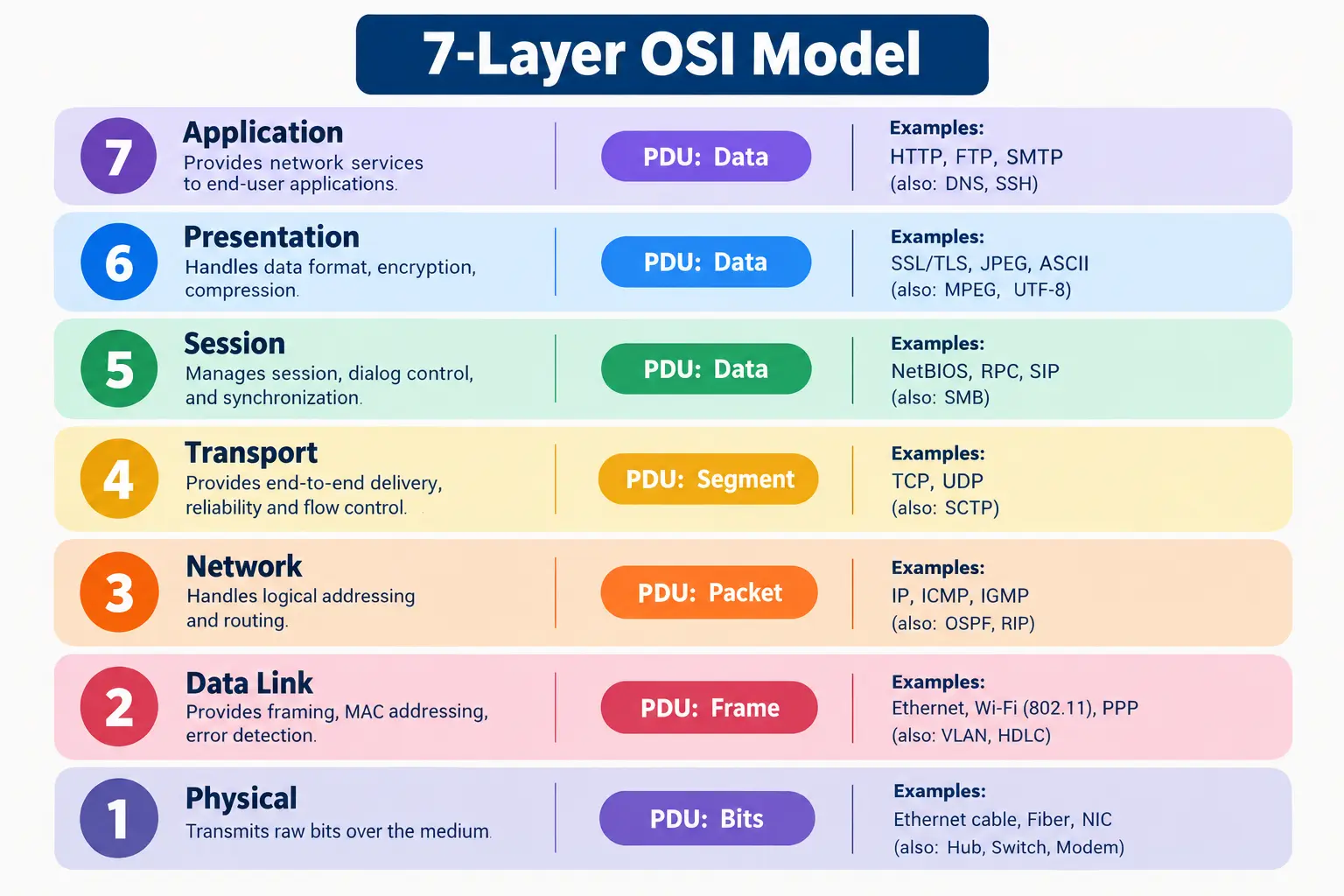
Here’s everything in one place. “Data unit” (or PDU — Protocol Data Unit) is just what that chunk of data gets called at each stage.
| Layer | Name | Data Unit | Example Protocols | Example Devices |
| 7 | Application | Data | HTTP, DNS, SMTP | — |
| 6 | Presentation | Data | TLS/SSL, JPEG | — |
| 5 | Session | Data | RPC, NetBIOS | — |
| 4 | Transport | Segment | TCP, UDP | — |
| 3 | Network | Packet | IP, ICMP | Router |
| 2 | Data Link | Frame | Ethernet | Switch |
| 1 | Physical | Bits | USB, Ethernet cable | Hub, Cable |
Most people remember the order with this old trick: All People Seem To Need Data Processing. Application, Presentation, Session, Transport, Network, Data Link, Physical — top to bottom.
Application Layer in OSI Model (Layer 7)
Quick myth to clear up first — the Application Layer isn’t “the app.” Chrome, Outlook, WhatsApp, none of these are technically part of this layer. What this layer actually is, is the set of rules that let those apps talk to the network at all.
What it handles:
- Lets programs request stuff from the network — loading a page, checking mail, syncing files
- Covers file sharing and remote access too
- It’s the 7th and topmost layer, right where users actually interact with things
Type a web address into your browser and hit enter. That request leaving your device? That’s this layer quietly doing its thing.
Application Layer Protocols
| Protocol | Port | Used For |
| HTTP | 80 | Loading websites |
| HTTPS | 443 | Loading secure websites |
| FTP | 21 | Transferring files |
| SMTP | 25 | Sending emails |
| DNS | 53 | Turning website names into IP addresses |
Presentation Layer in OSI Model (Layer 6)
If Application decides what needs to be said, Presentation figures out how to phrase it so both ends can actually read it. That’s why some call it the translation layer.
Functions of the Presentation Layer:
- Translation — puts data into a format both sides understand
- Encryption — scrambles it using TLS/SSL so nobody snooping can read it
- Compression — shrinks the file size before sending
That little padlock next to “https” in your address bar? Presentation Layer, doing the encryption bit.
Quick answer, since people search this a lot: encryption (TLS/SSL), compression, and formats like JPEG or MPEG all fall under presentation. This step in the OSI reference model in computer networks is what keeps your data secure and readable.
Session Layer in OSI Model (Layer 5)
The Session Layer is basically the one managing whether the “conversation” between two devices stays open — not what’s being said, just whether the line’s still connected.
What it does:
- Opens and closes connections between two systems
- Keeps that connection alive as long as data’s flowing
- Drops in checkpoints, so if something disconnects, it doesn’t have to restart from scratch
During a video call, this is the layer quietly holding the connection together until someone actually hangs up.
Transport Layer in OSI Model (Layer 4)
This one’s a bit more technical, but it’s worth understanding well. Transport’s whole job is making sure data lands in the right app — not just the right device.
Functions of Transport Layer
- Segmentation — breaks big chunks of data into smaller, manageable segments
- Port addressing — uses port numbers so data finds the correct app (this is called process-to-process delivery)
- Flow control — keeps a fast sender from overwhelming a slower receiver
- Error control — double-checks nothing got lost or corrupted
Transport Layer Protocols
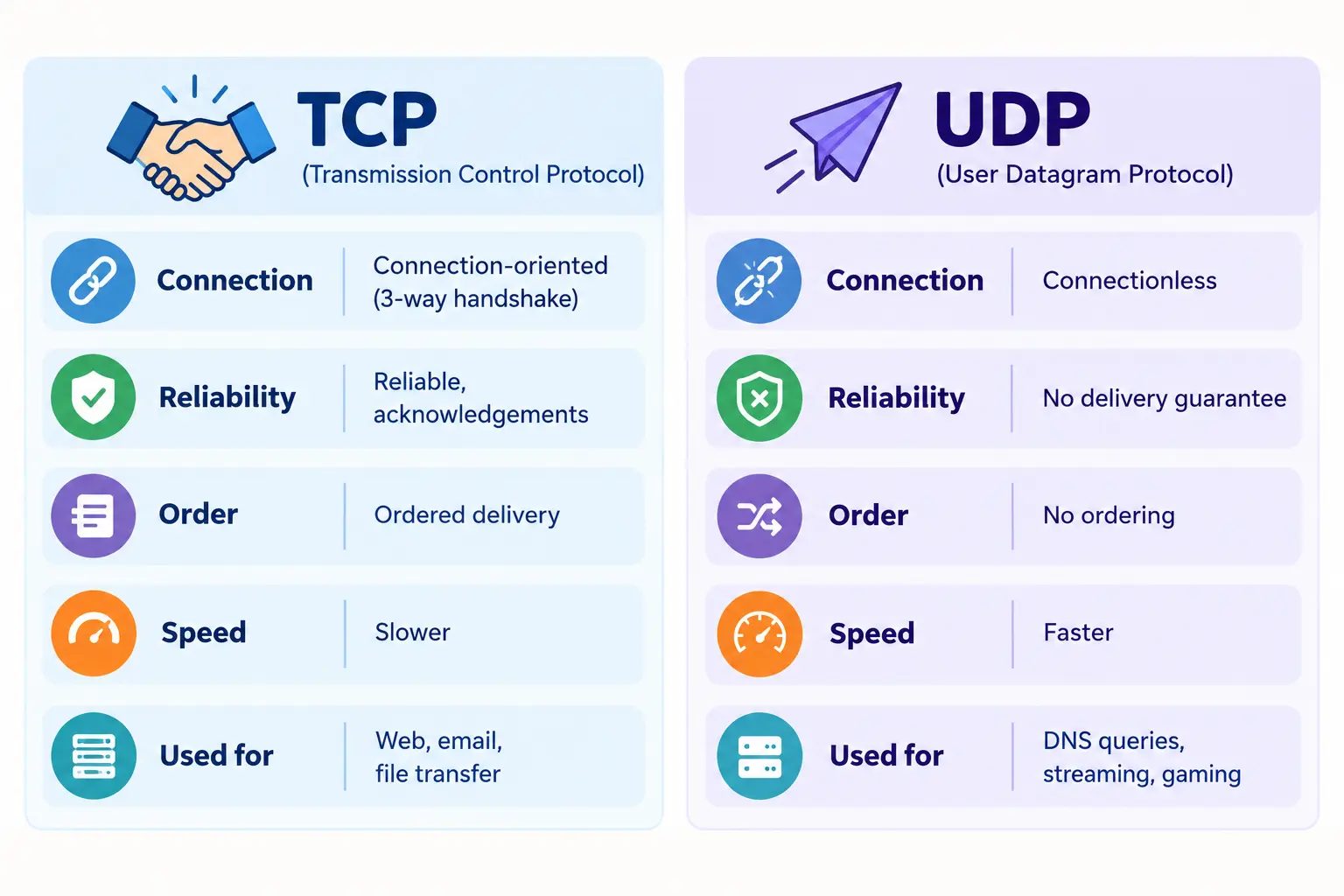
| Feature | TCP | UDP |
| Connection | Needs a handshake | No handshake |
| Reliability | Reliable, confirms delivery | No guarantee |
| Speed | Slower | Faster |
| Best for | Email, browsing, downloads | Gaming, live streams, video calls |
TCP works like shipping something with tracking and a signature on delivery. UDP’s more like shouting across a noisy room — fast, but if nobody catches it, that’s just how it goes.
OSI Model Network Layer (Layer 3): IP Addressing and Routing
In the OSI reference model in computer networks, the Network Layer sits right in the middle of the stack. Once Transport’s broken everything into segments, the Network Layer’s job is figuring out the actual route the data should take.
What it does:
- Assigns IP addresses so devices can be identified
- Picks the best path across networks — this is routing
- Wraps data into packets
It’s honestly a lot like using a maps app to dodge traffic — except routers are picking the path, and packets are what’s traveling.
Data Link Layer in OSI Model (Layer 2)
Once the route’s picked, something still has to physically move the data one step at a time, device to device. That’s on the Data Link Layer. This layer plays a key role in how the OSI reference model in computer networks handles local delivery.
Data Link Layer Functions
The three primary functions here are framing, physical (MAC) addressing, and error and flow control. Beyond those, there’s also:
- Framing — wraps raw data into structured frames with clear start and end markers
- MAC addressing — tags data with hardware addresses so nearby devices know who it’s for
- Access control — sorts out whose turn it is to send data when several devices share one connection
Twenty laptops on one office router? This layer’s the reason your download doesn’t accidentally land on your coworker’s screen.
Physical Layer in OSI Model (Layer 1)
Everything above this layer relies on it working properly. This is the actual hardware — cables, connectors, signals, the physical stuff.
What it does:
- Sends raw bits (0s and 1s) as electrical pulses, light, or radio waves
- Covers cable types, connectors, hubs, repeaters
- Sets the transmission direction — simplex (one-way), half-duplex (one at a time), full-duplex (both ways at once)
The Ethernet cable running into your router has no clue what data it’s carrying. It just pushes signals through. That’s all this layer does, really.
One-liner for the relationship: Physical ships raw bits, Data Link turns those bits into organized frames.
How Data Actually Travels: Encapsulation and Decapsulation
Here’s a way to think about it that tends to stick. Picture wrapping a gift for shipping:
- Gift goes in a box — that’s your Application Layer data
- Bubble wrap goes around it — Presentation Layer
- You scribble “Fragile” on the outside — Session Layer
- A tracking label gets slapped on — Transport Layer (it’s officially a segment now)
- You write the destination address — Network Layer (now it’s a packet)
- The courier adds their own routing sticker — Data Link Layer (now it’s a frame)
- The truck actually drives it over — Physical Layer (now it’s just bits on a wire)
Once it arrives, all of this happens backward. Each layer strips off its own wrapping until only the original gift is left.
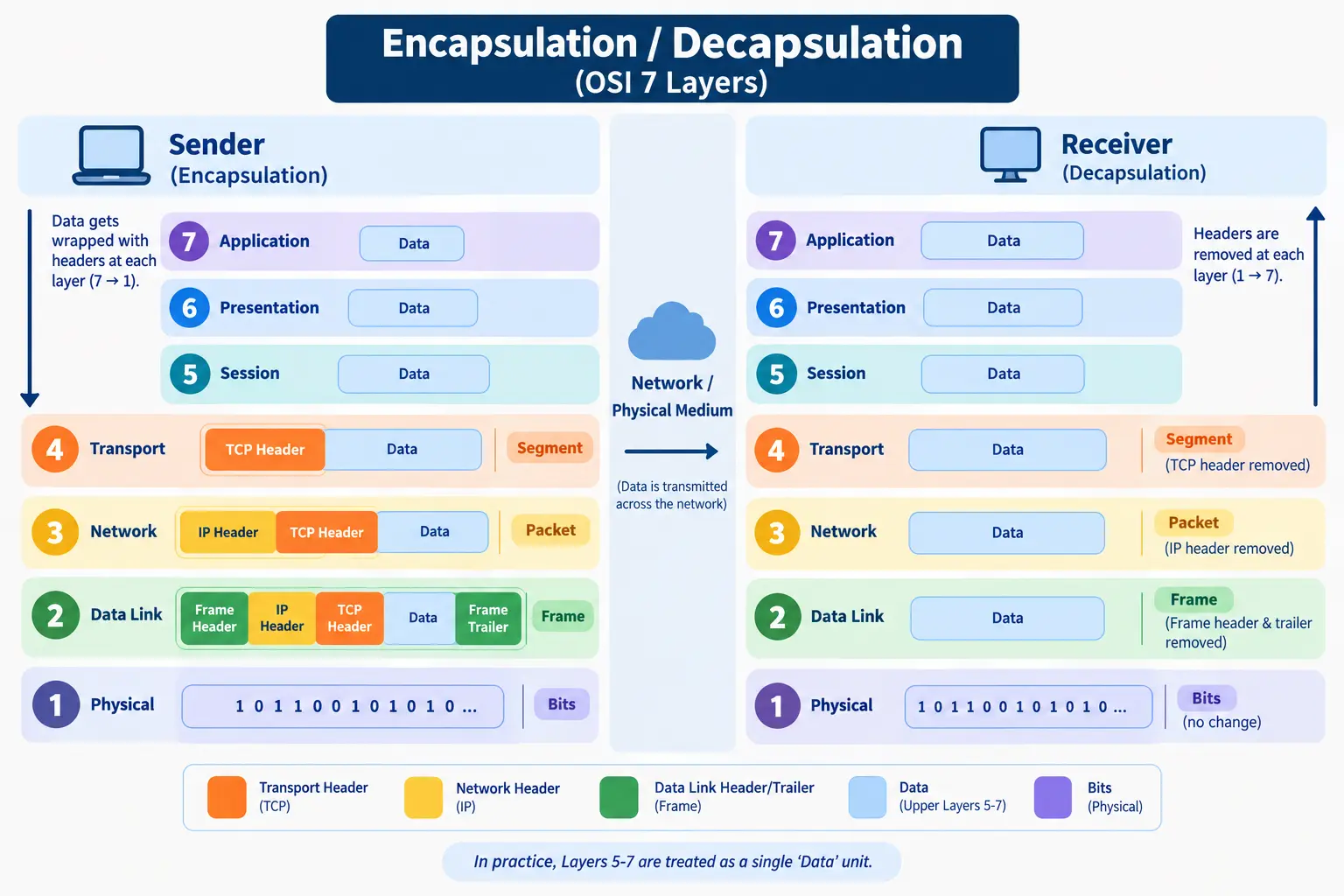
A question that pops up constantly: does every layer really add its own header? Technically, yes, according to pure OSI theory. But in real-world networking, layers 5 through 7 usually get treated as one combined “data” block. Headers really start showing up from Transport downward — and Data Link’s a bit special here since it tacks on both a header and a trailer.
Application vs Transport vs Network vs Data Link Layer: Key Differences
Understanding these layers is where most people studying the OSI reference model in computer networks get stuck. Almost every beginner mixes these four up at some point, so here’s a direct comparison:
| Layer | Delivers Between | Uses This Address | Data Unit |
| Application | User to app | Domain name / URL | Data |
| Transport | Process to process | Port number | Segment |
| Network | Host to host | IP address | Packet |
| Data Link | Device to device (same network) | MAC address | Frame |
One way to keep it straight: Transport gets data to the right app, Network gets it to the right device somewhere on the internet, and Data Link gets it to the right device on your own local network.
OSI Model vs TCP/IP Model
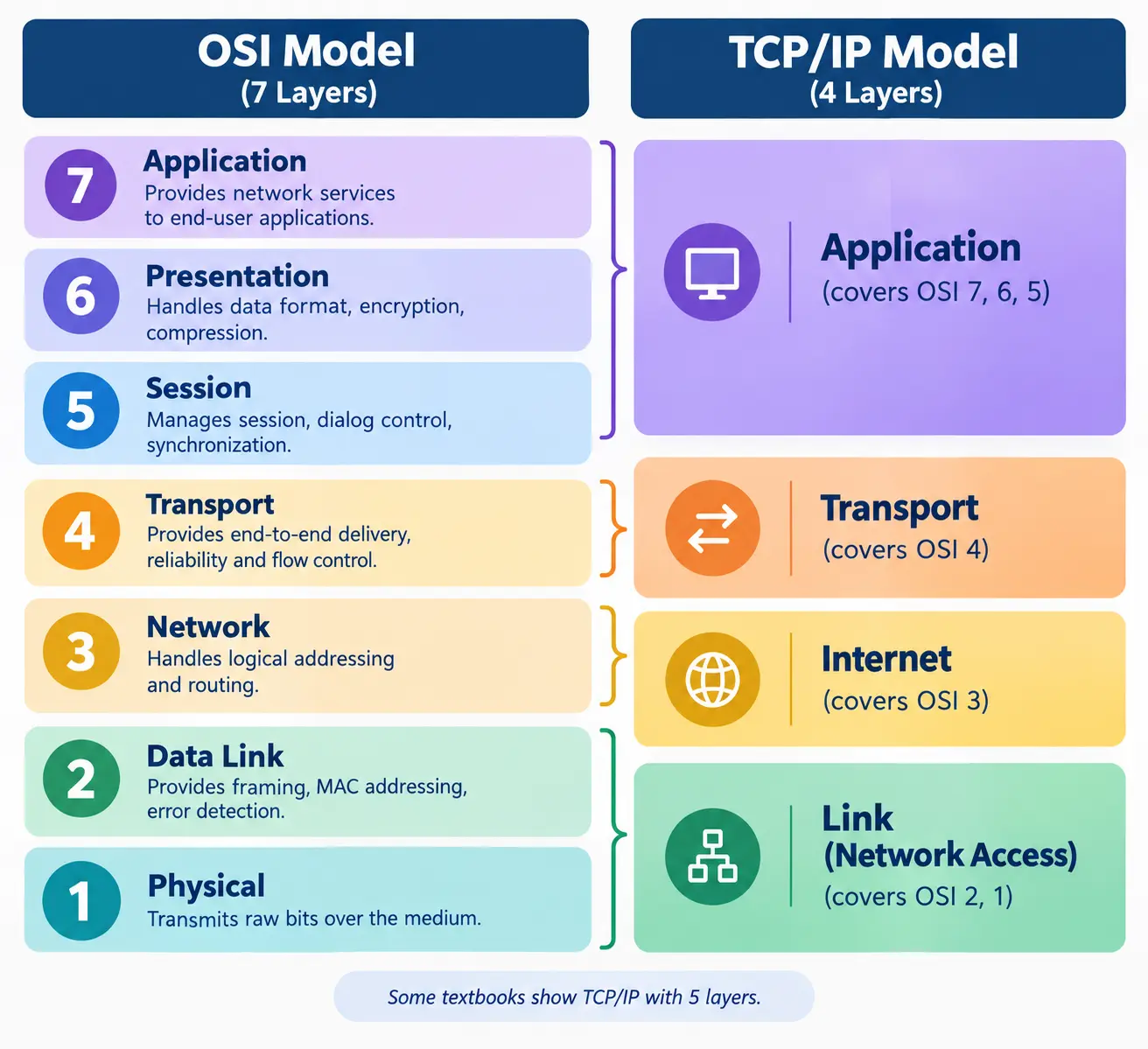
Here’s something that surprises a lot of beginners — the internet doesn’t actually run on OSI. It runs on TCP/IP, a simpler model with just 4 layers.
| OSI Model | TCP/IP Model | |
| Layers | 7 | 4 |
| Type | Theoretical | Practical, actually used |
| Created by | ISO | US Department of Defense |
TCP/IP squashes OSI’s Application, Presentation, and Session layers into one single Application layer, then merges Physical and Data Link into one Network Access layer.
Using the OSI Model to Fix Network Problems
This is where OSI stops feeling like an exam topic and starts actually paying off on the job.
| Problem | Check This Layer | How |
| No internet at all | Physical | Check the cable, look for the Wi-Fi light |
| Device won’t show up on the network | Data Link | Check MAC address, switch ports |
| Can’t reach a site by IP | Network | Run ping or traceroute |
| App keeps disconnecting | Transport | Check the port, check the firewall |
| Site loads but looks broken | Application | Check DNS, check the browser |
Frequently Asked Questions
Here are quick answers to the most common questions about the OSI reference model in computer networks.
What does OSI stand for?
OSI stands for Open Systems Interconnection — a 7-layer model built by ISO to standardize how devices talk to each other over a network.
What is the 7th layer of the OSI model?
The Application Layer. It’s the one closest to the end user, covering protocols like HTTP, DNS, and SMTP.
Do the application, presentation, and session layers add headers to data?
In theory, yes. In practice, most systems bundle layers 5 through 7 into one block, with real headers mostly starting from the Transport Layer.
What is the difference between the transport layer and the network layer?
Transport gets data to the right app using port numbers. Network gets it to the right device using IP addresses.
What is the relationship between the data link layer and the physical layer?
Physical sends raw bits as signals. Data Link takes those bits and organizes them into addressed frames.
What is the use of the session and presentation layer?
Session manages the connection itself — opening it, keeping it alive, closing it. Presentation handles formatting, encrypting, and compressing the actual data.
Conclusion
So yeah — the OSI reference model in computer networks looks like a lot at first glance, but it’s really just 7 handoffs happening one after another. Start with an email you’re typing, end with a signal moving through a cable. Once that clicks, most of networking starts making a lot more sense.