
Different Types of Network Topologies: LAN, WAN, Star & Mesh Guide
A network’s layout — how its devices connect and share data — is called its topology, and it shapes almost everything about how well that network runs. This guide walks through the different types of network topologies, from Star to Mesh, with plain explanations and real examples.
Before You Start
Table of Contents
What is Network Topology? (Overview of Different Types)
At its core, network topology is just the layout of a network — how computers, cables, and other devices are arranged and wired together. If you drew a map of how information moves from one device to the next, that map would be the topology.
There are two ways to look at it:
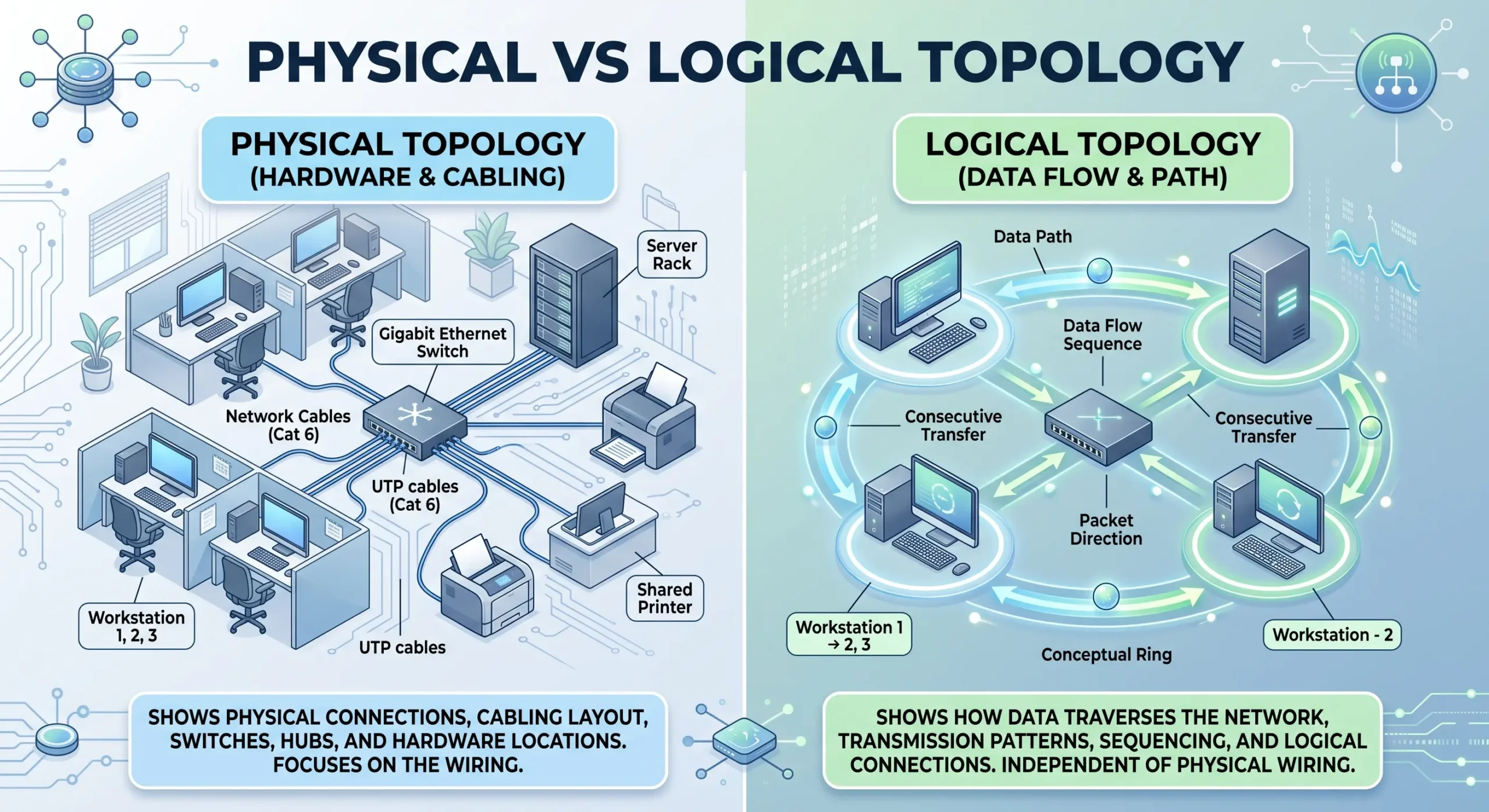
- Physical topology – the real, physical arrangement of cables and hardware you could actually walk up and touch.
- Logical topology – the path the data itself takes, which isn’t always the same as the physical layout.
The topology you pick ends up affecting speed, cost, and how reliable the network is. That’s really why it matters, whether you’re wiring up a home Wi-Fi setup or planning an office LAN. Knowing the different types of network topologies also makes it easier to plan for future growth and fix problems faster.
Physical vs Logical Topology
Physical Topology
This is the part you can see and touch — the actual cables, switches, and devices, and how they’re wired to each other.
Logical Topology
This is how data moves through the network, regardless of how the wires are laid out. A network can be physically wired like a star, and the data traveling through it can still follow a completely different pattern depending on the protocol being used.
Real-life example: In a typical office Wi-Fi setup, the physical layout looks like a star — every device connects back to one router. But the logical path the data takes can vary depending on how the network is configured.
LAN vs WAN: Which Network Topology Fits Where?
Not every topology suits every network. What works for a small office LAN usually won’t cut it for a company’s WAN, and vice versa.
Best Topologies for LAN
A LAN (Local Area Network) covers a small area — a single building or office, usually.
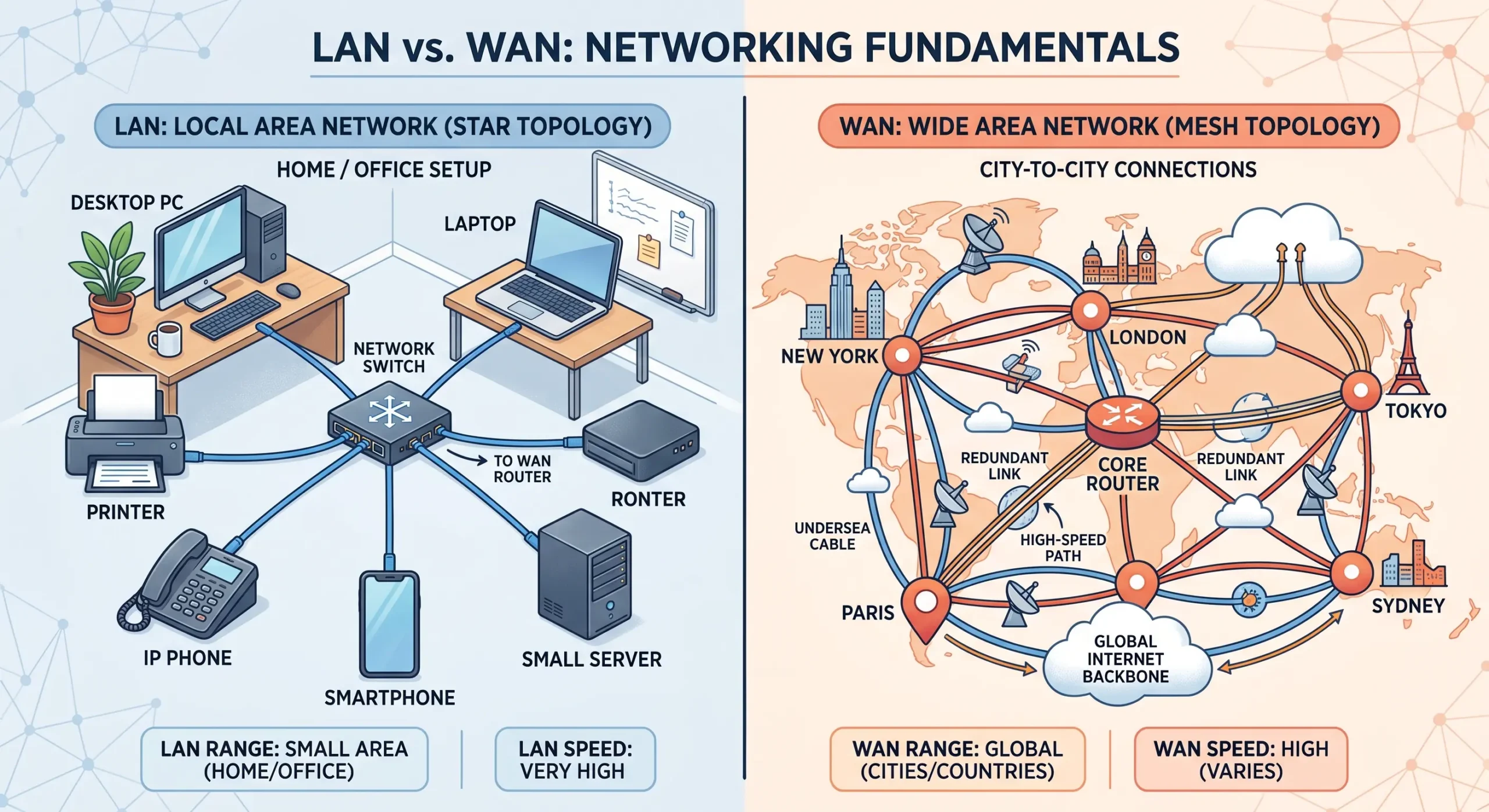
- Star topology is the go-to for LANs because it’s simple to set up and just as simple to manage.
- Bus topology used to be common in older LANs, though you rarely see it used today.
Real-life example: A small office where every computer connects back to one central switch — that’s a LAN built on star topology.
Best Topologies for WAN
A WAN (Wide Area Network) stretches across cities, countries, or continents.
- Mesh topology shows up a lot in WANs because it’s reliable — if one path goes down, data just reroutes through another.
- Hybrid topology is also common for large WANs, since it blends more than one topology type.
Real-life example: The internet itself basically runs like one giant mesh network, with countless paths connecting servers all over the world.
7 Different Types of Network Topologies Explained
Point-to-Point Topology
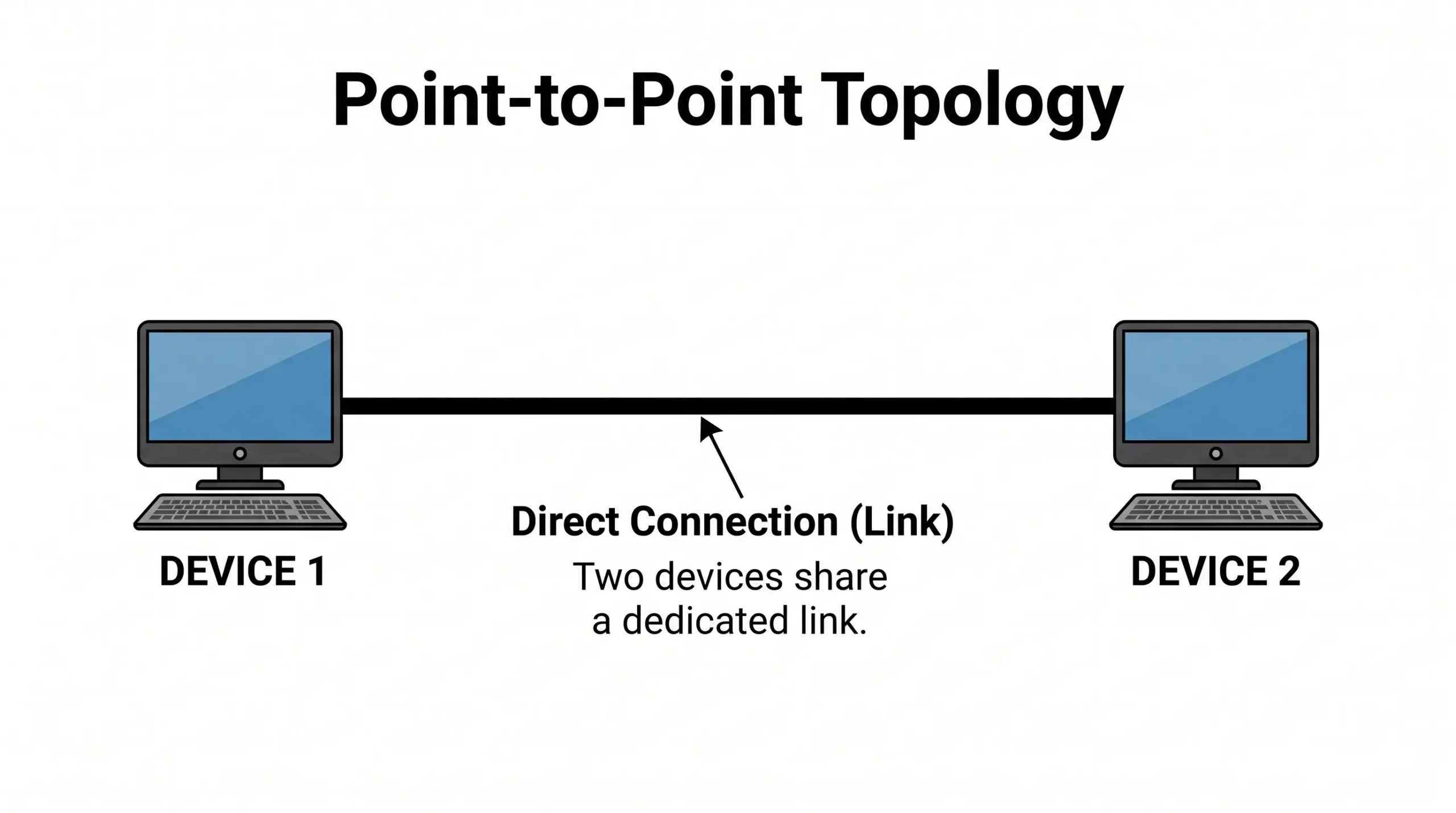
This is about as simple as topology gets — a direct link connecting exactly two devices.
- Fast and fairly secure, since it’s only two devices talking to each other.
- Quick to set up.
Real-life example: Two office branches connected through a leased line, or a direct link between two routers.
Bus Topology: Advantages, Disadvantages & Real-Life Examples
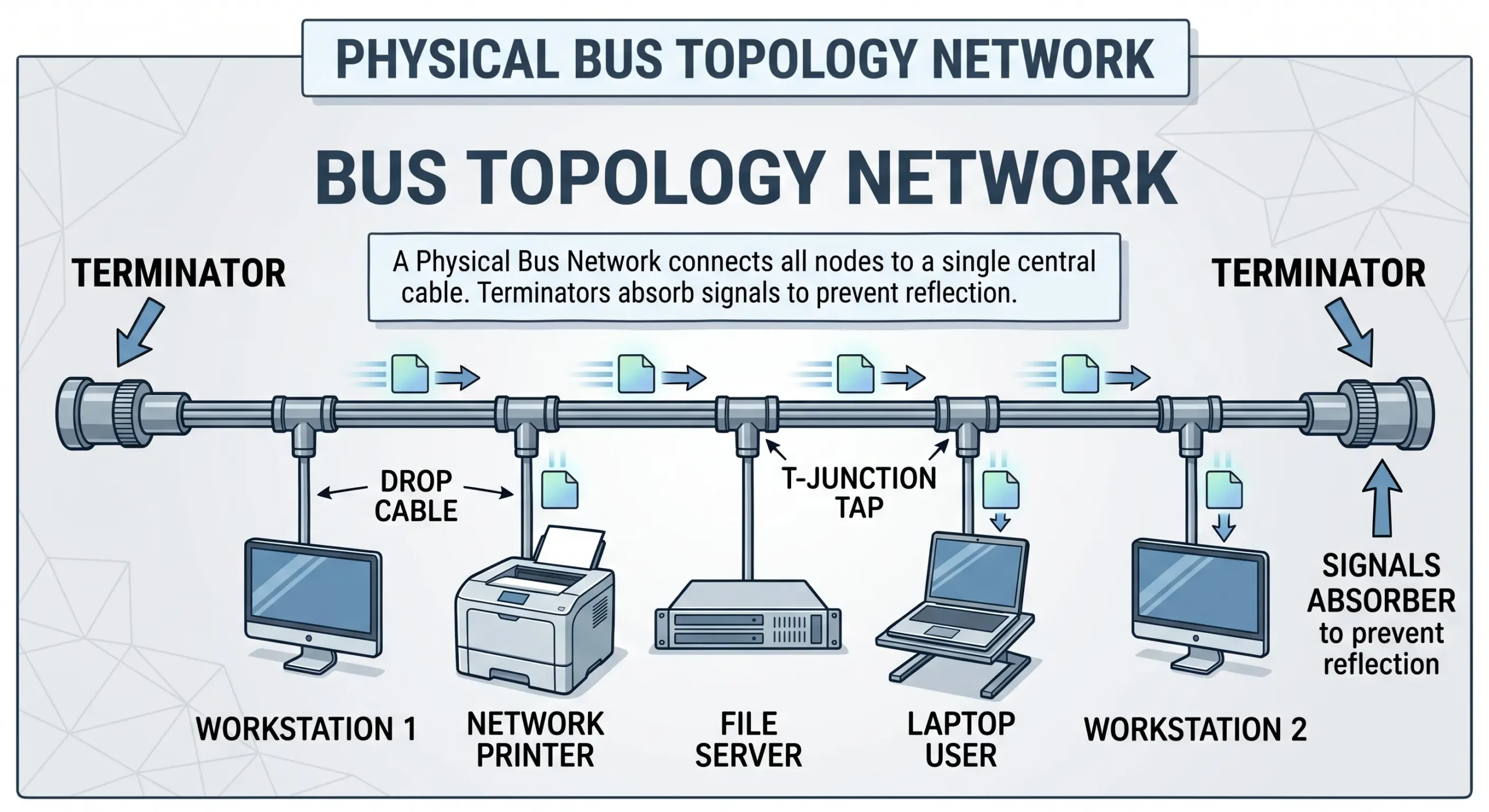
In bus topology, every device shares one single cable — the backbone — to communicate.
Advantages:
- Cheap and easy to set up
- Needs less cabling than most other topologies
- Works fine for small networks
Disadvantages:
- If that backbone cable fails, the entire network goes down with it
- Gets slower the more devices you add
- Hard to pinpoint faults when something breaks
Real-life example: Older Ethernet networks ran on bus topology, with every computer in the office wired to a single coaxial cable.
Ring Topology: Advantages, Disadvantages & Real-Life Examples
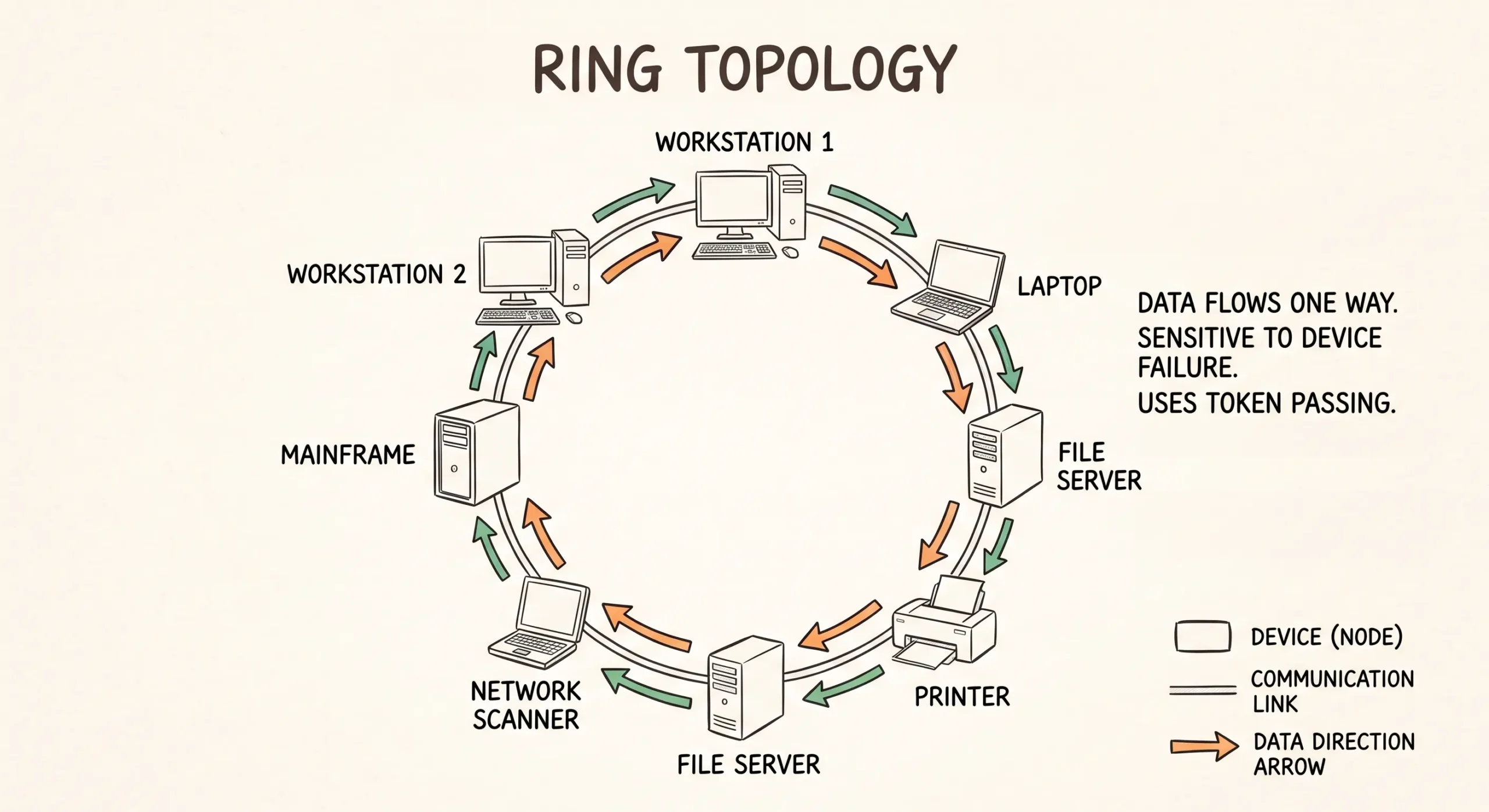
In a ring topology, each device connects to exactly two neighbors, forming a closed loop. Data travels around that loop in one direction until it reaches wherever it’s headed.
Advantages:
- No data collisions, since everything moves one way
- Handles steady, heavy traffic reasonably well
Disadvantages:
- A single broken link can take down the whole network
- Adding or removing a device isn’t straightforward
Real-life example: Token Ring networks used to run on this setup, and some legacy telecom systems and university networks still use ring-based designs for their consistent performance.
Star Topology: Advantages, Disadvantages & Real-Life Examples
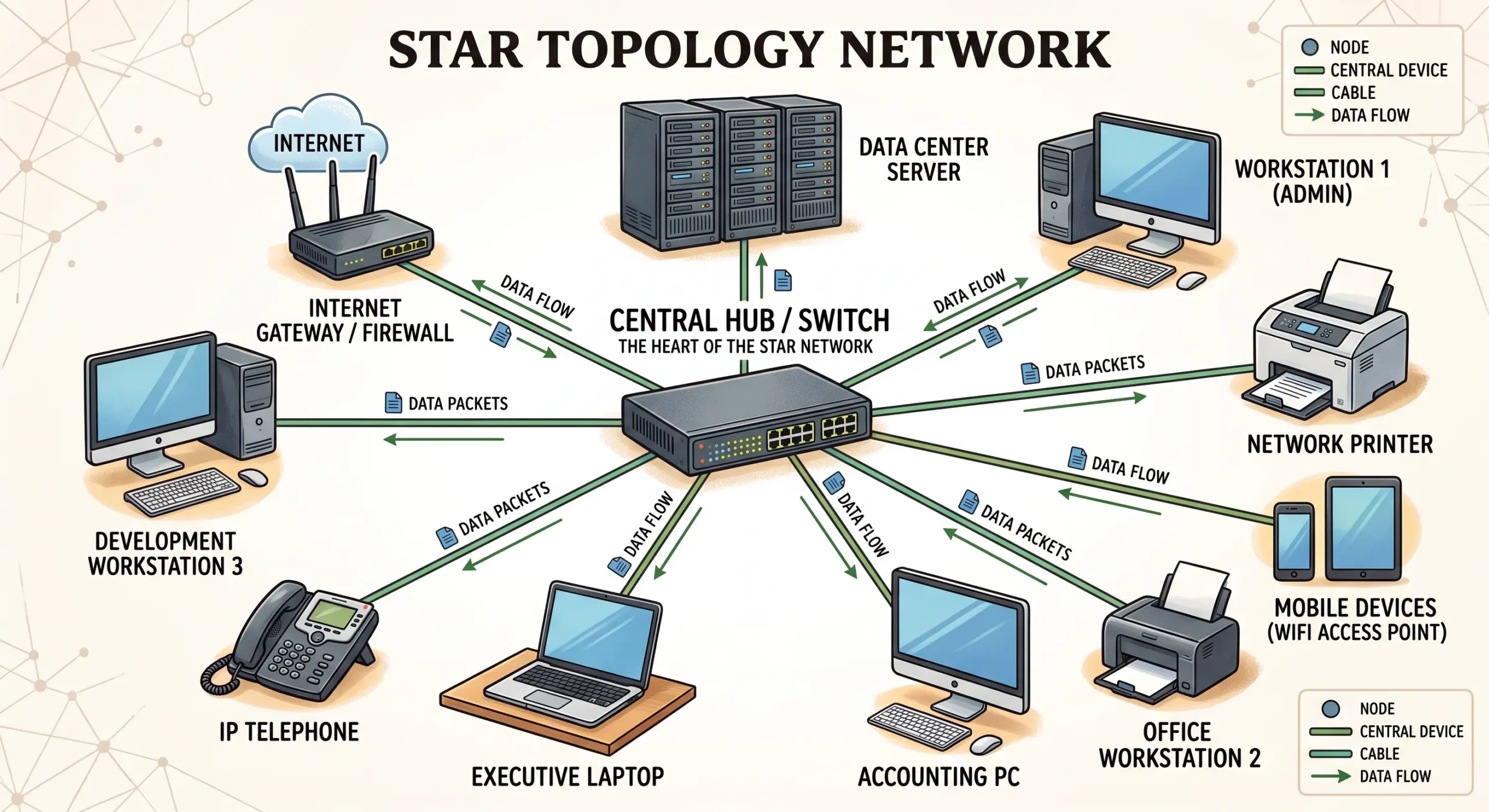
In star topology, every device connects to one central point — usually a switch or router — and all data passes through that hub.
Advantages:
- Easy to set up, expand, and manage
- One device failing doesn’t take the rest of the network down with it
- Troubleshooting is fairly painless
Disadvantages:
- If the central hub goes down, so does everything connected to it
- Needs more cabling than bus topology
Real-life example: Pretty much every modern office and home Wi-Fi network runs on star topology — your laptop, phone, and printer all connect back to one router.
Mesh Topology: Advantages, Disadvantages & Real-Life Examples
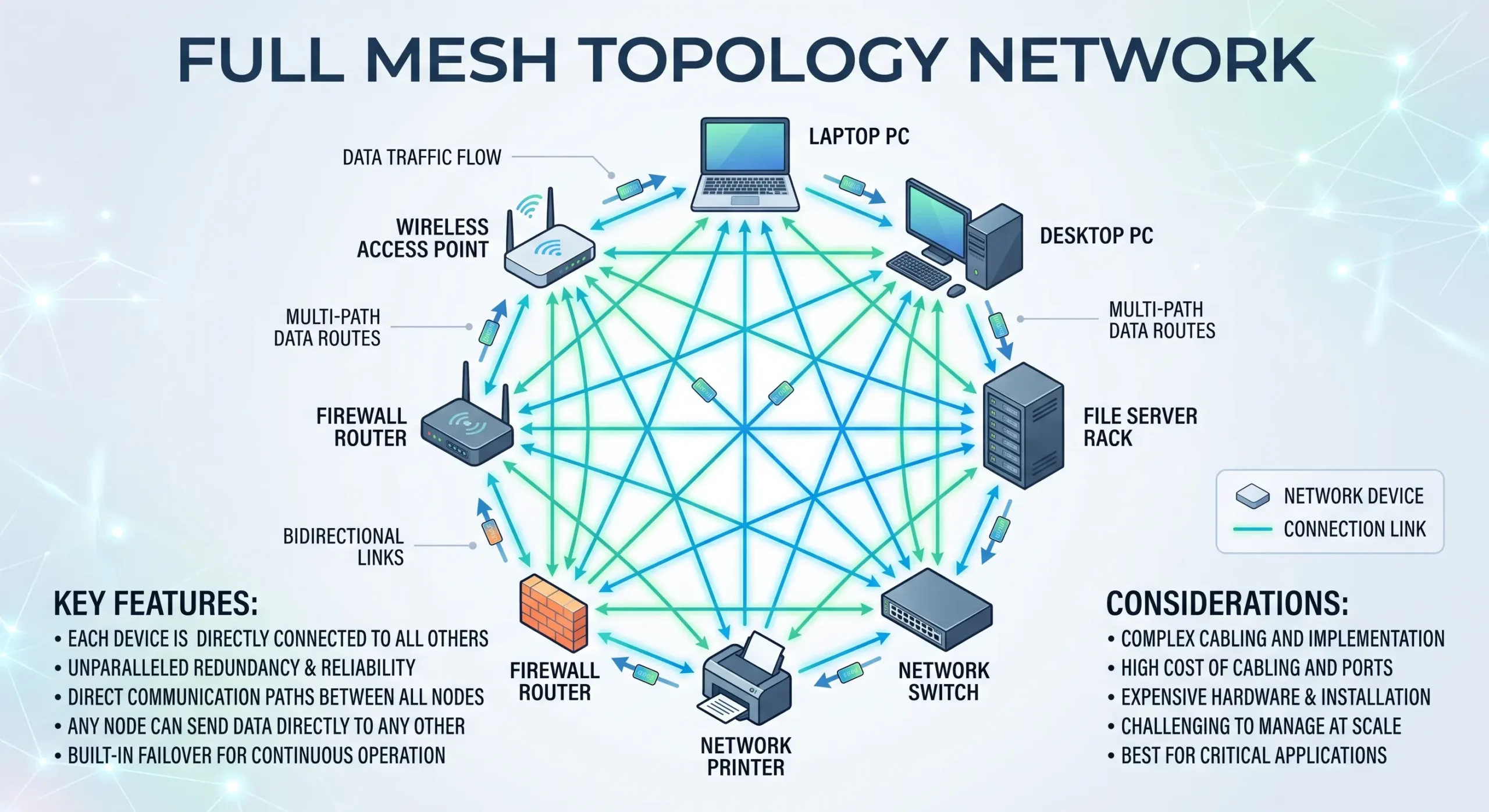
In mesh topology, devices connect to several other devices at once, creating multiple possible paths for data. In a full mesh, every single device connects directly to every other one.
Advantages:
- Very reliable — if one connection drops, data just finds another route
- Handles heavy traffic without much trouble
- No single point of failure
Disadvantages:
- Expensive, since it needs a lot of cabling
- Complicated to set up and keep running
Real-life example: Wireless mesh routers, the kind used to cover large homes or offices with reliable Wi-Fi, are a common everyday example. Data centers also lean on mesh networks for the same reason — reliability.
Tree Topology: Advantages, Disadvantages & Real-Life Examples
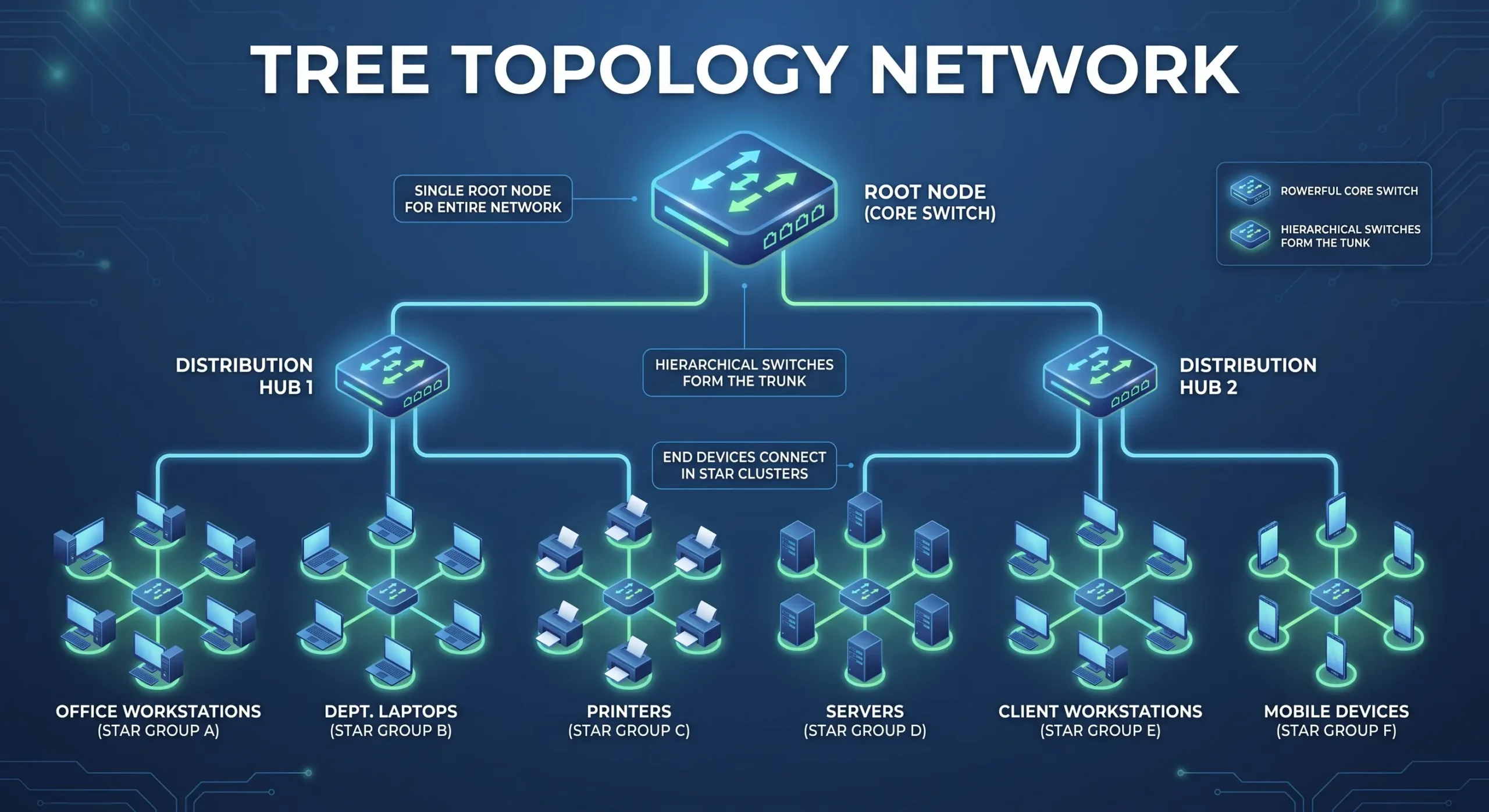
Tree topology mixes star and bus topologies into a hierarchy, branching out the way an actual tree does. Groups of star networks connect back to one central bus line.
Advantages:
- Expands easily as an organization grows
- Makes managing large networks in sections more practical
Disadvantages:
- A failure in the main backbone cable can knock out large parts of the network
- More complicated to set up than star or bus on their own
Real-life example: Think of a university where each department runs its own small star network, and all of those departments connect back to one main line.
Hybrid Topology: Advantages, Disadvantages & Real-Life Examples
Hybrid topology combines two or more topologies to get the strengths of each without being locked into just one.
Advantages:
- Flexible enough to be shaped around specific needs
- Pulls together the strengths of multiple topologies
- Well suited to large, complex networks
Disadvantages:
- Costs more to build and maintain
- Harder to design and troubleshoot
Real-life example: Internet Service Providers often blend mesh and star topologies to get both reliability and manageability across large service areas.

Network Topology Comparison Table
| Topology | Cost | Ease of Setup | Scalability | Fault Tolerance |
| Bus | Low | Easy | Low | Poor |
| Ring | Moderate | Moderate | Moderate | Poor |
| Star | Moderate | Easy | High | High |
| Mesh | High | Complex | High | Excellent |
| Tree | Moderate | Moderate | High | Moderate |
| Hybrid | Varies | Complex | Very High | High |
Star vs Bus vs Ring vs Mesh: Key Differences
Star Topology vs Bus Topology
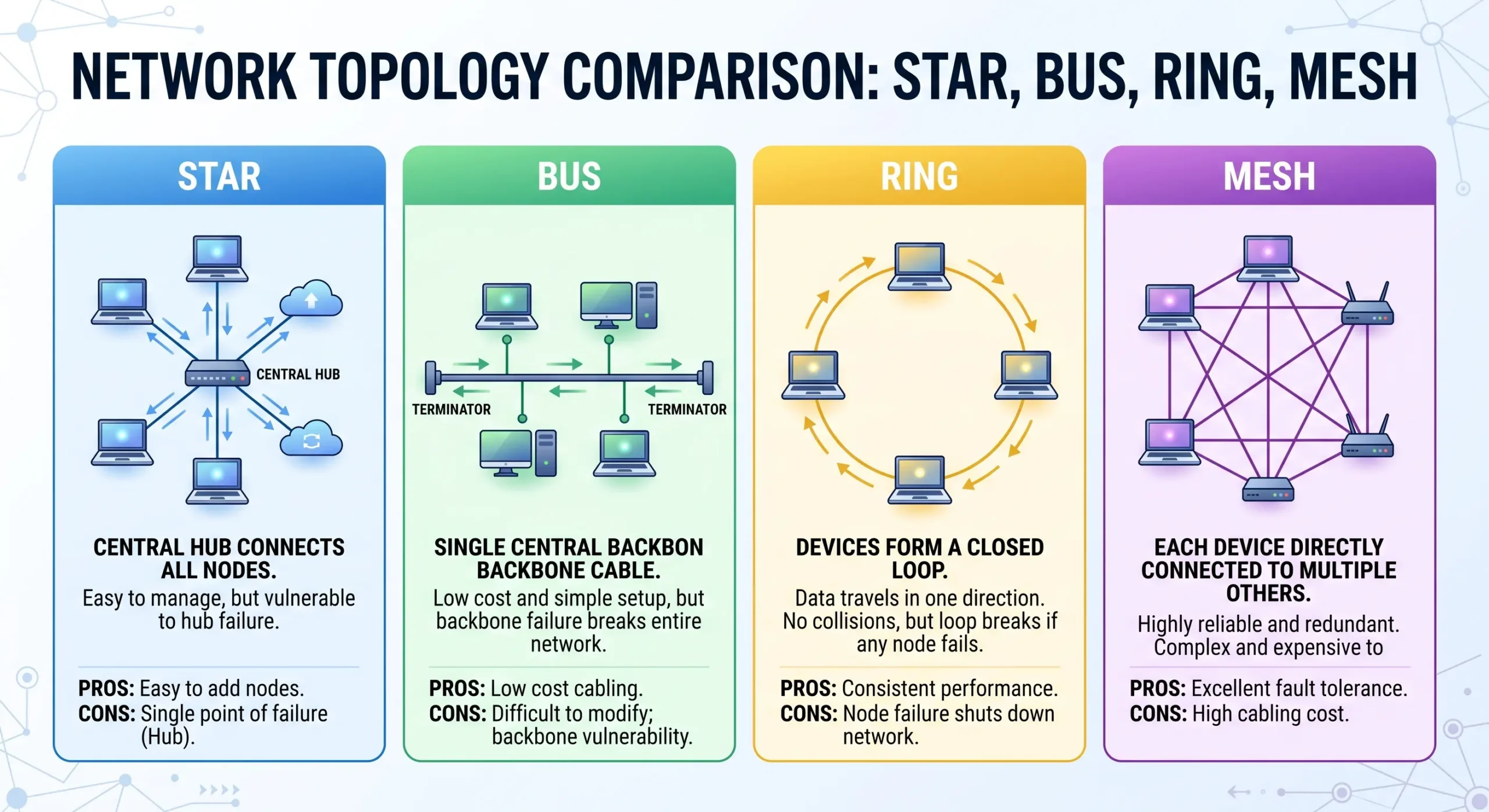
Star topology routes everything through a central hub, so one device failing doesn’t touch the others. Bus topology relies on a single shared cable, so if that cable goes, the whole network goes with it. That’s a big reason star has become the more common choice today.
Ring Topology vs Star Topology
Ring topology sends data one direction around a loop, while star topology routes everything through a central hub instead. Star tends to be more flexible when you’re adding or removing devices, while ring performs steadily but doesn’t expand as easily.
Ring Topology vs Mesh Topology
Ring topology only has one path for data to travel, so a single break can disrupt the whole network. Mesh gives data multiple paths to choose from, which makes it far more reliable — though that reliability comes at a higher cost.
Hybrid Topology vs Mesh Topology
Hybrid topology mixes different topology types together for flexibility, while mesh topology is built purely around having multiple redundant paths for reliability. Hybrid usually ends up being the more cost-effective option compared to a full mesh setup.
Hybrid Topology vs Ring Topology
Hybrid topology is more flexible and scales better than ring topology. Ring is simple, but it doesn’t handle failures gracefully, whereas hybrid setups can be designed specifically to avoid single points of failure.
How to Choose the Right Network Topology
Now that you’ve seen the different types of network topologies, here’s how to pick the right one:
- Network size: Small networks do fine with star topology; bigger ones often need tree or hybrid setups.
- Budget: Bus and star are the cheaper options; mesh and hybrid cost more.
- Reliability needs: If downtime isn’t an option, mesh or hybrid is worth the extra cost.
- Future growth: Star and tree topologies tend to scale more easily as a network grows.
It really comes down to what matters most in your situation — cost, speed, or reliability — before locking in a choice.
What Does a Professional Network Topology Look Like?
In real enterprise setups, you almost never see just one topology doing all the work. Most professional networks lean on a hybrid approach — star topology inside individual departments or floors, all tied together through a mesh or tree structure at the core. That combination gives businesses the easy management of star networks along with the reliability mesh connections offer, which is exactly why hybrid topology shows up so often in large companies and data centers.
Frequently Asked Questions
What is star topology, and what are some real-life examples?
Star topology connects every device to one central hub or switch. Home Wi-Fi networks and office LANs are the most common real-world examples, since every device in them connects back to a single router or switch.
What is the difference between star and bus topology? Which is more common?
Star topology routes data through a central hub, while bus topology relies on one shared cable. Star is far more common today simply because it’s more reliable and easier to manage.
What are the disadvantages of star topology?
The biggest one is that the whole network depends on the central hub — if it fails, everything connected to it goes down too. It also needs more cabling than bus topology.
What is bus topology, and what are its advantages and disadvantages?
Bus topology connects every device to a single shared cable. It’s cheap and simple, but if that main cable fails, the entire network stops working, and things slow down as more devices get added.
How are bus topologies implemented?
It’s implemented by connecting devices to one shared backbone cable using connectors, with terminators placed at both ends to stop the signal from bouncing back and causing interference.
What is the difference between full mesh and active star topology?
In a full mesh, every device connects directly to every other device on the network. In an active star setup, devices all connect to a central hub that actively manages and boosts the signal between them.
Conclusion
Getting a handle on the different types of network topologies makes it a lot easier to build networks that are reliable, affordable, and manageable. Whether you’re setting up a small LAN with star topology or a larger WAN running on mesh or hybrid, the right pick really comes down to your budget, your network’s size, and how much downtime you can afford. Use this guide as a starting point for designing a network that actually fits what you need.