
What is Network Security? (CIA Triad & Threats Explained)
Every time you check email, pay a bill, or log into Wi-Fi, your data moves through a network. Leave that network unprotected, and someone else can steal it, change it, or block it — often without you knowing. Network security is what stops that. This guide covers the CIA triad and the threats that matter most, like phishing and DDoS attacks, explained simply.
Before You Start
Table of Contents
What is Network Security? (Definition & Example)
Network security covers the tools, rules, and everyday habits that keep a network safe from hackers, malware, and anyone who has no business being there in the first place.
An easier way to picture it: your house has a lock on the door, which works a lot like a firewall. There are cameras watching who comes and goes — call those your monitoring tools. And maybe someone checks ID before letting a visitor inside, which is basically what authentication does. Swap “house” for “network” and “furniture” for “data,” and you’ve got the same idea.
Logging into your college Wi-Fi with a student ID and password is network security doing exactly what it’s supposed to. It’s the reason someone parked outside in a car can’t just connect and start going through private student files.
What is the Main Objective of Network Security?
Network security is really juggling three things at once:
- Keep unauthorized people out — hackers, outsiders, anyone who shouldn’t be there
- Catch attacks before real damage happens
- Let genuine users get in without a fight — employees, students, or customers who just need to do their thing
That third point gets ignored more than it should. A network that’s technically “secure” but impossible for real people to actually use isn’t really doing its job.
How Does Network Security Work?
There’s no single switch that makes a network safe. It works in layers instead, so if something slips past one layer, the next one is usually still standing.
A typical setup includes:
- A firewall to filter what traffic gets through
- Antivirus software to catch bad files before they run
- Login rules and passwords to check who’s actually connecting
- Monitoring tools that flag anything that looks off
Say a hacker somehow gets past the firewall — there’s a decent chance the antivirus or the monitoring system picks them up right after. That overlap is the entire point of layering things this way. No single failure should be able to take the whole network down.
The CIA Triad in Network Security
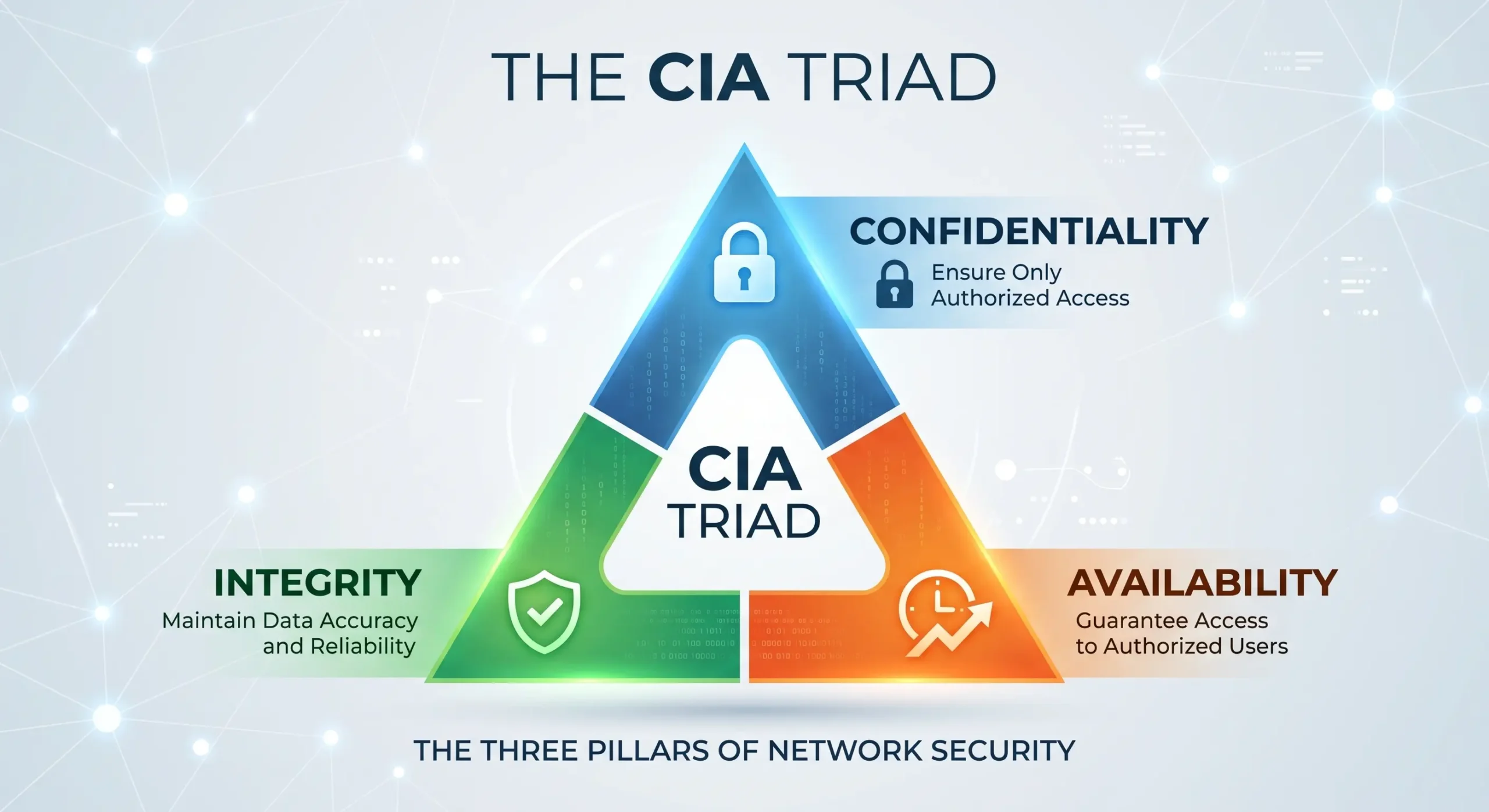
Nearly everything in network security traces back to three ideas, grouped together under one name: the CIA triad — Confidentiality, Integrity, and Availability. Sounds academic, sure, but it’s really just naming what’s being protected.
What is Data Confidentiality?
Data confidentiality is about privacy — making sure only the people who are actually supposed to see certain information can see it. When this fails, things like passwords or medical records end up somewhere they were never meant to go.
A few things usually handle this job:
- Encryption — scrambles data into something unreadable unless you’ve got the right key
- Access control — makes sure only the people who genuinely need certain data can reach it (HR can see salary details, but that doesn’t mean the entire office can too)
- Strong authentication — a password, an OTP, or a fingerprint scan, confirming that whoever’s logging in is actually who they claim to be
There’s a small example of this most people walk past every day without noticing. That padlock icon next to “https://” while you’re banking online means the connection is encrypted — the “s” is the giveaway. Even if someone’s watching the same network you’re on, your card details stay hidden from them.
What is Data Integrity?
Data integrity means information stays accurate unless someone with the right permission changes it. When it breaks down, data can get quietly altered, and that’s often worse than outright theft since nobody notices right away.
Think about sending money online, and right as you hit submit, a hacker swaps the account number without you catching it — that’s an integrity failure. Digital signatures and checksums exist for this exact reason: catching tampering before it slips by unnoticed.
What is Data Availability?
Data availability simply means systems stay reachable when the right people need them. Nothing has to be stolen for this to fail — the system just has to go down.
A DDoS attack is the classic example. It floods a website with fake traffic until the whole thing buckles. No data gets stolen anywhere in that process, but real customers still can’t get in. That’s availability breaking, even though nothing was technically “taken.”
Confidentiality vs. Integrity vs. Availability — Quick Comparison
Side by side, the three look like this:
| Principle | What It Protects | What Happens If It Fails | Real-World Example |
| Confidentiality | Privacy of data | Wrong people gain access to the data | A hacker reads through private emails |
| Integrity | Accuracy of data | Data is changed without permission | A bank transfer amount is quietly altered |
| Availability | Access to data | Real users can’t reach the system | A website crashes during a DDoS attack |
Common Network Security Threats & Attacks
Most of the threats you’ll run into fall into a handful of buckets:
- Malware — harmful software like viruses and ransomware
- Phishing — fake messages built to trick people into handing over information
- DDoS attacks — flooding a network until it collapses
- Insider threats — risk that comes from people who already had legitimate access
Two of these come up constantly enough to deserve a proper look.
Malware & Ransomware
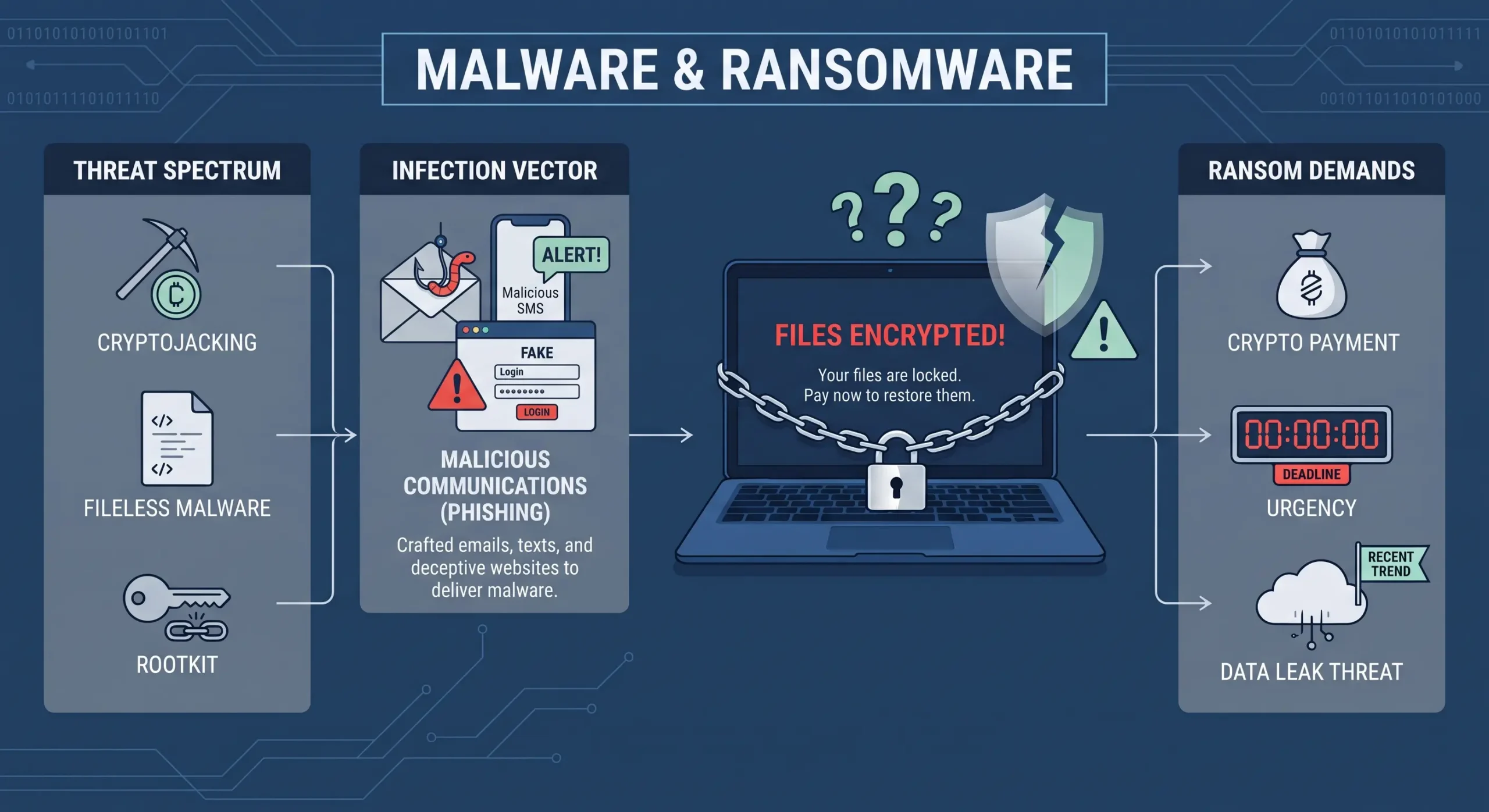
Malware is software designed to damage a system or sneak in access it was never granted. Ransomware is one particularly frustrating flavor of it — it locks your files and demands payment before handing them back. It usually gets in through infected email attachments or downloads that seemed harmless at the time.
Say someone downloads a “free” movie file from some sketchy website. Ransomware installs itself quietly in the background, and by the next morning, every file on that computer sits locked behind a payment demand.
Phishing Attacks (With Real Examples)
Phishing happens when someone sends a message pretending to be a trusted source — a bank, a company, sometimes even your own boss — hoping you’ll click a link or hand over details you really shouldn’t.
A few patterns keep showing up in real inboxes, over and over:
- The fake account suspension email — Subject: “Your Account Will Be Suspended in 24 Hours!” It pretends to be from your bank, pushing you to “verify” your account through a link that actually leads to a fake login page built to steal your password.
- The fake invoice — Subject: “Invoice #4521, Payment Overdue.” There’s an attachment or link that either installs malware the moment it’s opened, or asks for banking details to settle a bill that was never real in the first place.
- CEO fraud (spear phishing) — An employee gets an email that looks exactly like it came from their boss — urgent, personal, asking for a quick transfer or some confidential files. Because it feels rushed and legitimate, people often act on it before stopping to double-check.
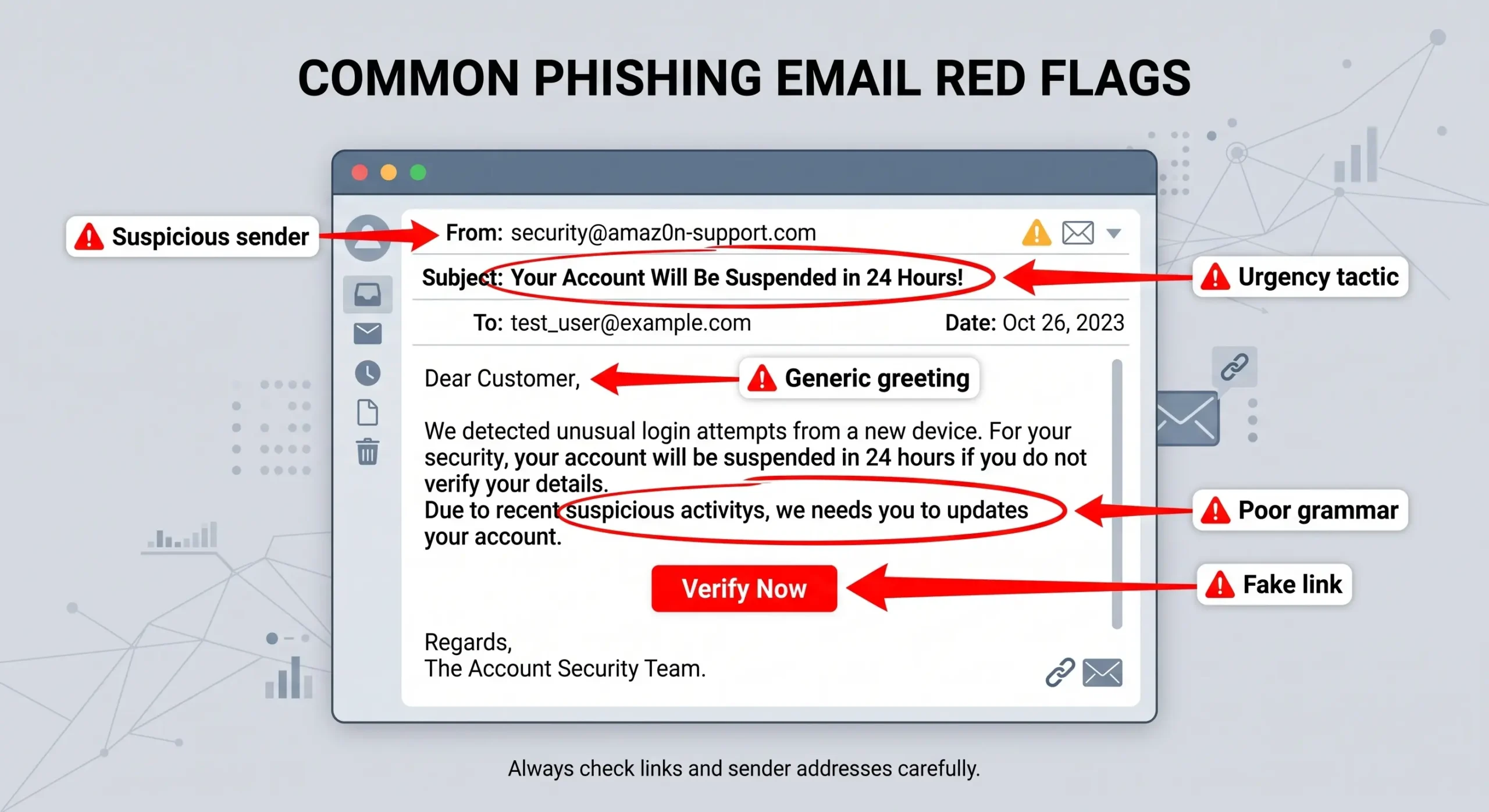
A handful of red flags tend to give these away:
- Subject lines that sound urgent or scary
- Generic greetings like “Dear Customer” instead of your actual name
- Sender addresses with a tiny spelling trick, such as “arnaz0n.com”
- Links that don’t quite match the real company’s website
- Grammar that just feels slightly off
DDoS Attacks & Types
A DDoS attack, short for Distributed Denial-of-Service, overwhelms a website or network with fake traffic, making it slow to a crawl or unreachable altogether.
Quick way to tell DoS and DDoS apart: a DoS attack comes from one machine, while a DDoS attack uses many machines at once — often hijacked ones — which is exactly why it’s so much harder to shut down.
There are three main types worth knowing:
- Volumetric attacks — drown the network in junk traffic until all the available bandwidth runs out
- Protocol attacks — exploit weak spots in how servers handle connections, slowing them down or crashing them outright
- Application-layer attacks — go after one specific part of a site, like the login page, so just that piece stops working while the rest limps along
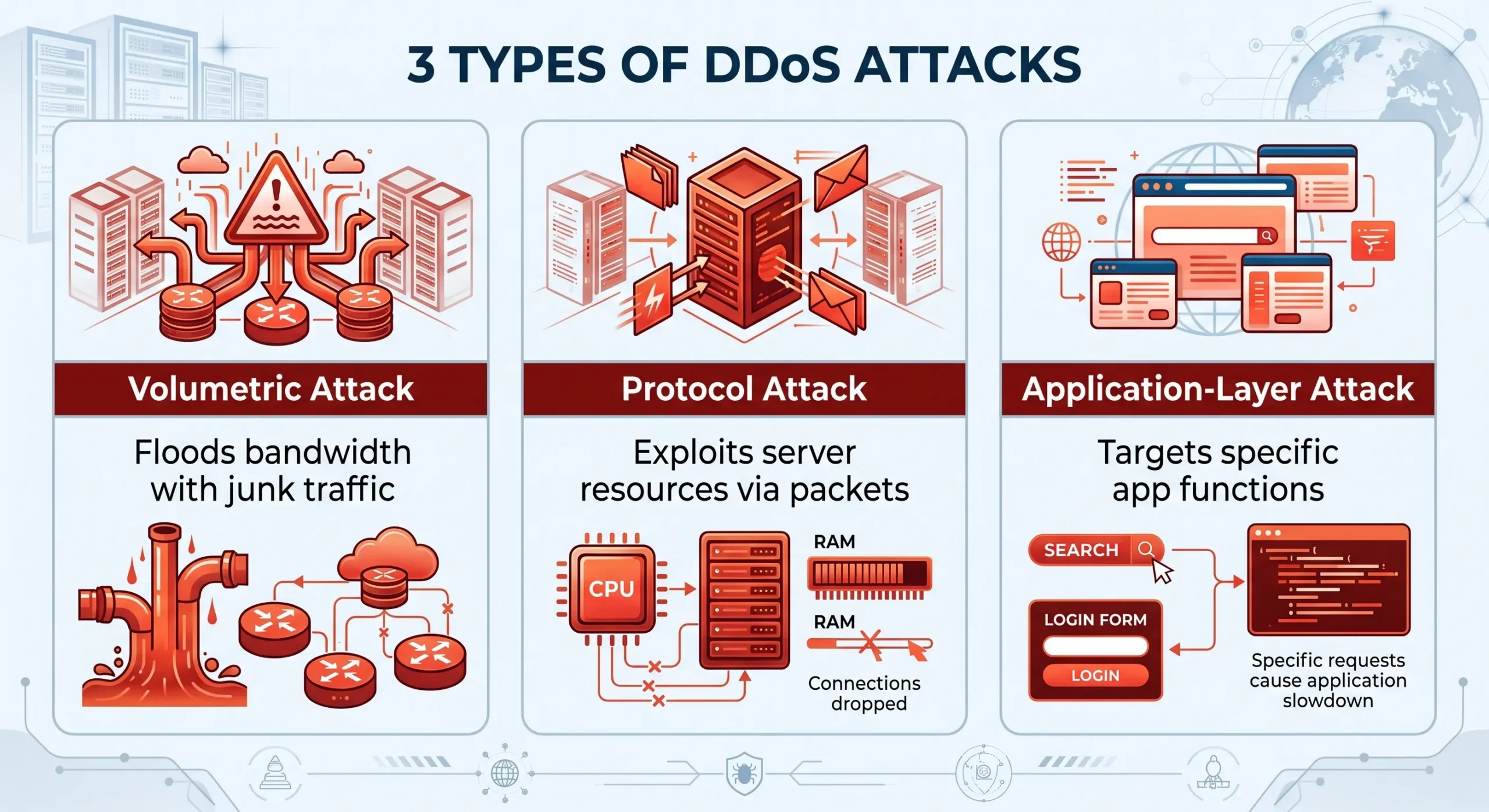
A scenario that happens more often than people expect: it’s the day of a big online sale, and a store’s website suddenly won’t load for anyone. More often than not, that’s a volumetric DDoS attack drowning the servers in fake requests at the exact moment real shoppers are trying to get through.
Insider Threats & Unauthorized Access
Not every threat comes knocking from outside. Insider threats happen when someone who already has legitimate access, whether an employee or a contractor, misuses it — sometimes by mistake, sometimes on purpose. A file might get emailed to the wrong person by accident, or someone frustrated at work might decide to leak something deliberately. Either way, the outcome is the same.
Types of Network Security Solutions
Most organizations rely on several tools working together rather than betting on just one:
- Firewalls — filter traffic going in and out based on set rules
- Intrusion Prevention Systems (IPS) — spot and block suspicious activity as it happens
- VPNs (Virtual Private Networks) — encrypt connections so remote access stays private
- Network Access Control (NAC) — makes sure only approved devices can connect in the first place
- Antivirus software — catches and removes harmful files before they cause damage
Each one covers a different weak spot, and together, they form the layered defense mentioned earlier in this guide.
Best Practices to Strengthen Network Security
A few habits go a long way here, whether you’re a student, a working professional, or running a small business:
- Turn on multi-factor authentication — blocks a surprising number of casual attacks with just one extra step
- Keep software updated — usually patches security holes you didn’t even know existed
- Use strong, unique passwords — the same one everywhere closes the door for no one but you
- Pause before clicking email links or attachments — a two-second check saves a lot of regret
- Use a VPN on public Wi-Fi — that network isn’t as safe as it feels
- Back up important data regularly — the one habit that actually saves you if ransomware hits

Frequently Asked Questions
What is network security?
It’s the practice of protecting computer networks, and the data moving through them, from unauthorized access, misuse, or attacks — using tools like firewalls, encryption, and authentication.
What is the CIA triad in network security?
CIA stands for Confidentiality, Integrity, and Availability, the three principles that guide how data and networks get protected.
What is data confidentiality?
It’s about keeping information private and accessible only to authorized people, usually through encryption and access controls.
What is the difference between DoS and DDoS?
A DoS attack comes from a single source. A DDoS attack uses multiple systems at once, which makes it bigger and much harder to block.
What is an example of a phishing email?
A common one is a fake “account suspended” message pushing you to click a link and “verify” your login details — details that actually go straight to the attacker.
What is the main objective of network security?
Blocking unauthorized access, catching attacks early, and letting authorized users safely reach what they actually need.
Conclusion
Network security isn’t some distant IT concept sitting in a server room somewhere — it touches anyone who’s ever sent an email or paid a bill online. Once the CIA triad clicks, confidentiality, integrity, and availability stop being abstract words and start meaning something concrete. And once phishing and DDoS attacks stop feeling mysterious, the whole topic gets a lot less scary — it turns into a short list of habits worth keeping, not a puzzle you need a degree to solve.