
What Exactly Is a Computer Network? A Complete Guide to Types & Working
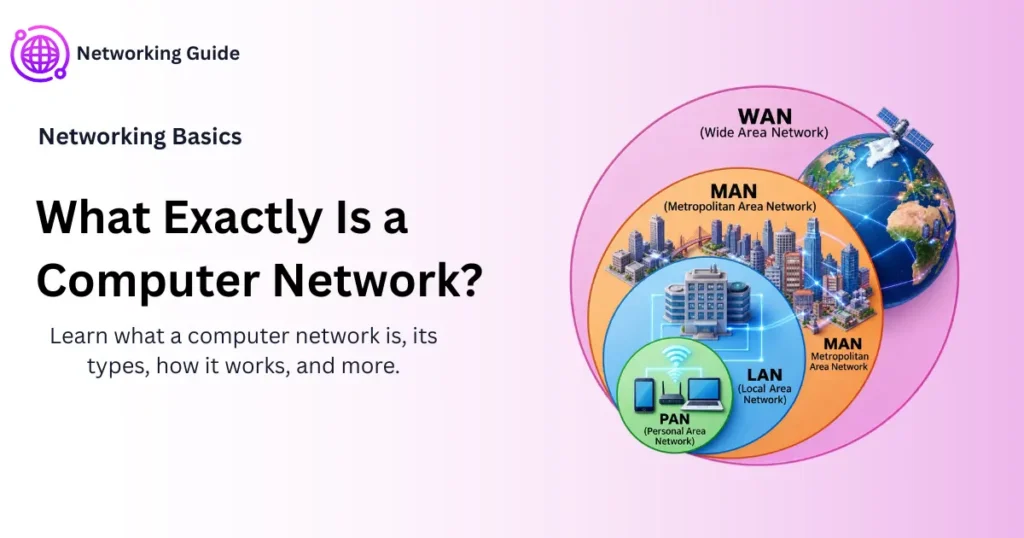
Ever wondered what exactly is a computer network? This guide breaks it down in simple terms — covering how networks work, their different types (LAN, MAN, WAN, PAN), and everything else you need to know, whether you’re a student, a beginner, or a working professional.
Before You Start
Table of Contents
Understanding the Basics — What Is a Network?
If you’ve ever wondered what exactly is a computer network, here’s the short version: it’s just two or more devices connected together so they can share information.
That’s really it. No need to overthink it.
A good way to picture what exactly is a computer network is a group chat — everyone in it can send messages, share photos, and stay in touch, even though they’re all sitting in different places. A computer network does the same thing, just with machines instead of people.
Here’s what a network typically lets you do:
- Share files between devices (sending a picture from your phone to your laptop, for example)
- Share hardware, like one printer used by an entire office
- Share a single internet connection across a whole household
- Talk to other people in real time through calls, chats, or video
Without networking, none of this would exist. No internet, no shared drives, no group video calls. So really, when someone asks “what is a network,” the honest answer is: it’s the invisible system quietly making sure your devices can talk to each other.
How Do Computer Networks Actually Work?
Okay, so networks connect devices — but how does the actual “talking” happen?
Think about mailing a letter. You write it, seal it in an envelope with an address, and drop it off. The postal service figures out the best route, and eventually it lands in the right mailbox.
A computer network isn’t all that different:
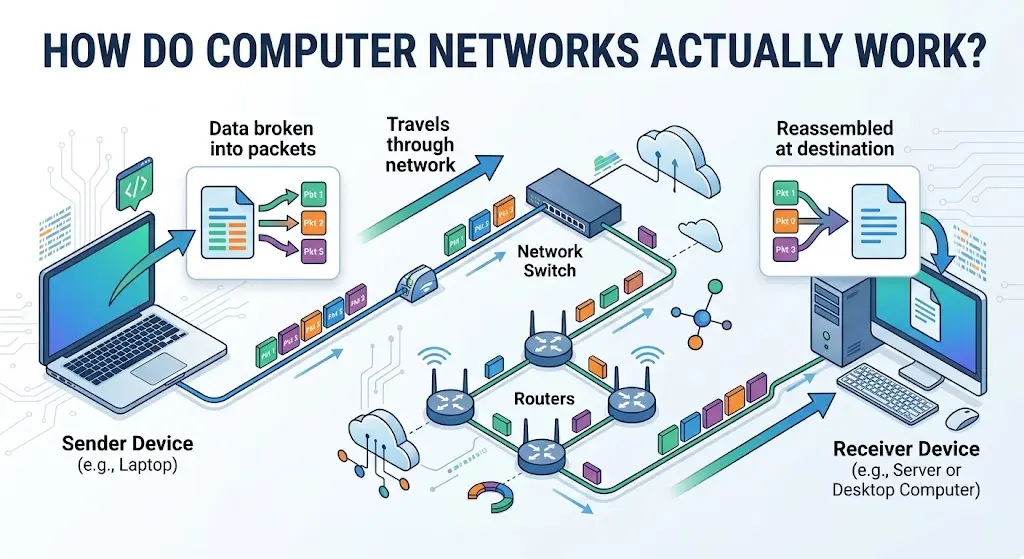
- Whatever you’re sending — a text, a photo, a file — gets chopped up into small chunks called packets.
- Each packet gets tagged with sender and receiver information, kind of like writing an address on an envelope.
- These packets then pass through routers and switches, which act like postal sorting centers, deciding the quickest path forward.
- Once everything arrives, the packets get reassembled back into the original message.
And somehow, this entire process — breaking data apart, sending it across the world, and putting it back together — usually takes less than a second.
How Exactly Do Computer Networks Talk to Each Other?
This question comes up a lot, and the answer boils down to one word: protocols.
A protocol is basically an agreed-upon set of rules, like a shared language two devices use to understand each other. For example:
- When your browser loads a website, it’s using a protocol called HTTP to communicate with that website’s server.
- When you hit “send” on an email, a protocol called SMTP handles the delivery behind the scenes.
Without these shared rules, two devices could technically be connected but still have no idea what the other one is saying — a bit like sitting next to someone who only speaks a language you’ve never heard.
Key Components of a Computer Network
Now that we’ve covered what exactly is a computer network, let’s look at the pieces that make it work.
- IP Address — a unique number assigned to each device, sort of like a home address, so data knows exactly where to go.
- Router — connects different networks to each other and figures out where data should travel next. Your home Wi-Fi router doing this every time you go online is a perfect example.
- Switch — connects multiple devices within the same network and makes sure data reaches only the device that actually needs it.
- Modem — takes digital signals from your devices and converts them into a form that can travel through internet cables (and back again).
- Gateway — works like a translator between two different types of networks, say, connecting an office’s private network to the public internet.
- Firewall — basically a security guard, keeping unwanted or harmful traffic out of your network.
You don’t have to memorize all of this word for word. Just remember: each piece has a job, and together they keep your data moving where it needs to go, safely.
Networking Types — Categories You Should Know
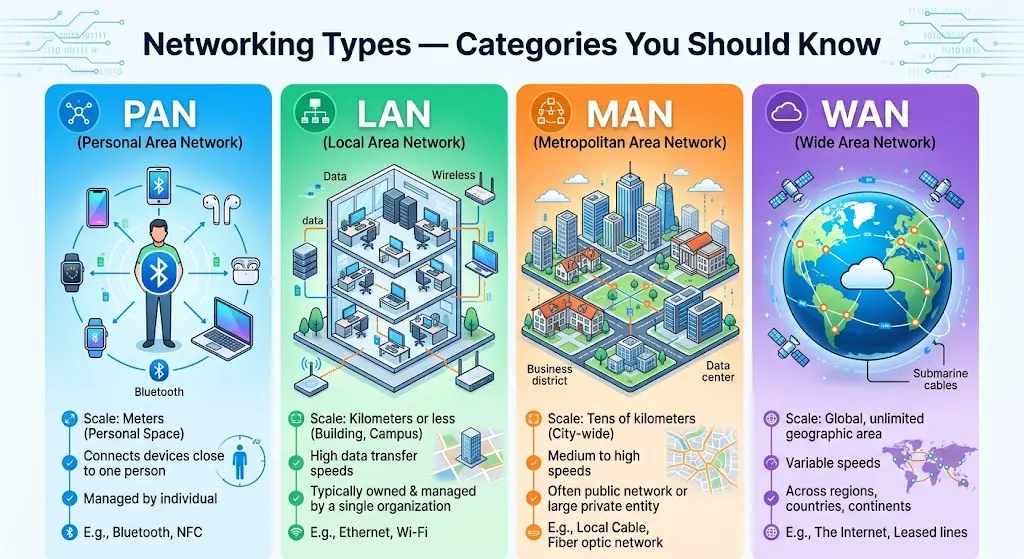
So, what exactly is a computer network when you look at it by size and reach? A lot of people searching for networking types or types of networks are really just trying to understand how networks get grouped by scale.
LAN (Local Area Network)
A LAN connects devices in a small, defined space — think a single office, home, or school building.
Picture a school computer lab where every machine shares the same printer and internet connection. That’s a LAN in action.
- Covers a small area, like a building or a single floor
- Usually set up and managed privately
- Fast, reliable, and cheap to install
Metropolitan Area Network Explained
Bigger than a LAN, smaller than a WAN — that’s a metropolitan area network (MAN) in a nutshell. A metropolitan area network usually spans an entire city or a large campus.
A good example? A city government linking all its offices, libraries, and public buildings across town under one network. That’s exactly what a MAN does.
- Covers a city or a large urban area
- Often run by government bodies, universities, or big service providers
- Sits right in between LAN and WAN in terms of size
Wide Area Network (WAN) — Definition & Examples
Now we’re talking distance. A wide area network (WAN) connects devices across huge geographical areas — cities, countries, sometimes entire continents. You’ll also see people searching for “state wide area network,” which usually just refers to a WAN set up across an entire state or region.
A classic example is a bank with branches scattered across different cities, all tied into one central system through a WAN.
What Is the Correct Definition of a Wide Area Network (WAN)?
Put simply, a WAN is a network that connects computers over long distances — usually relying on telephone lines, satellites, or leased communication links instead of direct cables.
What Is the Best Example of a WAN?
Honestly, the best example of a WAN is one you already use every single day: the internet. It ties together millions of smaller networks — LANs and MANs included — into one giant, global network.
A few other everyday examples:
- A multinational company connecting offices across several countries
- ATM networks linking banks nationwide
Personal Area Network (PAN)
So what is a personal area network, exactly? It’s the smallest network type out there, built to connect devices used by just one person, usually within a few meters.
Your phone paired with your smartwatch and wireless earbuds through Bluetooth? That’s a PAN right there.
- Covers a very short range, just a few meters
- Connects personal devices, not shared ones
- Common tech behind it: Bluetooth, USB, infrared
What Is the PAN Network and How Is It Different From LAN?
The main difference comes down to scale and who it’s for:
- A PAN connects devices for one person only — your phone, smartwatch, earbuds, and so on.
- A LAN connects multiple devices and multiple users, like an entire office building.
Simplest way to remember it: PAN is personal, LAN is shared.
What Are the Differences Between WAN and PAN?
These two sit at completely opposite ends of the spectrum.
A PAN covers a few meters and only connects your own personal devices. A WAN, on the other hand, spans entire cities, countries, or continents, linking together thousands, sometimes millions, of devices.
If it helps, think of a PAN as your close circle of friends, and a WAN as an entire country’s population all connected at once.
Comparison Table: LAN vs MAN vs WAN vs PAN
| Network Type | Coverage Area | Owner/Managed By | Real-World Example |
| PAN | A few meters | Individual user | Phone connected to a smartwatch via Bluetooth |
| LAN | A building or campus | Private individual/organization | Office or school computer lab |
| MAN | A city or large town | Government, university, or ISP | City-wide public Wi-Fi network |
| WAN | Country or worldwide | Multiple organizations/ISPs | The internet, bank branch networks |
Network Architectures: Client-Server vs Peer-to-Peer
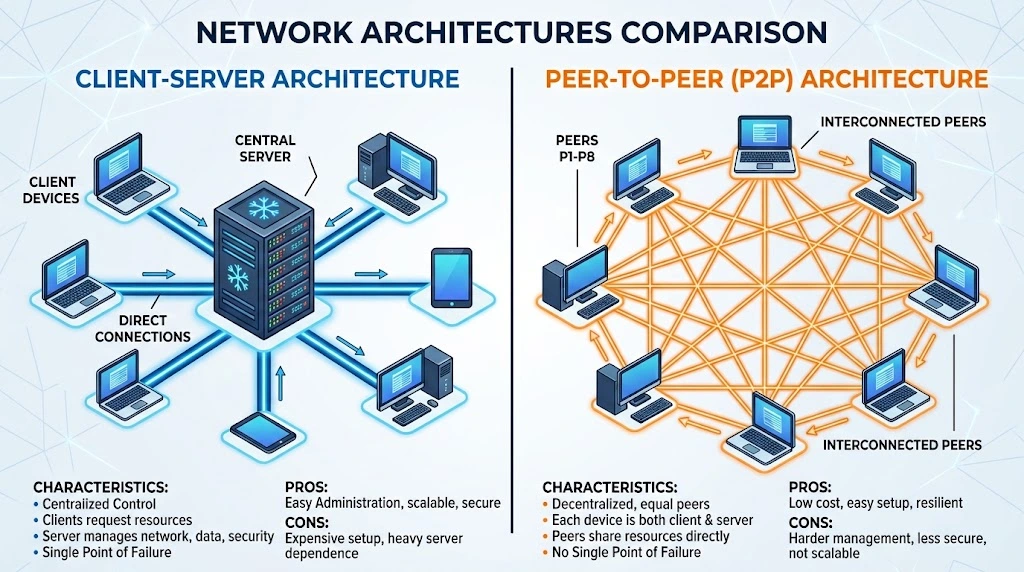
Beyond size, networks are also grouped by how the devices inside them actually interact. This is what’s called network architecture.
Client-Server Architecture
Here, one central computer (the server) provides a service, while other computers (clients) request and use it.
A familiar example: checking your email. Your phone, acting as the client, sends a request to Gmail’s server, and the server sends your inbox back.
- Centralized, which makes it easier to manage and secure
- The server does the heavy lifting, so clients stay light
- If the server goes down, though, everyone connected to it feels it
Peer-to-Peer (P2P) Architecture
No central server here. Every device, or “peer,” can act as both a client and a server at the same time, sharing directly with the others.
Think of two laptops sending files back and forth without going through the internet at all — that’s peer-to-peer at work.
- No single point of failure
- Cheaper since there’s no need for a dedicated server
- Managing security across so many independent devices, though, gets trickier
Why Computer Networks Matter — Importance & Benefits
It’s easy to take networks for granted, but they quietly run almost everything we do online.
- Communication: Every email, video call, and instant message depends on some form of network.
- Resource sharing: One printer or one internet connection can serve an entire office instead of everyone needing their own.
- Data centralization: Businesses can keep data in one place and let the right people access it from anywhere.
- Remote work: Networks are the reason employees can log in from home and still reach office systems like they’re sitting at their desk.
- Automation & smart devices: Smart homes, hospital equipment, even your fridge sometimes — most modern tech leans on networking in one way or another.
Take networks away, and you lose the internet, cloud storage, and even basic office collaboration as we know it.
Advantages and Disadvantages of Computer Networks
Like most technology, networks come with real upsides — and a few genuine downsides too.
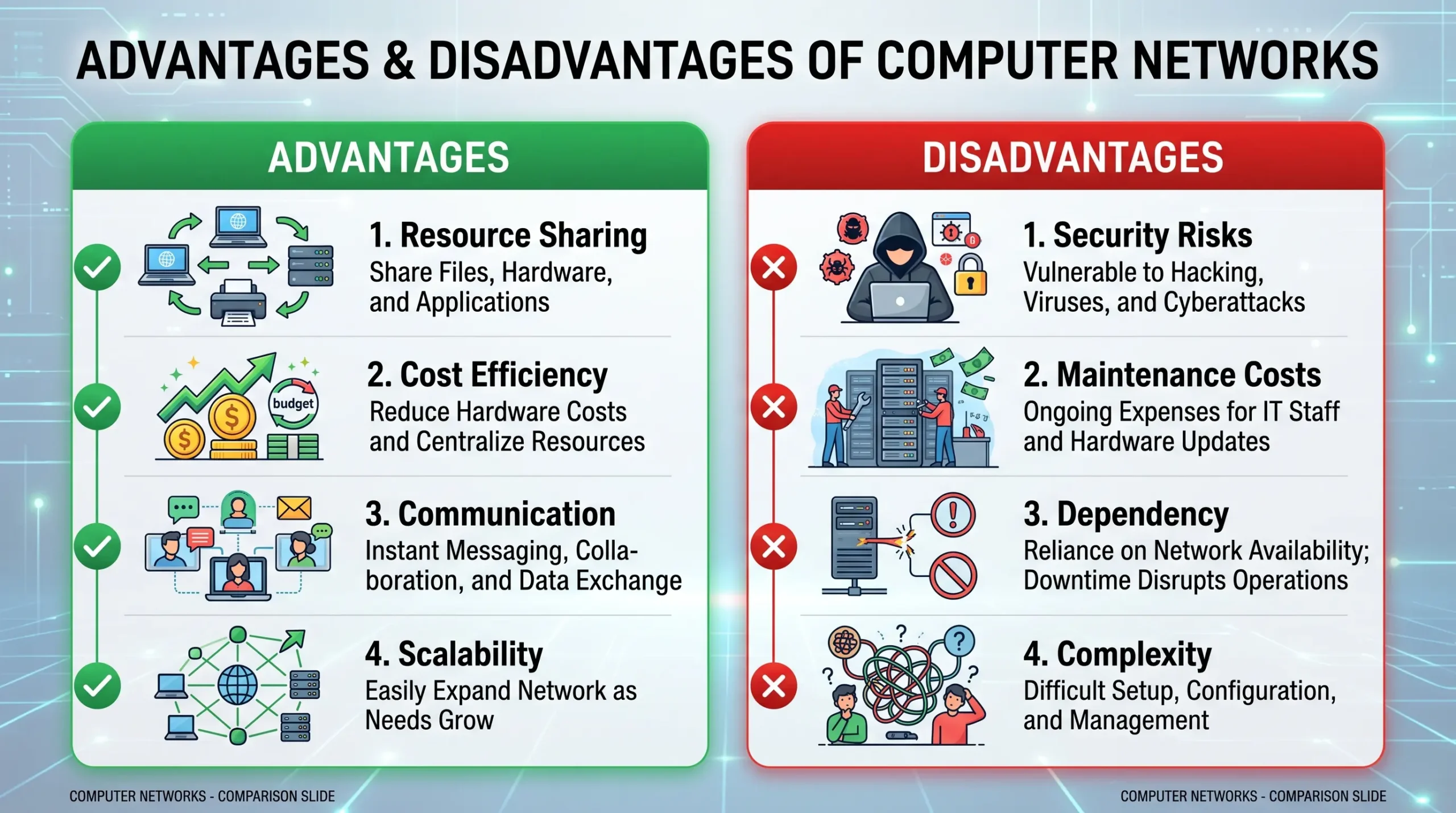
Advantages
- Resource sharing — one printer, one set of files, one piece of software, used by many people at once.
- Cost efficiency — businesses save money by sharing equipment instead of buying separate gear for every employee.
- Better communication — messaging, video calls, and file sharing become almost effortless.
- Scalability — adding new devices or users as a business grows is usually pretty straightforward.
Disadvantages
- Security risks — networks are a common target for hackers, malware, and unauthorized access attempts.
- Maintenance cost — bigger networks need real investment, both in equipment and skilled people to manage them.
- Dependency — if a key component like the main server fails, the whole network can feel it.
- Complexity — large networks can turn into a tangle of cables, devices, and confusing configurations fast.
What Are the Advantages and Disadvantages of a WAN Network?
Because WANs cover so much ground, their pros and cons look a little different from a typical network:
Advantages of a WAN:
- Connects offices and users across entirely different cities or countries
- Gives large organizations centralized access to their data, no matter where employees are
Disadvantages of a WAN:
- Tends to be slower than a LAN simply because of the distances involved
- Costs more to set up and maintain
- More exposed to security threats, purely because of its size and reach
Network Security Basics
Since data is constantly moving between devices on a network, keeping it safe isn’t optional. Here’s what usually does the job:
- Firewalls — act as a barrier between your safe internal network and the wider internet, filtering out harmful traffic before it gets in.
- Encryption — scrambles data into unreadable code, so even if someone intercepts it, they can’t make sense of it without the right key.
- VPN (Virtual Private Network) — builds a private, secure tunnel for your data using encryption protocols, especially handy when you’re on public Wi-Fi.
- Strong passwords & authentication — simple, but it works. Strong passwords paired with two-factor authentication go a long way in keeping intruders out.
A good real-world example: online banking. Your bank relies on encryption and firewalls together to make sure your financial information stays private, even from determined hackers.
Frequently Asked Questions
Is a Statewide Network the Same as a WAN?
Pretty much, yes. A statewide network is really just a WAN that operates within one state’s borders, linking offices, schools, or government buildings across that region. The underlying principles are the same as any other WAN — it’s just working on a smaller geographic scale than something international.
What’s the Difference Between Wired and Wireless Networks?
Wired networks use physical cables, like Ethernet, to connect devices. They tend to be faster and more secure, though a bit less flexible since you’re stuck to a cable.
Wireless networks use radio signals instead, like Wi-Fi. They’re far more convenient and flexible, but can be a touch slower and more prone to interference.
Which Network Type Is Best for a Home Setup?
To understand what exactly is a computer network for home use, think of it as a simple LAN — usually a wireless one, called a WLAN. It’s affordable, quick to set up, and works perfectly fine for connecting a handful of devices like phones, laptops, and smart TVs.
Can a Network Have More Than One Architecture Type?
Yes, actually — this happens more often than you’d think. Many modern networks use a hybrid setup, mixing both client-server and peer-to-peer models. A company might rely on a central server for official records (client-server), while letting employees quickly share files directly with each other (peer-to-peer) when they need to collaborate fast.
Conclusion
So, what exactly is a computer network? At its core, it’s just a system that lets devices connect, share resources, and communicate — starting from something as small as your phone linked to your smartwatch (a PAN), all the way up to something as massive as the internet itself (a WAN).
Once you understand the basic types — LAN, MAN, WAN, and PAN — along with how they work, how they’re structured, and where their strengths and weaknesses lie, a lot of modern technology suddenly makes a lot more sense.
Whether you’re just starting out, studying for a class, or working in the field, these basics give you a solid footing to understand the digital world you’re using every single day.