
How Does an Ethernet Switch Work? Ethernet, MAC Addresses & Switching Basics
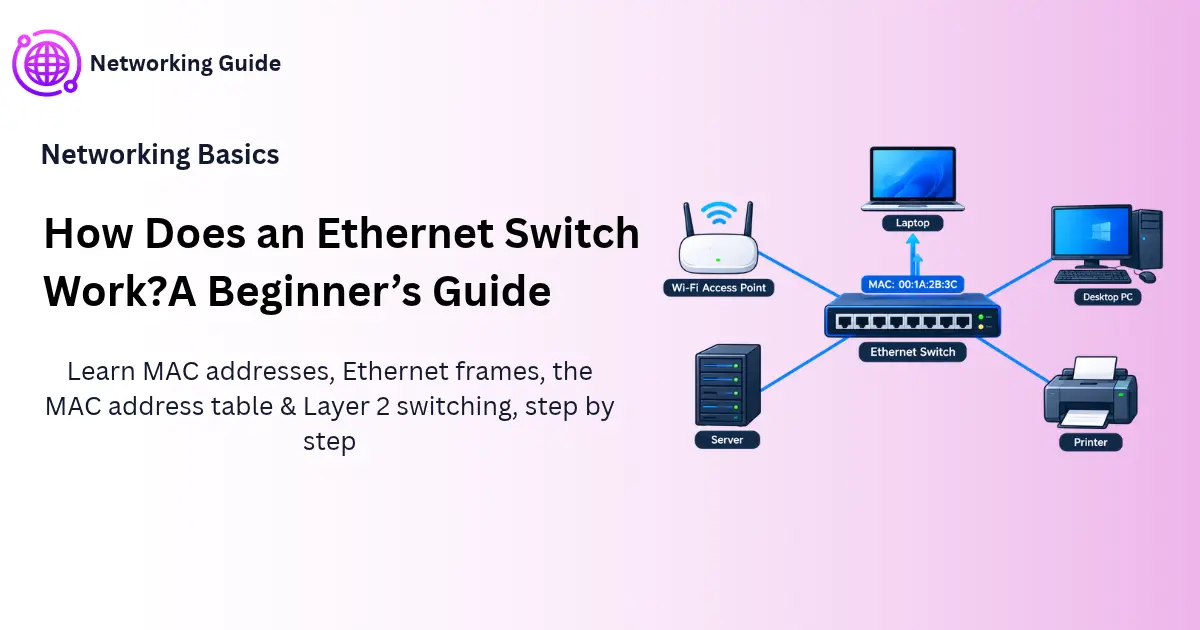
How does an Ethernet switch work? It remembers which device is plugged into which port, using each device’s MAC address. When data arrives, it sends it out through the one port where the receiver sits, not to everyone else.
Before You Start
Table of Contents
What Is Ethernet?
Ethernet is the common language of wired networks. It’s an IEEE 802.3 standard that decides how devices on a cable format their data, address each other and take turns. When you push an RJ45 cable into your laptop, you’re using it.
It has grown a lot since the 1980s. Early versions ran at 10 Mbps. Today, data centers run it at 100 Gbps and beyond.
The old design had one small problem. Many computers shared a single cable, so two of them could talk at the same moment and garble each other’s data. A rule called CSMA/CD told them to listen first and retry after a collision. Modern networks mostly avoid this, because every device gets its own private link to a switch.
Once you know how cables and frames fit together, the natural next question is: how does an Ethernet switch work with all these devices?
Ethernet vs Wi-Fi: Key Benefits
Wi-Fi wins on convenience. Ethernet wins on consistency.
- Steady speed: a cable gives you the full speed of its port. Wi-Fi shares the air with every phone and laptop nearby.
- Low lag: online gaming and video calls feel smoother.
- Fewer drop-outs: thick walls and crowded Wi-Fi channels don’t affect a cable.
- Harder to snoop on: an attacker has to physically plug in.
Real example: In a small clinic, staff phones can use Wi-Fi. But the reception PC, the billing server and the CCTV recorder should use cables, because they run all day and can’t afford to disconnect.
Common alternatives are Wi-Fi, fiber optic links and mobile data. Fiber is also part of the Ethernet family, and it’s used for long distances.
Which Ethernet Cable Should You Use?
| Cable | Typical speed | Max length |
|---|---|---|
| Cat5e | 1 Gbps | 100 m |
| Cat6 | 1 Gbps (10 Gbps up to about 55 m) | 100 m |
| Cat6a | 10 Gbps | 100 m |
- Cat5e: enough for most homes.
- Cat6: a sensible pick if you’re wiring a new place.
- Cat6a: best for servers or offices planning for 10 Gbps.
What Is a MAC Address in Networking?
A MAC address is a hardware address burned into a network card. It tells the network which physical device is which.
It’s 48 bits (6 bytes) long. MAC stands for Media Access Control, which is part of Layer 2 in the OSI model.
Real example: Think of a national ID number. It belongs to you, and it doesn’t change when you move house. Your MAC address works the same way for your device.
MAC Address Format and Structure
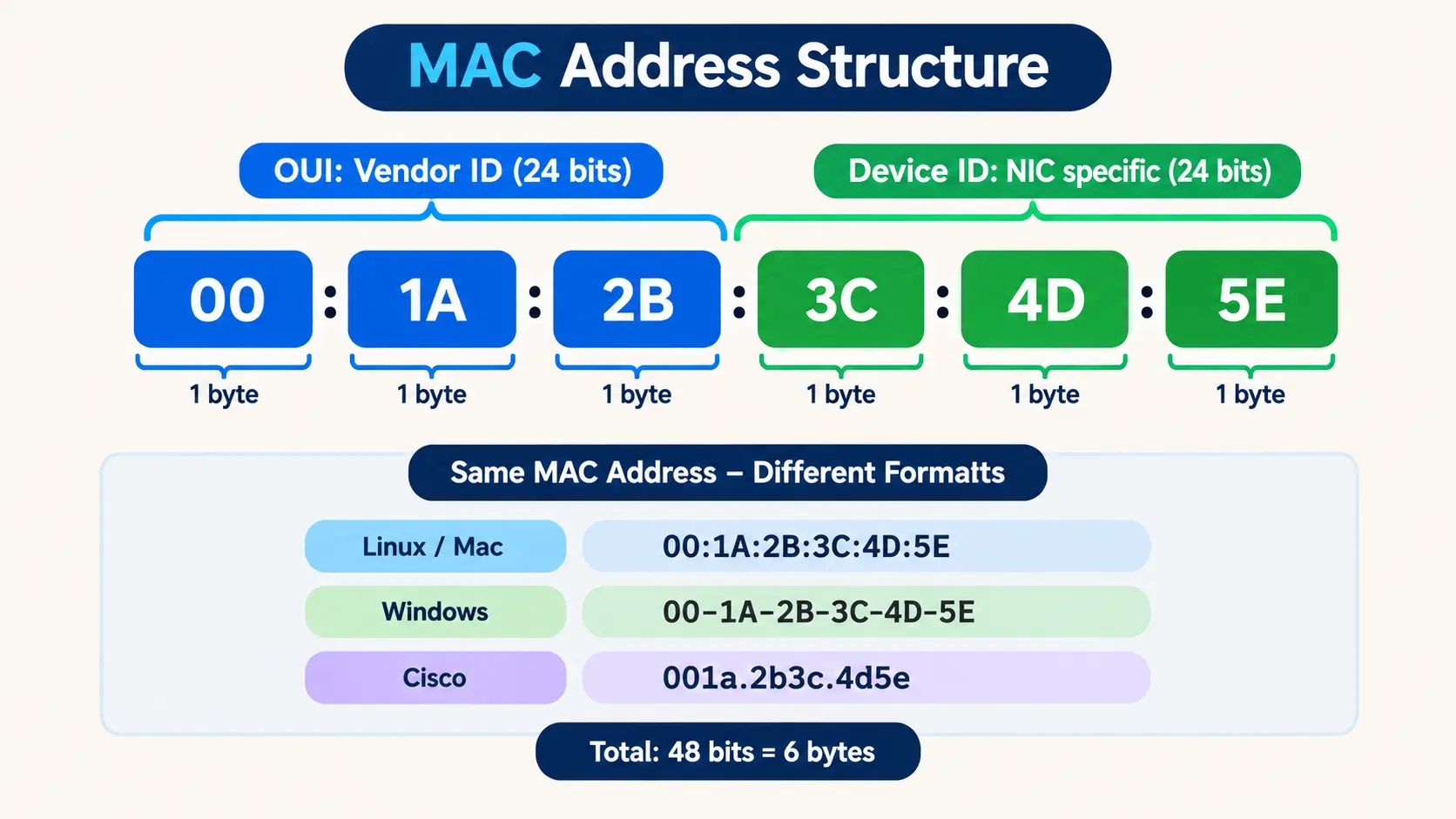
MAC addresses use hexadecimal characters: the digits 0-9 and the letters A-F. They have two halves:
- First 3 bytes (OUI): the manufacturer’s code, like Intel or TP-Link.
- Last 3 bytes: a serial number the manufacturer picks for that card.
One address can be written three common ways:
00:1A:2B:3C:4D:5E(Linux, macOS)00-1A-2B-3C-4D-5E(Windows)001a.2b3c.4d5e(Cisco)
They all mean the same thing. Cisco just groups the characters in sets of four.
Can a MAC address be all numbers? Yes. Digits are valid hex characters, so 00:11:22:33:44:55 is a legal address.
Switches have their own MAC addresses too. The one a switch uses to identify itself in protocols like Spanning Tree is often called the bridge MAC. Switches read these addresses all day, and that is the core of how an Ethernet switch works.
Unicast, Multicast and Broadcast MAC Addresses
- Unicast: one sender, one receiver. Most traffic is like this.
- Multicast: one sender, a chosen group, like a live video feed.
- Broadcast: one sender, everyone on the LAN. The address is
FF:FF:FF:FF:FF:FF.
MAC Address vs IP Address
Both identify a device. They just work at different levels.
| MAC address | IP address | |
|---|---|---|
| Layer | 2 | 3 |
| Size | 48 bits | 32 bits (IPv4) or 128 bits (IPv6) |
| Set by | Manufacturer | Router (DHCP) or admin |
| Changes? | Rarely | Often, when you join a new network |
| Used for | Delivery inside one LAN | Delivery across networks |
Real example: Your home address gets a courier to your street. Your national ID is what proves you’re the right person once he arrives. The IP address plays the first role, the MAC address plays the second.
Both are needed. IP helps data cross many networks. MAC finishes the job inside the last one.
How ARP Connects IP and MAC Addresses
Your computer often knows the IP address of its target but not the MAC address. ARP (Address Resolution Protocol) fills the gap:
- Your PC broadcasts: “Who owns 192.168.1.20?”
- That device answers with its MAC address.
- Your PC remembers the answer and starts sending frames.
A switch only cares about the MAC part. So how does an Ethernet switch work with it? That is a Layer 2 job, not a Layer 3 one.
Ethernet Frame Format Explained
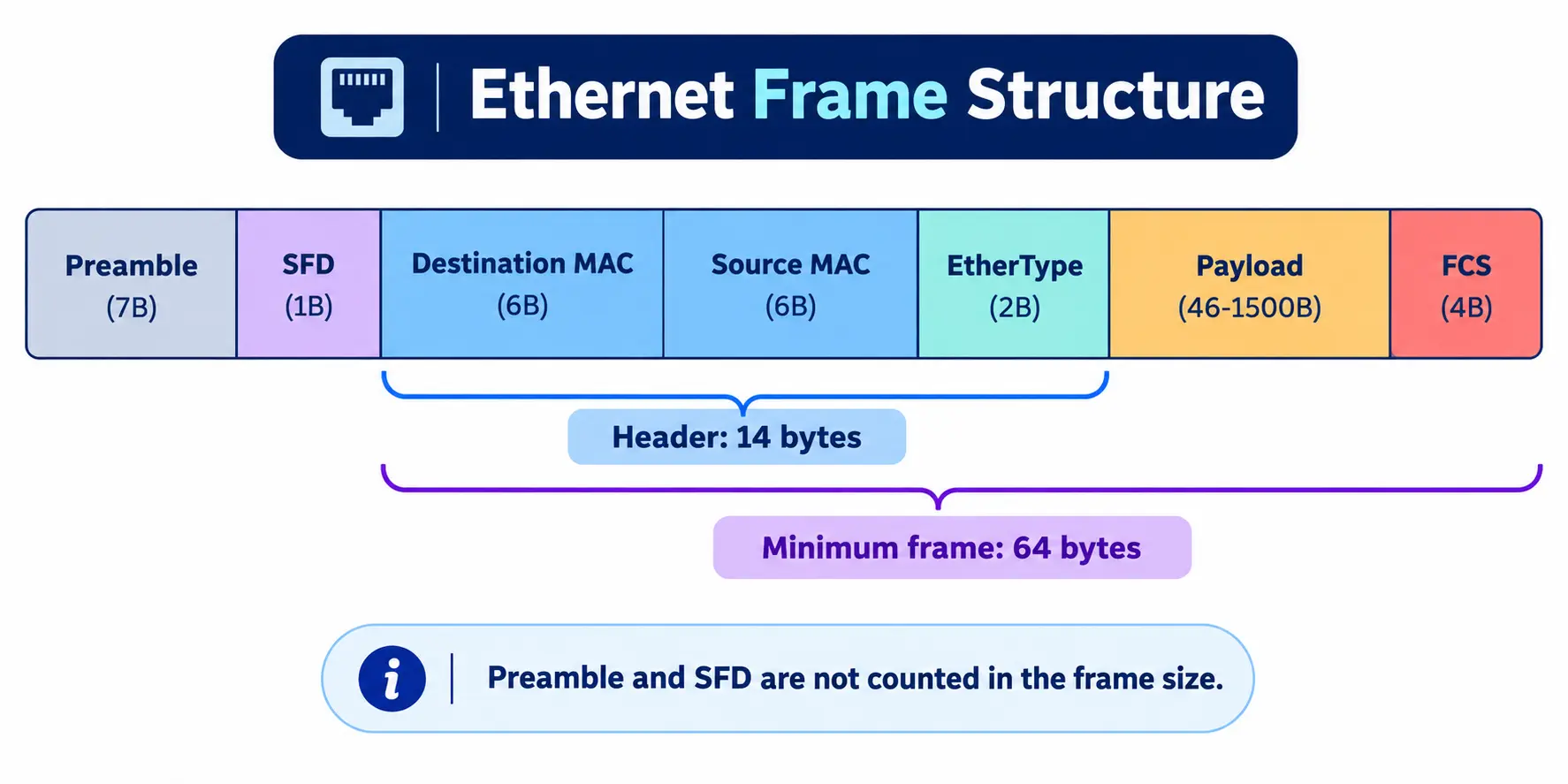
On a wired network, data is wrapped into frames before it’s sent. A frame is like a labelled box. The label has the addresses, and inside is the data.
| Field | Size | Purpose |
|---|---|---|
| Preamble | 7 bytes | Lets the receiver sync its clock |
| SFD | 1 byte | Signals “frame starts now” |
| Destination MAC | 6 bytes | Who it’s for |
| Source MAC | 6 bytes | Who sent it |
| EtherType | 2 bytes | What’s inside (IPv4, IPv6, ARP) |
| Payload | 46-1500 bytes | The data itself |
| FCS | 4 bytes | Error check (CRC) |
Destination, source and EtherType together make a 14-byte header. When people quote frame size, they count from the destination MAC to the FCS, and skip the preamble and SFD.
Why Is the Minimum Ethernet Frame 64 Bytes?
Add it up: 14 (header) + 46 (minimum payload) + 4 (FCS) = 64. The number comes from early shared-cable networks. A sender needed to still be transmitting when news of a collision traveled back, so frames couldn’t be too short. If your data is smaller, the network pads it.
Ethernet Frame vs IP Packet
- A frame lives at Layer 2 and travels inside one local network.
- A packet lives at Layer 3 and travels between networks.
- The IP packet sits inside the frame’s payload, like a letter inside an envelope.
- If the FCS doesn’t match, the receiver throws the frame away.
What Is an Ethernet Switch and Why Do You Need One?
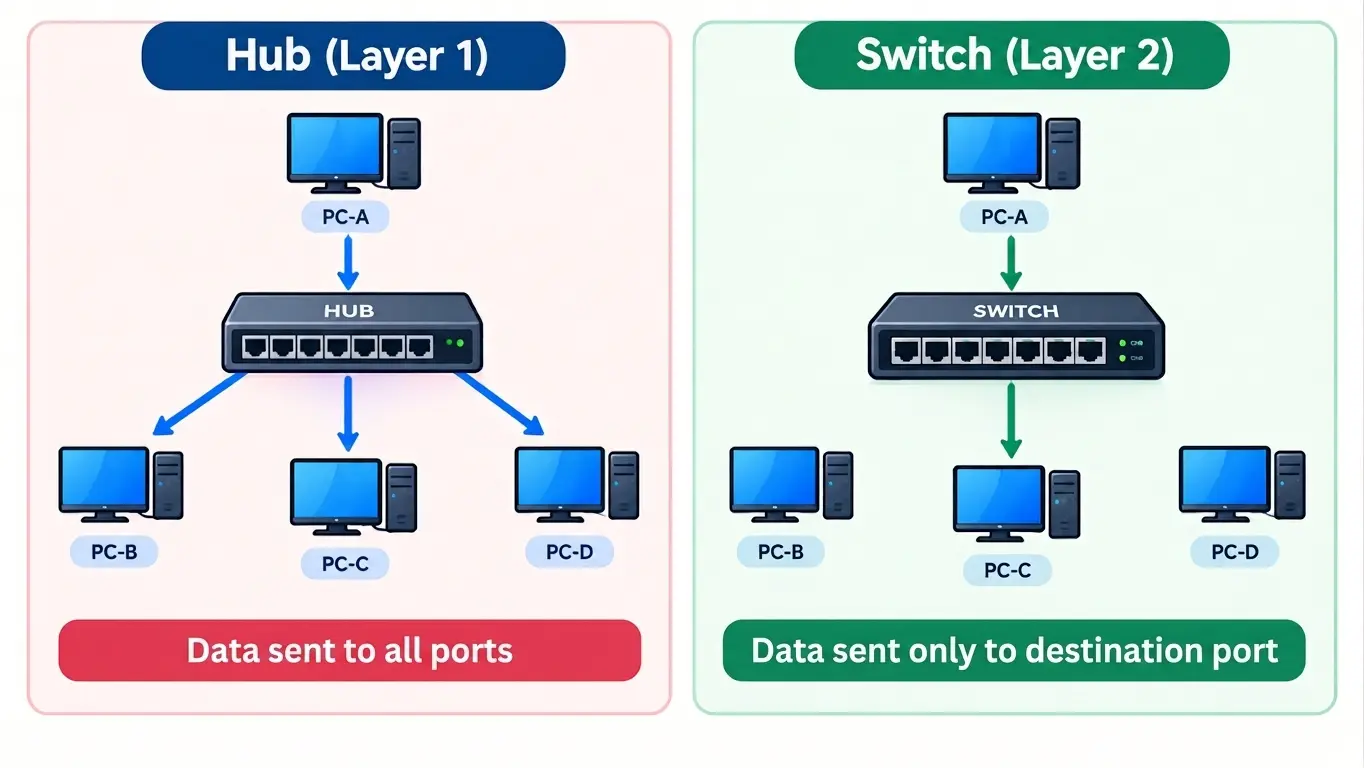
An Ethernet switch is a box with many ports that connects wired devices in a LAN. It reads the destination MAC address of each frame and sends it out of the right port only.
| Device | Layer | What it does |
|---|---|---|
| Hub | 1 | Copies every signal to all ports |
| Switch | 2 | Forwards frames using MAC addresses |
| Router | 3 | Links separate networks, like your LAN and the internet |
Real example: A hub is like a loudspeaker announcement at a railway station. Every passenger hears it, even if it’s meant for one person. A switch is like a reception desk with a register. It checks the name and sends the visitor to the right room.
A simple Ethernet splitter is different from both. It only divides a cable and doesn’t manage traffic.
Does Every Network Need a Switch?
- Two devices: one cable is enough.
- Three or more wired devices: you need a switch.
- Home router: its LAN ports are already a small built-in switch.
Without a switch, a ten-computer office would need a separate cable between every pair of machines. That’s 45 cables. A switch needs ten. So how does an Ethernet switch work once all your devices are plugged in? Let’s go through it step by step.
How Does an Ethernet Switch Work? Step by Step
If you’ve ever wondered how an Ethernet switch works behind the scenes, it comes down to five small actions. A switch repeats them for every frame, in hardware, so it’s fast.
1. Learning
The switch looks at the source MAC address of the incoming frame and records which port it arrived on.
2. Forwarding
It then checks the destination MAC address. If it’s in the table, the frame leaves through that one port.
3. Flooding
If the destination isn’t known yet, the switch sends the frame out of every port except the one it came from. Broadcast frames get the same treatment.
4. Filtering
If the destination sits on the same port the frame arrived on, the switch drops the frame. There’s nobody else to deliver it to.
5. Aging
Each entry has a timer. If a device stays silent, the entry is deleted. Cisco switches use 300 seconds by default. This stops the table from filling up with devices that have left.
Worked Example: 4 PCs on One Switch
MAC addresses are shortened here to keep the example simple. Four PCs are plugged in:
- PC-A on Port 1 (MAC: AAAA)
- PC-B on Port 2 (MAC: BBBB)
- PC-C on Port 3 (MAC: CCCC)
- PC-D on Port 4 (MAC: DDDD)
The table is empty. PC-A sends a frame to PC-C.
- Learn: the switch sees source AAAA on Port 1 and saves it.
- Flood: it doesn’t know CCCC yet, so it sends the frame to Ports 2, 3 and 4. PC-B and PC-D see it isn’t addressed to them and ignore it. PC-C accepts it.
- Learn again: PC-C replies. The switch sees source CCCC on Port 3 and saves it.
- Forward: the reply goes only to Port 1, because AAAA is now known.
From this point, A and C talk directly. B and D never see that traffic.
| MAC | Port |
|---|---|
| AAAA | 1 |
| CCCC | 3 |
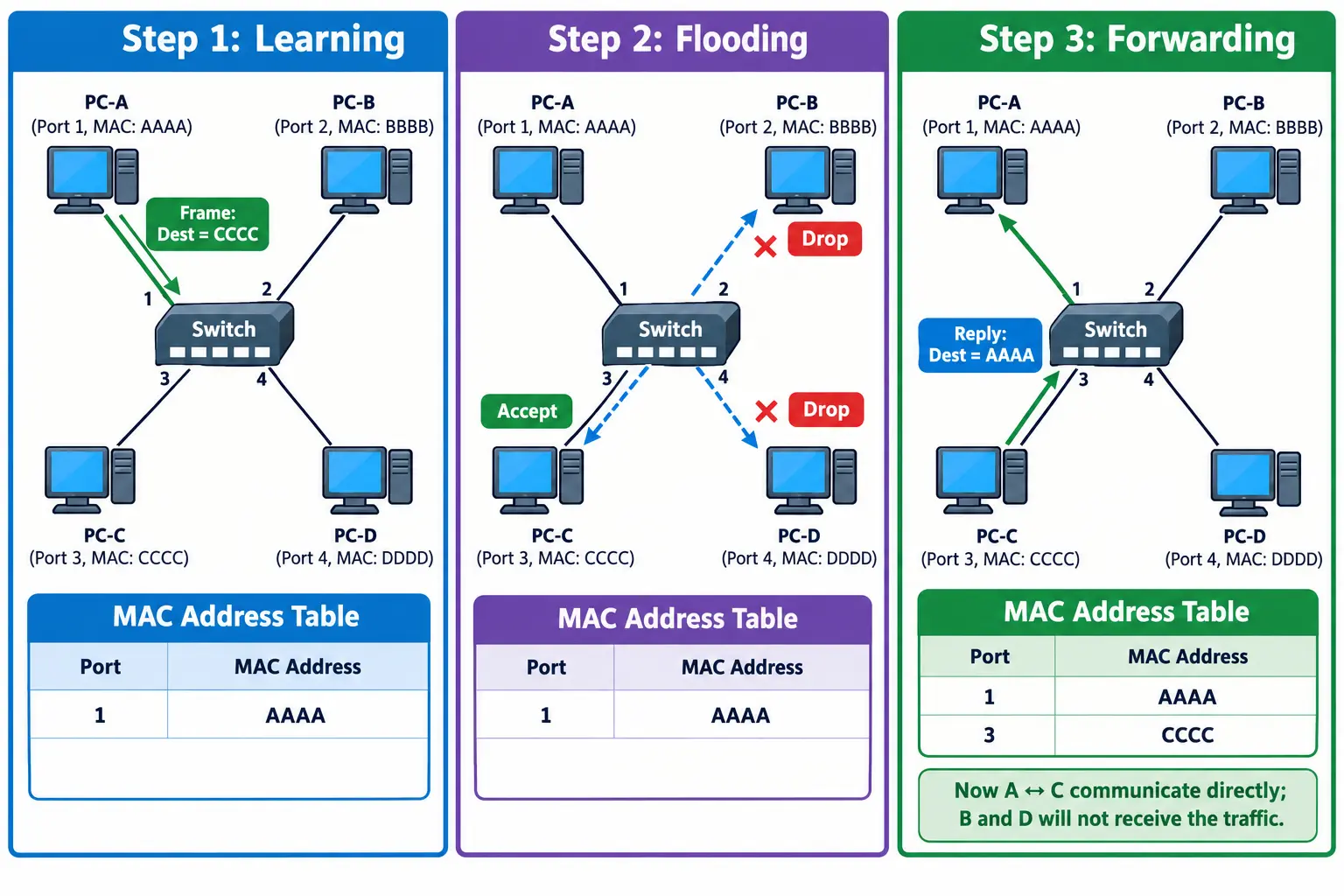
Nobody had to configure anything. The switch learned everything by watching traffic. That’s why an unmanaged switch works as soon as you plug it in.
That small example shows how an Ethernet switch works in a real network: watch the traffic, learn the address, forward the frame.
MAC Address Table (CAM Table) Explained
How does an Ethernet switch work without any setup? It relies on this table. It is the switch’s notebook, and it lists which MAC address can be reached through which port.
Each row usually has:
- VLAN: the virtual network the entry belongs to
- MAC address: the device’s address
- Type: dynamic (learned) or static (set by hand)
- Port: where the device is connected
CAM Table vs MAC Address Table
They refer to the same table. CAM stands for Content Addressable Memory, the fast hardware memory where the table is stored. “MAC address table” describes what’s in it.
Sample Output: show mac address-table
Switch# show mac address-table
Vlan    Mac Address       Type        Ports
----    -----------       --------    -----
   1    001a.2b3c.4d5e    DYNAMIC     Fa0/1
   1    00b0.d0aa.1122    DYNAMIC     Fa0/3
   1    0050.56c0.0008    STATIC      Fa0/5
The first row says the device with MAC 001a.2b3c.4d5e is reachable on port Fa0/1.
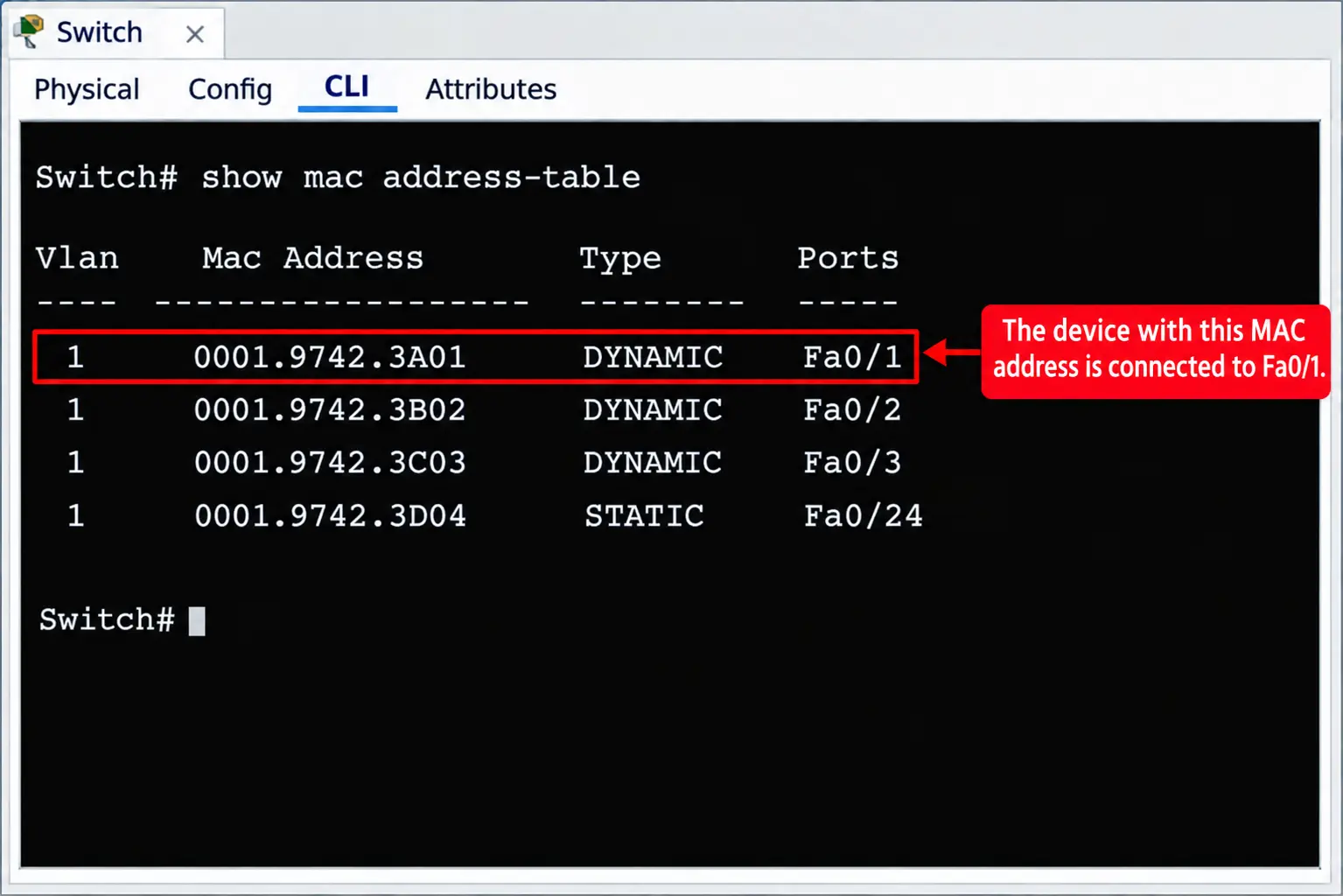
Good to know:
- One port can hold many MACs. This happens when another switch hangs off that port.
- Static entries don’t age out.
- IP addresses don’t change the table. A Layer 2 switch ignores IP, so giving a PC a static IP doesn’t affect it.
Store-and-Forward, Cut-Through, Duplex and Speed
| Method | What happens | Trade-off |
|---|---|---|
| Store-and-forward | Reads the whole frame, checks errors, then forwards | Safest, a bit slower |
| Cut-through | Starts forwarding once it reads the destination | Fastest, may pass damaged frames |
| Fragment-free | Checks the first 64 bytes, then forwards | Middle ground |
Store-and-forward is common today, because the extra delay is tiny and bad frames get stopped early.
How a Switch Preserves Network Speed
- Separate collision domains: every port is its own zone, so devices don’t compete for one cable.
- Full duplex: a device can send and receive at the same moment.
- Auto-negotiation: both ends agree on the best speed, such as 100 Mbps or 1 Gbps.
Real example: A hub is a single narrow lane where cars take turns. A switch gives every house its own two-way road.
Layer 2 vs Layer 3 vs Layer 4 Switching
The layer shows which information the switch uses to decide.
| Type | Looks at | Common use |
|---|---|---|
| Layer 2 | MAC address | Connecting devices in a LAN |
| Layer 3 | IP address | Routing between VLANs and subnets |
| Layer 4 | TCP/UDP port | Traffic priority, load balancing |
What Is Layer 2 Switching?
Layer 2 switching is what this whole article describes: read the MAC address, check the table, forward the frame. It’s quick and needs no setup. This is the simplest way to see how an Ethernet switch works at Layer 2: read, check, forward.
Can a Layer 2 Switch Act as a Router?
No. It can’t read IP addresses, so it can’t pass traffic between networks. For that you need a router or a Layer 3 switch.
A Layer 3 switch does both jobs in hardware. It still keeps a MAC table for local forwarding.
Common Switching Problems
Switching Loops and Broadcast Storms
Imagine two switches joined by two cables. A broadcast can circle between them forever, because Ethernet frames have no expiry counter. Copies pile up, and the network slows down or crashes.
Spanning Tree Protocol (STP) fixes this. It blocks one of the paths and keeps it as a backup.
MAC Flooding Attack and Port Security
A MAC table has limited space. An attacker can send thousands of frames with fake source addresses and fill it. The switch then can’t store real entries, so it floods frames out of all ports, much like a hub. The attacker may capture traffic meant for others.
How to reduce the risk:
- Use port security to cap how many MACs a port may learn.
- Split the network with VLANs to keep broadcasts small.
- Disable ports you aren’t using.
Types of Ethernet Switches
Whatever the type, how an Ethernet switch works stays the same: learn, store, forward.
- Unmanaged: plug and play, no settings. Right for homes and small shops.
- Managed: you can set up VLANs, port security, QoS and monitoring. Right for offices.
- PoE: carries power and data on one cable, so IP cameras, VoIP phones and access points don’t need adapters.
Big networks often use three levels: access switches for users, distribution switches to join them, and core switches for the fastest backbone.
Frequently Asked Questions
Here are quick answers to the questions people ask most about how an Ethernet switch works.
How does an Ethernet switch know where to send data?
It reads the destination MAC address and looks it up in its MAC table. If it finds it, it forwards the frame to that port. If not, it floods it to all other ports.
What is the difference between a MAC address and an IP address?
A MAC address is a hardware address used inside one network. An IP address is a logical address used to route data between networks. IP changes often, MAC rarely does.
Can a MAC address be all numbers?
Yes. MAC addresses use 0-9 and A-F, so an all-digit address is valid.
Why is the minimum Ethernet frame 64 bytes?
It comes from collision detection on old shared cables. A sender had to still be transmitting when a collision signal returned, and 64 bytes allowed enough time.
Is there a difference between the MAC address table and the CAM table?
In practice, no. CAM is the memory type, and MAC address table is the name of the content stored in it.
Does every network need a switch?
No. Two devices can connect directly. With three or more wired devices, you need one. Most home routers already include one.
Can a Layer 2 switch work as a router?
No. It only understands MAC addresses and can’t route between networks.
How does an unmanaged Ethernet switch work?
The same way as other switches. It learns source MACs, builds a table and forwards frames. You just can’t change its settings.
Do Ethernet switches reduce internet speed?
A switch adds a very small delay that you won’t notice. Real slowdowns usually come from a weak internet plan, a bad cable, a slow port or an overloaded network.
Conclusion
So, how does an Ethernet switch work? Devices connect over Ethernet, each has a MAC address, data travels in frames, and the switch stores addresses in its MAC table to send each frame to the right port. That’s why a switched network stays fast even as more devices join.