
TCP/IP Protocol Suite: The Internet’s Real Framework
The TCP/IP protocol suite is the shared rulebook that lets your phone, your laptop and every website understand each other. Without it, nothing you do online would work. This guide explains how it fits together, without the textbook jargon.
Before You Start
Table of Contents
What Is the TCP/IP Protocol Suite?
The TCP/IP protocol suite is a collection of rules for moving data across networks. It covers how data is cut into pieces, given addresses, sent, routed and rebuilt at the destination. You’ll also see it called the Internet protocol suite. Same thing, different name.
A courier service is a good way to picture it. You hand over a parcel, which is your data. The courier puts an address label on it, and that’s the job of IP. A tracking system confirms delivery and re-ships anything that got lost, which is what TCP does. Vans and planes handle the actual travel, and in networking that’s the physical connection.
One thing trips up a lot of beginners: TCP/IP is not a single protocol. TCP and IP are simply the two famous ones that gave the suite its name. HTTP, DNS, UDP, ICMP and ARP all live inside it too. It also doesn’t care about hardware. Wi-Fi, Ethernet cable, fiber or mobile data, it works on all of them.
A Brief History of TCP/IP
- Late 1960s: DARPA, a US research agency, builds ARPANET, an early ancestor of today’s internet.
- 1974: Vint Cerf and Bob Kahn describe a common protocol for joining different networks. The first specification came out in December 1974 as RFC 675.
- 1978: The design is split into TCP and IP, which made it much more flexible.
- 1 January 1983: ARPANET drops its old protocol (NCP) and switches to TCP/IP. Many people call this the birthday of the modern internet.
- 1998: IPv6 is standardized because IPv4 addresses were running short.
TCP/IP Architecture: The 4-Layer Model
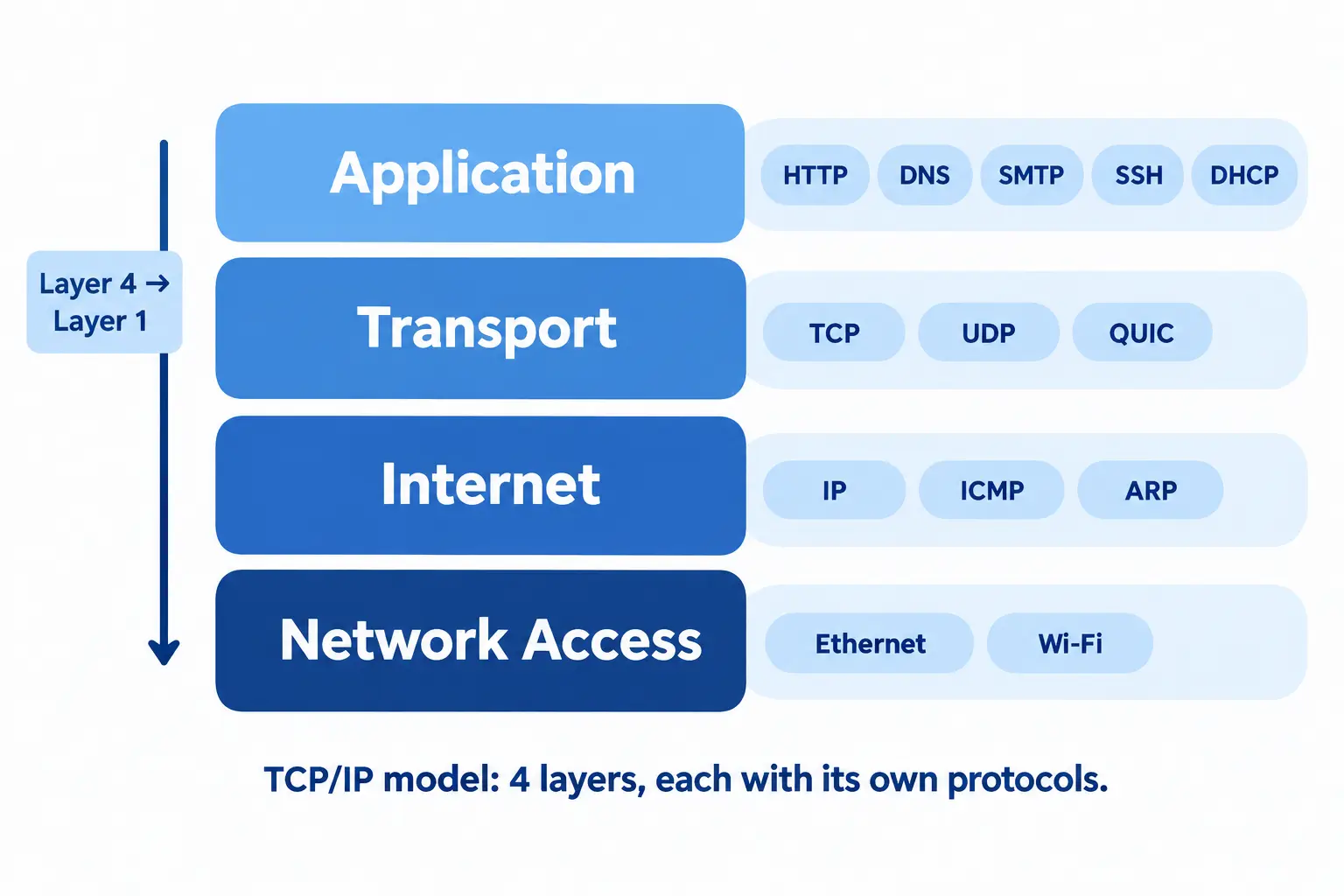
TCP/IP architecture is a stack of four layers. Each layer has one job and only talks to the layer directly above and below it. Your browser, for example, has no idea whether you’re on Wi-Fi or a cable. It doesn’t need to know.
| Layer | Main job | Example protocols |
|---|---|---|
| Application | Talks to apps like browsers and email | HTTP, HTTPS, DNS, SMTP, SSH |
| Transport | Delivers data between two devices | TCP, UDP, QUIC |
| Internet | Addresses and routes packets | IP, ICMP |
| Network Access | Sends bits over the local link | Ethernet, Wi-Fi, ARP |
4 Layers vs 5 Layers
Some textbooks describe the TCP/IP protocol suite with five layers instead of four. The only change is that Network Access is split into Data Link and Physical.
- 4 layers is the official version, based on RFC 1122.
- 5 layers is common in books because it matches real hardware more closely.
Honestly, the 5-layer version is easier when you’re learning. Just check which one your course or exam wants.
Layers in the TCP/IP Model
The TCP/IP protocol suite has four layers. From top to bottom:
- Application: the software you use.
- Transport: how carefully data is delivered.
- Internet: addresses and routes.
- Network Access: the physical link.
TCP/IP Application Layer
You use this layer all day without noticing. Apps create and read their data here.
- HTTP/HTTPS loads websites.
- DNS turns a name like
example.cominto an IP address. It works like your phone’s contacts: you tap a name, and the phone dials the number. - SMTP, IMAP and POP3 handle email.
- SSH gives secure remote access to a server.
- DHCP gives your device an IP address when it joins your Wi-Fi.
One detail people get wrong: encryption. TLS is what makes HTTP into HTTPS. It sits between the application and transport layers, and the original TCP/IP model doesn’t list it as a separate layer.
When you open Gmail, your browser talks to Google’s servers over HTTPS. That’s this layer.
TCP/IP Transport Layer
The transport layer carries data between two devices and decides how careful to be about it. It also uses port numbers. Say your laptop has a browser, Spotify and Slack running together. Ports keep each app’s data separate, so Spotify never receives a Slack message.
Difference Between TCP/IP and UDP
This one confuses almost everyone at first. TCP/IP is the whole suite. UDP is just one protocol inside it. What people usually mean is TCP vs UDP:
| Feature | TCP | UDP |
|---|---|---|
| Connection | Sets one up first | None |
| Reliability | Resends lost data | Doesn’t resend |
| Order | Keeps data in order | Can arrive shuffled |
| Speed | Slower | Faster |
| Header size | 20 to 60 bytes | 8 bytes |
| Typical use | Websites, email, downloads | Video calls, gaming, DNS lookups |
A PDF download needs TCP, because one missing piece can corrupt the file. A live video call is different. A tiny glitch is fine, but a long freeze is not, so UDP is the better fit.
There’s also QUIC, a newer protocol built on top of UDP. HTTP/3 uses it, and it helps pages load faster on unstable connections like mobile data.
TCP Three-Way Handshake and Connection Close
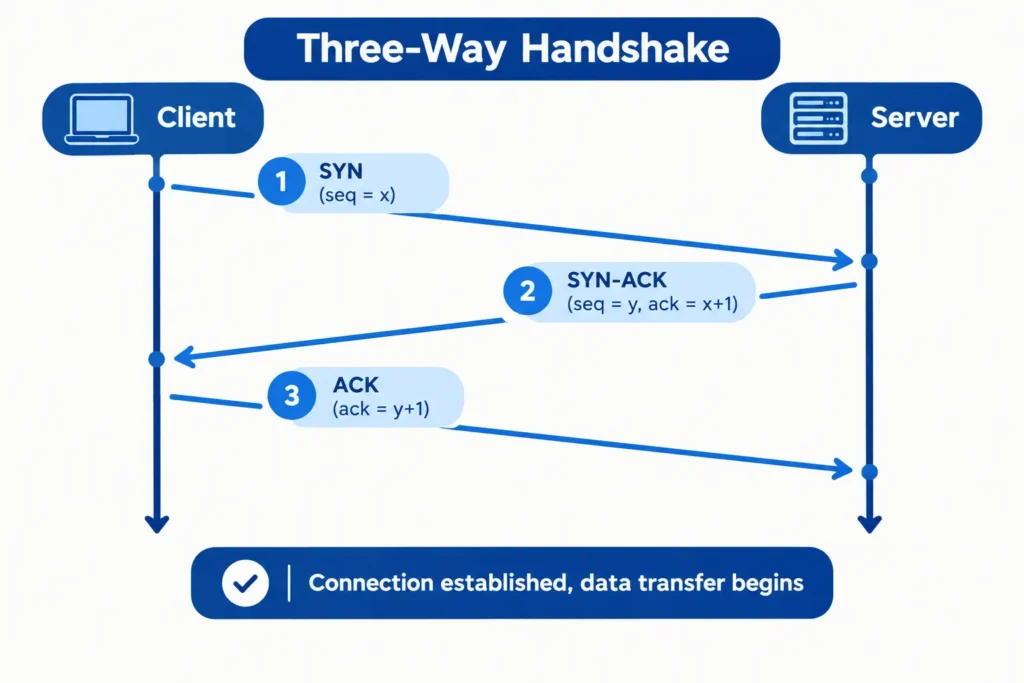
Before TCP sends any data, the two sides have a quick exchange:
- SYN: the client asks, “Can we talk?”
- SYN-ACK: the server answers, “Yes, ready.”
- ACK: the client confirms, “Good, starting now.”
When they’re finished, each side closes its own half of the connection with FIN and ACK messages.
Well-Known Ports
| Port | Service |
|---|---|
| 22 | SSH |
| 25 | SMTP (sending email) |
| 53 | DNS |
| 80 | HTTP |
| 443 | HTTPS |
TCP/IP Internet Layer
This layer gives each device an address and finds a path between networks. Its main protocol, IP, works on a “best effort” basis. It tries to deliver every packet but makes no promises. That gap is exactly why TCP exists on top of it.
- IPv4 uses 32-bit addresses like
192.168.1.1. There are around 4.3 billion of them, and they’ve mostly run out. - IPv6 uses 128-bit addresses like
2001:db8::1. There are so many that running out isn’t a real worry. - ICMP carries error and status messages. The
pingcommand uses it. - NAT lets many devices share one public IP address. Your phone, TV and laptop all reach the internet through your router’s single address.
- ARP finds a device’s hardware (MAC) address from its IP address. It sits on the border between this layer and the one below, so books disagree on where to put it.
TCP/IP Network Access Layer
This layer moves data across your local link, like home Wi-Fi or an office cable.
- It packs data into frames.
- It uses MAC addresses to reach the next device on the same network.
- It checks for transmission errors.
- It works with Ethernet, Wi-Fi and other technologies.
When your laptop sends a frame to your Wi-Fi router, that’s this layer. From there, the router forwards the data toward the wider internet.
Working of TCP/IP: Step by Step
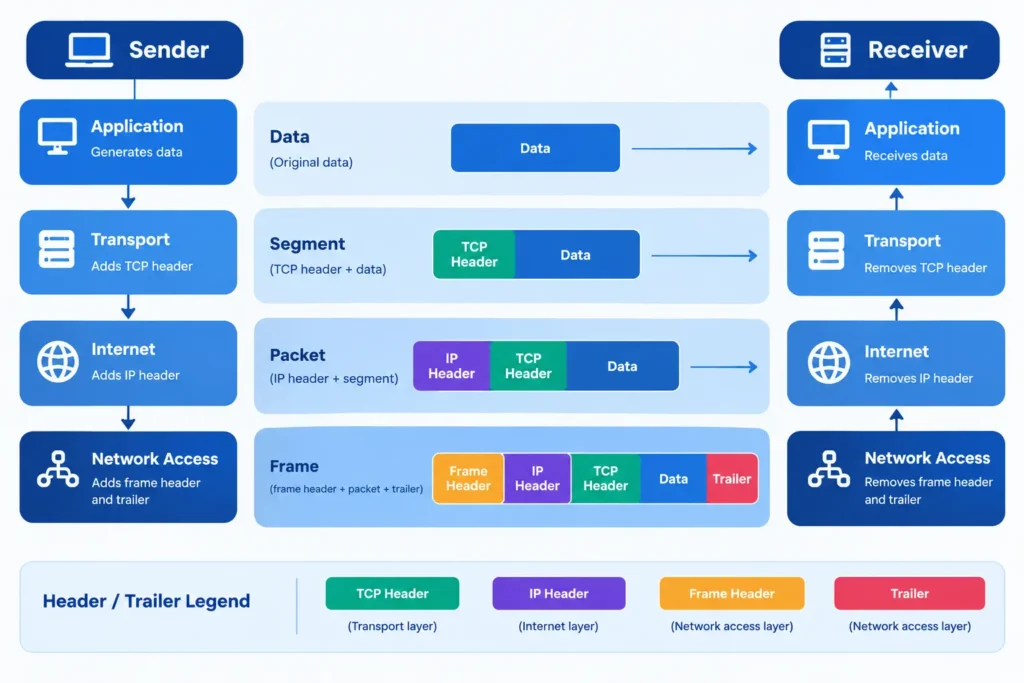
In the TCP/IP protocol suite, data goes down the layers and each layer adds its own header. It’s like sealing a letter in an envelope, then putting that envelope inside a bigger box. This is called encapsulation. The receiving device unwraps everything in reverse order.
| Layer | Name of the data unit |
|---|---|
| Application | Data |
| Transport | Segment (TCP) or datagram (UDP) |
| Internet | Packet |
| Network Access | Frame |
On the sender’s side:
- The app creates the data.
- The transport layer splits it into segments and adds port numbers.
- The internet layer adds source and destination IP addresses.
- The network access layer adds MAC addresses and sends the frame.
On the receiver’s side, the same steps run backward until the app gets the complete data.
What Happens When You Type a URL in Your Browser
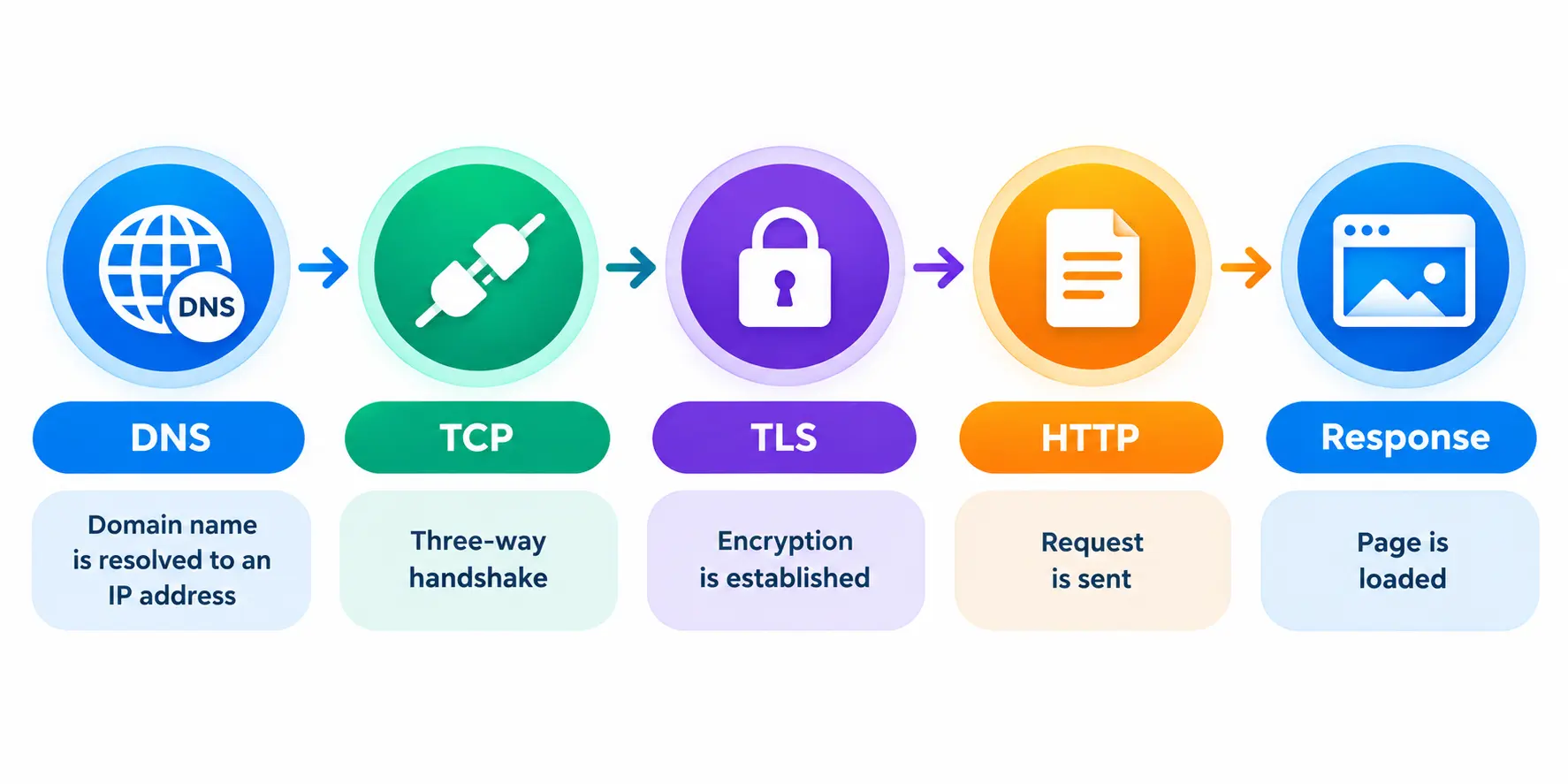
Suppose you type www.example.com and press Enter.
- DNS: your device asks a DNS server for the site’s IP address.
- TCP: your browser does the three-way handshake with that server.
- TLS: both sides agree on encryption keys (for HTTPS sites).
- HTTP: the browser requests the page.
- Response: the server sends the page back and your browser shows it.
Most of the time, this all takes a fraction of a second.
TCP/IP vs OSI Model
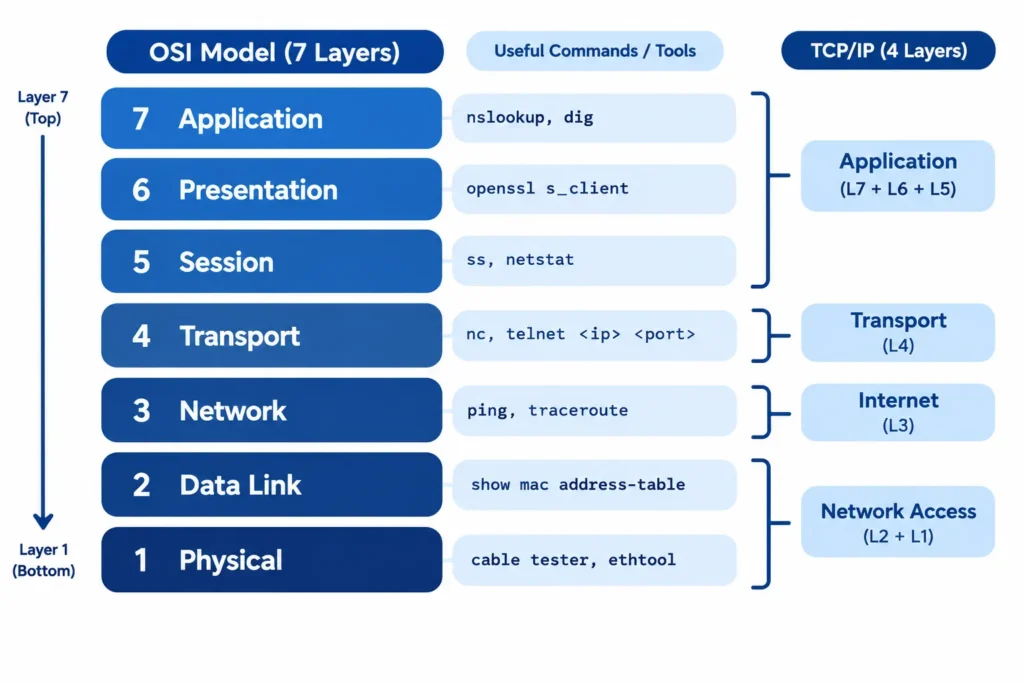
The OSI model has 7 layers and is mainly used for teaching. The TCP/IP protocol suite has 4 layers and is what real networks run on.
| Point | TCP/IP | OSI |
|---|---|---|
| Layers | 4 (or 5) | 7 |
| How it was built | Around protocols that already worked | Model first, protocols later |
| Real-world use | Everywhere | Mostly learning and troubleshooting |
| Top layers | One Application layer | Application, Presentation, Session |
| Bottom layers | One Network Access layer | Data Link, Physical |
OSI is the map, and TCP/IP is the road you actually drive on. Engineers still say “that’s a Layer 3 problem” because the OSI numbers are handy shorthand. The traffic itself, though, follows TCP/IP.
How TCP/IP Layers Are Implemented in Practice
Inside your computer, the TCP/IP protocol suite isn’t a set of neat separate boxes. It’s spread across software and hardware:
- Apps like your browser or mail client handle the application layer.
- The operating system kernel runs TCP, UDP and IP. Windows, Linux, macOS and Android each ship with their own TCP/IP stack.
- Sockets are the doorway apps use to send and receive data. A developer writes “send this over a TCP socket,” and the OS handles the rest.
- Network drivers and the network card (NIC) build frames and put them on the link.
- Routers work mainly at the internet layer. Switches work mainly at the link layer.
That’s why you can switch from Wi-Fi to a cable in the middle of a download and your apps barely notice.
TCP/IP Security and Troubleshooting Basics
TCP/IP was designed when networks were small and everyone trusted everyone. Security got added later, piece by piece.
| Layer | Common attack | Common defense |
|---|---|---|
| Application | Phishing, fake DNS replies | HTTPS, DNSSEC, user awareness |
| Transport | SYN flood (a server is swamped with half-open connections) | Firewalls, rate limiting, SYN cookies |
| Internet | IP spoofing, DDoS | IPsec, traffic filtering |
| Network Access | ARP spoofing on local networks | Port security, network segmentation |
pingchecks whether another device is reachable.traceroute(tracerton Windows) shows where the path slows down or breaks.nslookupordigtests DNS.ssornetstatlists open connections on your machine.- Wireshark shows real packets, which is great for learning.
If a website won’t open, try ping 8.8.8.8. When that works but the site still fails, DNS is usually the problem.
[YOUR LINE: one real time you used ping, traceroute or Wireshark to fix or understand something. Even 2 sentences is enough.]
Advantages and Disadvantages of TCP/IP
| Advantages | Disadvantages |
|---|---|
| Open standard, owned by no single company | Takes time for beginners to learn fully |
| Runs on any hardware and operating system | Not secure by default |
| Scales from a home network to the whole internet | TCP adds extra overhead |
| Offers both reliable (TCP) and fast (UDP) delivery | Layer boundaries are loose, so it’s less precise for teaching |
| Supported by every device you own | Swapping out one protocol can affect others |
How to Remember and Learn the TCP/IP Layers
Best Way to Remember the TCP/IP Layers
Use a memory phrase. Read from the bottom up (Link, Internet, Transport, Application):
“Like Ice Tea Always”
A phrase you invent yourself will stay in your head longer, so try making one.
How to Learn TCP/IP in Depth
- Start small: learn the 4 layers and what each one does.
- Get hands-on: run
ping,tracerouteandnslookupon your own computer. - Watch real traffic: capture a page load in Wireshark and find the handshake.
- Read the source documents (RFCs):
- Build something tiny: write a simple client and server with Python sockets.
Frequently Asked Questions
What is the TCP/IP protocol suite in simple words?
It’s a set of rules that lets devices send data over networks. It splits data into packets, adds addresses, delivers them and rebuilds the data at the destination.
How many layers does TCP/IP have, and what does each do?
Four. Application handles apps and services, Transport handles delivery between devices, Internet handles addressing and routing, and Network Access sends data over the local link.
What is the difference between TCP/IP and UDP?
TCP/IP is the whole protocol suite, and UDP is one protocol inside it. The usual comparison is TCP vs UDP: TCP is reliable but slower, UDP is faster with no delivery guarantee.
What is the difference between TCP, IP, UDP and ICMP?
IP addresses and routes packets. TCP adds reliable delivery. UDP offers fast delivery without guarantees. ICMP carries error and diagnostic messages, like the ones ping uses.
How does TCP/IP differ from the OSI model?
TCP/IP has 4 layers and runs real networks. OSI has 7 layers and is mainly a reference model for learning and troubleshooting.
Does TCP/IP use only the Internet layer?
No. It uses all four layers together. The Internet layer handles addressing and routing, but apps still need the other three to work.
What is the best way to remember the TCP/IP layers?
Use a memory phrase. From bottom to top, “Like Ice Tea Always” stands for Link, Internet, Transport, Application.
How do I learn TCP/IP in depth?
Learn the four layers, practice with ping, traceroute and Wireshark, then read the key RFCs (1122, 791, 9293 and 768) and build a small socket program.
Conclusion
The TCP/IP protocol suite is what keeps the internet running. If you only remember a few things, remember these:
- It’s a suite of many protocols, not just TCP and IP.
- It has 4 layers: Application, Transport, Internet and Network Access.
- TCP gives reliability, UDP gives speed, and IP handles addressing and routing.
- Real networks run on TCP/IP, while OSI is mainly for learning.
Try this today: open a terminal and run traceroute on any website. You’ll watch the internet layer work in real time.