
Firewalls & Network Segmentation: Protecting Network Boundaries
Firewall and network segmentation are the two most important layers of modern network defense — old-school security relied on just one locked front door, but that’s not enough anymore: once an attacker gets past a single wall, nothing stops them from wandering around inside. This is exactly where firewalls and network segmentation come in together — one guards the entrance, the other locks down the rooms inside — and this guide walks through both in plain language, with the kind of real examples you’d actually explain to a coworker.
Before You Start
Table of Contents
How a Firewall Works (And What It Actually Does)
Every byte of data trying to enter or leave your network passes through a firewall first, and it makes a call on each one — let it through, or shut it down.
A closer comparison would be an airport checkpoint rather than a front desk. Bags get scanned, IDs get checked, and anything that doesn’t match gets pulled aside instead of waved through. A firewall runs the same kind of check on data, just at network speed with no human involved.
What actually happens in the background looks something like this:
- Data shows up at the edge of the network.
- It gets measured against whatever rulebook the firewall is running.
- Depending on the match, it passes, gets dropped, or gets flagged for deeper inspection.
- The outcome gets recorded somewhere, so there’s a trail if anyone needs to look back at it.
Take the firewall out of the picture, and there’s nothing standing between your devices and the wider internet — the equivalent of a building with every entrance propped open all night.
Types of Firewalls Explained
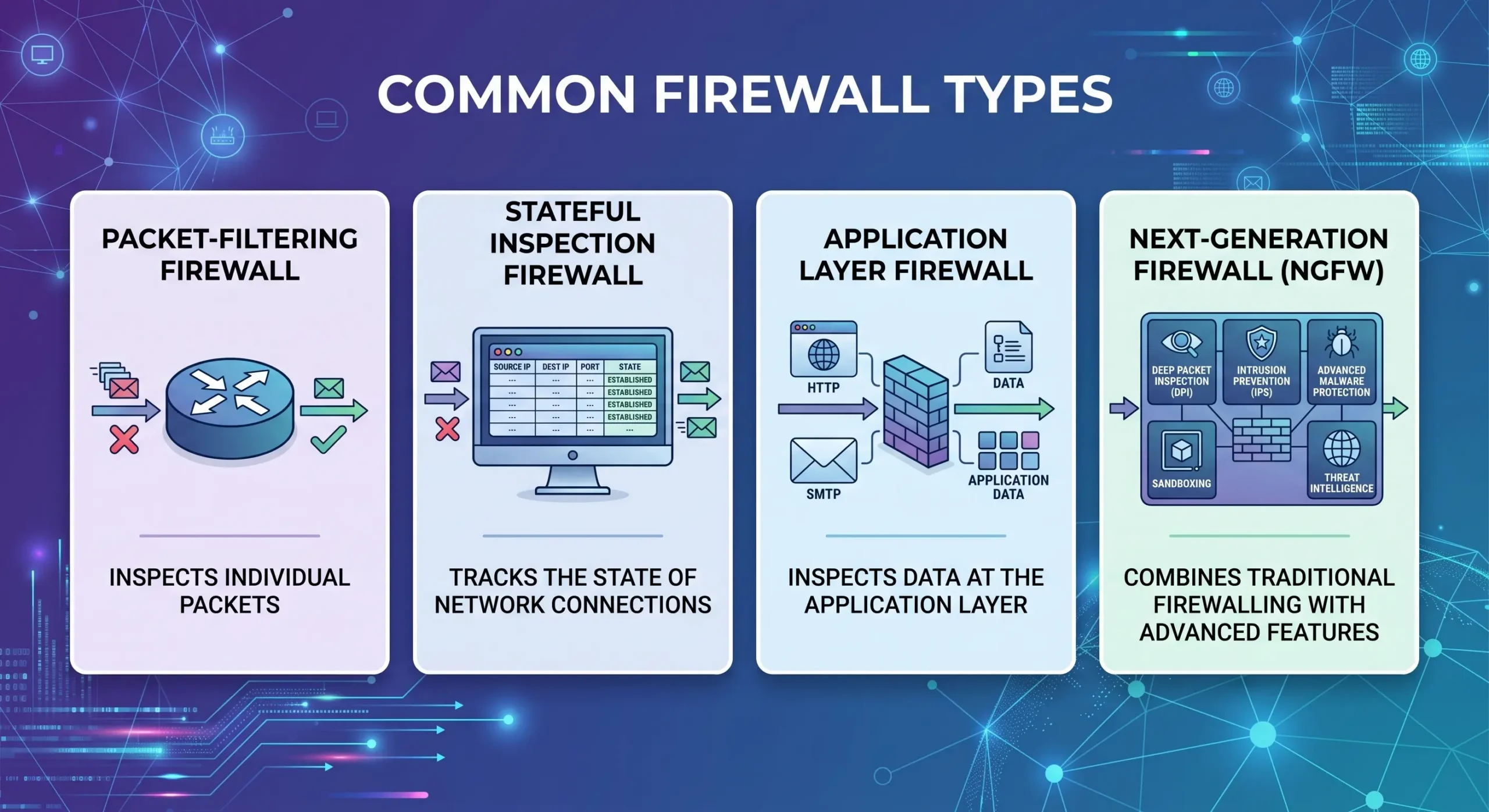
Firewalls aren’t all built the same way. Some just glance at the surface-level details of traffic, others dig much deeper into what’s actually being sent. A few types come up again and again. Firewall and network segmentation work best when you understand each firewall type first.
What Is an Application Layer Firewall?
This type looks past the basic traffic details and actually inspects the application data itself. So instead of just checking where a request came from, it can spot when something that looks like a normal web form is quietly trying to run malicious code.
It works a bit like a mail inspector who doesn’t stop at reading the envelope — they open the letter too. That extra step is what makes it so good at catching attacks that hide inside otherwise normal-looking traffic.
What Is a Stateful Inspection Firewall?
A stateful firewall keeps track of the whole conversation happening between two devices, not just isolated messages passing back and forth.
Think of calling a customer support line. The agent remembers you’ve already introduced yourself and doesn’t make you repeat it — but the second a stranger jumps into the line, they notice right away. That’s stateful inspection in action, and it’s a big reason attackers struggle to slip fake packets into an already-approved session.
What Is an Application Proxy Firewall?
Here, your device never talks directly to the destination. The proxy firewall steps in the middle, takes the request, checks it, and only then sends a clean version on your behalf.
It’s a lot like having an assistant screen your emails before they reach your inbox — anything suspicious gets filtered out first. One nice side effect: your internal network stays completely hidden from whatever’s on the other end.
(You’ll also come across packet-filtering firewalls — the most basic type, which only look at IP addresses and ports — and Next-Generation Firewalls, which we get into next.)
Next-Generation Firewall vs Traditional Firewall
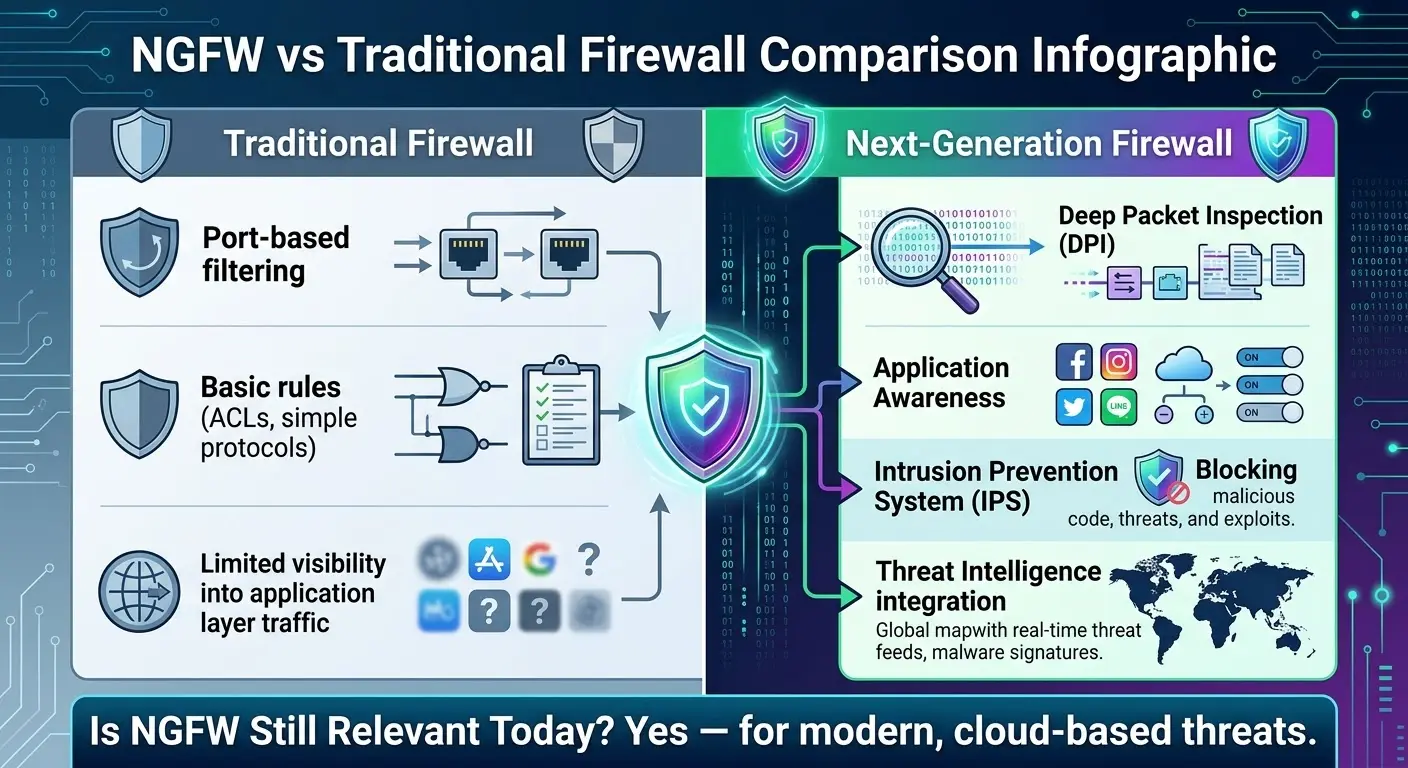
Traditional firewalls were designed for a much simpler internet, one where checking IP addresses and ports was enough. That’s no longer true, which is basically the whole reason Next-Generation Firewalls (NGFWs) exist.
| Feature | Traditional Firewall | Next-Generation Firewall (NGFW) |
| Checks | IP address, port number | Full application content, user identity |
| Threat detection | Basic, rule-based | Real-time threat intelligence, intrusion prevention |
| Visibility | Limited | Deep visibility into apps and users |
| Best for | Simple, older networks | Cloud, remote work, modern threats |
So, is NGFW still worth it in 2026? For most businesses, yes — it’s basically the baseline now. A traditional firewall simply can’t look inside encrypted or application-level traffic, and that’s exactly where most modern attacks like to hide.
Firewall Configuration and Rules: Best Practices
The firewall itself rarely causes a breach — a badly written rule set usually does. Get the configuration wrong, and even the most advanced firewall on the market won’t save you.
What Are Inbound and Outbound Rules in a Firewall?
- Inbound rules handle traffic coming into your network — say, letting employees receive email while blocking login attempts from unfamiliar countries.
- Outbound rules handle traffic leaving your network — like stopping an already-infected machine from quietly shipping stolen data to a hacker’s server.
A lot of businesses only think about inbound rules and forget outbound traffic matters just as much, especially for catching data theft after the fact.
What Are the Four Basic Types of Firewall Rules?
- Access control rules — decide which devices or users get to connect in the first place.
- Application-based rules — control access by the specific app or service (allow email, block random file-sharing tools).
- NAT rules — hide your internal IP addresses from anyone outside.
- User-based rules — give different levels of access depending on who’s logged in, like an intern versus an IT admin.
Firewall Best Practices
- Stick to least privilege — only open access that’s genuinely needed.
- Go through old rules every few months and clear out what’s unused.
- Default to blocking everything, then open specific exceptions — it’s safer than the other way around.
- Turn logging on so you actually know what’s being blocked and why.
- Keep the firewall’s firmware and software current.
If you’re starting from zero with no IT background, don’t overthink it: use the built-in firewall your device already has (Windows Defender Firewall or the macOS one), leave the defaults alone unless you know exactly why you’re changing something, and only open a port when an app clearly needs it.
What Is Network Segmentation?
Network segmentation is the practice of breaking one large network into smaller, separate sections instead of leaving it as one big open space.
Each section gets its own rules about who’s allowed in and what they can touch. So if an attacker breaks into one segment, they don’t automatically get a free pass into the rest.
It’s similar to an office floor plan — instead of one huge open area where anyone can wander anywhere, you’ve got separate locked rooms for HR, Finance, and IT, each needing its own keycard. This is the second half of the firewall and network segmentation equation.
Network Segmentation vs. Network Isolation
People mix these two up constantly, but they’re not the same thing.
- Segmentation allows controlled communication between sections — HR’s computer can still talk to the main server, just under restrictions.
- Isolation means a device or section has no connection to anything else, full stop.
Easiest way to remember it: segmentation is a room with a door that opens under the right conditions. Isolation is a room with no door at all.
How Firewalls Enable Network Segmentation
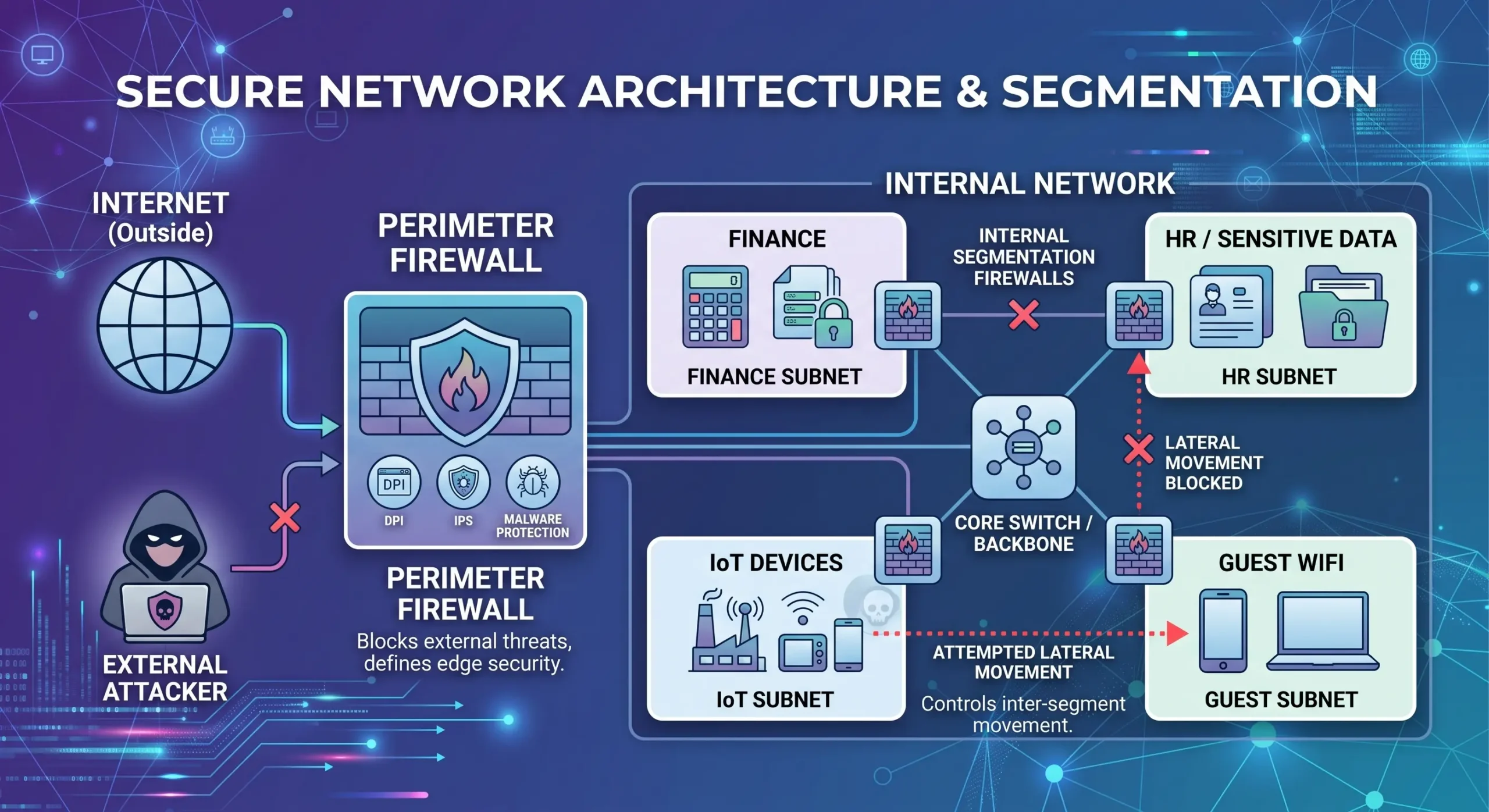
Firewalls are actually what makes segmentation work in practice. Internal firewalls — not just the one guarding the edge of the network — sit between each segment and control exactly what’s allowed to cross over. This section shows exactly how firewall and network segmentation connect in practice.
Here’s what that looks like in an actual attack:
- A hacker gets into your guest Wi-Fi.
- Without segmentation, nothing stops them from moving sideways straight into your finance servers.
- With internal firewalls in place, they hit a locked door instead and stay stuck in the guest zone, nowhere near anything valuable.
This is also where the idea of Zero Trust comes from — never assume a device is safe just because it’s technically already inside the network. Every segment boundary re-checks that trust, and a firewall is what actually enforces it.
Types of Network Segmentation
- Physical segmentation — separate hardware (routers, switches, cabling) dividing the network. Very secure, but not cheap to set up.
- Logical segmentation (VLANs) — divides traffic through software settings instead of new equipment. Cheaper, more flexible.
- Micro-segmentation — the most granular option, applying rules down to individual apps or workloads rather than whole departments. This is the go-to approach for cloud environments today.
Benefits of Combining Firewalls and Network Segmentation
- Stronger security — attacks stay contained instead of spreading network-wide.
- Better performance — less congestion usually means faster speeds.
- Easier compliance — PCI DSS and HIPAA often require sensitive data in its own protected zone anyway.
- Simpler monitoring — spotting trouble is easier in small sections than one giant flat network.
Common Challenges
- Encrypted (TLS) traffic — most of the web runs on encryption now, so firewalls need to decrypt and re-encrypt traffic to actually see what’s inside.
- Over-segmentation — go too far and the network becomes a nightmare to manage.
- Misconfiguration — one wrong rule can block legitimate traffic, or leave a gap wide open for attackers.
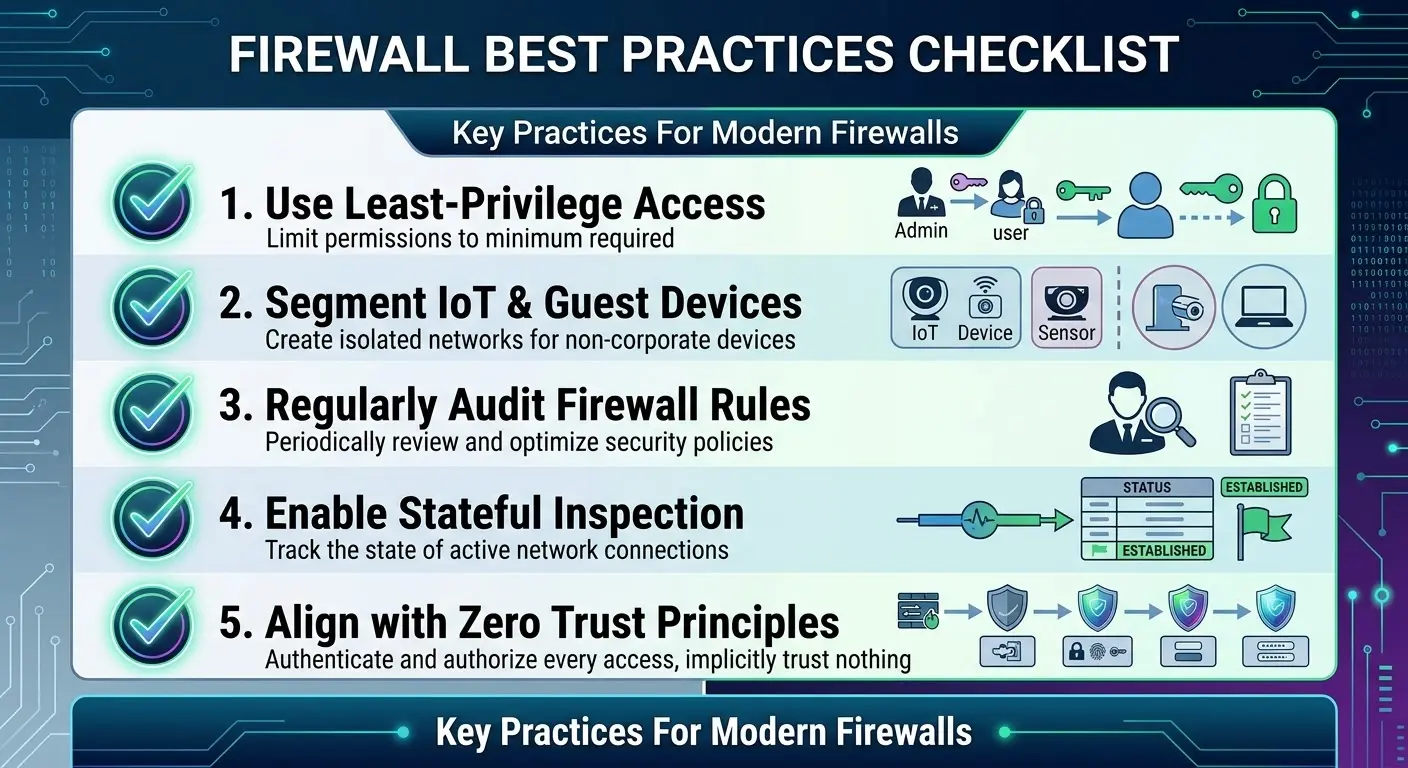
Firewall and Network Segmentation Best Practices Checklist
- Default to “deny,” then open only what’s actually needed
- Keep guest Wi-Fi, IoT devices, and critical systems on separate segments
- Apply least-privilege access everywhere, not just in a few places
- Review firewall rules and segments every few months
- Pair segmentation with Zero Trust principles
- Log everything — blocked and allowed traffic alike
Frequently Asked Questions
Still have questions about firewall and network segmentation? Here are quick answers.
What is a firewall, and how does it work in computer networking?
It’s a security tool that monitors network traffic and decides, based on a set of rules, what gets blocked and what gets through.
What’s the difference between a packet, stateful, and application firewall?
A packet firewall just checks basics like IP address and port. A stateful firewall follows the whole conversation between two devices. An application firewall goes further still, looking at the actual content inside the traffic.
What is the difference between network segmentation and network isolation?
Segmentation allows limited, controlled communication between separated sections. Isolation cuts a section off entirely, with no communication at all.
Is a WAF better than a Next-Generation Firewall?
Not really a fair comparison — they do different jobs. A WAF protects websites and web apps from things like SQL injection, while an NGFW protects the whole network. Most businesses end up needing both.
How does a stateful firewall detect a spoofed packet mid-session?
It checks whether an incoming packet matches the expected pattern of an already-established connection, things like sequence numbers and connection state. Anything that doesn’t fit gets flagged or blocked.
What’s the best way to create a firewall policy for a large company?
Start by figuring out which data and systems matter most, apply least-privilege rules around them, segment the network to protect those assets specifically, and revisit the whole policy as the business changes.
Conclusion
Getting firewall and network segmentation right is what separates a secure network from a vulnerable one. A firewall stops unwanted traffic at the door. Segmentation makes sure that if something still gets in, it can’t roam freely once it’s there. Put together, they turn a network from one wide-open room into a building full of locked doors — which is really what modern security comes down to.