
Networking Devices Explained: What Hubs, Switches, Routers & Access Points Actually Do
Most homes have more than one box tucked away for internet — a modem, a router, maybe a small disc mounted on the wall. People plug them in once and forget about them, until something stops working. This guide breaks down what a hub, switch, router, modem, and access point actually do, in plain language.
Before You Start
Table of Contents
What Are Networking Devices?
Put simply, a networking device is hardware that lets your computers, phones, and other gadgets actually talk to one another and reach the internet. Without them, every device in your house would just be sitting there isolated, unable to do anything online.
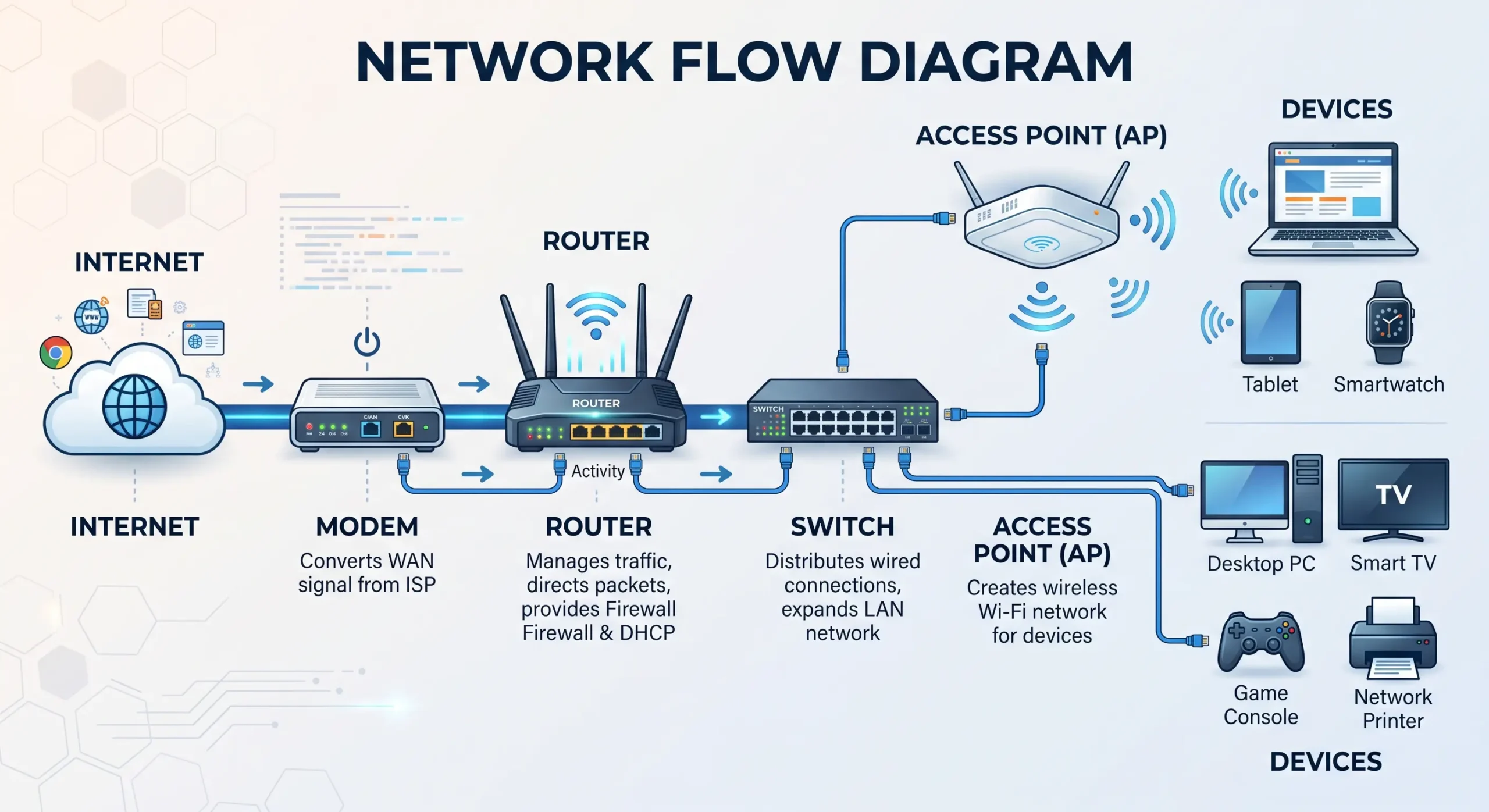
A useful way to picture it: your home network works a bit like a small city. Data needs roads to travel on, some kind of traffic control, and a gate leading out to the wider world. Every device below plays one of these roles.
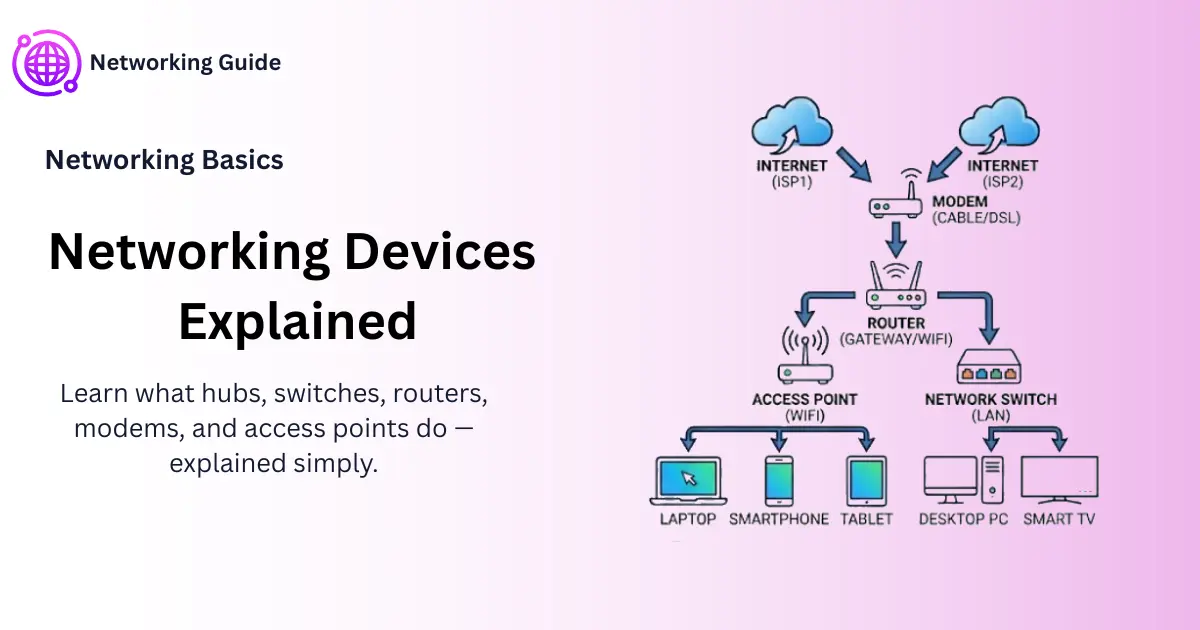
You’re already using several of these without realizing it:
- Modem
- Router
- Switch
- Access point
- Hub — though this one’s mostly disappeared at this point
Once each device has a clear job in your head, these networking devices explained one by one stop feeling technical and start making practical sense.
Types of Networking Devices Explained
What Is a Hub in Networking?
A hub is about as simple as network hardware gets, and honestly, that’s also its biggest problem. Whatever comes in through one port gets sent out to every other port, whether that data was meant for one specific device or not.
It’s a bit like an old-school radio broadcast — someone talks, and the whole room hears it, whether anyone was actually listening for that message or not.
There are three common types:
- Passive hub, which just connects wires, nothing else
- Active hub, which boosts the signal a little before pushing it forward
- Intelligent hub, which can monitor traffic but still broadcasts to everyone regardless
Here’s where it gets annoying in practice. Say five computers are connected through a hub. Computer A sends a file to Computer B, but C, D, and E all get a copy too — even though none of them needed it. That’s wasted bandwidth, plus a fairly obvious privacy issue.
This is basically why hubs have quietly disappeared from most modern setups, as Cisco’s networking basics guide points out too. Switches simply do the job better.
What Is a Switch in Networking?
A switch does the same core job as a hub — connecting multiple devices — but it’s not dumb about it. It actually pays attention to which device sits on which port.
Take that same five-computer setup, now running through a switch instead. Computer A sends a file to B, and only B receives it. C, D, and E have no clue anything even happened.
A few reasons this matters:
- It’s noticeably faster
- Way more secure, since other devices can’t see traffic that isn’t theirs
- Handles a busy network without slowing to a crawl
This is really the whole reason switches took over — homes, offices, doesn’t matter.
What Is a Router in Computer Network?
A router’s job is to connect separate networks and work out the best path for data moving between them.
Here’s where people usually get confused: a switch connects devices inside one network — your house, say. A router connects that entire home network to a different one, which in almost every case means the internet.
What’s actually happening behind the scenes when a router does its job:
- Sending data back and forth between your home network and the internet
- Assigning IP addresses to each of your devices
- Blocking a decent chunk of unwanted traffic, acting as a basic firewall
Say you type something into Google. That request leaves your phone, hits the router first, gets sent out to the internet, and the response makes its way back through that same door. If you want the more technical version of how this actually works, IETF’s overview of IP routing goes deeper into it.
Worth knowing too — routers work with IP addresses rather than just device names, one router can connect multiple networks at once, and most home routers handle both Ethernet and Wi-Fi from the same box.
What Is an Access Point (AP) and Why Do You Need One?
An access point turns a wired internet connection into a wireless signal your phone or laptop can actually pick up.
Your router probably already has one built in — that’s the reason it gives you both Ethernet ports and Wi-Fi. But once you’re in a bigger house, or an office with a few walls in the way, a single router’s signal often just doesn’t reach far enough. That’s when a separate access point gets added somewhere else in the building.
People often ask what “the access point name” actually means. It’s nothing complicated — it’s just your Wi-Fi network’s name, technically called the SSID. Whatever shows up when you’re scrolling through nearby networks on your phone, something like “Home_WiFi_5G,” that’s it.
A three-story office is a good example. One router might not be enough, so the building ends up with three separate access points — one per floor — just to keep the signal usable everywhere.
What Is a Modem, and Is It Different From a Router?
A modem connects your home to your Internet Service Provider. Its job is converting the signal coming in from your ISP — cable, phone line, or fiber — into something your devices can actually work with.
People confuse modems and routers all the time, but they’re doing two completely different jobs.
- A modem brings the internet into your house in the first place
- A router takes that connection and spreads it across every device you own
If you want a simple way to remember it — the modem is the pipe bringing water into your house, and the router is the plumbing that gets that water to the kitchen, the bathroom, wherever it needs to go.
Hub vs Switch vs Router vs Access Point: Key Differences
Now that each device has its own identity, it’s worth putting them side by side.
Hub vs Switch: What’s the Difference?
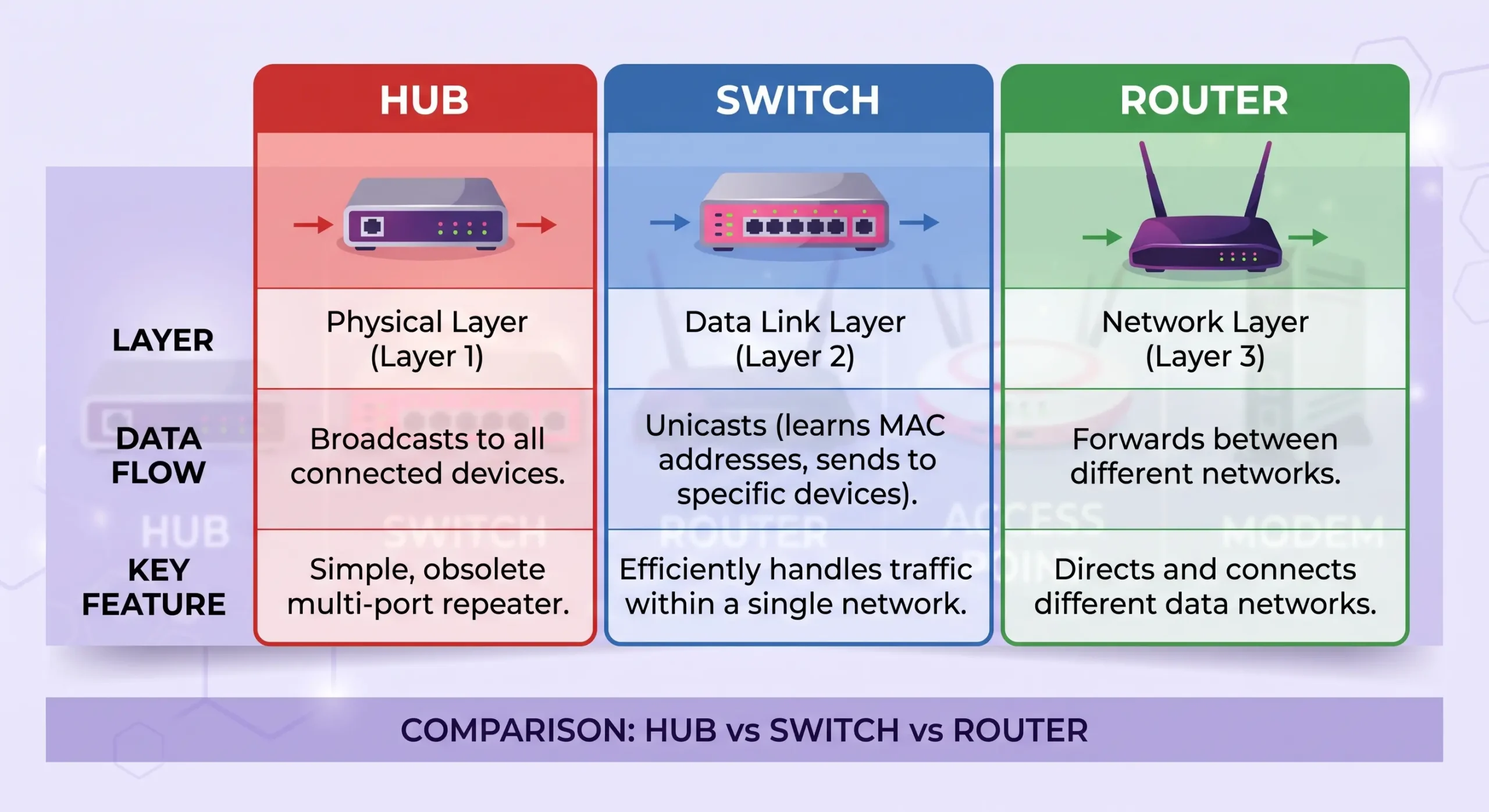
This is probably the single most searched question on this whole topic, and honestly the answer isn’t complicated. A hub sends data to every connected device, needed or not. A switch sends it only to the one device it’s actually meant for.
Why a switch wins in practice:
- Faster, noticeably so
- Much better security
- Less congestion, fewer collisions
- Handles more devices without choking
Why sticking with a hub doesn’t really make sense anymore:
- Gets slower as you add devices
- More collisions on the network
- Every device can technically see everyone else’s traffic
In pretty much any setup today, home or small office, a switch is just the better call. There’s not really a strong argument for a hub anymore.
Hub vs Switch vs Router Comparison Table
| Feature | Hub | Switch | Router |
| Works at | Physical layer | Data link layer | Network layer |
| Sends data to | All devices | Only the target device | Different networks |
| Uses IP address? | No | No | Yes |
| Speed | Slow | Fast | Fast |
| Common use today | Rarely used | Connecting devices in a LAN | Connecting your network to the internet |
Do I Need a Hub or a Switch?
For almost anyone reading this, it’s a switch. Setting up a home network — switch. Expanding a small office — switch. A hub only really makes sense if you already own one and have a tiny, non-critical setup lying around, and even then, a switch is still the smarter long-term option.
Modem vs Router: Do You Need Both?
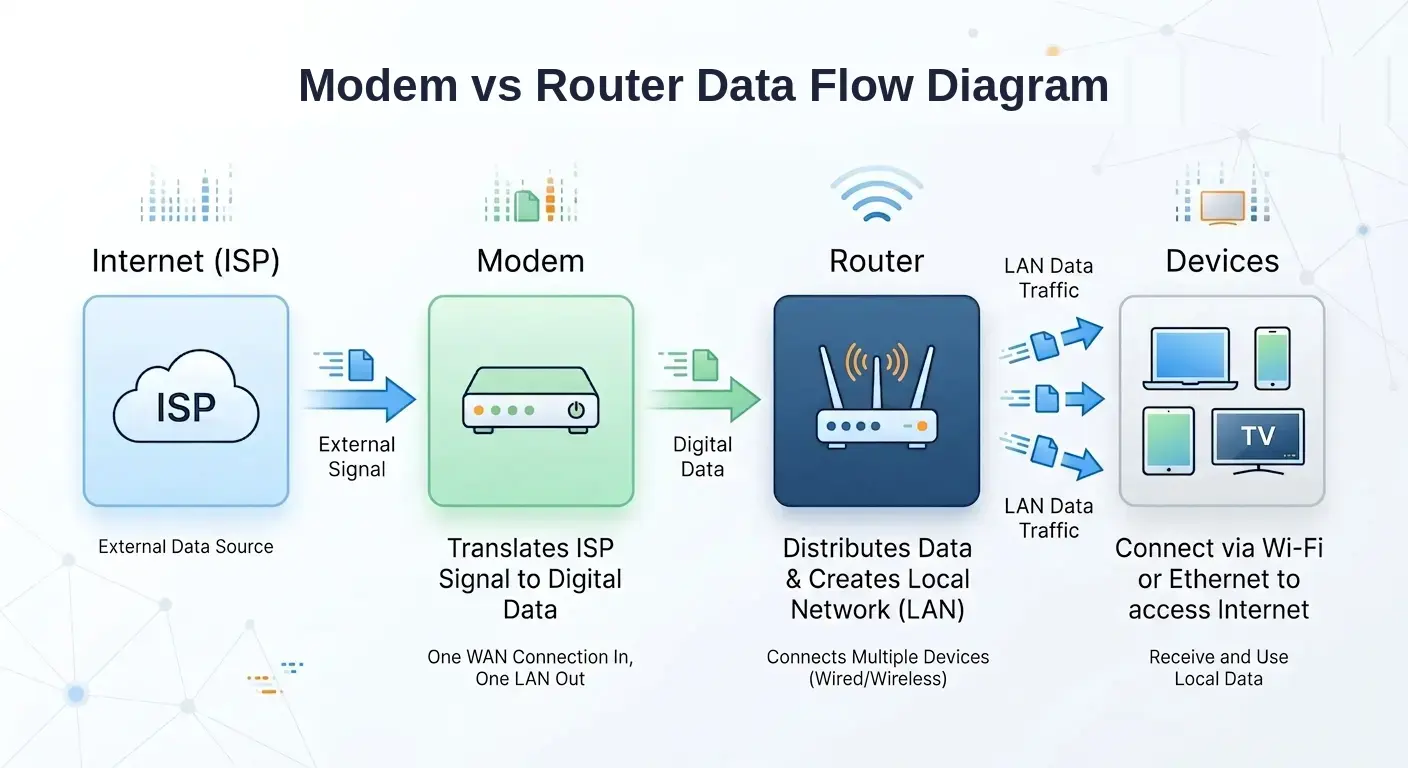
Most of the time, yes. Your modem connects to your ISP and pulls the internet into your home. Your router then takes that connection and shares it across every device, wired or wireless.
Without a modem, your router has nothing to distribute. Without a router, only one device at a time could really use that connection.
I Already Have a Router — Do I Still Need a Modem?
Usually yes — unless your provider already gave you a combo unit doing both jobs in one box. These get called a modem-router combo or a gateway device, and a lot of ISPs hand these out as standard now.
A quick way to check which one you’ve got: if it’s one box with Wi-Fi and a cable or phone line port going in, that’s a combo already doing both jobs. If it’s a separate small box connected by cable to your router, that’s your modem, and yes, you need both.
One thing people don’t expect — switching ISPs often means you need a new modem, even if your router stays exactly the same, since different providers have different modem requirements.
How Many Access Points Do You Need?
This really comes down to the size of your space and how many walls or floors the signal has to push through.
- Small apartment, 1-2 bedrooms: one router is usually enough
- Medium house, 2-3 floors: router plus one extra access point
- Larger home or office: router plus 2-3 access points spread across floors or far corners
- Signs you probably need another one: Wi-Fi keeps dropping in certain rooms, speed tanks the further you walk from the router, or there are flat-out dead zones somewhere in the house
A decent rule of thumb — if your phone shows full bars but nothing actually loads, that’s usually a sign you need another access point nearby, not faster internet.
Complete Comparison Table: Hub vs Switch vs Router vs Access Point vs Modem
| Device | Main Job | Works With | Best For |
| Hub | Sends data to all devices | No addressing | Rarely used today |
| Switch | Sends data to the right device only | MAC addresses | Connecting devices in one network |
| Router | Connects networks and shares internet | IP addresses | Connecting your home to the internet |
| Access Point | Adds Wi-Fi coverage | SSID/Wi-Fi signal | Extending wireless coverage |
| Modem | Brings internet from ISP | ISP signal | Getting internet into your home |
Frequently Asked Questions
What is a bridge, and how is it different from a switch?
A bridge connects two network segments and filters what passes between them. A switch does something pretty similar, just usually with more ports and more devices to handle. Switches have mostly taken over this job in modern networks anyway.
What are the advantages of using a switch instead of a hub?
Mainly speed. A switch is faster and more secure since it only sends data to the device that actually needs it, instead of shouting it out to the whole room.
Can I use a hub instead of a switch at home?
You technically could, but there’s little reason to. The more devices you add, the slower and less secure things get, and switches usually cost about the same anyway.
What is the main function of a router?
Connecting your home network to the internet and directing traffic between your devices and the outside world using IP addresses.
How do I restart my modem?
Unplug it, wait around thirty seconds, then plug it back in. Give it a minute or two for the lights to settle before checking if the connection’s back.
Conclusion
With these networking devices explained one by one, none of this really needs to feel complicated. A modem brings the internet in, a router shares it around, a switch keeps your wired devices talking to each other efficiently, and an access point stretches your Wi-Fi further than it would otherwise reach. Hubs, at this point, have mostly had their run.
Once each device has a clear job assigned to it in your head, figuring out what your setup actually needs stops being guesswork.